
Good shows iPad's dominating the enterprise environment
A recent activation report by Good Techbologies showed that the iPad and iPad 2 continue to dominate the tablet in the enterprise market (96% of all activations on Q3 2011 compared to just 4% for Andoird). On the handset front, the iphone commanded 28%. The most popular Android phone was the Evo 4G at 1.6%.
“This quarter, we saw Android smartphones gain in percentage of total activations,” Good Technology senior vice president of corporate strategy John Herrema said. “This is likely due to the consumers holding back purchases of new iPhones in anticipation of Apple’s latest release (the iPhone 4S) — as our reports indiciate, consumers are setting the agenda for enterprise mobility.” IPhone 4 activations fell from 32.4% during the second quarter to 28.3% during the third quarter as a result of that anticipation.
Important Note: Good's numbers do not include Blackberry or Win Phone 7 devices (since RIM uses BES).
You can download the full report here.
Research shows that Nice Guys DO Finish Last
If you have read any self-help books, you have undoubtedly read the adage “Nice guys finish last”. Now research from Notre Dame and Cornell Universities show how being too agreeable negatively impacts your earnings.
More recent research from Stanford, Northwestern and Carnegie Mellon) continued on the same path showing that people who are overly caring, for overs, generally tend to make bad leaders. In particular, being overly nice generally means that you will likely fail in 2 important leadership domains: prestige and dominance. Prestige comes from sharing within their group while withholding gave the person dominance.
The researchers said:
We predicted that contribution behavior would have opposite effects on two forms of status – prestige and dominance – depending on its consequences for the self, in-group and out-group members. When the only way to benefit in-group members was by harming out-group members (Study 1), contributions increased prestige and decreased dominance compared to free-riding. Adding the option to benefit in-group members without harming out-group members (Study 2) decreased the prestige and increased the perceived dominance of those who chose to benefit in-group members via intergroup competition. Finally, sharing resources with both in-group and out-group members decreased perceptions of both prestige and dominance compared to sharing them with in-group members only (Study 3). Prestige and dominance differentially mediated the effects of contribution behavior on leader election, exclusion from the group, and choices of a group representative for an intergroup competition.
Their research showed that in situations of group competition, individuals preferred having a dominant leader over a prestigious one (since the prestigious individuals were perceived as more submissive). So nice guys (the ones that share) are seem as prestigious and thus nor thought worthy of leadership during trying competitive times.
You can therefore assume that when things are going great and no major competition or risk is felt, people then prefer a prestigious boss.
Apple's SIRI comes from a 10 year military research project
When talking about Apple’s new iPhone 4s, most users immediately think about the Apple Siri Assitant and the new 8 megapixel camera. Siri is a cool feature but did you know it comes from a DARPA military project called COLO?
The lineage
Although we only heard about Siri a couple of years ago (as a stand-alone iphone app), it is actually research that started 10 years ago in a DARPA funded project called Personalized Assistant that Learns. DARPA awarded the contract to a company called SRI, who dubbed their internal project Cognitive Agent that Learns and Organizes (CALO).
The purpose of CALO was to develop a cognitive system (Adaptive Artificial Intelligence) that could learn from experience, reason, and adapt to ever changing realities. To be clear, CALO learns what information you want, how you want it and what you do with it. With each interaction, it becomes better at meeting your requirements. ”The goal of the project is to create cognitive software systems,” SRI explained, “that is, systems that can reason, learn from experience, be told what to do, explain what they are doing, reflect on their experience, and respond robustly to surprise.”
The switch to civilian use
In 2008 DARPA gave up on the project and SRI decided to commercialize it via a spin-off called SIRI. Seeing the huge potential, Apple scooped it up for an undisclosed amount and the rest is history.
Changing our interface
Siri is different than most competitive solutions because it can understand and respond to natural speech [not just canned command syntax]. Years ago, Apple revolutionized the PC world with its mouse based graphical interface, now it has the opportunity to change our interaction with Siri. Siri may be the first major step towards voice interactive devices that are intelligent.
What do you think?
Susquehanna claims iPad 3 in production
With the iPhone 4s now released, tech pundits have turned their attention to the next product in line for a refresh the Ipad 3. Susquehanna Financial Group’s Jeffrey Fidacaro now claims the Ipad 3 is already in production preparing for a release in early 2012.
Let the specification rumors start.
Source: Barrons
Check out your site in different screen sizes
You spent all that time and money to build your website. It's a work of art. A monument to your awesomeness... Then why are some of your contacts (with smaller screen devices) complaining that it looks weird? Are you still sure the site is awesome?
There is a cool free service called Screenfly that will show you how your site looks on different devices with different screen sizes (think desktop, tablet, mobile, etc).
I decided to give it a whirl with my blog:
On the bottom of the next page, you see the control menu:
By clicking on any of the options (except desktop) give you a choice of devices it can emulate.
I clicked on Mobile and was presented with these options:
If I click the Google Nexus S, it displays my site as:
Take the site for a spin and let me know what you think.
scr.im promises to protect you from SPAM... maybe
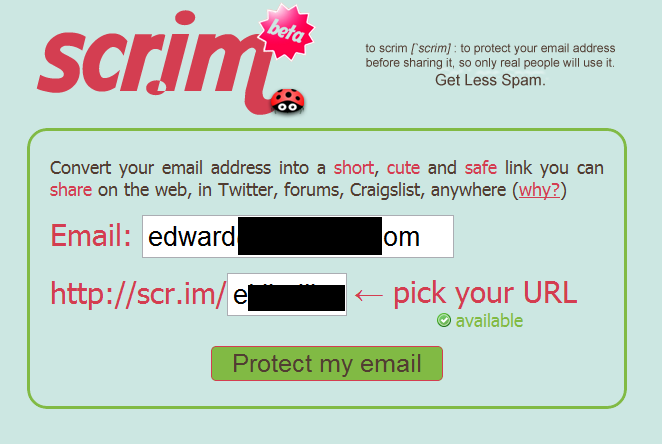
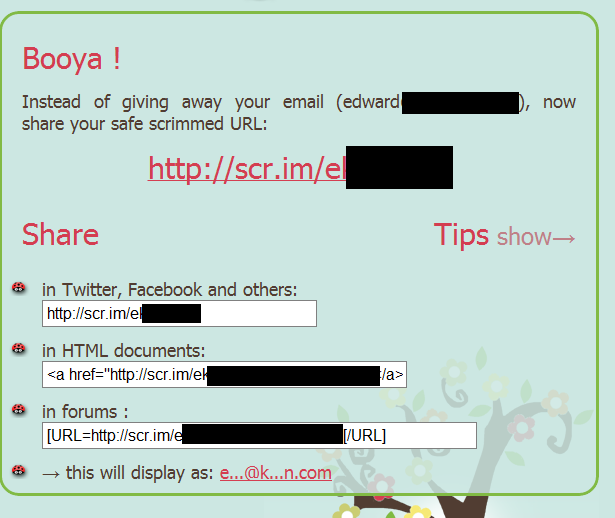
When someone visits one of those links, they are presented with a unique challenge and response system to ensure they are "human".
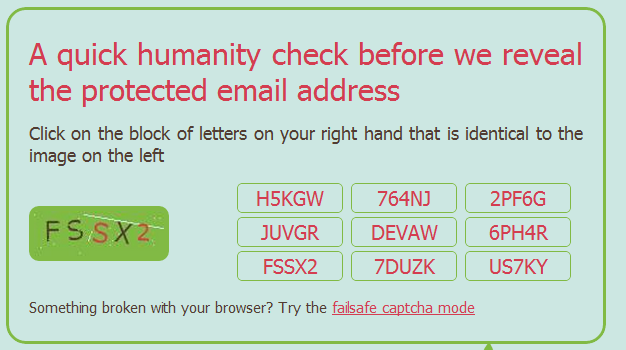
When the user chooses the correct box, they get your email address:
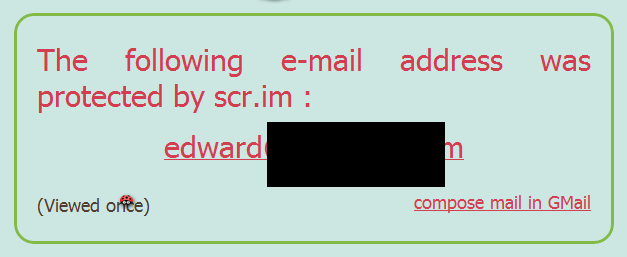
If you made a mistake during code selection, you get a box like this:
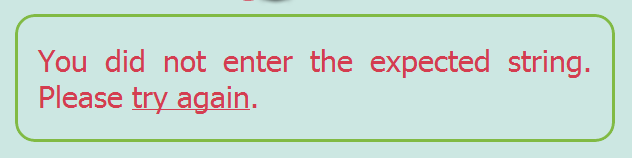
If for some reason the above box selection doesn't work, the user can click on the link entitled "Try the failsafe captcha mode" and enter the code in the usual Captcha method.
Not sure this is something I would use but some of you may find it interesting.
Scan your site for malware
With all of the recent news of sites getting hacked and infected by malware, you may be wondering how to scan your site. I recently stumbled on a cool free service called Sucuri SiteCheck.
You visit the site and enter your URL:
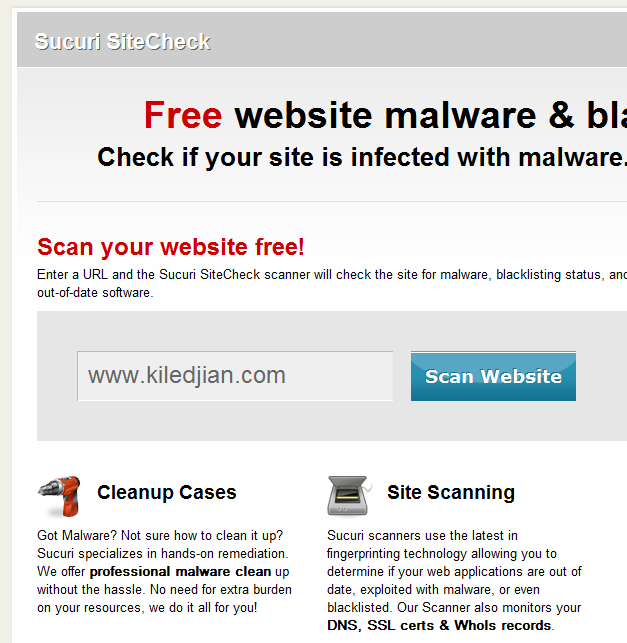
You then click on "Scan Website" and wait for the process to complete.
In the middle of the next page, you will see your results:
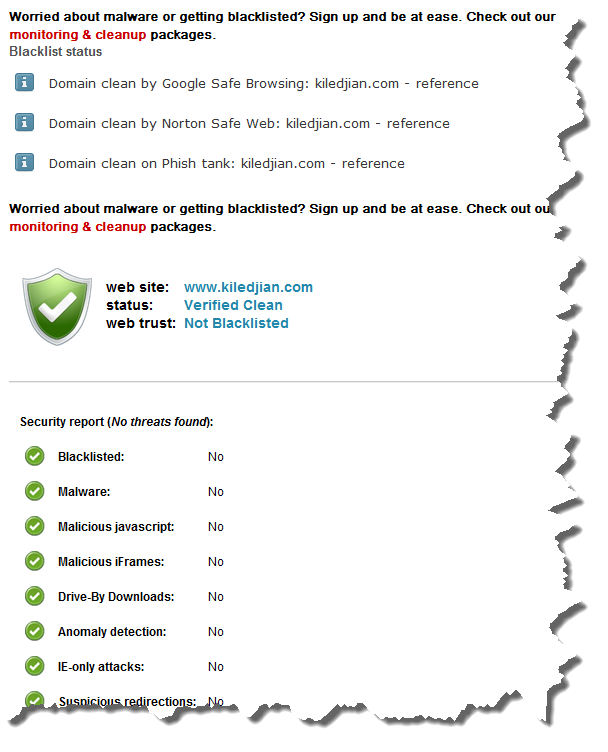
And voila. Piece of mind.
It is important to note that this wouldnt be my primary security tool but one more tool in your kit.
Software as a Service reaches $12.1 billion in 2011
Gartner is reporting that SaaS revenue will reach $12.1 billion in 2011. 63.6 percent of all worldwide SaaS usage [in 2011] is expected to be in North America.
It was interesting to see that the issue related to SaaS varies by region
- EMEA - Limited flexibility of customization.
- North America / Asia - Limited integration with existing systems.
"In North America, ease and speed of deployment are primary reasons for SaaS adoption, followed by lower TCO," Ms. Mertz said. "Limited capital expense is also considered more important in North America than in the other regions. Consistent with the other regions, CRM shows the highest use of SaaS among enterprise applications while use of Web conferencing, e-learning and travel booking is higher in North America than in the other regions."
Workflowy is a great list manager
Click on any image in this post to see it in full size
My regular readers know about my addiction to David Allen’s GTD system. At its core, it is a well defined list management system. My tool of choice for my GTD implementation is Evernote but many of my co-workers and friends have become big fans of a web-based list service called Workflowy.
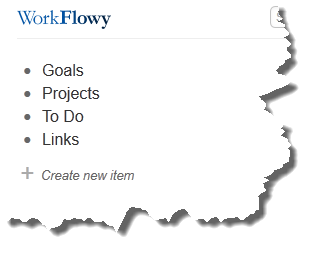
As soon as you login, you will notice a clean and easy to use interface.
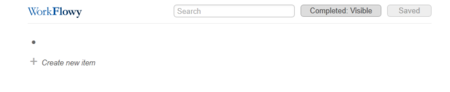
Sure a blank screen may be intimidating to some but getting started is easy. If you are not using a formal list management philosophy then why not start with these: Goals, Projects, TO DO and Links. To get started, position yourself right after the dot, and type your first item. Then press enter and type your second item, etc.
 Now the beauty of Webflowy is that you can create sub lists and sub-sub lists and sub-sub-sub lists (and so on). To do this, click on the dot next to your first item, then click on "+ Create New Item" and start typing your sub list items.
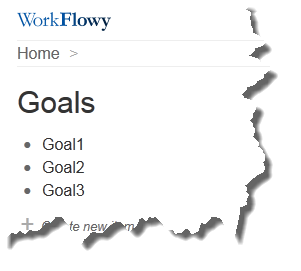 You can continue embedding to your hearts desire.
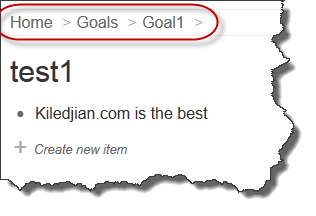 In the above case, I created 4 levels of embedded lists. I can move back to whichever level I want by simply clicking the navigator window (I highlighted in red).
If you hover your mouse over any of the item bullet dots, you get this menu
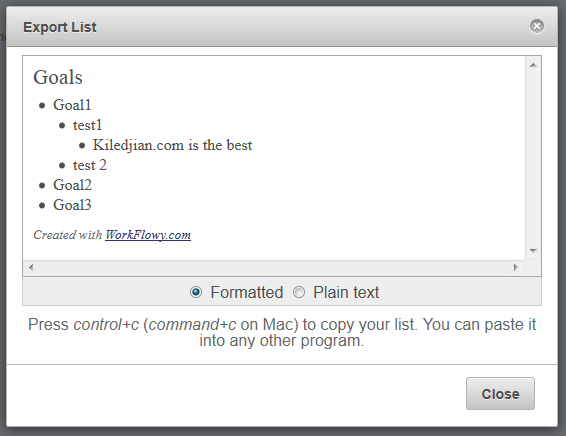
The export option is neat and would look like this for my above test list:
Search Twitter and the biggest request you will see from Webflowy users is an iPhone or Android app. Their support team informs me that this is in the works but that they cannot provide a timeline.


One question I ask any company offering a free service is "how do you plan to monetize it?". After all, an unprofitable business won’t be in business for long. When I asked this question on Twitter, their response was that they will use a freemium model (similar to Evernote) where premium paid customers receive additional benefits but where regular users can choose to stay on the free plan if they choose forever.
Windows 7 Will Be Running on 42% of PCs
Gartner Research believes that Microsoft's Windows 7 Operating System will be running on 42% of all PCs by the end of 2011. Supporting this move is the fact that 94% of all new PCs shipped in 2011 had Windows 7 pre-installed.
Another interesting note is that "Gartner's forecast assumes that Windows 7 is likely to be the last version of Microsoft OS that gets deployed to everybody through big corporatewide migration."
For Mac OS fans, Gartner believes 4.5% of new PCs shipped in 2011 will run Apple's operating system and that this will rise to 5.4% by 2015.
And for those wondering about Chrome OS or WebOS as desktop operating systems, Gartner says "Gartner does not expect Chrome OS, Android or webOS to get any significant market share on PCs in the next few years."
Their press release :
Gartner Says Windows 7 Will Be Running on 42 Percent of PCs in Use Worldwide By the End of 2011
Improvements in IT Budgets Are Accelerating Windows 7 Deployments in Enterprise Markets in U.S. and Asia/Pacific
STAMFORD, Conn., August 9, 2011—
Windows 7 will become the leading operating system (OS) worldwide in the PC installed base, running on 42 percent of PCs in use by the end of 2011, according to Gartner, Inc. Gartner's latest PC OS forecast shows 94 percent of new PCs will be shipped with Windows 7 in 2011.
"Steady improvements in IT budgets in 2010 and 2011 are helping to accelerate the deployment of Windows 7 in enterprise markets in the U.S. and Asia/Pacific, where Windows 7 migrations started in large volume from 4Q10," said Annette Jump, research director at Gartner. "However, the economic uncertainties in Western Europe, political instability in selected Middle East and Africa (MEA) countries and the economic slowdown in Japan after the earthquake and tsunami in March 2011 will likely lead to slightly late and slow deployment for Windows 7 across those regions."
Gartner's forecast assumes that Windows 7 is likely to be the last version of Microsoft OS that gets deployed to everybody through big corporatewide migration. In the future, many organizations will also use alternative client computing architectures for standard PCs with Windows OS, and move toward virtualization and cloud computing in the next five years.
"By the end of 2011, nearly 635 million new PCs worldwide are expected to be shipped with Windows 7. Many enterprises have been planning their deployment of Windows 7 for the last 12 to 18 months, and are now moving rapidly to Windows 7," Ms. Jump said.
Shipments of Apple iMacs and Mac OS share on new PCs have seen increases in the last 12 months. Mac OS was shipped on 4 percent of new PCs worldwide in 2010 versus 3.3 percent in 2008. Mac OS is forecast to be on 4.5 percent of PCs in 2011, and grow to 5.2 percent of new PCs in 2015. Shipments will grow stronger in mature markets where consumers are buying into the Apple product ecosystem.
"The adoption of Mac PCs and Mac OS is a result of Apple's ability to grow well above the market average in the last 12 to 24 months, thanks to its ease of use from the user interface (UI) point of view and ease of integration with other Apple devices, such as the iPhone, iPad, iPod touch and the existing Apple ecosystem of applications and programs," Ms. Jump said.
The Mac OS share still varies greatly by region, as Apple has much stronger presence in North America and Western Europe. The fastest growth is expected to happen in selected emerging countries, where Apple and Mac OS are growing from a small base.
Linux OS is expected to remain niche over the next five years with its share below 2 percent because of the remaining high costs of application migration from Windows to Linux. In the consumer market, Linux will be run on less than 1 percent of PCs, as Linux's success with mini-notebooks was short-lived and few mini-notebooks are preloaded with it today.
Gartner does not expect Chrome OS, Android or webOS to get any significant market share on PCs in the next few years. Analysts believe that to get any consideration as an alternative for a traditional PC, lighter OSs will first need to get strong positions on emerging client devices such as Web books and media tablets. Even then, it is unlikely that they will have any impact on Microsoft and Windows OS's hold on positions on traditional professional PCs in the time frame of the current forecast. This is because of application compatibility issues and the high proportion of Windows-specific applications within many enterprises.
Gartner estimates that only in 2012 will the market reach the point of crossover between Windows-specific and OS-agnostic applications for enterprises, as 50 percent of the applications will be OS-agnostic. In the consumer space, Gartner believes that the proportion of OS-agnostic applications is already above the Windows-specific applications. This could help Chrome OS and Android make inroads into the consumer space in the next three to five years.
Additional information is available in the Gartner report "Forecast Analysis: PC OS Market, Worldwide, 2008-2015, 2011 Update" at http://www.gartner.com/resId=1745026.
Firefox 6 is now 8% of Chitika's total North American traffic
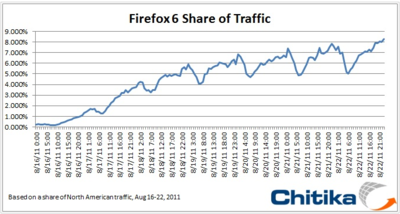
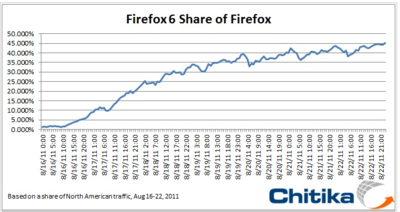
Chitika Insights, the research division of Chitika ad network, is reporting that 8% of its traffic is now Firefox 6. This data is based on Chitika’s analysis of their USA and Canada traffic. They go on to say that Firefox 6 accounts for 45% of all detected Firefox traffic, which is an impressive uptake of the new version (considering it was released August 16).
They mentioned that they expected adoption to slow a little. Click on any of the below images to see a full size graph.
Amazon's Android Tablet may be here in September
When I say tablet, most people will automatically think of Apple’s iPad. But if the fire-sale liquidation of HP’s WebOS tablets taught us anything, it is that consumers will buy anything for the right price.
The New York Post is now claiming that Amazon’s much talked about Android tablet will be released soon and cost hundreds less than Apple’s iPad. Their unnamed source claims that the mythical Amazon tablet will launch sometime on September or October and be priced aggressively to ensure it sells.
Amazon has deep pockets and can afford to sell the hardware as a lost leader and then upsell its other services (think of ebooks, the Amazon appstore, Cloud Drive, Streaming movie service, etc). If anyone can compete with Apple’s unified offering, it is Amazon. Competition is great for customers as it drives innovation and price competitiveness.
iPhone 5 may have a sub 4" display and a metal back
Digitimes is at it again and now believes the iPhone 5 will sport a display smaller than 4 inches (3.5-3.7 inches). They are also claiming that the glass back will be replaced with a metal one.
Other claims are ones we have hear before namely: an 8 megapixel camera, full HD video recording, the iPad 2's A5 dual-core processor and a thinner design. Most "unnamed sources" seem to agree on these specs which means although the iPhone 5 will get a slight spec bump, it is an evolutionary upgrade.
One rumor that we hear was that Apple was testing LTE but I doubt that would make it in the iphone 5.
Let's remember that this is Apple and that they have very strict information protection protocols. Regardless of what we read, no one can be sure of anything until it is unveiled sometime in September or October.
The Getting Things Done Workflow (GTD)
Life has a way of always getting more complicated so I am constantly searching for the next tool, technique or methodology that will make my life easier. A couple of years ago, I stumbled on David Allen’s Getting Things Done book and I knew I knew this was something special.
I had gone through many other time management techniques from ABC prioritization to the Eisenhower method. Nothing else seemed to be as simple or powerful. I have also referred to it in previous posts here and here.
One of the core components of the GTD system is it’s simple but supercharged workflow. Don’t be fooled by it’s simplicity. It will take time and dedication to turn it into a habit. I promise the effort will be worth it.
The Workflow
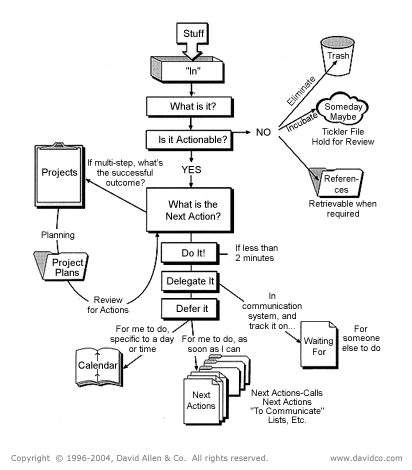
In GTD, every input goes into your inbox (whether physical or virtual) until you are ready to process it. When you start processing, you take the first item from the inbox pile and ask yourself a question “Is it actionable?” (is there an action attached to the inbox item?)
It is actionable
If the item is actionable and the task will take 2 minutes or less to accomplish then do it right away. It would take you longer to log it, track it and then get back into it.
If the action will require more than 2 minutes to complete, ask yourself if you are the right person to do it. If not, then simply delegate it to the right person.
If the action will require more than 2 minutes to complete, you are the right person for the job and it will require multiple steps (we call this a project in GTD) then you add the item to a list called a “Project List”. This is a simple list to remind you of everything “you have on your plate” at any given moment in time. Now that it is on a list, you can periodically review it to make sure you don’t drop the ball and you mind can stop wasting precious mental energy trying to remind you of it.
For all projects, familiarise yourself with the "What is the next action" approach I wrote about here. Once you have broken down the projects into their very next physical action and store them on an appropriate list such as (examples):
- @Home - things to do at home
- @Telephone - actions you need a telephone for
- @Internet - actions that require an internet connected computer
It is NOT actionable
If the item is not actionable, the first question would be “Is this trash?” If it is, then simply throw it away now.
The second category of non actionable item is the “Someday/Maybe” list. This is a way to capture interesting and cool ideas you are no ready to handle now but may want to in the future. Like any other list, you should periodically review items on it and decide whether:
- Items should stay on it
- Be moved to active “projects”
- Deleted because it is no longer something that interests you
If the information is time based and you want to be reminded of it in the future, you can store it in a Tickler File. Check up my write up of it here.
The last item in this category is the "Reference" category. This is for material you may need in the future. There are many ways to organize your reference folder. David Allen uses a physical alpha filling cabinet. I have implemented my Reference system in Evernote which means it is searchable and always available.
In Evernote I use the tags to create my filling “system”. I have tagz from A-Z and then create sub tags under each letter to store my content. There isn’t any magic or rocket science about where I store the info. I ask myself “where would I look for this info in the future” and file it appropriately. These may include anything from product pamphlets, warranty certificates to employee performance evaluations.
Other entries you may like...
Review of the free scan to cloud software - ScanDrop
"What is the next action" may be the most powerful question you can ask
Getting Things Done may be the most important business skill
Tickle your way to better organization
Steve Jobs resigns as CEO of Apple
Although many pundits and bloggers expected this new to come [some day], most were shocked by this sudden announcement.
The resignation letter was published on businesswire:
I have always said if there ever came a day when I could no longer meet my duties and expectations as Apple’s CEO, I would be the first to let you know. Unfortunately, that day has come.
I hereby resign as CEO of Apple. I would like to serve, if the Board sees fit, as Chairman of the Board, director and Apple employee.
As far as my successor goes, I strongly recommend that we execute our succession plan and name Tim Cook as CEO of Apple.
I believe Apple’s brightest and most innovative days are ahead of it. And I look forward to watching and contributing to its success in a new role.
I have made some of the best friends of my life at Apple, and I thank you all for the many years of being able to work alongside you.
Steve
The official Apple press release:
Steve Jobs Resigns as CEO of Apple
Tim Cook Named CEO and Jobs Elected Chairman of the Board
CUPERTINO, California-August 24, 2011-Apple's Board of Directors today announced that Steve Jobs has resigned as Chief Executive Officer, and the Board has named Tim Cook, previously Apple's Chief Operating Officer, as the company's new CEO. Jobs has been elected Chairman of the Board and Cook will join the Board, effective immediately.
"Steve's extraordinary vision and leadership saved Apple and guided it to its position as the world's most innovative and valuable technology company," said Art Levinson, Chairman of Genentech, on behalf of Apple's Board. "Steve has made countless contributions to Apple's success, and he has attracted and inspired Apple's immensely creative employees and world class executive team. In his new role as Chairman of the Board, Steve will continue to serve Apple with his unique insights, creativity and inspiration."
"The Board has complete confidence that Tim is the right person to be our next CEO," added Levinson. "Tim's 13 years of service to Apple have been marked by outstanding performance, and he has demonstrated remarkable talent and sound judgment in everything he does."
Jobs submitted his resignation to the Board today and strongly recommended that the Board implement its succession plan and name Tim Cook as CEO.
As COO, Cook was previously responsible for all of the company's worldwide sales and operations, including end-to-end management of Apple's supply chain, sales activities, and service and support in all markets and countries. He also headed Apple's Macintosh division and played a key role in the continued development of strategic reseller and supplier relationships, ensuring flexibility in response to an increasingly demanding marketplace.
HP kills webOS and maybe it's PC business
In an announcement that shocked the IT world, HP has abruptly killed it's webOS mobile operating system (it bought from Palm just a couple of years ago).
As if this wasn't a big enough bombshell, their press release also highlighted that it's board of directors has authorized "the exploration of strategic alternatives for it's Personal Systems Group". Sounds to me like their PC business is the next victim.
iPhone devices are cheaper to support than Android or RIM
We have seen a handful to analyst reports that clearly show that a MAC is cheaper to support than a PC. An analytics company called ClickFox has now determined that the same is true for iphones [versus RIM and Android].
The research was conducted by analyzing the support calls places with call centers [that support all three platforms]. It was determines that Android and RIM calls required multiple transfers and often multiple support sessions to resolve an issue. It was found that most iPhone issues could be solved with one call. To add additional context, they determined that a RIM support call required additional support ~33% of the time whereas Android required it ~77% of the time.
Apple is fanatical about its user interface. Add to that the fact that support is cheaper and that may explain why organizations like Good Technologies (1) are seeing impressive enterprise adoption of the iPhone.
---
(1) - Good Technologies latest report showed that 2/3 of enterprise activations in Q2 2011 where iphones while the remaining 1/3 went to Android.
Prize Linked Savings - encouraging people to save
We all know people love to play the lottery. For only a couple of dollars, they can dream big dreams for a week. The sad truth is that many people choose to play the lottery instead of building a nest egg. After all, putting a money aside is good but it doesn’t carry the chance of winning big. Or does it?
There is an interesting invention (in some parts of the world) called a Prize Linked Savings account. It allows people to save money while giving them the thrill of the lottery (all without risking a penny). The concept is simple, it collects the interest accumulated by all of the savers in the plan and awards it (via random draw) to one lucky person. Everyone else get’s to keep their money. In the UK, it is called a Premium Bond.
A South African bank tried this scheme to encourage the population to save. The response was so overwhelming that it impacting the South African government’s lottery revenue so they sued the bank and stopped the program.
A Prize Linked Savings Account test was run in the state of Michigan and the results were interesting: “56 percent of the Michigan participants in the program were non-savers prior to the program”.
Unfortunately many jurisdictions (including my own – Canada) make this type of program illegal to ensure there is no competition to the state run lottery corporations. Changing the laws to allow for these types of unique and attractive savings mechanisms is simple but politicians lack the will to push them through. After all, government is addicted to spending our money.
Don't argue when negotiating
I recently read an interesting article in Psychology Today about negotiation that I wanted to share with you. In the article, Art Markman presents findings from a study in the Journal of Personality and Social Psychology that analyzed the role of persuasion in negotiations.
For example, if you are interested in buying a house, the seller might ask for $350,000, arguing that the house was newly renovated and is near good schools. Maaravi, Gonzach, and Pazy argued that when people hear an argument in favor of the initial offer, they think of counter-arguments. These counterarguments may actually push the counteroffer further away from the initial offer than it would have been had there been no persuasive argument. Someone looking at a house might find all the areas that still need renovation and think about other houses even closer to the better schools in town and give a low offer on the house.
The study also highlights the importance of the first offer as it serves as an anchor for the rest of the negotiations. The author therefore recommend that you make the initial offer but resist the urge to justify it. Just let the other counter-party come back with a counteroffer. They believe that the counter-offer will be closer to your initial offer as long as you did not attempt to justify it.
The article is an interesting read for anyone involved in negotiations.