
Your smartphone has problems too
Fanboys aside, most smartphone users have some complaints about their chosen product. Whether the screen size is too small, the screen resolution is not enough, the battery drains too quickly or a certain feature just doesn’t seem to work.
As social creatures, we want to know what problems others are having and now FixYa has the answer. They analyzed data from their 15 million user reports to compile a list of the most common complaints against the best selling smartphones.
- Samsung Galaxy S3
- Iphone 4s
- Nokia Lumia 900
- HTC Titan II
- Galaxy Nexus
- Blackberry Curve
You can find the summary of their findings in the below press release. Find your device below and enjoy the satisfaction that you are not the only one experiencing these issues.
Galaxy SIII vs. iPhone 4S: Top U.S. Smartphones Get Pitted Head-to-Head in New Report From FixYa
FixYa’s report finds consumers plagued by Galaxy SIII and Galaxy Nexus microphone issues; iPhone 4S struggles with battery life; while the HTC Titan II registers some un-fixable problems
SAN MATEO, CALIF. (July 6, 2012) – Today FixYa, the leading product Q&A destination on the web, announces the first-ever report comparing consumer issues across all of the most popular smartphones including the newly-released Samsung Galaxy SIII, Apple iPhone 4S, Samsung Galaxy Nexus, RIM Blackberry Curve, HTC Titan II, and the Nokia Lumia 900. With smartphones already accounting for more than half of mobile phones in the United States, the market is expanding at a rapid rate. FixYa’s Smartphone Report, released today, looks at market-leading devices and pits them against each other, basing its findings on thousands of troubleshooting requests posted by consumers on its product Q&A site.
With the just-launched Samsung Galaxy SIII claiming the most buzz of any current phone, competition in the smartphone market is as fierce as ever. Industry titans are rolling out new smartphones left and right, leaving consumers confused about which one to pick and whether they are buying a reliable product. The Fixya Smartphone Report seeks to provide clarity to consumers by highlighting the main troubleshooting trends across six of the standout devices.
Below are the top five problems for each device in the FixYa Smartphone Report, and the percentage of troubleshooting requests that fall into each problem category:
Top 5 Samsung Galaxy SIII Problems:
1. Microphone Malfunction – 50%
2. Battery Life – 15%
3. Device Gets Hot – 15%
4. Internet Connection Issues – 10%
5. Other – 10%
Top 5 Apple iPhone 4S Problems:
1. Battery Life – 45%
2. Can’t Connect Wi-Fi – 20%
3. Bluetooth Connection – 15%
4. Siri Complaints – 10%
5. Other – 10%
Top 5 Galaxy Nexus Problems:
1. Microphone Malfunction – 55%
2. Battery Life – 20%
3. Can’t Connect Wi-Fi – 10%
4. General Usability – 10%
5. Other – 5%
Top 5 Blackberry Curve Problems:
1. Random Reboots – 40%
2. Software Errors – 20%
3. Missing Applications – 20%
4. Memory Card Error – 10%
5. Other – 10%
Top 5 HTC Titan II Problems:
1. Screen Resolution – 35%
2. Can’t Find Applications – 20%
3. Camera Quality – 15%
4. Battery Life – 15%
5. Other – 15%
Top 5 Nokia Lumia 900 Problems:
1. Tinted Purple Screen – 25%
2. Camera Button – 20%
3. Can’t Find Applications – 20%
4. Battery Life – 20%
5. Other – 15%
FixYa compiled its latest report and how-to troubleshooting guide by sourcing data from its 25 million users and 15 million product problems and solutions. Those interested in viewing the full report as well as crowd-sourced solutions to each device’s top issues can do so here: http://blog.fixya.com/pr/july2012/fixya-smartphones-report.pdf
“With all of the buzz that surrounds new smartphone releases, it is becoming increasingly important for consumers to see through the hype and understand the devices they are investing in,” says Fixya CEO Yaniv Bensadon. “The Fixya Smartphone Report reveals which devices have the edge and where even the top dogs struggle in the constantly evolving battle between iOS, Android, and their competition.”
FixYa brings consumers the most comprehensive solution database in the world. The FixYa Smartphone Report was generated from over 25 million users, 650,000 experts and 15 million product problems and solutions. FixYa’s unique access to crowd-sourced product Q&A from consumers grants the company transparent data that no other service can claim to provide. FixYa’s troubleshooting data comes from real-life consumer experience with products and product problems.
To learn more about the FixYa Smartphone Report, visit [blog.fixya.com/pr/july20...](http://blog.fixya.com/pr/july2012/fixya-smartphones-report.pdf.)
To learn more about FixYa, visit www.FixYa.com.
Microsoft Windows 8 upgrade priced at $39.99
Apple customers have had fantastic upgrade pricing for the last couple of years. While they were paying less than $30 (Lion was $29.99 and the new Mountain Lion will be $19.99) for their OS upgrades, most Windows users ended up shelling close to $100 to upgrade to Windows7. Many of us anxiously waited to see if Microsoft would respond.
We can all sleep easy, knowing that the next major Microsoft OS upgrade (Pro version) will cost $39.99 in 131 markets. Anyone who buys a new PC starting now until February 2013, will be eligible to buy Windows 8 Pro for $15. This is a major change for Redmond but is likely based on sound business principles.
- By pricing the upgrade so competitively, they are enticing consumers, even those who did not upgrade from Windows XP or Vista, to upgrade to Windows 8.
- They want consumers to move to the Pro version of Windows 8 (which is the version with all these great offers)
- Obviously they want their new desktop model (no start button) Metro interface and Microsoft App Store to be quickly adopted by consumers in huge numbers.
This special price will be available for customers buying the digital download version during the initial promotional period (ending January 31, 2013). The DVD version will sell for $69.99 during this promotion.
Many pundits have said Windows 8 is designed for tablets and is of no use to traditional mouse-based computer users. They said Windows 8 is doomed to fail (similar to Vista).
Others have come out supporting Windows 8, saying it moves us into a new computing paradigm that better matches how we use our PCs today. I have played with windows 8 a little and agree that it will take some getting use to but it’s not bad. To be honest, coming back to Windows 7 (on my production computer) feels wrong and awkward. I think Microsoft is on the right track and can’t wait for the final version.
Microsoft provides upgrade instructions on its blog here.
Apple iPad Mini may launch in October
This rumor simply won't go away but when two reputable news organizations pick it up, we should sit and take notice. Bloomberg and the WSJ are both reporting that Apple is working on a 7.85 inch (Sharp IGZO screen) iPad mini that will retail between $250 - $299.
Google's Nexus tablet will try to break Apple's stronghold on the tablet market by offering an extremely well equipped consumption tablet (made to consume not create content) for less than $300. Analysts saw this as a competitor to the Amazon Kindle Fire but many new would be tablet buyers may be swayed by the competitive price and nice featureset. However if Apple does enter this market with a small, low price point, then Google's uphill battle just became a little more difficult.
We know how much Steve Jobs hated the 7-8" tablets so it remains to be seen if the new leadership at Apple is willing to make such a radical departure from the Jobs standard. Having played with the Kindle fire and the Blackberry Playbook, I like the small form factor but you have to be willing to give up some comfort and functionality.
Apple may launch new Retina iMac in October
Digitimes is reporting that Apple will launch a new Retina display equipped iMac in October. Their source said Apple is bringing the Retina display to all of its products so this is a natural extension. Apple may use the fall launch of the Iphone 5 as the platform to announce the new iMacs.
Some have even speculated that the rest of the Macbook line (air and pro) may also get a Retina display makeover before holiday shopping starts. This is Apple so we’ll have to wait and see if this turns out to be true.
Simplify password management [for free] with LastPass
Every couple of weeks, we hear about another site being hacked and user account information being stolen. Security evangelists are constantly asking the community to choose complicated passwords and to not reuse the same password for multiple sites.
The biggest complaint I hear is that the above makes remembering passwords impossible. But guess what… you don’t need to remember them because of a fantastic free tool called Lastpass. Lastpass is a strong and easy to use password manager that offers 85% of its functionality for free and has plug-ins for most modern browsers.
Why do you need it
We want you to use complicated password of 10 characters of more which include uppercase and lower case letters, numbers and symbols. Plus we want you to use unique passwords for each site you register with. And you should be changing your passwords at least once every 90 days. Enough said. That is why you need a password manager.
Installation
If you use Internet Explorer, Chrome, Firefox or Safari, you simply choose the universal installer and the program takes care of the rest. For other browsers, you simply go to their download page and choose your browser specific plug-in. This second option is also interesting if you move from one browser to another later, you can simply download the appropriate plug-in for your browser, log-in with your credentials and voila (you have all your passwords within 60 seconds).
The Vault
After installing the plug-ins and rebooting your browser, you will see a new Lastpass icon. A grey icon means you are not logged in (while a red one means you are). If you click on the red icon, you can go to your password vault where all of your passwords are securely stored. As expected, you can organize your passwords in folders and groups, share/delete/edit individual passwords and search for the entry for any specific saved site.
It is beautifully simple
Whether you use the free or paid version, you get the same level of security and protection. Paid users get access to the mobile apps, removal of ads, faster support and the ability to use two-factor authentication to secure your LastPass login (using a YubiKey or USB key with special identifier). I use the free version and have enabled two-factor authentication with LastPasse’s Google Authenticator integration.
You install the free Google Authenticator for iphone or Android, then enable it for Lastpass using a uniquely generated QR code from the LastPass settings tab, which looks like this:

And everytime you log in from that point on, you will be asked for your LastPass password and then the unique Google Authenticator code (that changes every 60 seconds):

This means that even if someone steals your LastPass master password, without this unique Google authenticator code (that changes every 60 seconds), they won't be able to log in. We call this two-factor authentication because:
- It uses something YOU KNOW (aka the master password)
- and something YOU HAVE (which is the unique token code generated by your smartphone app)
Conclusion
Your LastPass passwords are encrypted and stored on their servers which means you can access your passwords from any internet connected computer (via the LastPass add-on or you can even use their site as the Launchpad for use on a friend’s PC).
This is a fantastically simple yet extremely powerful tool to protect your passwords and therefore your online life. The tool can auto-generate strong passwords when you register for new sites or change your password on an existing site (usually will even detect this automatically). It has a form fill feature where you can create different profiles with different information (personal, business, etc) and you can then use LastPass to auto-fill website forms. It has free two-factor authentication support via Google Authenticator.
I can’t recommend it enough. I use it every day and it is one of the first apps I install on every computer I own.
Screenshots
The vault

Site edit dialog box

A social networking privacy experiment
All too often, people forget to secure their facebook profile page and then post stupid self deprecating comments that site can easily scoop up and archive forever. This may be a good time for you to read my post on securing your Social Media information found here.
We Know What You’re Doing is the brainchild of an 18 year old web programmer who wanted to show the world just how stupid people can be. Using the publicly available Graph API, his site collects interesting updates and categorizes them into one of these categories:
- Who wants to get fired?
- Who's hungover?
- Who's taking drugs?
- Who's got a new phone number?
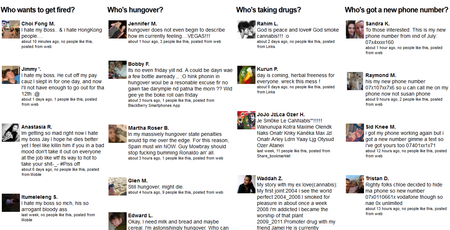
Click on the above image to maximize it.
Why should you worry?
Governments and companies datamine these sources of public information using techniques called Open Source Intelligence. Since it is based on publicly available information, they don't really need your permission and you would be surprised at how much information can be gleamed by a trained analyst.
My advise to you is simple, if you wouldnt want your husband/wife/mother to know about it, don't post it on the internet because the internet never forgets.
Take 2 minutes to secure your social media information
If you are like most social media users, you grant [app] access to your account way too easily and probably have dozens, even hundreds of apps with read and write access to your accounts. Take a second and think about what this means for your online privacy (or lack thereof).
The tool
Tech entrepreneur, Avi Charkham, faced the same dilemma and was frustrated by how much time it took him to locate the account permissions pages for the 8 most popular social media sites (often taking 5 clicks or more ). But unlike most users, he decided to do something about it and create a cool and useful site called Mypermissions.org. His site links directly to the privacy pages of the popular social media sites which means you can review and secure your pages within minutes (instead of hours).
The site currently supports:
- Yahoo
- Dropbox
- Foursquare
- Microsoft Windows Live
- AOL
- Flickr
- Familio
New Tools
The site now has two more ways to get and stay secure:
- MyPermissions Cleaner, the site describes as “Automatically scan your apps permissions, Get alerts when apps access your private info and remove them all in one click.”
- MyPermissions mobile app for iPhone which helps you while on the go.
Conclusion
I use IFTTT to automate some of my social media tasks and have configured the service to email me a monthly reminder to check my permissions. I can’t stress how important it is to keep your permissions clean and updated. I will write an article shortly about a site that mines status updates from public facebook profiles and publishes their embarrassing content on its site for all to see.
Link: Mypermissions.org
When buying cloud, think redundancy
As expected competitors were quick to jump on social media sites to announce that their services remained available and some enterprise pessimists may use this to justify not moving some of their enterprise services to the cloud. The reality is that outages happen whether your apps run in the cloud or your own datacenter. The reason AWS outages get more air time is because of the incredible number of services now dependent on Amazon’s Web Services. AWS is no more likely to go down than any of its major competitors.
The important message here is to ensure you have redundancy and High Availability built into your enterprise architecture from the start. Determine your tolerance for downtime and design accordingly.
Governments are requesting more user info from Google
Google geeks and privacy advocates love Google’s “Transparency Report” (now in its 5th version). In the latest version, it is interesting to note an upward trend of requests Google defines as “troubling”.
An interesting new feature is the ability to see aggregated court orders and other requests worldwide. To add some meat to this discussion, consider the fact that from July to December 2011, governments requested information on 28 562 user accounts. This number includes requests for user information and takedown requests for blog posts and videos. Of the 6321 US Government requests, Google auctioned at least 90% of them.
Just remember that nothing you do online is private and you'll be fine.
Microsoft tablet "surface" won't dent the tablet market
Microsoft announced its new self-made tablet called Surface on Monday. The product looks like it could be interesting but none of the reviewers were allowed to really test the device, it performance or feature set. We don’t even know the cost.
After the presentation, we saw dozens of articles about why this product is a failure even before it hits the market and research firm ABI Research is no exception. On Wednesday, they declared that Windows based tablets will have “little impact” on the tablet market for 2012 (they estimate it will account for no more than 1.3% of the 2012 tablet shipments). I don’t have a problem believing this statistic considering the product won’t be available until the end of the year anyway (September or October).
The firm writes “Is Microsoft suggesting that organizations will make the ‘post-PC era’ move toward a mobile computing device and ditch traditional desktop and clamshell form-factors, or is the company hoping that employees will gain access to multiple devices?” […] “So far, businesses have been opposed to buying incremental computing assets for users due to the support costs.”
Is the tablet market a zero sum game, where devices steal clients from each other, or will Microsoft be able to bring in new tablet customers with its offering? Will the fact that there will be 2 separate versions running on different chips and different versions of Windows 8 cause customer confusion and fragmentation? No one really knows but Microsoft’s track record is split. They have had huge success with MS developed hardware/software with products like the XBOX and others like their in-house built cellphones have all failed.
Followupthen.com free email reminder service review
If you are anything like me, you probably get a few hundred emails a day. Some of those emails require immediate attention but most are for future actions that I don’t need to look at now. So how do you clean up your inbox without losing the reminder for these future actions? Enter a cool new free service called Followupthen.com.
Ubiquitous
Using the service is simple, you send the email to a special (time coded) Followupthen.com email address and the service will then remind you at the designated date and time. The interesting part of this process is that it works on all platforms (Windows, Mac, Linux, iPhone, Ipad, Android) as long as you can send and receive emails.
It requires no special plug-ins, no complicated configuration or proprietary app.
Competition
Followupthen does have competition in this space from the likes of Followup.cc and Bomerang but it does have differentiating characteristics. Boomerang requires browser plug-ins so it limits its use and make it a little more complicated which is why I wouldn’t even consider it.
Followupthen.com allows you to send an unlimited number of reminders for free and uses more natural reminder language (e.g. to reminder you of something in 23 minutes, you simply send an email to [email protected] No account or registration required.
Their Premium service
Although we would like everything to be free, they have to have a revenue stream if they want to continue providing services. They have chosen to adopt the freemium model where most users will be able to use the free service without issues but where power users can pay a little extra and get the jacked up super powered version.
So for $24 a year, you get:
- SMS Reminders
- Customization of reminder email designs (company logo, layout, etc)
- You can manage your reminders via a simple web interface
- Calendar integration so your reminders get added to your calendar
- Ability to have attachments in your reminder emails
- You can use these premium services for all your email addresses
Security
Like most cloud services, they take some security precautions to protect your information but just remember that email, by it’s very nature, isn’t secure. An email can easily be intercepted by anyone between the sender and receiver.
Conclusion
I think you should try this free service right now. There are dozens of situations where it will be extremely useful.
Additional Service Information
How to Use FollowUpThen
FollowUpThen requires no account to get started!
Just compose an email and include [schedule format]@followupthen.com in the "Cc", "Bcc" or "To" fields of your email. Each is a bit different:
- BCC: You will receive a followup but we won't bug the original recipient.
- TO: You will get a followup after the time interval you specify.
- CC: If your recipient has not responded by the scheduled time, both of you receive a followup. Note: Your recipient has to “reply all” to include followupthen on their response for us to know about it. You can always cancel followups by emailing [email protected].
Time Formats
Here are some examples of the scheduling formats you can use:
- [email protected]
- [email protected]
- [email protected]
- [email protected]
- [email protected]
- [email protected]
[email protected]
Quick video
10 minute time management course
I love Getting Things Done and it is the basis of my day to day time management system. Like any skill, it takes time to learn and practice to master. Some people aren’t ready to make the time commitment to learn GTD but want to improve their time management. So if you fall into this category, these tips are for you:
Start with the end in mind
For each activity you will undertake, spend a couple of minutes to determine what a successful outcome would look like for that activity. Spending just a couple of minutes at the beginning will ensure you spend your time wisely and that you spend the right amount of time (and energy) for each activity.
Delegate when possible
Ask yourself if you are the best person to do this work. If not, then delegate it to the right person and move on.
The 5 minute rule
Anything that cannot be delegated and takes less than 5 minutes to accomplish should be done immediately.
If you fail to plan, you plan to fail
If you have thought about the activity, decided you have to do it and that it takes more than 5 minutes then you should decide how much time the activity will require and schedule it in your calendar. Once something is added to your calendar, it should not be rescheduled unless there is an act of God ( don’t play musical chairs with your calendar items).
You can’t improve that which you can’t measure
Keep a journal to determine how you are spending your time. Most people I coach, initially refuse to do this complaining of extra work. It is very important for you to understand how your time is being consumed and I guarantee it isn’t how you think it is getting consumed. This is usually an eye opener for anyone who does this honestly for 2-3 weeks. You will soon see how much time you waste on non-value generating activities and will probably shift your focus.
You cannot multitask so don’t try
Read my article here for details but just don’t do it. Start one activity, give it your undivided attention, complete it then move on.
Braindump
At least weekly, write on a sheet of paper all of your open to do action items. As you write, you will remember more commitments and add them to your list. Look at the last 2 weeks in your calendar and the upcoming week. Anything new come to mind?
Take some breathing time
Regardless of how busy you are, you can’t be productive for 10 hours straight. Every 45-60 minutes, take 5 minutes to walk around, stretch and just clear your mind. You will come back more energetic and productive.
Virtual Meeting Etiquette
We are living in a global just-in-time community where more and more of our meetings are held in cyberspace. This new reality is sometimes drive by cost and other times but convenience. Regardless of the business drivers, it requires an entirely new approach.
In real estate, the most important quality is location, location, location. In the world of virtual meetings, it is communication, communication, communication. To have efficient communication, you need trust and your remote participants need to feel like part of the team. This article will share some ideas on how to improve your virtual meeting etiquette …
- Don’t forget your remote participants. I can’t tell you how many times meeting organizers forget their virtual teammates.
- When during mixed meetings with onsite and remote participants, make sure you give all remote participants a chance to talk. It is a good idea to make the remote participants pass first or mix one remote then one onsite.
- Remember that you can’t pass documentation to your virtual participants so make sure you send it to them early enough so they can print and /or review the material.
- Each person who speaks (remote or onsite) should first identify themselves.
- If your company has an instant messaging tool, it is a great idea to setup a group chat session in case remote participants are unable to jump into the conversation. Some conference bridges won’t let a remote participant interrupt the chairperson (basically anyone who is sitting with you).
- If your participants are spread across our big blue marble, then be a good host and try to accommodate most participants (as it related to time zone). If this is a one time meeting then try to schedule it during the business day for most participants. If it is a recurring meeting then may be switch the meeting times each meeting to accommodate the different groups .
- Remember that remote employees don’t see physical mannerisms so avoid saying something that can be misconstrued. If dealing with an international audience, avoid regional slang and use basic business professional language.
A good video intro to Evernote
I love Evernote and I have written about it many times. For those who are more visual, here is a neat video done by Dotto Tech.
Try the One Text Procedure when negotiating
Large complex negotiations require special tools to keep them ontrack and productive. Inexperienced negotiators generally measure success by the number of concessions they were able to “win” from their counterparty. This inefficient approach forces people to stick to their position and rarely yields an optimal outcome.
The One-Text Procedure
Enter the wonderful world of the one-text procedure. The key driver of this processes is the use of an unbiased third party to help catalogue real interests of all parties and then facilitate the combined criticism of possible solutions until the best solution is found.
The summary of the processes is:
- Collect the true desires and interests of the participants
- Draft an interim proposal and present it to all participants for criticism
- Participants continually criticize the interim proposals until they can criticize it no more and the facilitator has prepare the best possible solution. It is only at this point that participants can accept or reject the final proposal.
Since everyone is working from the facilitator’s draft (participants cannot add, edit or modify themselves), it prevents participants from taking positions and becoming inflexible. By criticizing the drafts of the facilitator, it allows them to criticize the proposal without fear of alienating the other party.
The draft criticism and revision process continues until the facilitator feels the proposal cannot be improved further. It is only at this point that the participants can make a Yes or No decision. This is the process used by the US government when they negotiated the Camp David Middle East piece agreement between Israel (Prime Minister Begin) and Egypt (President Sadat).
DVDs and blu-ray discs to get new piracy notice
If you have watched a DVD or Blue-ray movie, you have surely seen that government notice about piracy and copyright. Well the US government announced that it will now require 2 copyright notices. The first notice is a warning to pirates and the second one is aimed at educating the general viewing audience.
All major studios have agreed to the new notices and it should start showing up on new discs in the next couple of weeks. Each notice will last 10 seconds and you will not be able to skip them.
Read details
Apple to ditch Google Maps in IOS 6
At the launch of the iPhone, Apple and Google were best of friends and it wasn’t unusual that many Google apps found their way into the base IOS image (Youtube, Maps, etc). A short while after this lovefest (aka the release of Android), their relationship hit an all time low and Steeve vowed to use every last cent to squash Android.
9to5mac is now reporting that IOS version 6 will now replace the maps application with an in house Apple built product derived from their purchase of Placebase, C3 Technologies and Poly9. Their insider source said that it was cleaner and faster than Google maps while delivering a more reliable experience enhanced by a 3D-mode.
Most analysts believe IOS 6 will be announced at their WorldWide Developer Conference in June so stay tune.
The promise of unlimited cloud storage - A review of Bitcasa

Everyone was excited when Google finally launches Google Drive. This is the search king’s response to dropbox, box.net and Skydrive. But there is a little known startup called Bitcasa which you may want to know about.
BitCasa is promising unlimited online storage for $10 a month. The service claims that as soon as you upload your first file, your OS will show you 500TB of available space remaining (and they say this limit is set by Windows and Mac which cannot show a larger number).
The feature that is the most revolutionary is that the local Bitcasa agent integrates completely with your computer. You can select any folder, on any drive, right click it and choose to Cloudify it. The files are moved to your online storage (freeing up local space) but the folder remains in the original location. Your local drive becomes a caching system for your cloud storage and anything you save to the directory automatically gets uploaded (the most commonly used files are the ones that get cached so they are available faster and even if your internet connection is down). This was a big turn off for me with Dropbox and even Google Drive.
Economics of unlimited storage
The natural question is how can they offer unlimited storage? The economics can’t make sense, right? The CEO of the company says that up to 60% of the files users store are duplicates therefore their actual storage infrastructure remains manageable. Their claim to fame seems to be a patented de-duplication algorithm, compression technologies and encryption.
Security
Because the beta is just opening up, we don’t have independently verified security reports yet but here is the company’s position. They say that everything is encrypted on the client side, which protect it from hackers and even company employees. To be more specific, the company has said that all files are encrypted using AES-256 hash, SHA-256 hashing.
They seem to be using a technique called Convergent Encryption where the encryption key for the data is derived from the data itself which would allow the company to compare uploads from different users and still detect duplication and to perform de-duplication without having your encryption key.
The company says that even with a subpoena, they are unable to decrypt your files therefore you can feel safe knowing no one can take your files without your explicit consent (unlike Dropbox, Google Drive or Skydrive where the files are available to those providers).
Beta Signup
Head over to their site and sign-up to their waiting list.
I have 10 invitations remaining so message me via Twitter (@ekiledjian) and I’ll send you an invite code (while supplies last).
Conclusion
The concept sounds so good, it seems to be too good to be true. I am currently running the beta and found some small glitches (I am sure they will work out before it becomes final). The main question is about the economics of the service. They believe that regardless of actual storage, each user will have about 25-30GB of unique (non de-duplicatable) data. What if the actual number is double or triple that estimate? Will their backend service scale well? We have yet to hear the details about where they will host their backend. There are lots of questions but this is definitely a startup to watch very closely.
If they can deliver what they promised, this may be the next billion dollar startup.
My Evernote feature wish list
Those who know me or have read my blog probably know that i love Evernote. December 2011, I wrote a blog entry about the features I wish Evernote added to its products.
Most of the items in my wish list still haven't been implemented so they are staying on my wish list but if I had to choose my most wanted features, they would be:
- Add semantic intelligence to my Evernote data (similar to what SpringPad does but I expect better things from the Evernote team.
- Implement much more robust security features to protect my information at the notebook, tag, note or note content level.
- Skitch for Windows and iPhone
- Ability to print a list of note titles for any particular notebook and/or tag
- Better sharing and collaboration features
If Phil Libin ends up reading this, the first 2 would be the most useful and powerful features.
Let me know what you think.
Fax 50 pages for free per month with Google Drive