
LaCie PetiteKey the ultimate USB key for professionals
We've all heart the old saying "the best camera is the one with you" referring to the benefits of having smartphones with cameras. The same can be said for USB keys. A USB key left in your desk drawer or home office is of no use. This is why I love the PetiteKey product from LaCie.

It is the newest iteration of their immensely popular imakey launched in 2009. Compared to its older brother, the PetiteKey is 30% smaller. The PetiteKey is waterproof to 100 meters and LaCie even says the little guy will survive a spin in the washing machine. This little bundle of joy comes in 8/16/32 GB flavours. My only complaint is that is is USB 2.0 (wish it had USB 3.0 support).
I saw the 8GB version on Amazon for $11.99.
Ultimately this is a tool that will always be on you and therefore will be ready to serve when needed.
Microsoft Safety Scanner - Free Windows malware cleanup tool
5-8% of users who downloaded this tool had some type of infection (Detected and cleaned by the tool). Interestingly many of the vulnerabilities used to infect machines have patches available but users simply didn't apply them.
Read my article entitled : Stop Hackers - Automatically Keeps Your PC Software Updated
Download the Microsoft Safety Scanner here.
Review of heart rate measurement apps on IOS
There are plenty of reasons why you may want to regularly check your heart rate. After a recent run, I wanted to compare the performance of:
- Cardio Buddy 0.99$
- Instant Heart Rate 0.99$
- Wahoo ANT+ Heart Rate Monitor (Check belt and ANT+ key for iphone) $99.00
The measurements were taken within seconds of each other so I could be sure nothing else could impact the results.
First up was Instant Heart Rate. To use this app, you gently plate your finger in front of the back camera & flash. After a couple of seconds, it detects and counts your heart rate.
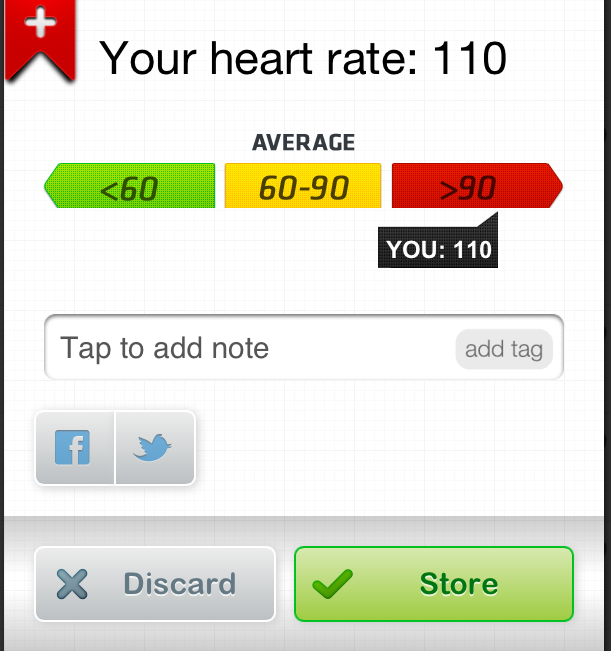
Next up was Cardio Buddy. In addition to performing a useful function (calculating your heart rate), it also has a high cool factor in how it measures your heart rate. You frame your face (using the front facing camera) and it calculates your heart rate using blood flow variations not visible to the human eye. This is a cool party trick. Everyone I show this to is surprised and amazed.
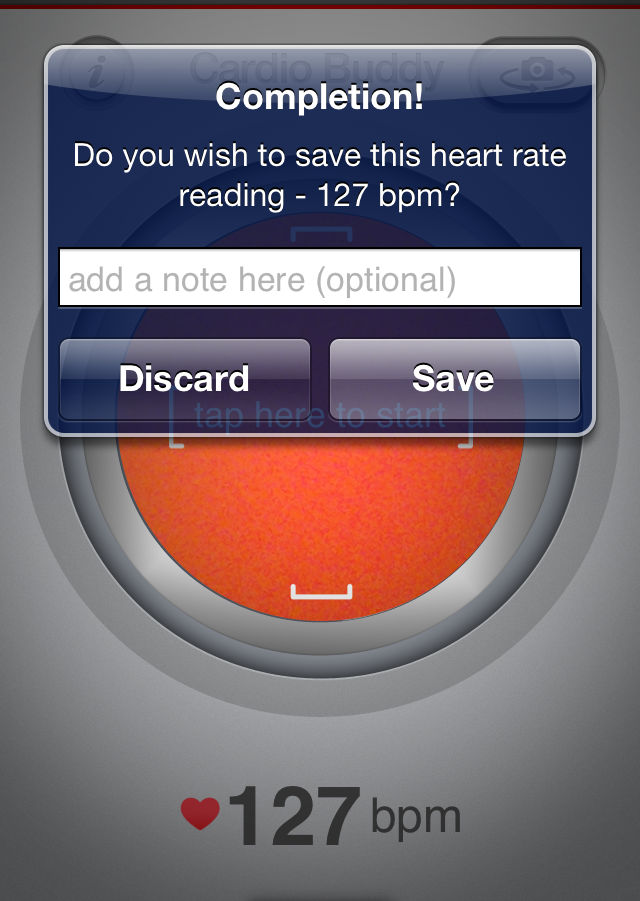
Last was my trusty chest based heart rate monitor. I have previously compared it's results to those from my blood pressure monitor and they usually match.

Comparing all of the results, they are relatively close but Cardio Buddy seemed to be closer to the my chest based monitor than Instant HEart Rate (which surprised me). I ran another series of test 30, 60 and 90 minutes later and the results were a almost the same. As the rest period grew longer, Instant Heart rate got closer to the chest monitor but in all the tests, Cardio Buddy was the closest.
It is important to note that the 2 app based monitors are best used in an indoor or shady environment without harsh direct sunlight.
LongURL shows what's really hiding behind that short URL
A technique used by hackers is hiding a malicious URL using a URL shortening service like Goo.gl, TinyURL or the automatic shortening done by twitter using the t.co address. There are plug-ins for most browsers that show the actual URL however you may not want to install another browser plug-in (that may compromise your security or slow down the browser).
LongURL performs this function without having to install anything.
1. GO to LONGURL
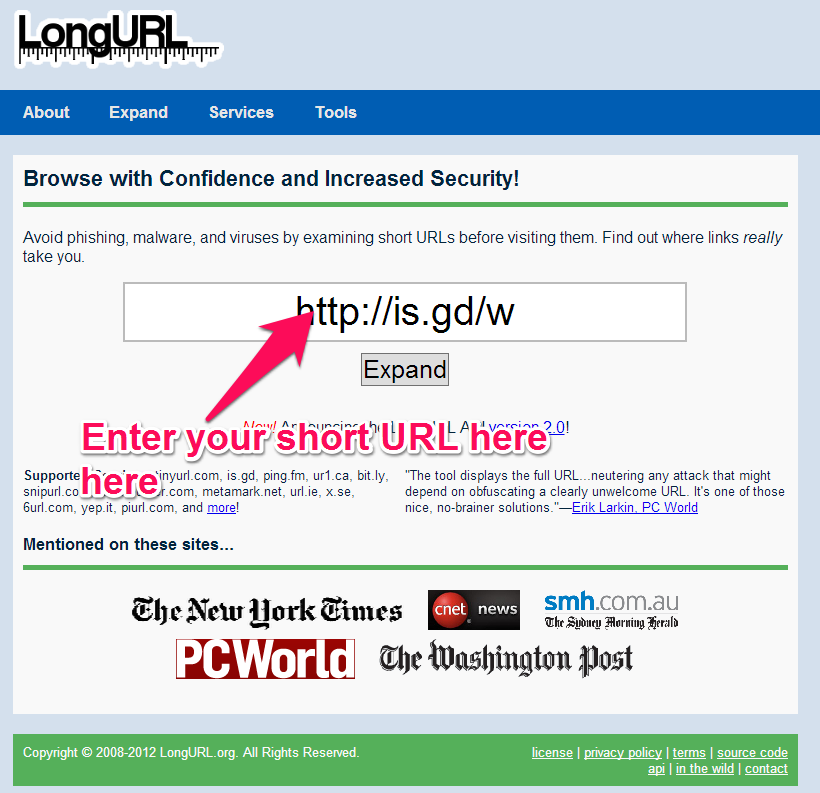
2. Enter your short URL
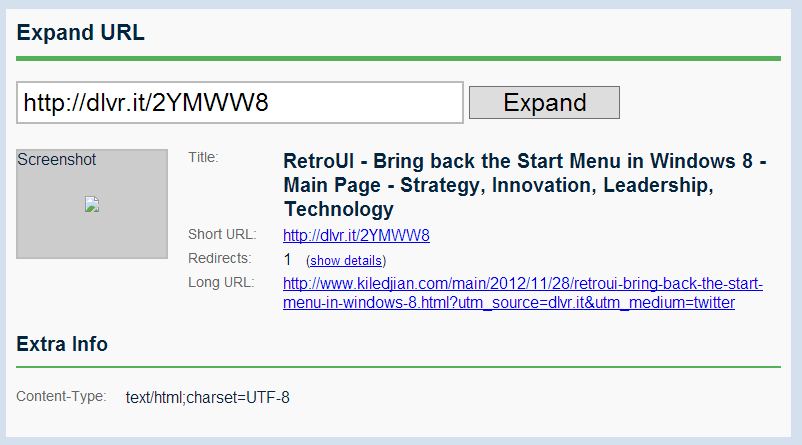
You immediately get the title, short URL, how many redirects they have seen to that address and the long URL. I tried the service with about a dozen different shortened URLs (from different providers and to different web sites) and screenshot never seemed to appear.
Splashtop IOS App Review update - Don't buy it!
During my original review, I was using Windows 7 and Splashtop worked like a champ. I loved it and recommended it. Then I upgraded to Windows 8 and started to experience strange issues. After I made sure the issue wasn’t from a misconfiguration, I opened a support ticket with Splashtop (which cost $9.99 when I acquired it mid this year).
Here is the response I received from Splashtop:
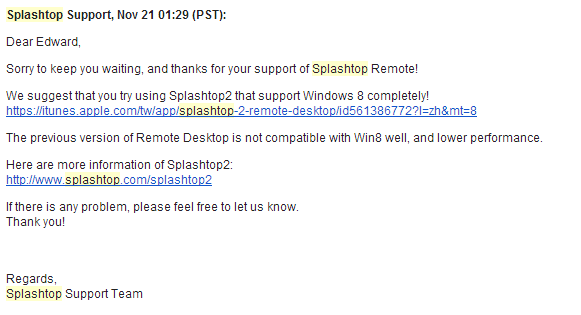
Basically to solve my issues, they want me to "upgrade" to Splashtop 2 which has a monthly service fee. No other suggestion was made to fix my issues and they were unwilling to provide an upgrade promo price considering I had paid for their previous product less than 5 months ago.
I have a real issue with a company selling a product known to be inferior. The original Splashtop is still being sold on itunes (albeit now $2.99). They should be honest and clearly warn consumers not to purchase this product if the intended use is with Windows 8. I also hate companies trying to do a "hard sell" as the only solution to my problems. It's really too bad because it worked very well with Windows 7.
I have gone back to my LogMeIn Ignition solution for remote access (which doesn't stream video but has always been rock solid).
My verdict is don't buy Splashtop 1 for use with Windows 8. Splashtop 2 works well on your LAN but if you want to remote access your device via the internet (which is likely why you wanted a remote access solution in the first place) then you have to pay their monthly or annual fee.
Gangdam Style Christmas Light show
With the popularity of Gangdam style, this was bound to happen. Someone has created a Christmas light show to the popular song.
It sure is entertaining. I wonder how long this setup took to design and build.
Windows8 TIP - Remove ads from built in apps

Other Windows 8 Tips and Tricks you may enjoy:
- Windows8 TIP - Take a screenshot
- Windows8 TIP - Quick Access Menu
- Windows8 TIP - Log in automatically
- Windows8 TIP - Keyboard shortcuts
- Windows8 TIP – Bringing the start menu back to the Windows 8 desktop
- Memonica - Learn windows 8 tips and tricks easily
- Windows8 TIP - How to shutdown or reboot your PC
- Windows8 TIP - List all of your applications
- Windows8 TIP - Get Windows Media Center upgrade for Free
Canada's great north get's added to Google Street View
To get a sense of what it’s like to live up in the north, you can walk down Omingmak Street, make your way to the bridge (where locals fish for Arctic Char) and head out to the Old Stone Church. Check out some Arctic souvenirs in the Arctic Closet, or visit the Ice Hockey and Curling Arena—it’s uninsulated and freezes over once they flood it in the winter! You can also learn more about Inuit history and culture at theKitikmeot Heritage Society and the Arctic Coast Visitors Centre.
Is the D-Link SharePort Mobile Companion a travelers best friend?
Anytime I travel, the one thing I absolutely want is wireless in-room internet. Most hotels offer some kind of wireless service but often it is slow, overloaded or isn’t accessible everywhere in the room. The best solution to this problem is to bring along your own router and convert the in-room wired connection into your own personal wireless network.
Being a one bag (carry-on only) traveler, everything I bring has to be useful and small. The D-Link SharePort Mobile Companion is the right answer (DIR-505).
What it does
The 2 ways you may use the DIR-505 on the road is:
- As a router, it takes your wired connection and shares it with all your wireless devices
- As a repeaster, it can amplify a weak WIFI signal and actually make it usable
- WIFI Hostpot mode to share files from a USB key (not something I think is useful for a business traveller)
If the hotel room has a wired internet connection, then I will always use it in the first mode. If the hotel only provides weak WIFI then I'll try to set up my wireless router as a repeater and may move it around the room to see where it provides the best peformance.
You use a simple mode rocker switch to change the device’s function. For the first option, you choose the Router mode, plug it into the wall, plug in the wired Ethernet cable. You then use the provided network information (provided on a business card size card) and voila. 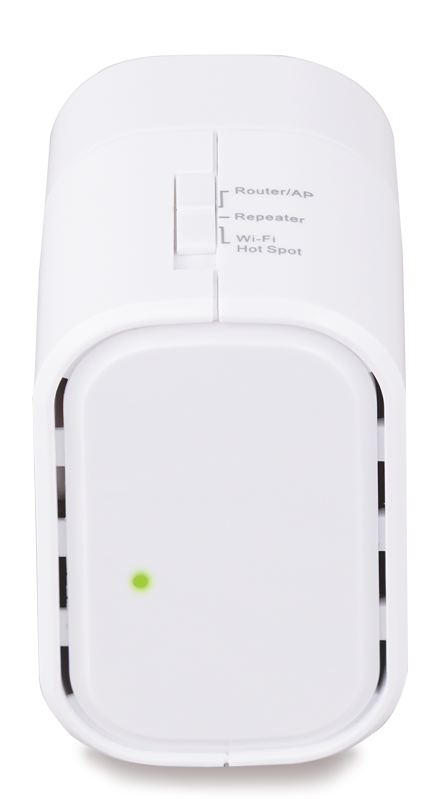
Here is a view of the bottom.
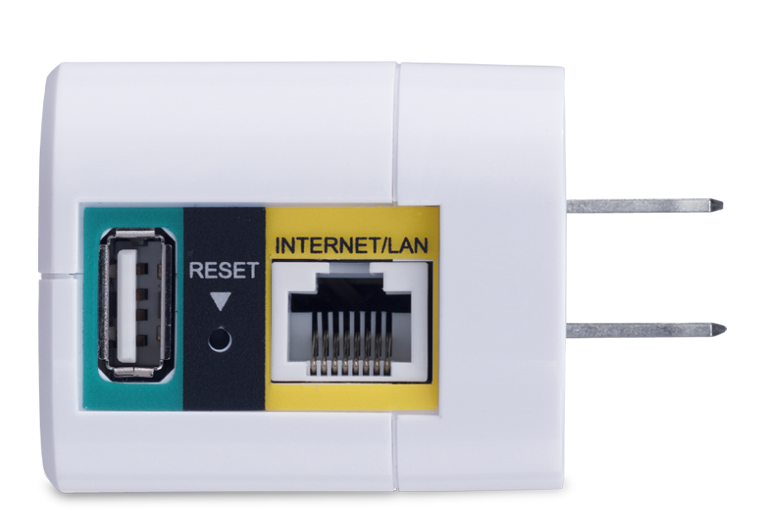
You can load the D-Link IOS or Android companion app to unlock additional functionality. You can plug a USB memory key in the USB port and use it to stream pictures/movies to your device (via their app) or to backup your device onto the USB key. The port doesn't provide enough power to use a traditional USB powered mechanical hard drive (but I didn't expect it to either).
The USB port can also be used to charge your iPhone or Android phone. Which is a nice touch. It doesn't seem to charge well with the iPad but I'll have to do some additional testing.
Since hotel rooms, aren't extremely big, you shouldn't have any issues with the power of the WIFI router. In tests I was able to go to connecting rooms and still keep a solid connection. Nothing to complain about here.
I connected to the test device using everything from a Winwows Surface RT tablet, an iphone 4s, an iPad 2/3, a couple Android phones and 2 Dell laptops (one ruinning Windows 8 the other Windows 7). It worked great with all the devices.
Get the updates
I read some complaints related to configuration or performance but didn't experience any of it. Make sure you update to the latest firmware as this liekly fixes many of the issues users have been complaining about (drops, ability to upload photos from an ipad, etc).
I found that performing a factory reset after installing an upgrade helps get the kinks out.
Comparing it
This isn't an ultra powerful device but is small, easy to use and fairly affordable. For the occasional traveller, this is a fantastic option to ensure you stay connected while on the road. Many European hotels include wired internet but charge extra for WIFI and the device pays for itself in 2 or 3 days.
Overall I like it and would give it a 3.5 out of 5 star rating.
I tried the Belkin wireless travel router (F9K1107) and found the D-Link easier to use and more reliable. The Belkin seemed to intermittently drop my connection. I would give it a 2.5 out of 5 star rating.
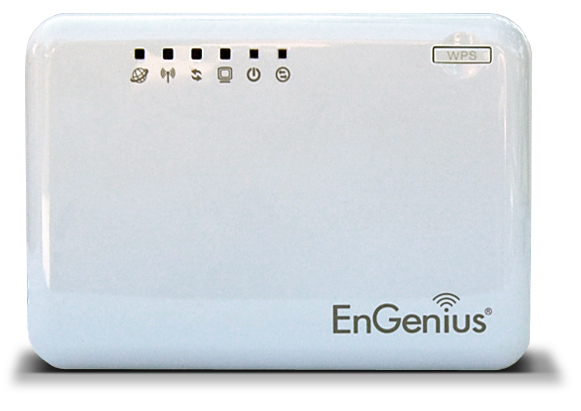
For now, I will stick with my Engenius ETR9330 wireless travel router. I like the Engenius because of all travel routers I have used, this one seems to provide the strongest most reliable WIFI signal. It is as small as a pack of cigarettes. Setup is extremely easy using a web browser. I have never found a device that didn't work with it. It has a built in Stateful Packet Insepection firewall which is a very nice feature for hostile hotel networks. I would give it a 4.5 out of 5 star rating.
RetroUI - Bring back the Start Menu in Windows 8
I wrote an update to my article entitled : "Windows8 TIP - Bringing The Start Menu Back to Windows 8."
I talk about RetroUI and why it may be the best Windows 8 app to bring back the start menu.
I recommend you take a quick look at the update section of that article (at the bottom).
The Bing Top Searches of 2012 Report
- iPhone 5
- iPad
- Samsung Galaxy S III
- Kindle
- iPad 3
- iPod Touch
- Xbox
- PlayStation 3
- iPhone 4S
- Windows 8
- iPhone 5
- 2012 Elections
- 2012 Olympics
- Hurricane Sandy
- Honey Boo Boo Reality Show
Nexus 4 available but not for Canadians
WineSkin is the ideal way to bring back Wine from your trip
One of the joys of travelling is discovering new tastes and bringing some of it back with you. Bringing back some souvenir alcohol is a great but most travelers worry about the bottle breaking in transit and leaving an indelible mark on your valuables.
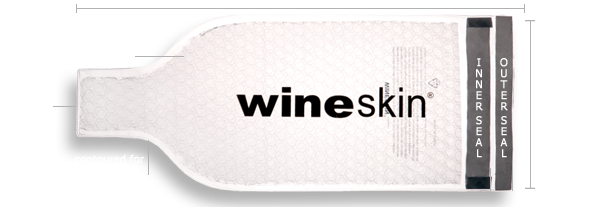
The WineSkin may just be able to solve your problem. The WineSkin is a thick peal-and-seal bubble protection system for your alcohol. Using it is very simple.
- Insert your favorite 750ml (or smaller) bottle into the WineSkin
- Peel and press the seal (the inner seal) against the vinyl covering
- Form fit the rest of the WineSeal around your bottle
- Peel and press the seal (the outer seal) against the vinyl covering
The WineSkin is a single use item but you can find a 3 pack for $9.99 or less.
Alternatives
There are some reusable alternatives but they are usually much bulkier and don't seem to offer the same level of spill protection. Having looked at about a dozen different models, I am confident that this is the one you will want in your luggage.
Where to find it
This is my personal blog and I don't use any kind of affiliate marketing. Any links I provide here are done for your convenience (I don't get anything from the retailers).
Take a quick look around the web and you'll find these everywhere.
- IWA has a 6 pack for $18
- The Container Store has then for $2.99 each
- Amazon has a 2 pack for $7.98
- Sears has a 2 pack for $19.40
Obviously shop around but it is easy to find and very affordable. Your local travel store may even have some in stock.
Steripen review - Guaranteed clean water for the business traveller
As a business travel, I have visited some exotic cities and learned how important clean drinking water is. Water purification is done differently in each country and not all systems match the cleanliness we have come to expect. Other times countries have old or ill-maintained water distribution systems which infect the entire water network. Regardless of the reason, I have come to distrust tap water is most non-western countries.
Even bottled water may not be safe. I once caught a vendor in Thailand who was extracting the clean water from the bottles [by making a small incision in the bottom of the plastic bottles], replacing it with local tap water and then resealing the bottom with a dab of crazy glue. Bottled water can be bad because of foul play or simply because the contents weren’t treated as thoroughly as you would like.
“An estimated 10 million people develop Traveler’s Diarrhea each year. High-risk destinations include developing countries of Latin America, Asia, Africa and the Middle East.” - U.S. Center for Disease Control
WHAT IS IT?
The Steripen is a little device that is now part of my critical travel gear. Using hospital grade UV light, it kills 99.9% of bacteria, viruses and protozoa that cause water-borne illness. You simply fill a glass or plastic container, insert the Steripen tip into the water, press the start button, mix or shake the water during the purification process and when the light turns off, the water is safe to drink.
WHICH MODEL?
I have the original classic and it still works perfectly. All models have the same UV technology but they come in different sizes and shapes. Regardless of which one you choose, you will be well served.
ALTERNATIVES
There are some alternatives but none are as good as a Steripen. You can use water purification tablets but most require an extensive soaking period and change the waters taste.
You can always boil the water for 10-15 minutes but most business travellers simply don't have the facilities to boil water (A coffee machine does not boil the water).
PICTURES
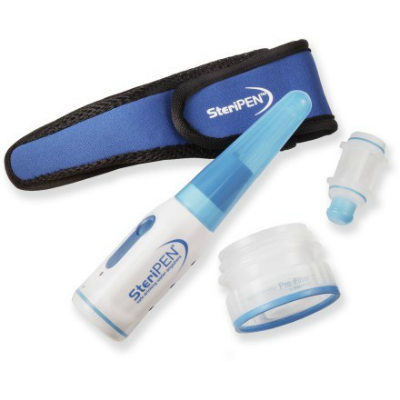
This is the one I have. IT includes the Steripen, a large mouth water bottle adapter and the adapter tip that can be used for drinking.
Double your monthly 3G or LTE allowance for free
Would you like to double your monthly data plan for free? Then go ahead an immediately download the FREE Onavo Extend for iPhone, iPad or Android.
WHAT IS ONAVO EXTEND?
Onavo Extend is a data compression service that works quietly in the background [anytime you are on 3G or LTE] to minimize the amount of data your smartphone consumes. It is completely transparent and magically works to reduce your overall usage.
WHY DO YOU NEED ONAVO EXTEND?
There are 3 scenarios where Onavo Extend really shines:
- Most carriers are now getting rid of their unlimited plans so the last thing you want to do is give them more money
- When travelling abroad and buying pay per use data access, the less you use the cheaper it is
-
When your device switches to a slower 2G network because your carrier hasn’t upgraded the network in some areas
HOW DOES ONAVO EXTEND WORK?
It adds a network profile to your device’s configuration (which can easily be removed if want) and then sends all your traffic through its proxy servers where data is compressed before being sent back to your device (through your carrier). The concept is nothing new because RIM has been doing this for a long time. Opera mini also performs server side compression however it only does it for traffic through its app. Ovano compresses all compressible traffic regardless of the app.
The more security conscious users are wondering what this means for their security and the company has been adamant that they do not track or analyze user identifiable data. They only store aggregate app level usage information to show your savings and to find improvement opportunities. It is important to remember that your carrier and everyone in between already sees your traffic so people shouldn’t get overly paranoid.
Onavo uses the global Amazon EC2 infrastructure to reduce costs and have a global footprint. It does not read or compress SSL traffic except Microsoft Exchange traffic (for which compression can be enabled but requires the users specific approval).
Because of the way streaming media flows, Onavo doesn’t compress them so you won’t see any savings when using Skype, Dell Voice, Netflix or other streaming apps. It also won’t compress encrypted connections (banking, secure email, itunes App Store, etc).
Some friends that also agreed to test the app this month (iPhone, iPad and Android) all saw data savings with “typical” users seeing close to 50% data savings. Every single one of them said they would be keeping the app running on their device going forward and one perform with 3 separate 3G/LTE devces said he decided to install it on all his devices. So a unanymous thumbs up.
INSTALLATION AND OPERATION
After downloading the app on my iPhone 4s, I ran it, chose my carrier, it directed me to a special webpage where it created and helped me install the Onavo profile and I started saving.
Once installed, I took a look at the configuration and left most options with their default settings. There is an option to compress mail but it converts all emails to text so I left it off (which is the default).
Everything else happens in the background. I have been testing it for a month and have not had any issues. Everything worked perfectly and seamlessly. If for some reason you do experience an issue, there is a button called Diagnose and Repair which walks you through possible corrective measures (but I never needed this).
THE ONAVO EXTEND INTERFACE
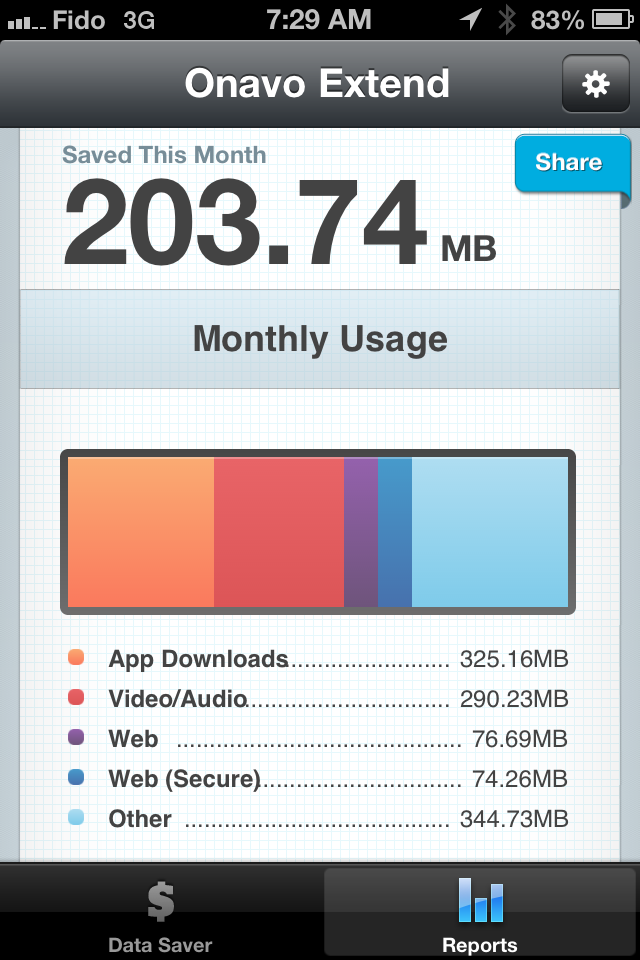
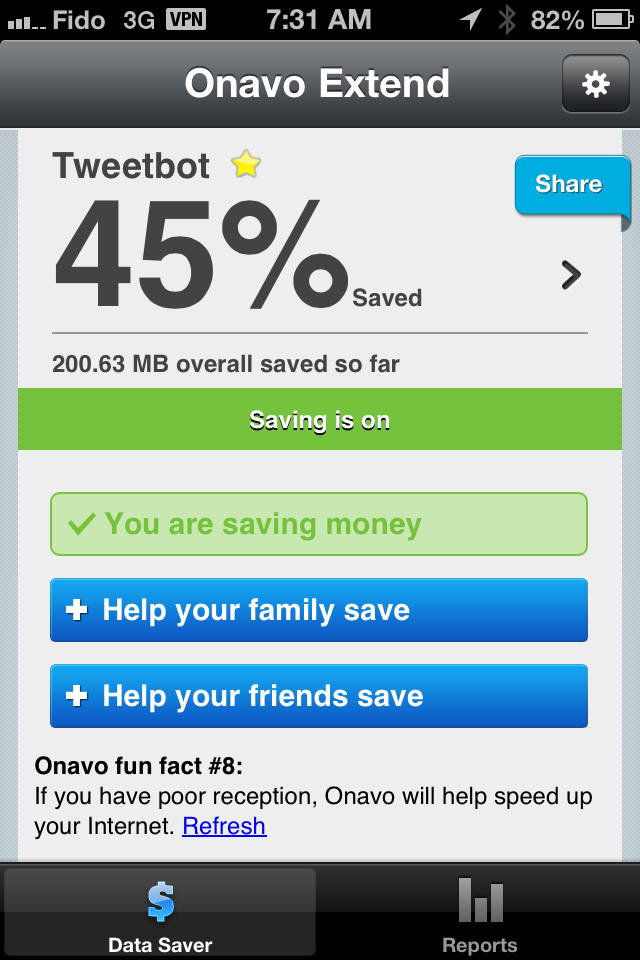
With 22 days of normal use, it managed to save me over 200MB of data.
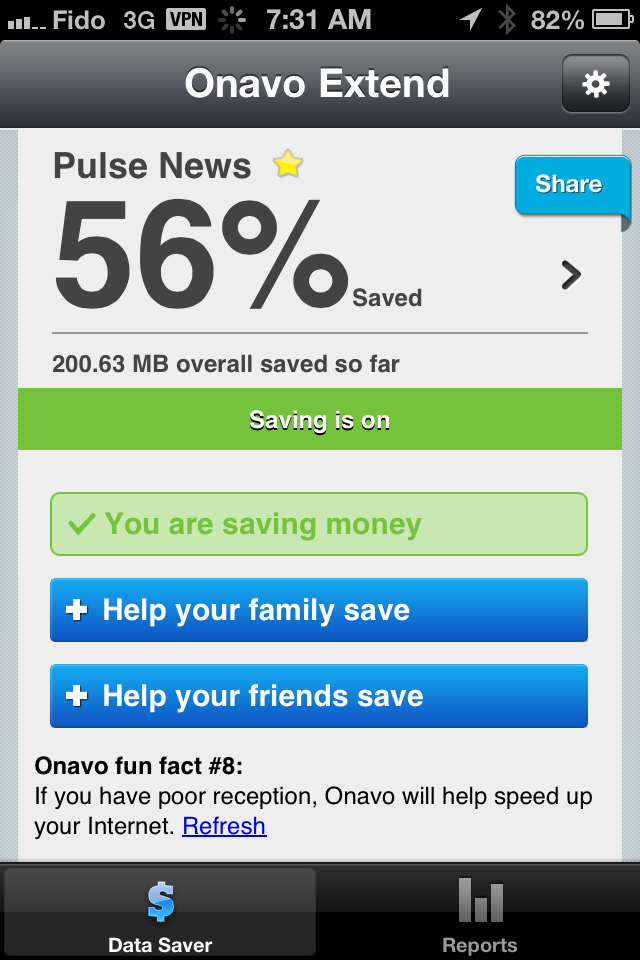
The main screen is super simple and it scrolls the savings for each of the apps you use for that month.
Video
ONAVO COUNT REVIEW
I also installed the other free Onavo app called Onavo Count. You can get it for iphone/iPad here and Android here.
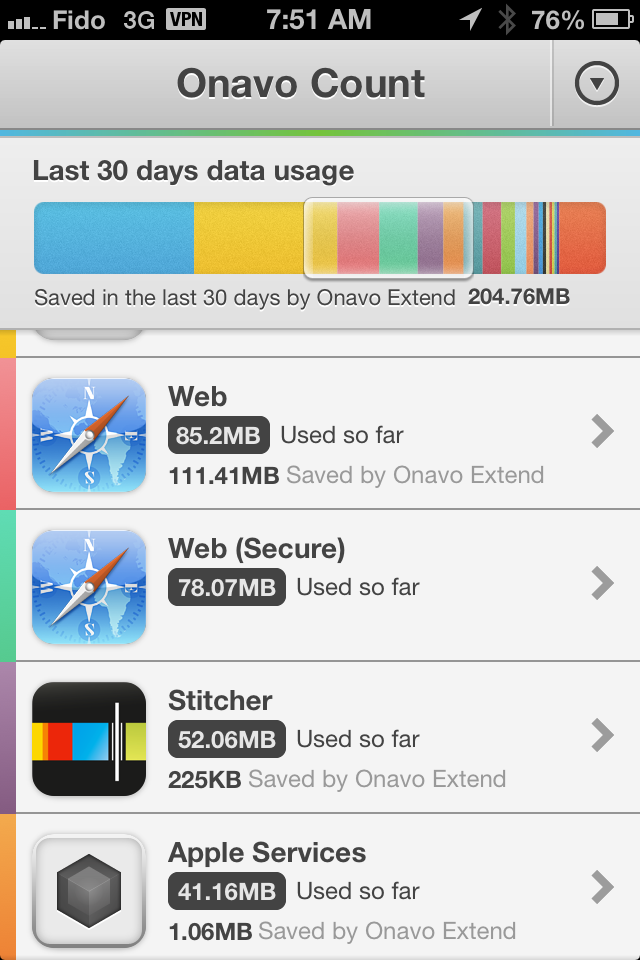
It is a free app that works with or without Onavo Extend and provides a view of how much data each of your apps and phone services are using in a given month. It’s a great way to understand which apps are “costing” you the most data per month.
When combined with Onavo Extend, Onavo Count also show you how much data you saved for each of the apps.
After playing with it, I like:
- It’s integrated with Onavo Count and shows me my usage and savings on one screen
- Ranks apps buy data usage
- app updates with weekly usage data
Get Crashplan unlimited online backup for $12 for 1 year (PROMO)

BLACK FRIDAY SPECIAL
If you need an online backup service for your computer files, Crashplan is running a crazy sale. (Price increases every 2 hours until the end of the promo). Right now you can buy the family unlimited plan (you can backup up to 10 computers online - unlimited storage) for $12US.
https://www.crashplan.com/bigsale/
Its cheaper and better than Carbonite, Mozy or Backblaze
The story of how Windows 8 was designed
Jensen Harris was involved in the design features of Windows 8 and he recently presented the story at UX Week.
He highlights Microsoft's core belief that if you give people enough good reasons, they will accept change (regardless of how radical it is). Let us not forgot that Microsoft has lead computing change over the last 3 decades :
- moving from DOS to Windows 3.1
- moving from Windows 3.1 to windows 95
- Moving from Windows 95 to Windows 8
Sure there were evolutionary changes in between but these represent the really big paradigm shift points. During each of this changes, a faction of their users complained and another group embraced the change. Eventually everyone understood the benefits of the new model and it became the standard.
If you have any interest in Windows 8, this video is interesting to watch
Windows8 TIP - Get Windows Media Center upgrade for Free
AppRemover uninstalls security & filesharing applications
I previously wrote about my favorite app uninstaller called Revo, it is worth the 5 minutes to read that article.
As mentioned in the above linked article about Revo, it will do a fantastic job for 99% of the applications on your windows 7/8/Vista/Server 2003 computer. Then we get to the 1% which is the wonderful world of security apps. These little gems are a must but need to deeply embed themselves into your operating system in order to perform their work. All of this is fine and dandy until you decide you want to uninstall the app.
Sure you can use the windows uninstaller but in most cases, it does work well enough so most vendors have created special uninstallation program for their security tools. Enter AppRemover. AppRemover is a specialized program that helps you completely remove the most popular security applications without having to find and download each developers custom uninstall program.
Like all uninstallation programs, once you download it, it performs a deep scan to identify what is actually installed on your PC. It then presents you with the list of apps it can uninstall. In my tests, it properly detected and cleaned the most common security programs (McAfeem Symantec, Microsoft, F-Secure and Sophos).
It also uninstalls the most common peer file downloading apps like utorrent, bitcomet, eMule, etc.
PRO
- Portable app - download and run
- Easy to use - even a newbie can use it
- Complete - In my tests it did an excellent job cleanup up during the uinstallation process
- Its free
Verdict
Obviously this isn't an app you will use very often but it is a nice addition to your toolkit. I still think you should install Microsoft's Security Essentials antivirus app and leave that one running.
For removal of peer to peer filesharing apps, I would still go to my Revo Uninstaller.
Windows8 TIP - Keyboard shortcuts
There are several dozen keybaord shortcuts but I just wanted to share the bare minimum you need to know to be efficient.
- Windows Key - brings up the new Start Menu interface
- Windows Key + C - Brings up the charms bar
- Windows Key + D - Hide or display the desktop
- Windows Key + E - Open "Windows Explorer"
- Windows Key + F - Open the Charms Search for Files tool
- Windows Key + Q - Open the Charms Search for Apps
- Windows Key + R - Open the run dialog box
- Windows Key + TAB - Cycle through the Metro apps.
- ALT + TAB - Cycle through desktop apps
- Windows Key + Print Screen - Capture a screenshot and save it to your Pictures folder
- ALT+F4 - Close current app