
Site will be down because of Sandy
My hosting provider, Squarespace, just notified its customers that their primary data center in New York will be shutting down sometime today. There isn't much I can do, my site will go down until they can restore service. I'm surprised they don't have geo-diversity and that will make an excellent topic for a future post.
I will be available by twitter for questions or issues @ekiledjian
My thoughts and prayers are with the people affected by Sandy.
I will tweet when my site comes back.
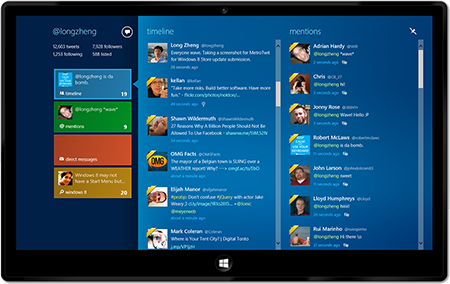
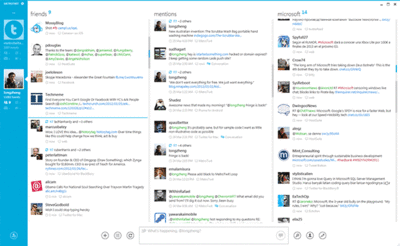
MetroTwit is a fantastic Windows 8 Twitter client
MetroTwit is a fairly new Twitter client and they have done a fantastic job of bringing a visually pleasing yet easy to use and powerful interface to Windows 8. It allows you to watch multiple streams simultaneously, check user profiles, update your own stream, create and manage lists, URL shortening, infinite scrolling and much more. It has a desktop and Start menu versions.
The ad supported free version supports one account (which should be good enough for most people). If you are feeling generous or want to manage multiple accounts then fork over $15US to help the developer, remove ads and enable multi-account management.
Get Google search and Chrome back on Windows 8
After installing Windows 8, you will find that Internet Explorer 10 and Bing are the default browser/search engine. If you like them, then congratulations you’re done. If you are one of the millions of Windows users that prefers the warm embrace from the sultan of search then keep reading.
In a direct yet playful way, as soon as Windows 8 launched, Google opened its “Get Your google Back” webpage. The fine folks at Google provide step by step instructions on how to bring them back into your computing life.
Instructions
- Download the Google search app from the Microsoft Windows 8 store. It provides a Start screen enhanced (aka the interface formerly known as Metro) interface and is touch enabled for touch devices.
- Download Google Chrome for windows 8 and bring a refreshed Google experience back in your life.
Evernote for Windows 8 (Metro Style)
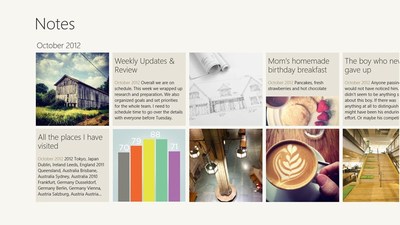
My readers should know how much I love Evernote and I was happy to see their Windows 8 version. This updated version allows you to use all of the Evernote goodness from the new Start screen (the interface formerly known as Metro). Some people have said it is not as feature packed as their Windows 7 client (and they are right) but at least you don’t have to launch the desktop everytime just to add or check a note.
Evernote for Win8 in the MS app store : here
Memonica - Learn windows 8 tips and tricks easily
You’re adventurous and want to jump head first into the raging water that is Windows 8. I’m with you but be aware Windows 8 has a bunch of new tips, tricks and shortcuts. Enter Memonica from Microsoft. It’s a simple learning app that teaches these new tips, tricks and shortcuts through repetition.
It covers:
- Tips & Tricks
- Mouse gestures
- Keyboard shortucts
- Repetition scheduling
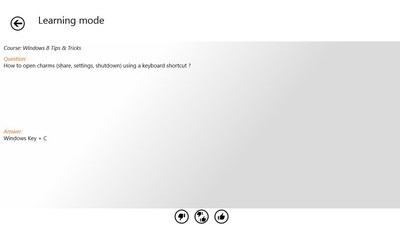
The app Splash Screen
A sample question
Windows 8 tips and tricks coming
Over the next couple of days, I will post tips and tricks about windows 8. If you are a Linux or Mac user, sorry and I promise I’ll get back to my typical posts by the end of the week ;-)
Have a great day
Stop what you're doing and clean your smartphone
There are hundreds of blogs, articles and podcasts about living an uncluttered life but very few of them actually talk about your digital world. It’s time for an intervention. Sit down, grab your smartphone and read the following.
How many apps do you currently have on your smartphone?
How many of those apps have you used today, in the last week or even in the last month?
Research shows that most new apps get used for less than 30 days and then fall into the abyss of uselessness. These useless apps take up valuable space, slow down your device, make backups bigger (plus it takes longer to backup). It’s time you decided which apps really need to be on your phone and get rid of the rest.
Now take the time to re-evaluate where you place your apps and how you group them. Chances are your usage habits have changed and your phone doesn’t reflect it (which means everything you do is being unnecessarily slowed down. Take the time to rearrange your apps based on their current usage pattern and priority.
How many do you have on your phone and do you really need all of them on your device? Best case you have too many pictures/videos but they are backed up anyway. Unfortunately most people keep too many of their digital memories on their phones and never take the time to back them up. Imagine how you would feel if your device was stolen or malfunctioned. Dust off that USB cable and move most of your pictures to your home PC (which is backed up right?).
Now we clean the outside
Now we step out of the digital and talk about physically cleaning your device.
The only products you can safely use to clean you mobile device is purpose made cleaning solutions, distilled water and isopropyl alcohol. Never use glass cleaner, abrasives, disinfecting wipes or anything else you would use to clean a bathroom. Never use paper based towels (paper towels, brown bathroom towels, toilet paper, etc).
Step one, turn off your device and remove the battery where possible.
For smudges and light dirt
Use a dry microfiber cloth to gently clean the device. This is the real cleaning microfiber cloths (with hundreds of little microfiber legs), not eyeglass cleaning ones. You can pick one up for about a dollar a piece.
Cleaning a keyboard
If your device has a keyboard, use quality cotton swabs (with wood or strong plastic stems) dipped in rubbing alcohol to gently wipe in, on and around the keys. Take your time. Don't rub too hard or you may remove the printed key identification. Your cotton swab should be humid but not dripping. Repeat as needed.
Once the keyboard is clean, use a microfiber cloth to dry and polish the keyboard.
Cleaning the metal trim
If your phone has metal trim, don't use alcohol on it. lightly dampen a small section of your microfiber cloth in distilled water and clean the metal trim. Once clean, use the dry section of the microfiber cloth to dry and gently buff it.
Cleaning the body of the phone
to clean the outside of your phone, lightly dampen a section of your microfiber cloth with distilled water and clean the outside of your phone. Make sure water doesn't get into any of the holes (speaker, microphone, connector, etc). As soon as the outside is clean, use the dry section of the microfiber cloth to dry and buff the phone.
Cleaning the camera lens
If you have a dSLR lens cleaning kit, use it. Otherwise dampen the tip of a cotton swab with distilled water and clean the lens using a gentle clockwise spinning motion. Once clean, dry off the lens with a dry microfiber cloth.
how to disinfect your phone
Mobile phones are excellent peatry dishes for bacterial growth. There has been a handful of well documented studies that prove that many smartphones are dirtier than a public toilet seat. This is some scary stuff. As a business person, I use my phone very often and when I started reading these reports, I was taken aback.
My solution is a little device I bought called the Violight UV Cell Phone Sanitizer. You simply drop your phone in (you can also use it to disinfect your Bluetooth headset, earphones, etc), place the top cap and wait until the activity light turns off (about 5 minutes). The germicidal UV light kills strep many of the bad things living on my device like e.coli, salmonella, listeria, and H1N1 virus.
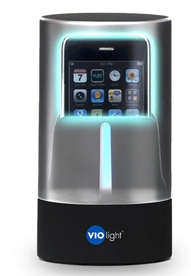 Cover isnt actually transparent, this is just to illustrate how it looks when working.
Livestream of Oct 29 Windows Phone 8 launch event
Microsoft will livestream its official Windows Phone 8 launch event on October 29th 2012. From the Microsoft blog:
As many of you know, we are landing in San Francisco on Monday October 29th to showcase some new things from Windows Phone. For those that can’t join us in person, no need to worry! You can tune into a live webcast here, all from the comfort of your couch, cubicle or coffee table. We hope you can join us, see you on the 29th!
The event starts at 1000 PST (1300 EST).
Most popular posts of the week 10-27-2012
- Quickly Setup A Windows 7 WIFI Hotpot With The Free Connectify App
- BitCasa Review Update And New Chrome Plugin
- How To Set Personal Goals
- PersonalBrain For IPhone And IPad Coming
- Let Rezscore Analyse And Grade Your CV
- Lark Life May Be A Fitbit And Nike FuelBand Alternative
- My Review Of The Red Oxx AirBoss Carry-On Luggage
- The Promise Of Unlimited Cloud Storage - A Review Of Bitcasa
- Workflowy Pro Review
Buy cheaper Apple Lightning cables from China
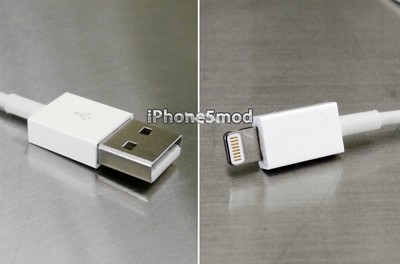
Love Apple’s new products but hate the fact that the new Lighning cable costs $19? Fret not my friend for the Chinese have already reverse engineered the cable (authentication chip and all). iPhone5Mod will be shipping knockoff lightning cables for a mere $9.99 (plus $4 shipping).
It is interesting to note that most “reputable” accessory makers haven’t even been briefed by Apple yet about these new cables. I’m not sure how safe these cables are but if you are interested, check out the video and their site.
I won't be buying the iPad 4th Generation
Even without the venerable Steeve Jobs, Tim Cook and company put on an excellent show for reporters during their iPad mini unveiling. They announced a slew of new and updated products. One refresh that seems to have caused a lot of controversy is the iPad 4th Generation. Typically Apple had a 12 month update cycle for the iPad and customers were happy in the knowledge that their investment would keep its "best device" value for at least the next year. Many customers were upset by the mid-cycle update.
What's new
The main new features are:
- The new A6x processor which doubles the CPU/GPU performance
- The new smaller lightning connector
- "Improved WIFI" - the current versions work pretty well
- Better front facing camera - nice to have but not something I would spend money on
- Siri - siri is fun but nothing I seriously use.
So what?
The new features are good and I am a fan of a faster device but I think I'll wait until the 5th Generation. I expect Apple to make the (5th gen) device much thinner, lighter and improve the battery performance. One reason why battery performance didn’t improve is the screen they used. The retina display needs a lot of backlight and power to drive it.
Since the release of the Retina equipped 3rd generation iPad, Sharp has started marketing a technology called IGZO. What would IGZO provide?
- A thinner display assembly - which means we would likely have a thinner bezel making the device easier to hold and use (bezel like the iPad mini)
- A brighter screen - always a good thing
- New technology requires less LEDs so the device could be thinner and the battery could potentially provide 50-100% more runtime
Sharp has said it will be ready to mass produce these screens Q4 2012 which means they would be ready for the next iteration of the iPad sometime in early 2013 (typically released each March).
The Verdict
I believe the iPad 4th Generation is the absolute best tablet a consumer can buy today. It is a well build device that feels great in the hand, performs very nice, has a great display and wonderfully diverse ecosystem (apps and accessories). If you need a tablet today, you can't beat the iPad. If you own an iPad 3, the move isn't compelling enough so stick with your device. If you own a gen 1 or 2 iPad, change if you really have to but I recommend waiting until early 2013 to see what the next gen will bring.
25 Worst passwords of 2012
A recent Splashdata news released shared the 25 worst passwords to use in 2012 (these are the most commonly used passwords exposed by hackers this year).
The words “password”, “123456” and “12345678” are popular this year and were popular last year too. New entrants (in the 2012 list) include “welcome”, “jesus”,”ninja”, ”mustang” and “password1”.
- password (Unchanged)
- 123456 (Unchanged)
- 12345678 (Unchanged)
- abc123 (Up 1)
- qwerty (Down 1)
- monkey (Unchanged)
- letmein (Up 1)
- dragon (Up 2)
- 111111 (Up 3)
- baseball (Up 1)
- iloveyou (Up 2)
- trustno1 (Down 3)
- 1234567 (Down 6)
- sunshine (Up 1)
- master (Down 1)
- 123123 (Up 4)
- welcome (New)
- shadow (Up 1)
- ashley (Down 3)
- football (Up 5)
- jesus (New)
- michael (Up 2)
- ninja (New)
- mustang (New)
- password1 (New)
If you use any of these, change it now. Each site should have its own password. Each password should be at least 8 characters, made up of uppercase & lowercase letters, numbers and symbols.
Microsoft surface review round-up
Various high profile reviewers were given early access to the Surface tablet but because of strong NDAs, weren’t able to write about it until yesterday. Now that the floodgates are open, I wanted to provide (in a short write up) the review summary of the various reviewers.
- Wired - Article - Thinks its a great device but will likely confused long time Microsoft customers.
- Laptop - Article - Great hardware but needs a stronger ecosystem to make the device truly worthwhile.
- The Verge - Article - "INSTEAD OF BEING NO-COMPROMISE, IT OFTEN FEELS LIKE MORE-COMPROMISE". Joshua said he really wanted to like the device but there were too many irritants.
- Time - Article - Impressive for a 1.0 version product but will closely follow Microsoft and see if they continue to improve the product through constant innovation to really make it a must have.
- Gizmodo - Article - Surface is priced close to the the most premium tablet, the iPad, yet the Surface is inferior in most ways.
My personal rule of thumb is to never buy the first generation of any product (e.g. Microsoft Surface and even the Apple iPad Mini). I wouldn't spend my own money to buy this just yet but I will be following it with great interest.
Ai Weiwei does Gangdam Style
AccountKiller - How to delete your account from different sites
AccountKiller is an interesting website that provides instructions on how to delete your account from most major online sites (e.g. Skype, Facebook, Live.com, Yahoo, Google, Twitter, etc.)
What do you do when you no longer use an online site? Most users unfortunately just stop visiting the site but never go through the process of deleting their accounts. When you ask them why, they say it is "too complicated" or that "they couldn't figure it out".
AccountKiller provide instructions for most major online sites making the delete process as easy as possible. Interestingly the site has a whitelist (sites that allow deletion of user accounts) and blacklist (sites that do not allow you to delete your account & information).
This is a great site to bookmark and use.
More than half of Brits are victims of cybercrime
Results from a recent getsafeonline.org survey show that 56% of adults in the United Kingdom have been targeted through online attacks. Interestingly, 65% of those attacked haven’t changed their computing behavior.
The top 5 attacks where:
- Viruses
- Email attacks
- Social media attacks
- Fraud driven sales
- Online credit card fraud
29% of respondents didn’t realize that they were increasing their risks of becoming victims. Interestingly 17% of respondents admitted that they were embarrassed to admit having fallen victim to online attack.
Interestingly the top 5 attacks could be easily mitigated through vigilance, improving your knowledge about online attacks and implementing better online security hygiene (using more stringent security settings on sites, implementing 2 factor authentication where available, etc.).
Tips:
- MyPermissions - Secure social media information
- Use complex passwords (which include uppercase+lowercase letters, numbers and symbols)
- Use different passwords for different sites
- Enable 2 step authentication (if you use Google Services).
- Only download software from reputable sites and scan it before executing it.
- Never submit personal information via email (banks never ask for your personal information)
- Never open emails from unknown people.
- Assume everything you do is monitored when using 3rd party WIFI hotspots.
- Log Out of your sites when your work is done (don't just close the browser).
- Install a security plug-in like https everywhere.
- Remember you can't easily verify someone's identify on the internet (be wary of trusting strangers online).
Square allows any Canadian to accept credit cards
Square is a little iPhone and Android dongle that allows anyone to process credit card transactions for a small flat fee of 2.75% (without a merchant account or monthly fees). Unfortunately Canadians were left out in the cold but Square just changed all of that with their new Canadian presence.
In Canada, they will accept Mastercard and Visa cards (US users also get American Express and Discover). To get started, you visit their site, complete a 5 minute online questionnaire and they mail you a free credit card reader dongle. Once your application is approved and the dongle received, you download the square app on your iphone, ipad or Android and you can start accepting credit cards instantly.
This is a great option to get paid during a garage sale or product sale via Kijiji or Craig’s list. It is a great way for small businesses to accept credit cards when volume is small, mobility is required or when no other options are available. There are lots of ways this can be used and since it is free, you have no reason not to get it now.
Describe yourself in one word
Interviews can be fun or scary depending on how prepared you are. A new question many candidates are being asked is to described themselves in one word. Interviewers know that unless you prepared for this question, you will likely delay and stumble.
Before you go into that interview, take the time to conduct some honest introspection and ask yourself :
- “Who am I?”
- “What makes me unique? What sets me apart?”
- “What value do I bring to the company?”
When you feel you finally understand your service offer, start trying to find a word that best describes you. In my case, the word I would use is driven. I know it’s the right word because my background proves it and anyone that knows me will agree immediately.
Lark Life may be a fitbit and Nike FuelBand alternative
Walk into any Apple store and you will likely see Lark’s wristband alarm clock which tracks your sleep and gently wakes you up with its vibrating wristband. The company has decided to enter the growing lifestyle tracking world and compete head on with the likes of Nike’s Fuelband and Fitbit’s One and Zip activity trackers.
Similar to its main competitor, the Fitbit, it will track activities and calorie intake through a custom smartphone application but they claim they will provide more value by providing immediate and customized user feedback.
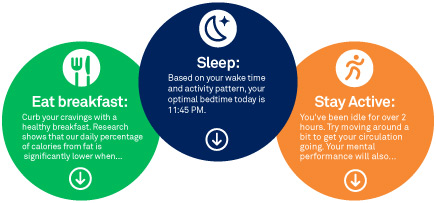
Larklife learns your unique internal clock, or circadian rhythm, and finds the small changes you can make, like moving your exercise time to when your energy is at its peak, or adding in a snack when you hit a low, to make a big difference in how you feel.
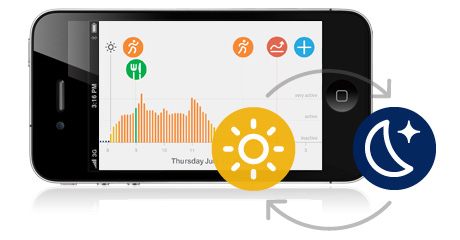
Smart tips are designed with the world’s top energy, health and sleep experts, including professors, scientists, pro-athlete coaches and top business executives.
As I try to live a healthier lifestyle with more exercise and a healthier diet, I am realizing that I am a person that needs metrics to keep me motivated. I need to know that I am constantly improving and these types of tools sound like a great way to measure & report. I was about to buy the Fitbit One until I heard about the Lark Life and now I want to wait and see if their final product is as good as they are claiming.
Lark Life is up for pre-order now with an expected ship date "this year".