
Iphone 5 and mini iPad to be released September 12
Most tech blogs have been filled with wild speculation about when Apple would be releasing the next iPhone and possibly the iPad mini. After having read dozens of different dates, most pundits have now settles on September 12 as the magical date Apple will shine the light of its new devices on its followers.
It seems the deal was sealed when iMore chose this date. For those that don't know, iMore seems to have an uncanny ability to determine accurate release dates for Apple products so the market tends to believe them. This date was further validated by Jim Dalrymple from The Loop.
To be clear, I believe Apple will call the next iteration of the iPhone "the new iPhone" and not the iPhone 5. This is in line with the naming of the new iPad.
Site refuses to delete my account
All of my accounts (username/password) are stored in LastPass and every quarter, I browse the and identify the accounts I no longer find useful. Using the built in account management features of most sites, I can delete my account myself and in some rare cases, I have to send a customer service email asking for the deletion.
DVOR.com was one such site which had originally interested me but that I found "less interesting" after a while and wanted to delete my account. After going through their account management options and reading their Frequently Asked Questions (FAQ), I could not find an option to delete my account so I sent a request to their customer service department. Their response surprised me and I decided to share it on my blog.
My email to them simply said "Please delete my account on your site". Their first Customer Service reply was:
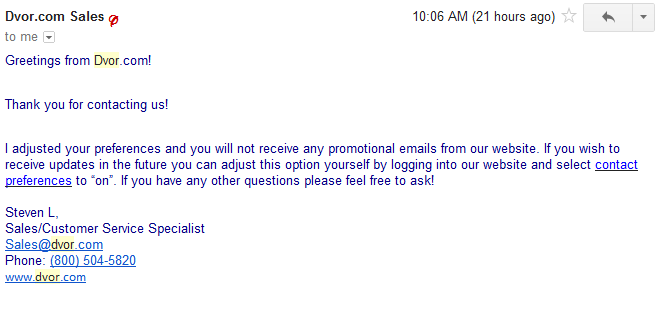
I then replied back clarifying that my request was to delete my account and just disable their marketing emails. The second response I received was:
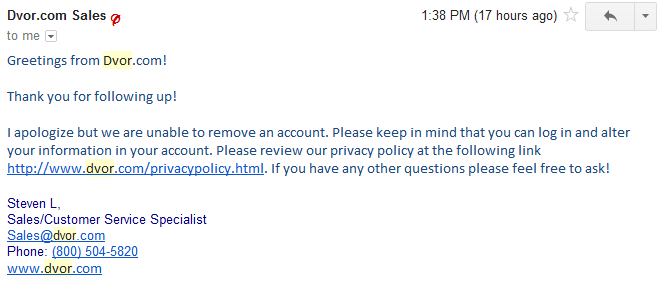
Unable to remove my account? It is the first time a site tells me they can't delete my account on their site. I feel I should be able to delete myself from their site. What do you think?
I have more Facebook friends than you
The most common Facebook question people ask is
- how many friends does the typical Facebook user have?
- is 6 degrees of separation real
The latest statistics I was able to find where published in November 2011 and provides some interesting insight I wanted to share with my community.
I have friends
Examining the 721 million active Facebook users (on November 2011), they had built 69 billion friendship relationships amongst them. Beyond the amazing numbers, the researchers discovered that users are actually much closer to each other than the “6 degrees of separation” and that gap is shrinking as the social network grows larger. They also discovered that most your friends are likely close to your age and from the same geographic area.
50% of Facebook users have over 100 friends and the average friend count is 190. A 1991 paper called “Why Your Friends Have More Friends Than You Do” described an interesting paradox validated by the Facebook data. Even though the median friend count is 100, 84% of users have a higher friend count than that. But how can that be? If you take a New York to LA flight, you may say that is it always more full than your other flights. Or your favorite restaurant always seems to have longer wait times and is always more full than others. This is because these (flight, restaurant and friends) must have more people choosing them if they are more popular. This is why it is completely normal if your friends are more popular and have more digital friends than you.
6 degrees of separation
This term was created in a short story in 1929 by Frigyes Katinthy then used as a movie plot. In 1960, Stanley Milgram decided to test out this theory by asking 296 volunteers to deliver a message to a stockholder living in Massachusetts. The only condition was that they could not send the message directly unless they personally knew this individual. The result was that most people could get the message use 5.2 intermediaries (which translated into 6 hops).
The University of Milano studied this phenomenon on Facebook and found that 99.6% users are connected within 5 degrees but 92% are connected with only 4 degrees. As Facebook grows and the inter-friend network of relationships becomes denser, it is expected that this will shrink dramatically. In 2008, any 2 users were 5.28 hops from each other while in 2011 they are only 4.74. The gap is closing. This is also the premise behind business oriented sites like Linkedin.
Real world test and review of the Monster Turbine In Ear headphone
This is a quick review of the Monster Turbine In Ear Monitor headphone. Like them or hate them, most people know the Monster brand. I have always thought their cables are extremely overpriced so I had glossed over testing their Turbine IEM headphones. But since they are so popular, I thought it was time I get them a fair shake and here it is.
Build
They are called Turbine because they kind of look like jet engines (or at least that is my guess). These ear buds are metallic and feel solid in the hand. The colors are nicely matched and conservative enough to be used in an office environment yet hip enough to be called cool by teens. For a company best known for cables, I was hoping these earphones would have stronger, thicker and more quality cables. I would have loved for them to use a ZAGGSmartbud type polyurethane coated cable which would make it more resistant and less prone to tangling.
The pair I tested was given a hard time: thrown in a gym bag, rolled and shoved in a pocket, and basically beaten. The little fragile ear buds have held up well. I have to acknowledge that many on the net rant that their pair broken within the first couple of months but my pair was in very good condition after my tough love.

Comfort
Any in ear earphone has to be evaluated for comfort. I have been using In-Ear Monitors (IEM) for 2-3 years now (as my primary buds) and so am very use to the insertion and feeling. The buds are made of metal, but they don’t feel heavy and don’t weigh down your ears. Many on the net like the Monster Turbine rubber tips, but I found them bothersome after 30 minutes of use. I prefer the tips provided with by Ultimate Ears, Etymotic or the Comply Foam ones.
We’ll talk about the audio reproduction profile later but the buds are bass heavy and as such, I found them more tiring than my other IEMs. I found myself playing with my devices equalizer to compensate for this and lowering my volume.
Audio Quality
I tested the Monster Turbine against my ultimate Ear Triple-Fi, The Bose QuietComfort 3/15, Etymotic ER-4, Etymotic ER-6i and Audio Technica ATH-ANC7B.
I tested the Monster Turbine with a Windows computer, iPod (gen 4), Iphone 4s, Cowon Audio iAudio 7 and a Sony CD Player. I tested with all types of MP3 files (from 128-320 encoding) and platform specific lossless (ALAC on Apple and FLAC on Cowon).
I found that a headphone amplifier really didn’t improve the performance of the IEMs. You don’t need to buy an amp to power the Monster Turbine. Regardless of the source audio, I found the soundstage to be very similar and it is definitely not neutral and the soundstage is narrow. Bass is very strong and at times overwhelming. After 30-40 minutes of listening, the extra bass sometimes caused mental fatigue ( If you like this type of super-bass then this may be a positive for you. ) Highs and lows sound muffled and aren’t as clear as I expected them to be. Mid’s are acceptable but nowhere as clear, crisp or enjoyable as on my other IEMs.
The default tips and earphone provide a good level of passive sound isolation which means you can still hear your music on a crowded bus or get some peace and quiet in a plane. Noise isolation wasn't as good as my Ultimate Ear Triple-fi or Etymotic ER-4 / ER-6i but was still very good.
Verdict
If you are a casual listener (not an audiophile) and want bass more than anything else, then this may be the IEM for you. It is well built and durable. If you want a versatile IEM that can support all kinds of music with accurate and balanced sound reproduction, then forget about the Turbines.
Skype is spying on your instant messages
A couple of weeks ago, a group of hackers accused Skype (now owned by Microsoft) of changing its underlying architecture to make eavesdropping easier.
It is still unknown if Skype/Microsoft can intercept your voice calls but reading their privacy policy, it is clearly written that they can and do comb through instant messages (which is stores for 30 or more when permitted by law) sent via the Skype service.
The reason voice interception is unknown is the use of a common legal term called “includes but is not limited to” which means they list some services they monitor but reserve the right to monitor others. We also know that Skype “co-operates with law enforcement agencies as is legally required and technically feasible,” so assume anything you IM via Skype may be used by them or handed over to law enforcement.
ZDNet’s Steven J. Vaughan-Nichols goes on to say “There is no reason to believe that they can’t record our Skype voice calls as well,” “Therefore, any person or business who is concerned with their communication privacy should stop using Skype and look for an alternative.”
Interesting when these types of privacy concerns surface and get confirmed. User beware.
Do I need an amplifier for my headphones?
Most of us listen to music while on the go through headphones and some type of portable music player (smartphone, music player, etc). In order to keep component costs low and extent battery life, most of these devices have very small built-in underpowered amplifiers. These small mediocre amps are acceptable when using the cheap $1 manufacturer provided headphones but the minute you step up to something a little more sophisticated, you
- start losing clarify
- degraded audio definition and detail
- higher noise
- poor channel separation
Just a couple of years ago, headphone amps where the exclusive domain of professionals and demanding audiophiles. They were big and expensive. Times have changed and customers can now find them in all shapes, sizes and price-points.
The first time you listen to your music collection through good headphones powered by a decent headphone amp, you will likely be blown away. If your source is high quality, you will likely hear notes and instruments you had never noticed before. Subtle nuances become clear and most people start to enjoy their collection that much more.
Types
Headphone amplifiers comes in 3 categories: Portable, desktop and full size. Since this is a business blog and most of you will use their amp while on the move, I will stick to the portable type.
Portable amplifiers are designed to be small and have been optimized for use will mobile audio sources (such as iphones, ipads, laptops, android devices, etc). The smallest ones look like an ipod shuffle while larger ones are the size of a large breath mint canister.
Technical
Without becoming an audio expert, there are a some important technical characteristics you should consider.
Total Harmonic Distortion is overall sound distortion and you should look for a rating of 1% or less at full power (the lower the number the better of course).
Signal to Noise Ratio – this measures the amount of noise output from the amplifier compared to the original source. Measures in decibels, look for a large ratio. The larger the better.
Impedance will provide the output impedance of the headphone the amp will support. Make sure that the impedance of the headphone you use is supported by the amp you are considering to buy.
Price
Like all electronics, you can spend a little or a lot. There is no use spending $300 on an amp if you are using $100 headphones. For most "regular use" headphones, you should be able to find a great amp for between $20-100.
Over the next couple of weeks, I will review some of the ones I have tested.
Real world test and review of the Bose QuietComfort 15 (QC15)
Having spent a good chunk of my time in airplanes, I am always looking for the next great invention that will make my travelling life a little easier or more pleasant. Noise reducing headphones and In Ear Monitors fit into the second category by reducing the annoyance of that crying child in the next row or the constant annoying low hum of the airplanes engines.
I have a tried a tone of different earphones that I will be reviewing in future write-ups but this one is dedicated to the Bose QuietComfort 15 earphones. People either love or hate them.
Price and Noise Cancellation
At close to $300, these are fairly expensive and audiophiles expect “better audio” from a device costing this much and they are right but it all comes down to your priorities. Assuming you are more interesting in the noise cancellation feature than the absolute quality of the audio reproduction then this is the device for you. I’ll talk about the audio quality a little later in the article.
Of all the noise cancellation headphones I have tested (Audio Technica, Sennheiser, Sony, etc) the bose QuietComfort 15 provide the best active noise cancellation performance of any device. Let’s be clear, there is no magic device that blocks out all external sound but even with the music off, the QuietComfort 15 provide an unparalleled level of quiet. Start a song and the rest of the remaining noise just drifts away.
My covering your ears, it passively blocks out some of the external sounds. Then little microphones in the device picks up the remaining sound and produce an exact opposite sound wave which effectively cancels most of it out.
For noise cancellation, this get’s a solid 9/10.
Build
When I first used the QuietComfort 15, I was surprised at how cheap the product felt. It seemed to be made of cheap light plastic and was very light, compared to other headphones competing in the same price range. The fake leather headband and ear pads are comfortable but again feel cheap.
The devices uses easily replaceable AAA batteries which was a welcome change from their previous Quietcomfort 3 model (which used proprietary rechargeable batteries). Bose claims that a AAA battery will provide about 30 hours of listening enjoyment and they have an indicator light on the side when it’s time to replace it. If the battery dies, you can no longer use the headphones (there is no passive listening). This one is a bummer. You should be able to use the headphones without a battery (losing the noise cancellation of course).
When purchasing expensive devices like this, you want replaceable parts and I am happy to report that the cable is replaceable if it were to break.
The device is designed to sit on an angle on your head which means it will not move when you rest your seat on the airline seat. It is these small elements that show how much care went into the design of the product. Being light makes it feel slightly cheap but it also means you can wear the product for extended periods of time without feeling tired. The ear cups provide a solid seal around your ears without being uncomfortable.
For build, this get’s a solid 7/10.
Sound Quality
And now back to sound quality. These are not neutral earphones and if you are looking for a true audiophile listening experience, you will be disappointed. The lows (bass) are strong and marked. The mids often sound metallic and the highs are easily blow out. The Bose Quietcomfort 15 seem to be designed to play music at medium levels because anything above 70-80% volume causes a marked blowout of sound quality.
It comes down to the style of music you listen to. Styles like pop, classical and jazz will sound acceptable but anything that has an artificial EQ (not neutral) like hip hop, R&B, trance, dance will sound horrible unless you manually adjust your device’s equalizer.
When watching movies with their original Dolby soundtrack intact, you will be pleasantly surprised. I found these to be excellent for movie playback. To really benefit from this, use high quality video source like those found on the iTunes store. Cheap homemade DVD rips usually have badly encoded audio which won’t allow the devices true potential to come through.
Headphone amp
I tested the Bose QC15 with these portable amps:
- FiiO E11
- JDS Labs CMoyBB
- HeadRoom Total AirHead
I found that the Bose QuietComfort 15 does not need a headphone amplifier and using any of the above didn’t really improve sound quality or make a material change in audio reproduction.
Verdict
If bought for the right reason (primarily noise cancellation and not audio reproduction quality), this device is exceptional. Amazing noise cancellation, very comfortable to wear and standard battery use.
But is it worth the $300 price tag? For me, personally, the answer is no. For almost half the price, I can get an Audio Technica ATH-ANC7B which has good noise cancellation and better audio reproduction (a review of this device will be written shortly). But I know a lot of people who bought these and loved them. After reading my review, if you still think they may work for you, buy it from a retail location that accepts returns and take them for a spin at home. In store tests using their test booth is next to useless.
I get a lot of questions about detecting counterfeit products so I wrote this article you may find interesting:
Lenovo CEO distributes his $3M bonus to employees
Most tech company CEOs are accustomed to receiving large multimillion dollar salaries just for showing up to work. In extreme cases, some CEOs have received huge paydays while their company tittered on the brink of bankruptcy and employees faced huge layoffs.
Imagine my surprise when I learned that Yang Yanqing, CEO of the very successful Lenovo, decided to breakup his $3M supplemental performance bonus into 10,000 small chunks and award it to his lower level employees (line workers, assistants, etc).
This is a fantastic show of loyalty to his employees.
Jelly bean safest version of Android yet
Ars Technica is reporting that Google’s new mobile Operating System, Jelly Bean, is the safest version of the Android OS thus far. This new version is the first time Google has implemented address space layout randomization protection which randomizes memory allocations for library, stack, heap and OS data structures. Combine ASLR with data execution prevention and this protects users from memory corruption exploitations.
Apple IOS has had these features implemented ASLR and DEP for at leat 16 months. Apple also uses code signing to prevent unauthorized code from running. Google hasn’t implemented this additional layer yet.
Is Google killing SEO and organic search rankings?
Ask 10 people how Google makes the bulk of its money and you can be forgiven for thinking they are in the software business. The reality is the majority of Google’s golden egg comes from paid advertising and research from the online advertising consulting company WordStream shows a worrying trend: Google is flooding organic search with sponsored results.
This finding is highlighted when you start looking at the statistics Wordstream highlights. 64.6% of high value commercial search term traffic is directed to sponsored links, compared to 35.4% to organic links. These are searches where Internet users are looking for commercial products or services.
WordStream CTO (Larry Kim) says it is too premature to declare SEO and organic ranking dead for commercial revenue generation through Google but the trend is moving towards PPC for US Google users.
Here is an infographic they created

Microsoft Windows 8 will be released October 26 2012
Steven Sinofsky, president of Microsoft’s Windows division, finally announced that The next major version of the Windows operating system will be released on October 26 2012.

Kiledjian.com is PR Friendly
Kiledjian.com is the personal blog of an experienced business professional with a true love for technology and useful gear.
I love to test new products and share my experiences with my readers. This can be a fantastic way for your company to reach a targeted and educated group of professionals.
All reviews include a link to your website, will contain your contact information along with all of the product qualifications. Products will not be returned and some may be given away through contests.
You can reach me at webpage @ kiledjian[.]email
Samsung accuses LG employees of theft
Rogers offers incredibly attractive 6GB Plan

How to motivate students to perform better in school
I am always looking for new tricks to help motivate kids to perform better in school and I recently read an interesting report from some researchers from the University of Chicago. They performed tests on children in under-performing schools to determine if money or a trophy could motivate a student to better grades.
The researchers wanted to know if the money would motivate the students, how much money it would take to motivate them and how quickly the money would have to be paid out for it to be a motivator. They confirmed that hyperbolic discounting (aka delayed gratification) was in play. This means we put more importance on immediate gratification and overly discount near future gratification.
Keeping hyperbolic discounting in mind and knowing that the real payoff for education is very far out in the future, we understand why the students don’t see that as a motivating factor. It is too far in the future to carry any weight. By paying a student for good grades, you are providing some (almost) immediate gratification which is a strong motivator.
Without going into the nitti gritty of the tests, here are their main conclusions:
- Money is a motivator. The researchers also discovered that the amount of money has an impact on the amount of motivation. This means a student will be more motivated for $80 than $40.
- They discovered that losing a reward was more powerful than gaining it. This means that instead of giving them $20 for an A grade, you give them $20 and say they will have to give it back if they don’t get an A (this is called loss aversion).
- Non monetary rewards like trophies worked better for young children.
- They confirmed that delayed gratification didn’t work. Telling a student you will give them $20 in 3 weeks if they get an A on an exam.
I really liked this research because it is immediately actionable with your kids. The next time you want to motivate your young one to perform better, remember that cash is king.
Real world phishing scam with the mail service
When I mention phishing scams, you rightfully think about online tricks used to steal user information. But many of us still use the national mail service and some backwards thieves have started using a real-world phishing scam with USPS (blue) mailboxes.
Would be phishers are coating the inside of the mailbox chute with an adhesive. This means they can then easily pass by and steal your mailed check or letter containing your personal information (useful for identity theft). Although this latest scam is in Texas, the USPS has said there have been over 30 arrests for similar scams in the last year.
Another version of this trick is to drop a flexible “cord” into the mailbox with a very sticky end to retrieve mail from the mailboxes belly. This is a wakeup call to remind everyone that real-world scams still abound and that we all need to be extra vigilant.
Test Microsoft Office 2013 Now for free

Microsoft announced Office 2013 last week which will be touch optimized, have added functionality and of course be cloud connected.
Some of the coolest new features are:
- Touch optimization : using Office 2013 via touch is as natural as using the traditional keyboard and mouse. All of your standard gestures are supported.
- Stylus support: Office 2013 now has built in stylus support which means you can now jot down digital ink notes and send them or have Office convert your written notes to text.
- New Windows 8 apps are now built in (OneNote, Lync, etc)
- Built in PDF support (ability to edit PDFs and save docs to PDF)
- Excel has a new start screen with much more helpful template use.
- Really nice touch interface for Powerpoint.
- Outlook is the app with the most changes.
- Super clean 3 pane view
- Ability to hide ribbon
- Outlook works very well with GMAIL now (using ActiveSync)
- Integrates with People app on Windows 8
- You have full screen mode in most apps (aka you can hide the ribbon)
- Overall performance improvements
You can now test the early preview version of Office 2012 by checking out this link.
Office 2013 works with Skydrive so make sure you have a Microsoft (hotmail, live, etc) account.
Office 2013 will no longer work with Windows XP or Vista. If you are interested in upgrading to Windows 8 for $39, read this article.
New York City Payphones getting a new lease on life
Payphones of yesteryear get a new lease on life in New York city as WI-FI hotspots. This interesting program is starting with 10 locations but the hope is to expand it to 12000 locations in all 5 city boroughs.
Since they are using standard WIFI, each access point will cover about 100 feet and will be an incredibly useful feature for tourists.
This effort is being spearheaded by the mayor Bloomberg as part of his NYC Digital Initiative.

Current locations
MANHATTAN
- 402 W Broadway near Spring Street
- 458 7th Ave. near 35th Street
- 28 West 48th St. between 5th and 6th avenues
- 1609 Broadway near 49th Street
- 410 Madison Avenue near 48th Street
- 1790 Broadway near 58th Street
- 230 West 95th St. near Broadway
QUEENS
- 30-94 Steinway St. near 31st Avenue
BROOKLYN
- 2 Smith Street at Fulton Mall
- 545 Albee Square at Fulton Mall
Long term testing and review of ZAGGsmartbuds
My last review of Zagg was for their InvisibleShield screen protector here. I loved the product but hated the hyper inflated cost of shipping on the replacements. Today I will be reviewing their ZAGGsmarbud earphones.
I have been testing these for the last 6 months and wanted to share my opinion. For the record, I purchased these myself for this opinion is completely unbiased.
Packaging
The earphones come in a triangular easy to open box. Within this pyramid, you find the earphones, a small zippered carry pouch and 5 eartips.
 Audio Quality
I have 2 types of headphones:
- High quality (expensive) audiophile earphones that I listen to through a high quality headphone amplifier and where my music in is the Apple lossesless audio codec (ALAC) format.
- Everyday earphones that I carry with me all the time and use when at work, at the gym, shopping or doing chores around the house.
The ZAGGsmartbuds are of the second category. For about $50, they are much better than the gargabe headphones Apple (or other manufacturers) provides but they arent $500 audiophile earphones either. Over the last 6 months, I tested these with all kinds of songs from soca to rock to heavy metal and they handled it all excessively well.
Comparing them to my high end Etymotic or Ultimate Ear earphones, I noticed that some of the more subtle nuances were lost or washed out with the ZAGGsmartbuds. Same issue with some very high notes. This is to be expected from $50 earphones but overall I found their sound reproduction very pleasing and satisfying enough to use as my everyday earphones.
Ear Tips
 I have standard ears and most standard manufacturer provided ear tips work well for me. The Zagg provided tips where no exception. They were comfortable and blocks external sounds well. Halfway through my testing, I installed Comply Foam tips and this made the experience so much better. I liked the Zagg tips but the Comply tips were that much more comfortable and they blocked out even more external sound. A worthwhile investment.
Volume Slider and control button
The ZAGGsmartbuds have a volume control slider and this worked as advertised. Moving the slider did not introduce and static or audio artifacts. This is an analog controller so exact control is out of the question. I found that turning my devices volume to 80% then using this slider control yielded the best results.
The control button works fairly well with my iphone to hang-up on a call, start/stop my music, change to the next song, change to the previous song or initiate SIRI. I wish they adopted a 3 button model instead but this isn’t half bad. I could easily perform the above functions when running or working out at the gym. The nest/previous song functionality even works with apps like Pandora, Slacker Radio and Stitcher Radio. This button functionality (or a part of it) worked on many other Android and Windows Phone 7.5 devices I tested it with.
Call Quality
Since this was my everyday earphones so I sometimes used these to make calls. I usually hear the caller fairly well in moderated noisy environments but callers regularly asked me to repeat or said I sounded muffled. If you will be making a lot of calls then this may not be the product for you. For casual calling use, it isn’t terrible.
Tangle free cord
The promise of a tangle free cord was very intriguing. There is nothing worse than spending 10 minutes trying to untangle your earphone cable and here the ZAGGsmartbuds performed as advertised. The cost did get into a mess but untangling it usually took 30 seconds or less. Zagg says this is because the cord “features a tough polyurethane coating”.
Hangin Tight

At first I thought this was a gimmick I would never used and took a while for me to figure out but once I started using this feature properly, I wanted this on all my earphones. By following the enclosed instructions and using it with their hangin tight feature, the buds are always accessible on your sides and never fall to the ground.

Conclusion
Overall I like this product and it performed well enough to become my everyday earphones. I can through it in my back, pocket and gym bag and not worry about it breaking. It has proven to be extremely durable. Sound quality was good for a product of this category but I wish the microphone performed a little better.
Shop around because you can find this product for around $30 at various large online resellers (so don’t buy it directly from Zagg).

Retailers may not accept scanned receipts
2 years ago, I was tired of reshuffling papers and made the move to go paperless. This means that almost all paper is somehow converted to a digital image and stored in Evernote and/or TheBrain. I scan them using my flatbed document scanner or Scanner Pro on the iPhone.
Why did I go paperless?
- It is cleaner and helped de-clutter my work area.
- It also makes information much easier to find year later when I actually need it (aka searchability).
- Last but not least, is portability. My digital Evernote storage is available wherever whenever (on any device).
The one caveat to my all digital conversion is store receipts, where I keep them until the end of the warranty period. The province I live in (Quebec) has very pro-consumer laws, but even here, it is up to the retailer to decide if digitally copied receipts are acceptable for returns or refunds. I contacted the online customer service centers for about a dozen of the largest Canadian retailers and most confirmed that they require the original store receipt (even when the store receipt had a barcode which could be read from my digital scan). A few of the retailers said they had no corporate policies preventing use of digitally reproduced receipts but that their store associated ultimately had the last word.
Some people asked for examples:
Say an original receipt is required
- Rona
- Reno Depot
- Canadian Tire
- EB Games
Say a scanned receipt is acceptable
- The Source by CC
Say it depends on the store
- Futureshop
- Best Buy