
Google has granted you 10 GB of free GMAIL Storage
When GMAIL started 8 years ago, we were astounded that the King of Search would graciously offer us 1GB of free storage. After all, the big players (like Hotmail and Yahoo) were offering a paltry 25-50MB. Why would we EVER need 1 GB of storage?
Well just a couple of years later, the King of Search has yet again blessed its citizens by offering them an additional 2.5GB of storage bumping users to 10GB of GMAIL space.
Here is the original Google blog post about the increase.
Enjoy your new freedom and breathe free (at least for a little while longer).
How to enable Google Drive for Google Apps Domains
Google drive was finally released with fanboys finally breathing a sigh of relief. Their beloved Google has finally delivered an affordable alternative to Dropbox.
As a Google Apps Domain customer, I realized there was no way for me to enable Google Drive but to ensure you get it as quickly as possible, make sure you log into your domain management page here: [www.google.com/a/cpanel/...](https://www.google.com/a/cpanel/YOURDOMAIN.com/Dashboard)
** replace YOURDOMAIN.com with your actual domain name of course **
Click on DOMAIN SETTINGS

Go to the New User Features and ensure Automatic is selected

Then go to the New Services section and ensure Next Generation Release is selected.

Then go to [drive.google.com](http://drive.google.com) and click on the Notify Me button
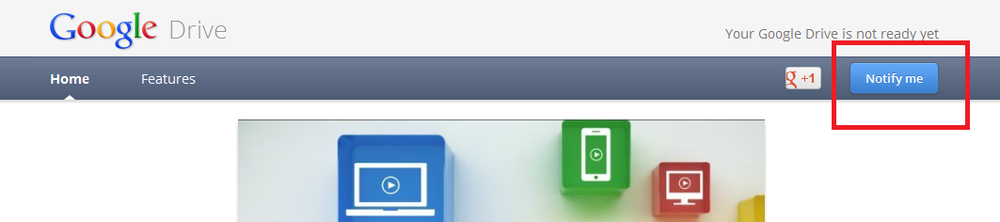
You are taken to this page
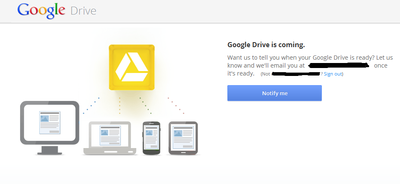
Click the Notify Me button
then you get this confirmation
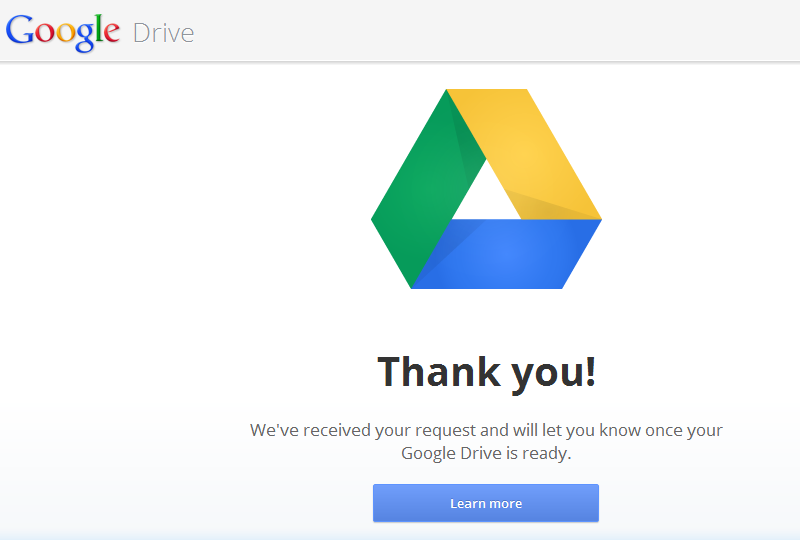
And now you wait until Google decides its your turn.
48 hours after asking "to be notified", Google sent me an invite to Google Drive.
The process works.
PersonalBrain for iPhone and iPad coming
After making this request for years, I was extremely happy to see a tweet from Harlan Hugh (CEO of The brain) that PersonalBrain (TheBrain) will be coming to the iPhone and iPad soon.
TheBrain on iPad and iPhone is coming soon. Been working on it for a bit. It'll be workth the wait… @vanmorrison2 @hshomestaging @ekiledjian
— Harlan Hugh (@HarlanHugh) April 24, 2012
A review of SocialFolders
Enter SocialFolders
Getting started is easy, you head over to their website , create a free account and download their software. Once downloaded and installed, you right click on the system tray icon and choose Connect to my services which takes you to their online account page where you choose one of the supported services, provide your credentials and choose what it is you want synchronized.
The Pro features
The main reason you will need to upgrade to a pro account is the 3000 file or 3 connected services limit for free accounts. As soon as you hit one of these, you have to move to their affordable $9.99 annual subscription model.
The switch takes minutes and is as simple as configuring an additional service.
Verdict
I love the idea and think SocialFolders has a great model but there are some things I don’t like:
- They only support one account per service. If you use multiple Google Docs accounts, you will only be able to sync with one of them. Support says this is on their roadmap with no ETA.
- High traffic sites not yet available as connectors. As an example, I have a Dropbox account I would like to sync using this tool but Dropbox/Google+/Skydrive is not yet available. Support says this is on their roadmap with no ETA.
- For photo sharing sites, I wish they offered more granular control (like those offered by the site). As an example with Picasa, SocialFolders allows me to set the default privacy of new folders to Public or Private but none of the sites sharing options are enabled through it (sharing through a link, etc).
- I am an active Evernote user and was stocked about the ability to download my files as a local backup but… as an Evernote users with thousands of note and attachments, I was surprised to learn that it downloaded the attachments only and organized them based on the notebooks they were in. I wish it offered the ability to sub-categorize based on tags (my primary Evernote organization tool).
Overall I love the idea and think it can become a solid solution to the social networking data dilema. The only question is: will they be able to develop the product fast enough? With other entrants getting into or looking at entering this market (Gladinet, etc), they have a short window of opportunity to develop the product and gain marketshare or crash & burn.
I recommend testing out the free version and keeping my caveats in mind. If these are things you can live with, then go ahead and buy it.
Workflowy Pro review
On September 2 2011, I reviewed Workflowy and although I thought the clean and simple interface was good, it wasn’t good enough for me to use it on a daily basis. For a service to truly win me over, I need multi-platform clients as a bare minimum (before any fans get angry with me, an html5 interface which works in a browser is not the same thing as a native client).
One of my original questions was about how the company would monetize their service... At the time no one wanted to say but now we know. They are using the fremium model where free users get a bunch of free functionality but demanding users can pay $4.99 a month (of $49 per year pre-paid) and upgrade to their pro version. To see the benefits of the pro version or to subscribe, look at the bottom right corner of the Workflowy interface for the "Go Pro" link.
In exchange for $50 of your hard earned money, they will give you:
- Ability to create an unlimited number of lists (non pro users are limited to 500 per month)
- Automatic backups to dropbox
- Access to a future update which will somehow enable offline access
- Access to a future update which will enable the ability to share partial lists with selected users (protected by passwords).
- Ability to customize the look and feel of workflowy
I don't feel that the features justify the cost. I still want to see Workflowy get picked up but Evernote and its features built-in to it.
Some readers have asked if my position on Workflowy has change and it has not. I still don't think its useful but will keep monitoring the service regularly and will let you know if my position changes ;-)
Cubby is the latest entry in the cloud storage market
Logmein is the gold standard for remote desktop access. They have steadily added a bunch of other cloud services from remote technical support to backup and configurationless VPN. Now they have decided to enter the crowded and competitive cloud storage business.
Cubby is branding for their new cloud file storage service. The key differentiating feature compared to most of its competitors is that you can choose to cloud share any folder on your computer without having to move it into a “special” folder (for dropbox, all shared files have to be located in its special dropbox folder). They offer 5GB of free cloud storage and unlimited synchronization when your computer operates as the main server (a nice touch).
You log in to the service using your free logmein account.
We know they are using 256bit encryption (similar to their logmein product) so this shouldn’t be much of a concern for most users. I would like to see details of how cloud stored files are protected though.
As I write this, they have clients for Windows, MAC, Android and IOS so most readers should be covered. The service is still in beta and I received my invitation about a day after applying for it.
I don’t know the cost for additional storage but it has to be cheaper than what dropbox charges. I have installed it and am playing with it. So far no major issues but I do wish they had a couple of short tutorial walkthrough videos about how to configure a file for cloud storage and how to setup “cloudless” unlimited synchronization.
Link : https://www.cubby.com/
I played with the beta for a week and found it frustrating. I decided this service was not for me and I uninstalled the client. I may look at it again in the future but with BitCasa and Google Drive, I doubt their offer will be compelling enough.
INDIA BUSINESS ETIQUETTE TIPS AND TRICKS
Salutation and greeting
Know the background of names
Business Cards
Importance of a relationship
Conducting the meetings
Chinese business etiquette tips and tricks
I received some messages from readers asking about Chinese business culture and etiquette. Although I won’t write a 10 page essay on proper business etiquette and behavior, here are some tips and tricks.
The business card exchange
In North America, we exchange business cards as a means to remember someone’s contact information but we don’t really pay particular attention to it. Often times we take a business card and immediately stuff it into a holder or a shirt pocket.
In China, business cards are much more important and their exchange is usually done after the formal introductions. If you will be dealing with China a lot, it may be worthwhile to print a batch (or at least one side) using simplified Chinese characters.
To present your card, hold it with both hands and present it to your counterpart with the Chinese side facing him/her. When presented with a business card, accept it with both hands, read it and then put it on the table next to you or in a business card holder. Do not stuff it into a pocket.
Some Chinese may be insulted If you start writing on their business cards so it is good practice to jot down notes on a sheet of paper and consolidate the information later.
Business dress
Traditional Chinese etiquette dictates that men should wear dark colored business style suits. Because I am a light packer, I usually stick to clean pants and a nice shirt (usually in the more classic darker tones).
Woman should wear conservative business attire with a high neckline (doesn’t have to be a turtleneck but understand that the local business culture is much more conservative so avoid open style blouses.)
That’s pretty much it for clothing guidelines. The younger Chinese generation is embracing western culture and will dress in more colorful clothing but if you are meeting a senior executive, stay away from bright colored clothing.
Can I offer a gift?
Typically, Chinese may offer each other gifts for the New Year, a wedding or birth. As they embrace western culture, it is now also acceptable to offer a gift for someone’s birthday.
A well prepared food basket is always a good gift idea for a Chinese counterpart.
Remember that many Chinese have superstitious beliefs and never offer something that may be interpreted as severing a relationship (e.g. scissors, knives, or other sharp/cutting elements.)
Some items commonly gifted in North America are associated with funeral’s in China and should be avoided (e.g. clock, straw sandals, flowers).
If your gift is made up of multiple elements, remember that 4 is an unlucky number and 8 is the luckiest number.
As done with business cards, present gifts with both hands and remember that many Chinese will not open gifts when received. Also your gift may be refused a couple of times before being accepted so don’t take it the wrong way.
Time for the meeting
If you want to meet a Chinese national, try to book your meeting at least one month ahead of time and send your request in writing (physical or electronic). Your request should include a clear and simple agenda and purpose for the meeting.
If you want to meet a new company that does not know you, the introduction should be done by a trusted local third party that can vouch for you, your company and the quality of your services.
Always plan to arrive a little early as tardiness is seen as an insult.
Some North American executives have a no-mobile policy during meetings, this doesn’t work in China. You cannot ask a Chinese national to turn off his mobile phone.
Rank is important and there is generally an expectation that the most senior people will enter first together then the rest in descending order of rank in the company. Generally your counterparty (with the same rank) will sit in front of you.
IF you do not speak Chinese, you must plan to bring your own interpreter. Ensure the interpreter is qualified to translate the content you will be discussing (general business, legal, engineering, etc).
It is expected that any material you present will be available in English and simplified Chinese. Have your material proofread to ensure none of your content can be misinterpreted.
During business meetings, remember that the Chinese are non-confrontational and will rarely comes out and say no in a meeting. Instead, they will use code words like “let me think about it” or “let us review in more detail”. Unlike North America’s turbo speed negotiations, expect Chinese ones to be prolonged and slow. Come with lots of patience.
The most senior Chinese counterpart will be the defacto speaker therefore you should do the same. Identify your most senior meeting participant and designate that person as your representative.
Regardless of your feelings or frustration, you must never loose your cool. Doing so may cause irreparable harm to the relationship.
Understand that the Chinese are expert negotiators and come prepared. Do not under-estimate them.
Dell Voice (Follow-up)
On February 10, I wrote about a free VOIP telephone service being offered by Dell to Canadian consumers. While travelling (Europe and Asia), I tested it to call home and had mixed results. 1 out of 5 times the call quality was very good, 2 out of 5 times the call qulity was OK and the other 2 times it was unusable. After everyone of the Dell Voice tests, I tested call quality with Skype and it consistently offered a cleaner more enjoyable call.
I also wished that they offered free SMS messages. This isn't something I needed when at home (since my monthly package includes more than enough) but I would have appreciated this when travelling.
I then tested their customer service to inquire about my call quality issues and received a vague non-helpful response about 48 hours later.
Overall you still can't beat the price of free and performance was usually good when in Canada. It is likely an app I'll keep on my cell but will likely fallback on Skype (even if it is not free) for calls when overseas.
WANDERLITE DAYPACK (Follow-up)
I posted my review about the Wanderlite daypack bagpack on February 8 here. If you haven't read it, I recommend you check it out.
As promised, I took the Wanderlite with me and wanted to see if I would use it while travelling. I am happy to report that the bag was useful.
First it packs real small and light, which makes it the ideal secondary bag for a onebag (carry-on only) traveler. It easily fit into the Red Oxx Airboss' middle compartment along with my shoes, bathroom kit and socks/underwear.
When in Shenyang and Shanghai, I decided to do a little shopping and this was the bag I took with me to carry my items around.
Overall I still like the Wanderlite and would recommend it to any light packing traveller that may need a temporary second journee bag.
My favorite iPhone travel apps
I recently completed a 15 day business trip that took me to 5 cities on 3 continents (more than 24,000 air miles return). This trip was an amazing opportunity to conduct some real world tests on some cool items I had been wanted to test for a while.
My first review was for the Red Oxx AirBoss carry-on bag. If you haven’t read it, I recommend you check it out.
Since buying my first iPhone about 2 years ago, it has become an indispensable life tool. This trip was no exception. This article talks about the apps I used and why I chose each.
Airline apps
I flew multiple airlines but the longest legs of my trip were done on Air Canada and British Airways. Before travelling, I loaded both apps on my iphone and made sure I configured my locator numbers in each. This allowed me to check my flight status and even check-in all from my device.
CardStar
As a one bag (onebag) traveller, you have to become a minimalist and my wallet is no exception. Instead of carrying dozens of loyalty cards with me (airline, hotel, card rental, retail chains, etc), I simply loaded all of the information into the free CardStar application before leaving and left thick pile at home.
Skype WIFI
Most hotels, airports and restaurants now offer some kind of WIFI access but often times it isn’t free. If you are passing through an airport and want to send a quick email, it doesn’t make sense to buy a full day internet pass. Enter Skype WIFI with it’s by the minute invoicing. You simply load-up on Skype credits, and fire up the app at home to ensure it recognizes your initial credit amount. Then as soon as you get to a supported WIFI zone (over 1 million around the world and all listed in the app), you connect to the WIFI hotspot, load up Skype WIFI and accept the charges. You then go about your business as normal. When you are finished, you load the Skype WIFI app again, terminate the connection and voila, the charges stop. Most airports I visited offered Skype WIFI connections for 0.20CDN$ per minute.
Language App
I have no mandarin vocabulary whatsoever so I loaded a free iPhone app called Huaying. It allows you to translate english words into Mandarin. It didn’t make me an expert but it was very useful when negotiating for goods, asking for a receipt or for conveying general ideas. This became one of my most useful apps during my trip.
Evernote and the gang
If you have read my blog, you know I love Evernote. It is a free (premium version also available) note taking application that offers lots of features, offline support (with the premium version) and a bunch of useful 3rd party apps to store great memories.
I installed the Evernote application, created an offline notebook and stored all my travel documents in there. A copy of my passpost, all travel confirmations, important addresses and telephone numbers, etc. If I needed something, it was quickly available from the app. If for whatever reason I lost my phone, I could still access the data via the web.
In addition to their base app, I installed the following partner applications:
- Evernote Food : A great free way to catalog all of the original food you encounter during your trip. Link
- Genius Scan+ : A great way to store JPG or PDF versions of documents while on the go. I made sure I kept a digital copy of every receipt so I had a backup in case I lost the originals. I stored all of the info locally and then uploaded it to Evernote via the hotel’s WIFI at night. Link
Business Card Scanners
Anytime I wanted to save a business card, I scanned it using 2 card scanning softwares.
CardMunch: This is a free software provided by Linkedin where scanned cards are manually transcribed for you. I like this software because its free and when transcribed properly, the information collection beats most other automated systems. There are a couple of issues I want to highlight though. Link
- Sometimes their service is too busy and the app refuses to upload the scanned cards
- Sometimes the human doing the transcription is less than diligent and they miss a tone of important information. In this case you can resubmit but it is a pain. There are some cards that I had to resubmit 2 or 3 times.
- The app allows you to send a linkedin invitation to a contact you scanned but since the most recent update, 50% of the time this doesn’t work.
Scanbizcards: This is my main app and it uses optical character recognition to transcribe the card information. This OCR works in over 20 languages and is fairly accurate but you will likely have to make some manual corrections. I find that this app is a lot more user-friendly than Cardmunch and the developers are super responsive to support requests. This app also allows you to upload transcribed cards to various online services from jigsaw to evernote. Link
Trip planning
Where available, I made sure I had the mTrip travel planning app installed on my device. This is a great app that can build sightseeing itineraries based on available time, preferences and mode of transportation. It uses your devices built in GPS to help guide you to the next location (and of course the plan is route optimized to start from your hotel and end there too).
mTrip also has offline maps for the city of covers so no worries about finding a WIFI connection to see your route.
Currency Converter
I loaded and used the free Oanda currency converter app to determine what the actual Canadian dollar price was of items I was interested in. You load the app in the hotel to updates its conversion table then have access to it throughout the day using the latest update.
Camera+
Sure I had a “real” camera with my but there are times when the iPhone’s camera was easier and quicker to use. For these situations, I use an app called Camera+
You can load it up and start taking pictures quickly or you can use its manual controls to make fine grain adjustments. I configured the app to store all my pictures in its built in lightbox, I can then edit or share them quickly directly from the app (saving the final version to my camera roll of course).
PerfectlyClr
The other iPhone Camera app I have loaded is called PerfectlyCLR by Authentec. The app makes auto corrections to your pictures to make them that much better. I have found that this app performs really well for scenery pictures (cities, landscapes, building, cars, beach, etc). I compared the authentec desktop plug-in filters to the iphone app and the desktop version is much better. I like this app and am hoping they improve it even more over time.
Are there any other apps you use during your travels?
My review of the Red Oxx AirBoss carry-on luggage
I recently completed a 15 day business trip that took me to 5 cities on 3 continents (more than 24,000 air miles return). This trip was an amazing opportunity to conduct some real world tests on some cool items I had been wanted to test for a while.
My first review will be about the Red Oxx Air Boss.
Why One Bag travel?
This is a question I received anytime someone heard I was traveling with only a carry-on bag. The answer is simple: convenience. With a carry-on, you are not worried about damaged, delayed or lost baggage. While others wait at the carousel to pick-up their luggage, I am already in the taxi half way to my destination.
As soon as I decided to be a one bag (onebag aka carry-on only) traveler, I started searching for the ideal bag and that bag was the AirBoss by Red Oxx. Let me state right here that this bag was everything I expected and more. It proved to be a phenomenal bag that I will use and abuse for years to come.
The rest of this review will explain why I chose the Airboss.
Ease of movement
I needed a bag that maximized available carry space all the while staying compliant to the different carry-on size/weight rules imposed by the different airlines I was going to use. In addition, I needed a bag that could easily be taken from the plane to a taxi, subway or tuctuc (a gas powered rickshaw).
No Wheels means the bag would be lighter, offer more internal carry space and be much easier to transport throughout. The Airboss can be carried using it’s extremely comfortable “Claw” strap or hand straps. I found that the Claw strap was comfortable and stayed in place (i.e. didn’t slide off my shoulder when moving).
No backpack Since this was a business trip, I may have needed to bring my bag into the office and find a backpack to be un professional. Luckily the Airboss met this requirement too.
Solid no nonsense construction
I expect my bag to log thousands of miles over the next couple of years and as such, it must have strong reliable zippers, seams (aka stitching) and fabric.
The Red Oxx AirBoss uses incredibly strong YKK #10 zippers. These are the biggest luggage zippers I have ever seen yet operate very smoothly. I can’t stress how well these zippers worked even when the bag was completely full. Red Oxx also adds a monkey’s fist zipper-pull knot to each zipper making them easier to grab and pull.
The seams are well sewn using thought dependable fabric. Every snap or metal hook seems industrial grade. When I first saw the bag, I knew it was well designed. When I started using it, I was convinced this bag would be with me for the long haul.
This is a great opportunity for me to share with you their incredible no nonsense guarantee. Regardless of what happens to the bag, simply send it back to them and they will repair or replace (no questions asked). Red Oxx clearly believes in their product and it was refreshing to see such an amazing warranty.
The compartments
The Airboss has 3 separate compartments. There is an outside compartment on each side that open completely when the bag is lying on its side. This was great because I separated my clothes into 2 piles which meant I didn’t have to unload all of my clothes every time I landed in a new city. For shorter stays, I could simply unload one of the sides (each having an assortment of pant and shirts. I use the bundle packing method and used jeans, shorts and t-shirts as the core for each bundle.
Each of this compartments has 2 compression straps to keep your clothes in place (minimizing wrinkles).
The center compartment is supported by closed-wall cell foam padding which was a great place to store my underwear, bathroom supplies, medication, shoes and belts. All the airlines I flew allowed me to have a carry-on and a personal item (aka laptop bag) therefore I kept these separate but I could have easily carried my laptop in the center compartment as well.
I wish the center compartment had some kind of compression strap also to hold a laptop or tablet in place. Also the bottom of the center compartment is not padded.

Just enough storage
While shopping for luggage, I was amazed at how many compartments/pockets some bags had. The reality is that too many pockets means each is smaller (limiting what can be carried) and making it more complicated to find that you are looking for. The Airboss has the 3 compartments mentioned above, plus a full size zippered pocket on one side, a full size snap protected pocket on the other and a small vertical pocket designed to store your boarding pass. Obviously Red Oxx used the KISS principle when designing this bag and it shows.
My fully loaded Airboss weighed in at 20 lbs.
Fitting the Airboss in the overhead compartment
My trip had me using North American carriers, European carriers and some really small no-name Asian ones. Regardless of the plane I found myself in, the Airboss easily fit into all of the overhead bins.
Verdict
Over the last 15 years, I have logged close to 1 million air miles and as such have gone through dozens of bags and suitcases. I can say without a doubt that the Airboss is king. Sure $225 may seem expensive at first but once you experience the quality, dependability and versatility of the Airboss, you will certainly consider it a bargain.
Unless you want a backpack style pack or one with wheels (not sure why you would) then this bag is for you. I love their warranty so much, I am disappointed other manufacturers aren’t taking notes.
Some pictures
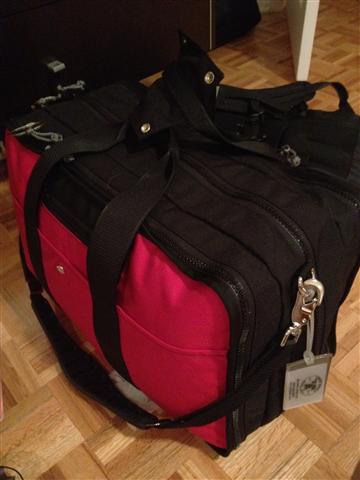
My fully packed AirBoss
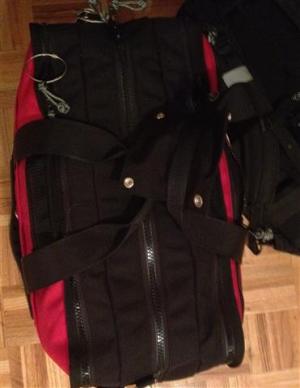
Top view of my fully loaded Airboss
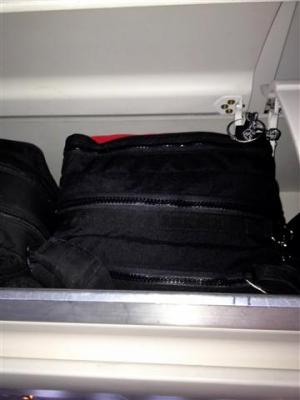
In the overhead bing of an A330-300
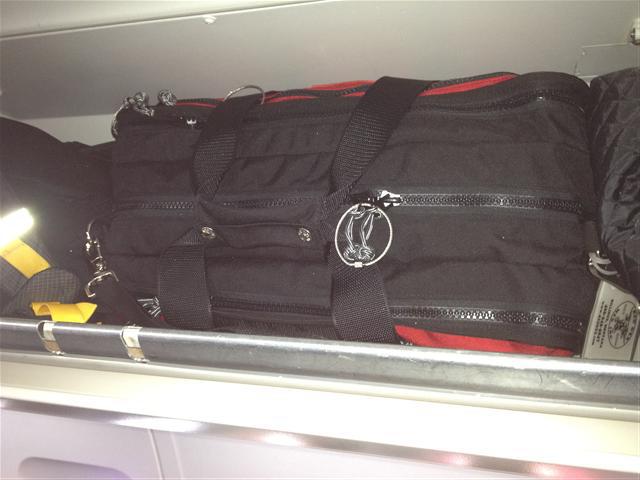
Easily fitting in the overhead bin of an A320 with lots of room to spare.
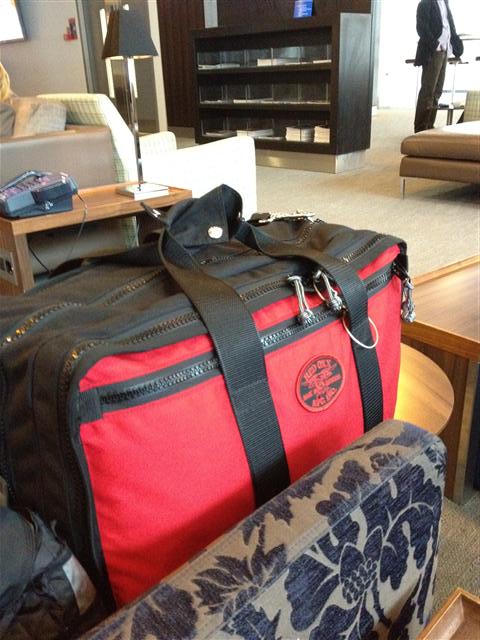
The AirBoss sitting on a counch in the British Airways business class lounge in Heathrow.
Redoxx in overhead bin
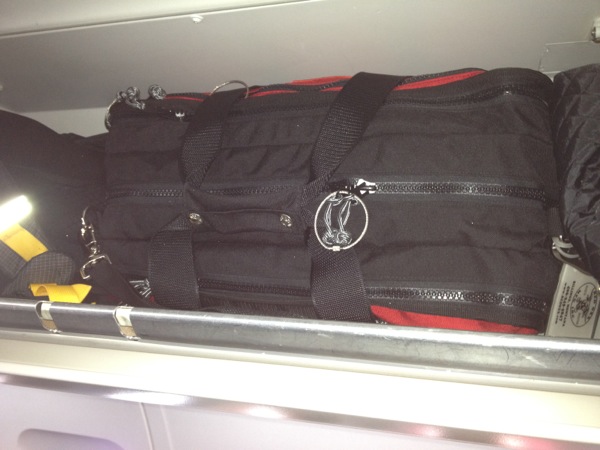
Here is a picture of my very full Red Oxx Airboss bag easily fitting in the overhead bin of a BMI Airbus A320.
No problems at all. A full review will be posted when I get back.
Review of the Scottevest Travel Boxers 2.0
As mentioned in a previous entry, I will be travelling to China shortly and one item I will be carrying and using are the Scottevest Travel Boxers.
What is it?
These are boxer’s , underwear that look like shorts, with 2 built in pockets. Scott Jordan, CEO of SCottevest, explained it like this : “Like a lot of guys, I sleep with my iPhone on the nightstand. But in between using the phone as a nightlight to find the bathroom, making coffee in the morning and checking my email, there was no place to put my phone.”
An x-ray view of the pockets
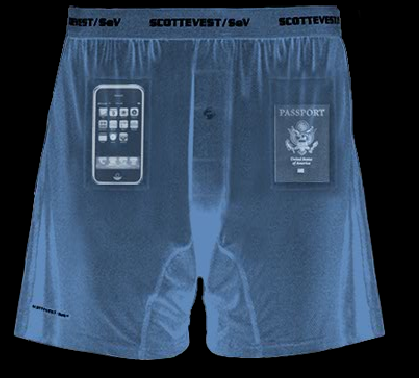
Scott also says that these can be used as swim trunks or shorts in a pinch.
Why I use them?
The boxers are made from a quick-drying nylon/lycra blend which means I can easily wash and dry them in my hotel room. They are treated with a special anti-odor treatmen, always a good thing. They are small, light and easy to pack. This makes the onebag traveller in me very happy.
Many countries around the world require that travellers carry their passport for identification purposes all the time. This being said, I don’t want to carry it in my regular pant pocket [for security reasons] therefore you can either use a money belt or these boxers (I prefer the later).
Verdict
At $20 each ($15 each if you buy 3 of the same color), these are on the expensive side but I say they are worth every penny. If you travel or need comfortable underwear for sports, take a look at these. I like them. I recommend them.
As a bonus, the underwear are delivered in a thick reusable plastic bag that is great to store your liquids while travelling.
Test 3G speed of a laptop versus a Playbook
I havent been RIM's biggest Playbook fan and even with their 2.0 OS upgrade, it feels unfinished and rough to use. I wanted to see how the Playbook would perform compared to a Windows 7 laptop when using WIFI sharing of my iPhone's 3G connection.
THE SETUP
I closed all the apps on my iPhone 4s, did a force shutdown and restard. I placed my phone 4 inches away from my Wilson cell phone booster and it had a full 5 bars.
THE TEST
I then started the Personal Hotspot function on the iPhone and connected only the Playbook. I ran the Speedtest.net test twice and received similar results.

I then turned WIFI on the Playbook off, placed the laptop in the same location and performed the same test

Notice that both tests where conducted using the same test server.
when I performed the test via the Speedtest.net iphone app, the results were very close to those from the laptop.
VERDICT
This is far from a scientific test but it confirmed my "feeling" that the Playbook was slower than the iphone or laptop when using 3G WIFI Sharing.
HTTPS Everywhere helps you browse safely and securely

Whenever you browse the web, your internet browser uses a protocol called http. Now the secure version of this protocol is called https and head to any bank website and you’ll see them add the s to http when logging in.
Why is this important? Anytime you enter sensitive information, you want to make it as hard as possible for the “bad guys” to steal it. By using https, you encrypt the data as it swirls through the internet. It is easy to see why you should like and use this more secure protocol when logging into your bank, facebook or webmail account.
If you want your browser to use https automatically when browsing the 1400 of the most common sites, then check out a free extension called HTTPS Everywhere by The Electronic Frontier Foundation. It automatically changes the URL for these common sites to their secure versions automagically.
The EFF describes its protection as “HTTPS Everywhere enables the sites' HTTPS protection which can protect you against eavesdropping and tampering with the contents of the site or with the information you send to the site. Ideally, this provides some protection against an attacker learning the content of the information flowing in each direction — for instance, the text of e-mail messages you send or receive through a webmail site, the products you browse or purchase on an e-commerce site, or the particular articles you read on a reference site.”
I have this installed on every machine I use. It adds a layer of protection without having to take any additional steps.


iPad 3 announcement March 3
Let's not put on the party hats just yet, since nothing has come out from Cupertino. Most analysts and Apple watchers now believe the iPad will be announced at an event early March.
Although we have seen all kinds of crazy rumors, the most reliable sources believe it will look like the ipad 2 but will contain a higher resolution display, slightly faster processor (A5x), an 8 megapixel camera and a bigger battery.
Now we wait and see. What do you want to see? Will you buy an iPad 3?
Looks like its official. Apple has sent out invites to select media representatives for an iPad event scheduled for 1000AM PT on March 7 2012.
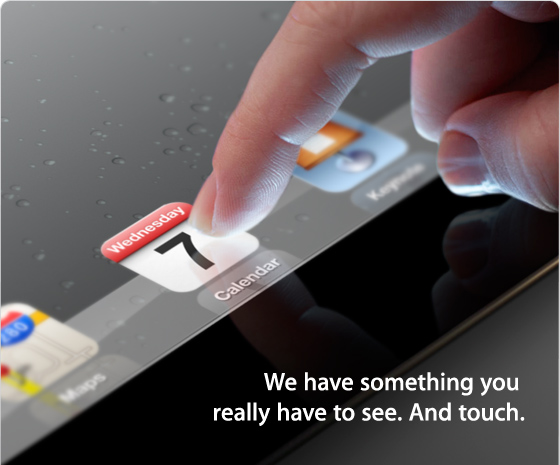
Rumors will abound until the official announcement is made but my money says we will see a same size ipad with a high resolution display, quad-core processor, SIRI and maybe LTE Wireless data.
Google bypasses Internet Explorer's privacy settings
Last week, researchers found that Google (and other online advertising services) had found a way to bypass Safari’s privacy settings. At the time, Google said it was using know functionality to delivery services to signed in Google users.
Another week, another claim, this time by Microsoft. Microsoft claims that Google is using the same technique to bypass the privacy settings of its Internet Explorer browser. The Microsoft claim is that Google misrepresents its cookies allowing them to bypass Internet Explorer’s security settings. As I write this, I do not believe Google has issued a statement yet.
I say they are testing their “Don’t be evil” mantra. What do you think?
Read Microsoft's post here
Ghostery warns you about all the networks tracking your web habits
Anytime you talk a walk down the information superhighway, creepy companies track your every move so that they can offer more targeted behavior based advertisements. To pull this off, they need to track you as you move across the web. If you have ever wanted to know how many of those systems are tracking you, check out a free Firefox / Chrome add-on called Ghostery.
Whey say “Ghostery tracks the trackers” and that is a great way to describe it.
DETECTION
When you stumble upon a site with these trackers, your Ghostery icon will show a badge listing how many trackers are on your current page: 
INFORMATION
When you click on the icon, it provides a detailed list of all the trackers it has detected:
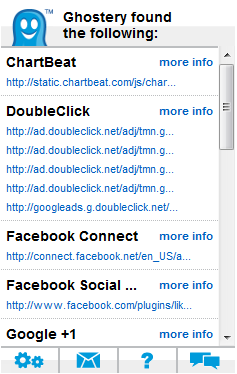
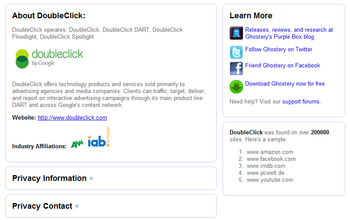
This is where the educational part of Ghostery starts. You can click more information on any of the trackers and it provides a bunch of useful and interesting information:
BLOCKING
The blocking option is still in beta for Chrome but still worth a look. You can enable it by :
- Click on the Ghostery icon :
- Then click on the Settings icon :

- Enable the beta bug blocking feature:
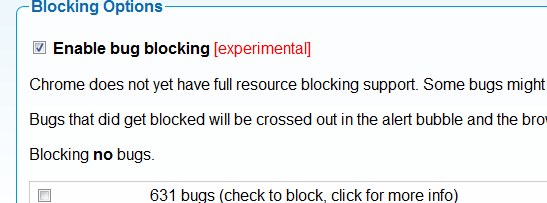
- When you visit a site with trackers and click on the Ghostery icon, you have a new option at the bottom of the screen "Edit Blocking Options":

- Now you can check the trackers you want to permanently desable and voilà
As soon as I installed it, I browsed some of my more visited properties and was absolutely surprised at how many trackers they contained. Even if you decide not to block them, knowing who is tracking you is interesting information. My recommendation is download and enjoy
Why I cancelled my Sirius XM Satellite Radio subscription
After having been a loyal XM radio Canada subscriber for many years, I finally decided to cancel my subscription, and I wanted to share my reasoning (hopefully someone from Sirius XM will read this).
For those that do not know, Sirius XM is a premium satellite radio service that promises crystal clear sound, unmatched variety and commercial free programming on the music channels.
Why I cancelled:
- Each subscription is attached to a single device. Because I subscribed to their service using my car’s built in receiver, I could not listen to the programming anywhere else. My only option was to buy another portable device+subscription or subscribe to their radio + internet streaming service.
- At first, the internet streaming service sounds like a good option until you realize that it costs an additional $40 per year and doesn’t include all of the channels included in your subscription.
- My subscription charge kept increasing every year.
- They position themselves as a premium commercial free service …. Most music channels do not have commercials but that doesn’t mean continuous uninterrupted music. You still get some channel advertising, annoying DJs, etc. When you tune in to the non-music channels, you get commercial advertising and Sirius XM advertisements.
- As a Canadian subscriber, some of the better channels aren’t available to me.
- Lots of channels I never listen to. Sure they offer an interesting variety of content but the reality is that you will probably stick to 10-20 core channels. And this is where the value proposition really starts to take a dive. Are you prepared to spend $200 a year for these 10-20 channels? To stay competitive, they have to adopt the Dell business model allowing customers to custom build their plans.
- Incompetent and unhappy customer service agents. When I called to try to negotiate the price to make it more palatable, the telephone agent said “This is our pricing model, take or leave it.” To be clear, I was very polite and calm. I was then transferred to the customer loyalty group
As my renewal approached, I was determined to find another option. I wanted something more flexible, cheaper and integrated with my iphone. After reading dozens of posts and testing some options, I chose an app called TuneIn Radio. It is a web/mobile service that allows you to listen to thousands of radio stations from around the world. My primary interests were talk radio, comedy and finance shows, all was content I found easily. It allowed me to record, pause or rewind a broadcast I was listening to. A recent update also added “Car Mode” making it much easier to operate the app while driving.
When I want music, I either stream it from my library or load up my VPN (to the US) and enjoy the wonders of Pandora. All for free. If XM wants to remain relevant in a world that is increasingly connected, they have to offer a new per subscriber pricing model that can be used anywhere the subscriber goes. They have to substantially drop the prices for their receivers and they have to start offering more tailored plans where I don’t have to pay for the channels I never listen to.