
Tweeting from the grave will soon be possible
Twitter is one of those services that users love and the general public just doesn’t understand. Now a startup will enable you to tweet from the grave. The LivesOn service is being developed by a British ad agency called Lean Mean Fighting Machine. They setup a new twitter account with your existing twitter handle and add a “_liveson” at the end. For my twitter handle is ekiledjian and my LivesOn ID would be ekiledjian_livesone.
The system is in closed limited beta and is still in active development but the company claims it will learn about the user (while alive of course) by studying tweet patterns, writing style, preferred content, re-tweet strategy ,etc. In will then allow you to follow it (only you) while you are alive so it can collect your feedback and fine-tune its engine. Once you pass away, a designated person will notify LivesOn that you have passed and will authorize them to “public” your LivesOn account.
The company has partnered with Queen Mary University (London) to develop and fine tune the Artificial Intelligence engine. Interestingly the team isn’t working on monetizing the service just yet. The company claims to have 7000 registed users worldwide
But this type of service opens up a whole bunch of questions around monetization and death:
- Is there really a market for this type of service or will it only be used by hardcore twitter fans?
- How will grieving family members feel about “something” tweeting in the name of their departed loved one?
- Will this type of service help or hinder the grieving process?
Google News now in tablet flavour

- You can find new articles, news sources, and even topics of interest with intuitive gestures. Swipe horizontally between sections – from Business to Entertainment, for example – or tap “Explore in depth” to see multiple articles and other info related to a particular story.
- We’ve also added more breathing room between articles, making it easier to spot the stories you really care about.
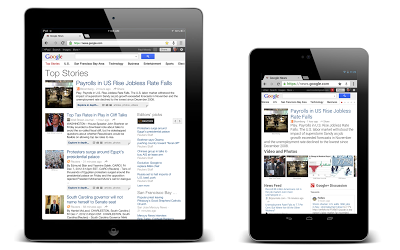
I believe this change was made December 2012 but it's news to me and I wanted to share it.
Does Daylight Saving Time reduce energy consumption
We switched to Daylight Saving Time (Summer Time in Europe) this past weekend and most of us are still groggy and missing that 1 extra hour of sleep. DST was first proposed by George Vernon Hudson and implemented during WWI. It was thought that by shifting people’s awake time by one hour, there would be more light in the evening this reducing the need for artificial light (aka reduce usage of electricity in the evening).
Many have wondered if there is really any benefit to this sleep-reducing tradition and recent information says no. There have been a few studies and most show little to no gain by using DST. A paper from the US National Bureau of Standards says there are absolutely no benefits.
Pictures of the Samsung Galaxy SIV?
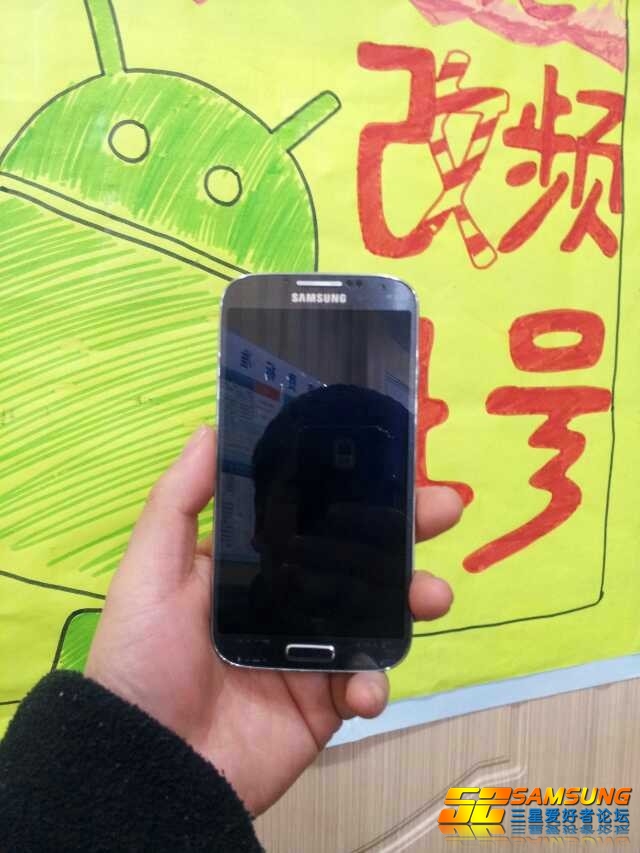
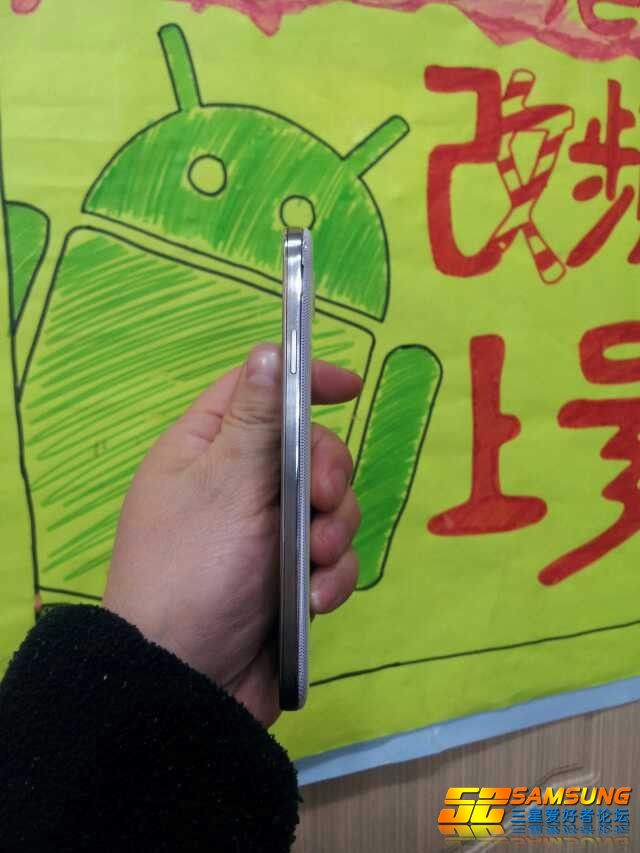
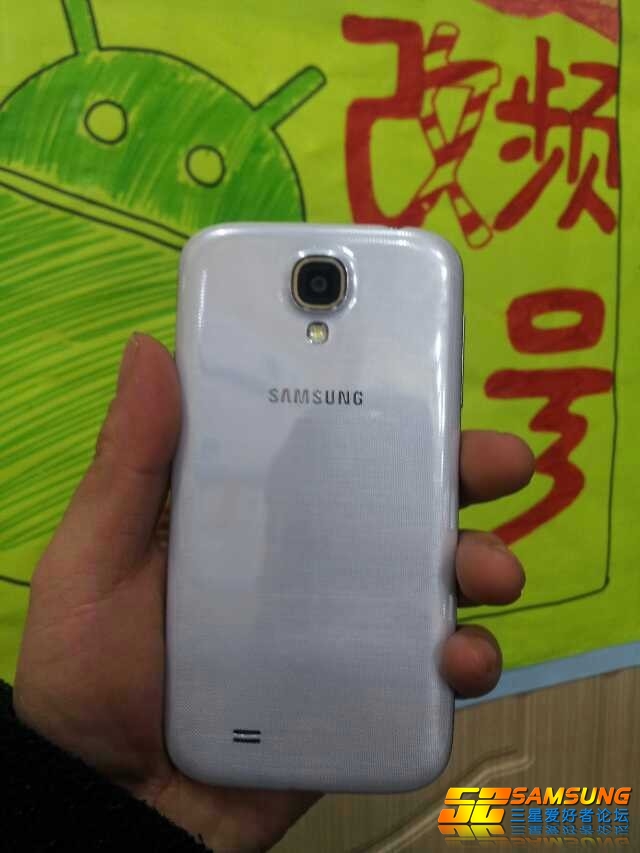
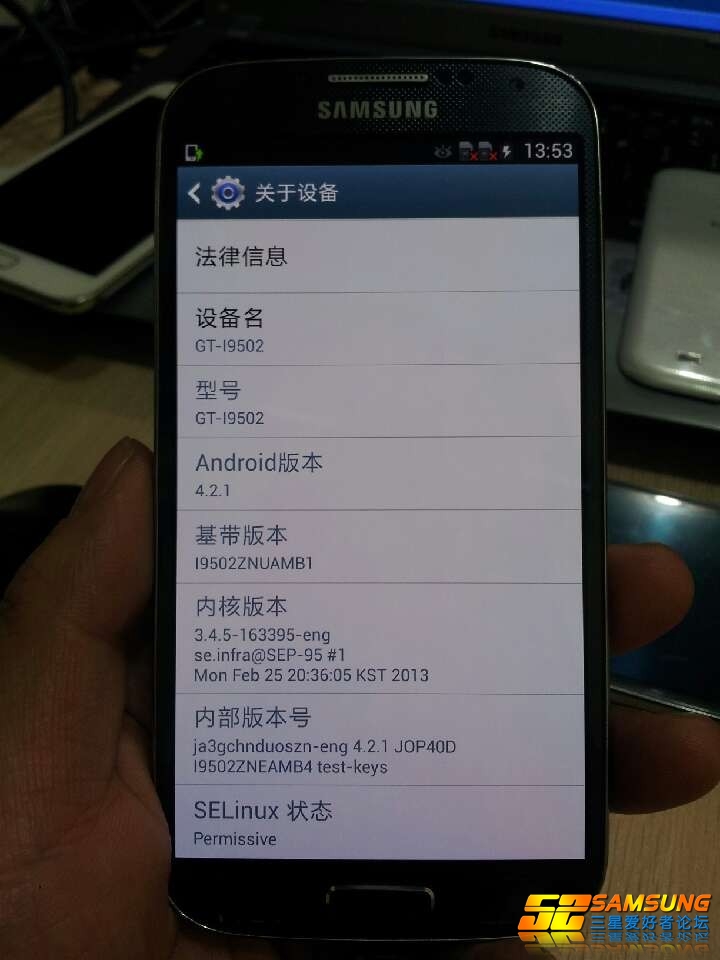
We are 3 days away from the launch of the Samsung Galaxy SIV in New York’s Time Square and the rumors surrounding the device have reached a feverish pitch. Now a Chinese site has published pictures claiming to be the Samsun Galaxy SIV.
We know Samsung takes confidentiality seriously and this may simply be a Galaxy SIV with a Halloween costume or may even be a decoy unit meant to take potential leakers off track. Coming from China, it may even be a knock off device made by a local manufacturer.
The photos do mesh with the other rumors we have been hearing for some time now: 2GB RAM, 13 mp camera, Android 4.2 and the new Samsung Exynos Octa (eight core processor).
So for now, enjoy these pics are what the device may look like but I wouldn’t these as definite snapshots just yet.
Baidu Antivirus Pro free
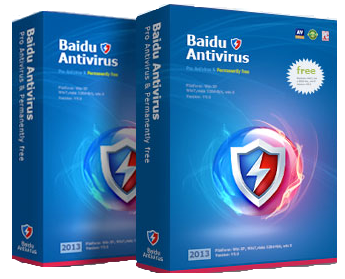
Baidu is China’s response to Google and they have just launched a free antivirus solution called Baidu Antivirus 2013. In my tests, it was light, easy to use and fast anti-virus. They promise to protect you from malware, viruses, spyware and adware. I tested it against some more common malicious code and it seems to catch and clean the system. Although we haven’t seen any independent tests yet, I expect them to be as good or better than many of the traditional free products but not as good as the stronger for pay products.
Before anyone asks the question, it does come in English and the English version is very good.
You can download it here.
Considering this is Chinese, I have to urge caution if you chose to use it. I tested it on a sandboxed virtual machine and I would never install this on any of my personal computers.
Get free home high speed internet in the USA
Canadian carriers are notorious for overcharging customers for mobile or home internet services, so we are jealous of all the competition and competitive pricing our US friends have access to. There is a neat little company (in the US) called FreedomPop that has launched a new home internet service which offers free internet services.
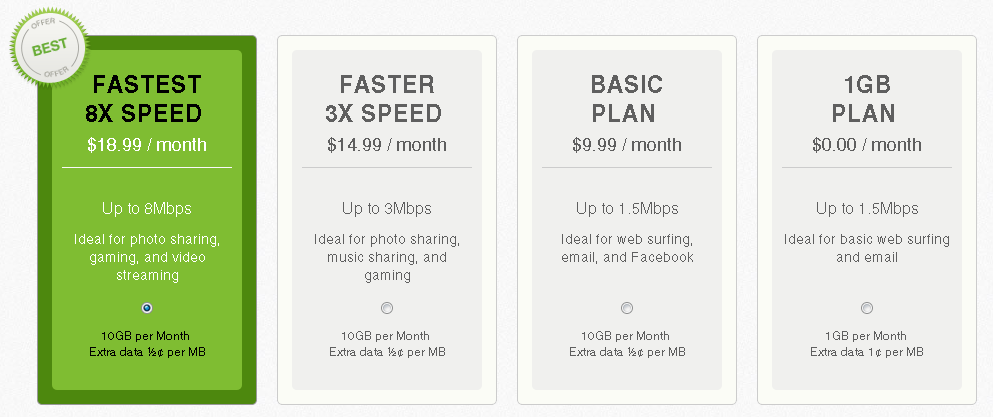
You can buy the special 4G router for $89 (plus $8.99S&H) and then use it with FreedomPop’s free internet service. The free plan gives you 1GB of data a month with 1.5Mbps download speeds. If you want faster speed or more bandwidth you can always upgrade but there are many people for whom the 1GB is more than enough.
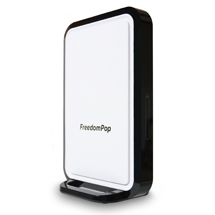
Above you can see tha small sleep FreedomPop home router that really looks like the ADSL routers most providers use.
Once you sign up for their service (even the free one), you can participate in activities to earn additional free data (like sharing FreedomPop on social networks, watching ads, completing questionnaires, etc). Even if you choose one of their paid plans, it is likely cheaper than anything you can get from your local ISP (as long as your data upload/download is limited).
The one catch is that they use the Clearwire Wimax network which is fairly limited. This means you should check to see if it is available in your area. We heard late last year that FreedomPop will be moving to the Sprint LTE network sometime this year which should open up their services to a much bigger geographic area.
CWTA launches their Protect your data campaign
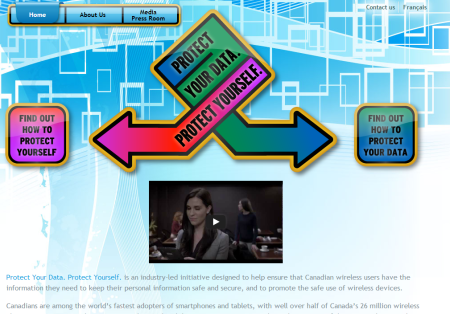
The Canadian Wireless Telecommunications Association and the major Canadian carriers are joining forces to stop mobile device theft in Canada. By the end of September 2013, they will implement a new device verification process to ensure the device being activated hasn’t been declared lost or stolen. The purpose is to eliminate the secondary market for stolen devices making theft less attractive.
In preparation of this initiative, the CWTA has launched a special protectyourdata website to help consummers.
Le CWTA rend disponible un site web spécial qui aide les consommateurs à protéger leur appareil mobile et l'information contenue dans ces appareils. La version française est disponible ici.
Canada wants to make changing the IMEI illegal
A member of parliament representing the NDP (a major Canadian political party) has submitted a bill making tampering of a devices IMEI illegal. The IMEI is a unique serial number embedded in all GSM devices that allows the network to uniquely identify it. Carriers can use this to pair a device with a user or to prevent a stolen device from being activated on someone else’s account.
Read the NDP press release here
“Cell phone theft is primarily a crime of opportunity, because any stolen mobile device can easily be reactivated with a different carrier,” said Sullivan. “This will make it easier to track lost or stolen phones and will cripple the illegal cell phone trade by making it a criminal offence to tamper with the cell phone identification numbers.” - NDP MP Mike Sullivan (York South – Weston)
Office 2013 can now be legally transferred
Microsoft created a huge uproar when it notified customers that the new Office 2013 license is tied to a PC. This meant that when you upgrade or replace the PC, you would lose you expensive Microsoft Office 2013 license.
Now we find out that Microsoft has hear customer complaints and is reversing course. They have just announced on their blog that they are updating the license policy to allow users to transfer Office 2013 licenses to a new PC. The change is valid immediately and the EULA will be changed to reflect this in the future.
Updated transferability provision to the Retail License Terms of the Software License Agreement for Microsoft Office 2013 Desktop Application Software:
Can I transfer the software to another computer or user? You may transfer the software to another computer that belongs to you, but not more than one time every 90 days (except due to hardware failure, in which case you may transfer sooner). If you transfer the software to another computer, that other computer becomes the "licensed computer." You may also transfer the software (together with the license) to a computer owned by someone else if a) you are the first licensed user of the software and b) the new user agrees to the terms of this agreement before the transfer. Any time you transfer the software to a new computer, you must remove the software from the prior computer and you may not retain any copies.
Updated transferability provision to the Retail License Terms of the Software License Agreement for Microsoft Office 2013 Desktop Application Software:
Can I transfer the software to another computer or user? You may transfer the software to another computer that belongs to you, but not more than one time every 90 days (except due to hardware failure, in which case you may transfer sooner). If you transfer the software to another computer, that other computer becomes the "licensed computer." You may also transfer the software (together with the license) to a computer owned by someone else if a) you are the first licensed user of the software and b) the new user agrees to the terms of this agreement before the transfer. Any time you transfer the software to a new computer, you must remove the software from the prior computer and you may not retain any copies.
You can’t transfer the license more than once every 90 days and it can only be installed on one PC at a time. Remember that Microsoft is trying to nudge users to its subscription based office offering where for $99 you can install Office 2013 on up to 5 PCs (but it is an annual charge).
Review of Canadian ISP ElectronicBox.net
Why ElectronicBox
The Signup Process
The Cherry on top
Verdict
iPhone 5s to have a finger print scanner
Since we’re talking about iPhone 5s rumors, I wanted to share with you the predictions made by Ming-Chi Kuo, an analyst with KGI research. He predicts that the iPhone 5s will be released in June and that Apple will maintain its 2 year hardware redesign strategy (aka which means the iPhone 5s is expected to look like the iPhone 5). He also claims that a lower cost iPhone 5 will also be released this year so Apple can penetrate the developing economies.
Like always, the device is expected to keep its beautiful retina display (same size), come bundled with a new A7 processor, come with a smartflash LED, come with an inproved camera sensor and camera software.
My favorite prediction is that the iPhone 5s will come with a finger print reader under the home button. This means we could finally get rid of study unlock passwords but the importance is execution. When I look at the last year, Apple has made a number of high profile blunders with Siri, Apple Maps, etc. I hope the revised management team is going to make sure that the released product is what consumers expect from a $600 phone ($199 on contract).
He also believes the battery will be the same but hopefully they make hardware/software tweaks to improve battery life.
He predicts we will see IOS 7 but didn't provide any details about what he expects. IOS 7 probably requires the most work and is probably the biggest improvement they can make.
Humble Bundle for Android now live - Super cheap games
The Humble Bundle is a fantastic way to get great indie games for an unbelievably cheap price (aka donationware). Donationware means you can pay what you want. The current bundle (version #5) comes with 4 games (3 of which are new to Android):
- Beat Hazard Ultra
- Dynamite Jack
- Solar 2
- NighSky HD
If you donate more than the average, you also get:
- Dungeon Defenders
- Super Hexagon
Saudi Aramco Twitter account hacked
Due to recent attacks again Twitter and high profile Twitter users, Twitter has started implementing new security measured. Now we learn that the official account of Saudi Aramco (the world’s largest oil producer) was hacked by “Mister Rero”.

Saudi Aramco is no stranger to infosec issues and had 30,000 workstations hacked last year. Don’t forget other twitter accounts were also recently hacked from Burger King, Jeep, etc.
Fido and Rogers implement new unlocking policy end of March
I wrote about the new unlocking policies for Rogers and Fido a couple of weeks ago and it seem the start of this new policy is almost upon us. In a tweet from FIDO, I was notified the policy would start end of March.
For those unfamiliar with the new policy, the 2 carriers will unlock any customer device for $50 after a device has been active for at least 90 days (as long as the customer’s account is in good standing).
Their PR machine says this new policy is in response to customer demand but most of us feel this is a pre-emptive move in response to the CRTC’s investigation into mobile carrier practices.
Dramatically improve the iPhone 5's WIFI performance
As a business traveler, I seek out WIFI hotspots where I can but am often disappointed by the actual performance. WIFI performance is highly dependent on the strength of the signal and often the entire WIFI for a location is dependent on one lonely router in a cupboard somewhere.
Imagine my excitement when I learned about a cool new case called Linkcase from Absolute Technology. It is a case for your iPhone 5 that has a built in Electromagnetic Waveguide antenna. You heard right, an antenna. Absolute Technology claims a 50% improvement in WIFI performance by simply moving the signal away from your hand.
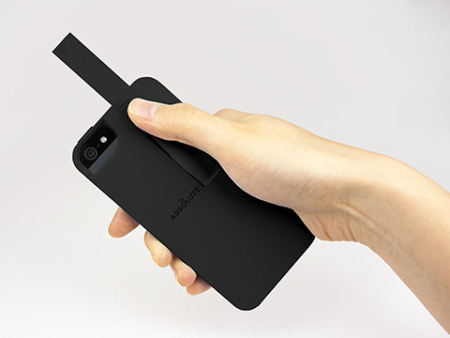
The case isn’t available for sale just yet but some lucky reviewers have managed to snag a test version. The product should cost $49.95, be available in several colours (black, grey, white, red and blue) and hit the street in the next couple of months.
I didn’t upgrade to the iPhone 5 but if I do buy the iPhone 5s (or whatever they call it) and this is available for the new model, I will definitely buy one. Did I mention I love antennas because they always seem to improve the situation? I would love to have this for my next trip abroad.
Check out this cool video demonstration:
Google Maps for IOS updated
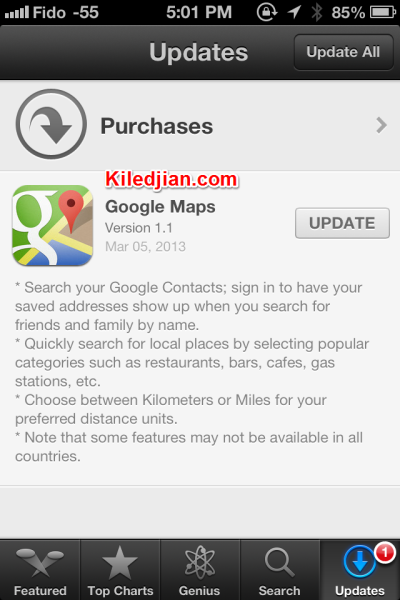
Its time to update Google Maps for IOS. Version 1.1 released today allows you to search savced addresses of contacts, browse by category. Plus the update welcomes more locations into Google Maps' loving arms such as Bahrain, Egypt, Lebanon, Oman, Qatar, Saudi Arabia, and the UAE.
Rumors about the iPhone 5s and its release date
As the unveiling date of the new Samsung Galaxy SIV get’s closer, we have started to hear rumors about the next iPhone. Now the team over at iMore believes that the next iPhone (the 5s maybe?) will be released in August, which matches up nicely to other rumors we have heard.
In the last year, Apple seems to have moved away from a predictable release pattern which makes an August release possible. By allowing itself to have a flexible release cycle, it can respond to Android challengers more quickly and prevents customers from holding off from buying an existing phone (because the next release isn’t know, most won’t wait).
iMore’s hardware rumor is in line with what we always expect from new Apple devices : faster processor, better GPU, improved camera and better battery performance. The hardware predictions are nothing to write home about and it will be interesting to see what they will do with IOS.
There are many iPhone customers (like me) that are hoping Apple really innovates with this iteration (hardware and software) otherwise I will jump ship to Android. What I really want is a substantially improved camera and a major revamp of IOS.
Related Articles:
Evernote will implement 2 factor authentication
A couple of days ago, I wrote about Evernote being hacked and the fact that it is the new reality for cloud services.
Now we learn that Evernote intends to implement 2 factor authentication. In case you were not aware, Evernote was hacked and it forced its 50 million users to reset their passwords. According to InformationWeek, they will offer some kind of 2 factor authentication for all of their users before the end of the year.
Why you shouldn't buy iCloud storage
Manufacturer specific cloud storage solutions are a bad idea. If you buy iCloud storage, it won’t work with your Windows PC or your wife’s Android device. This is the message Drew Houston , Dropbox’s CEO, shared with the audience at the Mobile World Congress. He highlighted the danger of getting locked into one manufacturer’s cloud storage solution (which won’t run on devices from any other brand).
Houston talked about a user being able to store a file in the cloud and share it with any user regardless of their consumption device (Blackberry phone, Windows desktop or phone, Android device, etc). His statements are clearly an attack on Apple’s icloud but they should resonate with most users as true.
Interestingly, he spoke about Samsung which had initially built its own cloud storage solution but then migrated its customers to Dropbox by offering free storage.
My primary phone is an iPhone (for now since I’m contemplating switching in October when my contract is up) but there is no way I would buy iCloud storage. My home PCs are all windows and many of my friends and family use Android devices. Plus iCloud has had a few too many reliability issues over the last year.
I think these comments are very powerful and true. Whether you choose Dropbox, Bitcasa, Sugarsync or Box.net, they are all better alternatives than iCloud (notice I didn't include Skydrive in my list either). My only wish is that these companies drop their subscription prices. Storage prices are falling faster than the monthly fees for these services. The ideal solution is an unlimited plan from Dropbox or for Bitcasa for fix the really annoying service limitations of its unlimited storage offering.
D-Link Wireless Range Extender (DAP-1320) Review
- Extend the range of your existing network
- Easy setup with the touch of a button
- Delivering up to 300Mbps wireless performance
- Universally works with any Wi-Fi device
Why do I need the DAP-1320 wireless range extender?
In my never-ending search to blanket my entire house with beautiful, warm and comforting WIFI, I decided to test the D-Link DAP-1320 Network Range Extender.
A WIFI wireless Range extender is an easy way to push WIFI connectivity to every corner of your house without having to pass wiring.
How is the device?
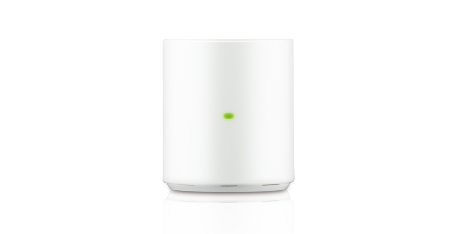
The device is very small and comfortably fits in a power socket without impeding the use of the second socket on the plug. I like the design as it is small, with soft curved lines that easily blend into your decor (aka it doesn’t stick out). There is one button on the left side of the adapter that is used to pair devices with it or to configure the adapter to connect to your existing router via WPS. There is a small LED indicator light on the front.
The device can be configured using any device but comes pre-configured out of the box so it is almost plug and play. The device comes with 2 built in 2.4GHZ wireless antennas and supports up to 300Mbps.
My tests
In order to test the device, I moved my internet router to the corner top floor of my 3 story house and made sure I couldn’t get a signal in the basement. I used a WIFI analyzer to ensure the signal wasn’t coming in.
I then installed the DAP-1320 on the mid-level (almost in the exact middle of the floor) and went through the 5 minute configuration process using WPS. I then went to the same location in the basement and now had a signal from the wireless range extender (with its original Dlink SSID).
My internet connection is a 30 Mbps down / 3 Mbps up via cable. My router is a Thomson DCM475 (Docsis 3.0). I tested the DAP-1320 connecting to different routers including a :
- Linksys wrt54g (802.11g router running DD-WRT)
- Engenius ESR9850 (802.11n router with stock firmware)
- Belkin N450 DB (802.11n router with stock firmware)
End devices I used for testing include:
- iPhone 4
- iPhone 4s
- Nexus 7
- 4 year old Lenovo laptop
- 2 year old Dell laptop
- A desktop using a dual band 802.11n (with dual antennas)
In every one of my tests, the DAP-1320 wireless range extender quickly connected to the router and started repeating the signal within 5 minutes. The Linksys WRT54g with its weaker 802.11g was the worst performer but that is due to the wireless G technology and not the repeater. Connected to the e N routers, the DAP-1320 delivered clean and responsive performance.
I have tested a couple of WIFI wireless range extenders and this one isn’t the most powerful but provided good enough signal for internet browsing or streaming audio. Speed tests showed that close to the device (on the same floor), I was able to get 85% of my internet connections full speed. When I went to the far corner in the basement, the speed dropped to 55-70% of my internet connection speed.
If you intend to use it as a repeater with the default DLINK SSID with WPS, anyone can configure it in 5-10 minutes with no issues. The provided instructions are clear and easy to understand. If you want to play with the configuration of the device however, you will need to be a little more technical as you may encounter some small glitches while connecting to the device or changing configurations.
Verdict
Overall I liked this little device and recommend it for most users. It is small, easy to configure out of the box (with default configurations) and will definitely fix your WIFI weakness issues. You can use the same SSID as your main router but for that you will have to log into the device with a computer and change the configuration.
- WIFI Signal Strengh: 6.5/10
- Ease of use out of the box: 8/10
- Ease to customize device: 7/10
- Overall Score : 7.5/10