Google terminating Activesync support for general public in January
Google is a giant lab and every once in a while we see a list of projects that the sultan of search (aka Google) has decided to kill off. As part of its winter cleaning program, we learned that it will terminate public support for ActiveSync (for all but paying customer using Google Apps business, Government and education). Google will grandfather existing accounts with ActiveSync but will not allow new accounts to use it (past January 31 2013).
As a workaround, Google recommends users leverage IMAP (mail), CalDAV (Calendar) and CardDAV (Contacts). This means software vendors will also have to update their software to account for this new process (including how Microsoft Windows 8 connects back to GMAIL).
I tried the CalDAV and CardDAV and they worked flawlessly on my iphone. It is a slightly longer procedure to set I up but not too bad. Software developers can do the heavy lifting in their apps and make the experience almost seamless to their users (if they want to). I can't wait to see how Android devices and tablet handle this change.
You can read the full winter cleaning note here. It also talks about getting rid of some unpopular google calendar features.
Use your dSLR as a (cheaper than) Lytro alternative
I remember first reading about the (at that time) Lytro camera and was excited about being able to change a picture's Depth of Field after the picture was taken. It meant less shots would get wasted and you could snap a picture almost instantly (since there is no focusing).
The $400 photography revolution that isn't
I am convinced Light Field Technology will revolutionize the consumer photography market in a couple of years. What we have now is first generation and therefore there is plenty of room for improvement.
Although the technology is awesome, I can't justify spending $400 on something I will rarely use. I know people who bought a Lytro hoping to move away from their traditional dSLR but after a short test period came back.
The biggest complaint I heard about Lytro was the picture resolution, high price and low light capabilities.
Get the same effect for free
OK well not for free but using the dSLR you already have. The very cool folks over at Chaos Collective explain how this is done and provide the free tool on their site.
In simple terms, you use your dSLR to take a manual-focus video using the largest aperture possible. Then slowly change the focus for a couple of seconds and save your clips.
How the magic is accomplished
Their software performs the magic by detecting the various focus areas in your video and breaking it down into 20x20 grids than can be clicked. You can upload your photos to their site and get a freely shareable embed code.
Lytro is simpler
Lytro is simpler since all you have to do is press the button and use their software but this solution just saved you $400. If Lytro released v2 with the improvements the market is asking for then I may fork over the money because the tech is great. Until that time, I can play with this little technique.
D-Link PowerLine AV+ Mini Adapter Starter Kit (DHP-309AV) Review
WIFI Convenient but slow
WIFI is a wonderful thing and makes our lives that much easier. Even with the latest and greatest technologies, WIFI is often slow and unreliable compared to a wired network. Interesting real world tests conducted by Epitiro show that a WIFI connection is on average 30 percent slower than a wired one.
You're not going to wire your iphone, Android or ipad and browsing the web on WIFI works well enough but the minute you start playing games, streaming video, using HD video chatting or other service that requires low latency high bandwidth connectivity, you'll feel the pain of WIFI.
Start passing the wires
If your lucky enough to build your new house, you may be able to wire every room with nice and reliable Category 6 cable. You can then route all the cables to one central location and interconnect everything with a gigabit switch.
But most of us won't be building a new home anytime soon and making holes in perfectly good walls and floors is out of the question.
Enter Powerline adapters
Powerline adapters are small little devices that plug into your electrical outlets and use your house's existing electrical wiring to transmit data. Powerline networks aren't as fast as a direct wired Ethernet network but they are the next best thing. There are various models currently available but you should expect between 200Mbps up to 500Mbps networking performance.
Even the slowest name brand powerline adapter will provide enough bandwidth to play games, transfer large files and stream high quality video. It will provide wireless coverage anywhere you have a power plug and in most cases will be much faster (and more reliable) than your WIFI setup.
Dlink PowerLine AV+ Mini Adapter Starter Kit (DHP-309AV)
Looking a the box, I thought the adapters would be huge but I was oh so wrong. These adapters are small and light. Installation couldn't have been easier. I plugged both adapters into separate power outlets, I then pressed the little button on the bottom of the first adapter, I then pressed the button on the bottom of the second adapter and within 2 minutes I had setup a secure network connection between these 2 adapters.
It's important to note that these adapters should be plugged directly into the wall without a power adapter, no extension cords or other line conditioner. It is also recommended that you not plug these next to a power hungry appliance. Otherwise you shouldn't experience any issues.
Click on the image to see the full size one in a new window.
My test
At first I was going to test it for a couple of days and write my review but I had such a wonderful experience, I decided to do a longer 3 week test instead.
My internet connection at home is fiber to the house with 16Mmbps down and 8Mbps up. When plugged into the main router, my speed is always constant with only 8ms latency and I always hit the advertised speed.
I conducted WIFI tests with an Engius, Linksys, Apple Airport Extreme and the WIFI built into my fiber router. All wireless routers were configured into a forced 801.11n mode and I chose a channel with very little interference. Most devices were MIMO with multiple antennas.
My test devices were a laptop, desktop with gigabit Ethernet adapter, iphone 4, iphone 4s and an ipad. I tested my internet speed on each of these devices using all of the Wireless routers (only 1 router was online at a time so as not to create interference). My first tests were conducted in the same room, then I move one floor up/down and the last test was from the basement.
The best performance was when I was in the same room as the router and I was very close to wired performance. The next test from 1 floor up/down showed good degradation and my speeds were almost half or worse. The last test from the basement was the worst with speeds less than a quarter of wired.
I then placed one of the powerline adapters next to the router and went to the furthest point in the house (based on location and wiring layout). I then plugged my laptop and desktop (separately) and conducted my tests. I started with a speedtest. Then I tested transferring large (2-20GB files). I also played latency sensitive internet using games. My last test was streaming an mkv super high quality video file from my server to a set top box. Everything worked flawlessly and everything was super speedy. The powerline setup added a 15% latency (negligible). Tests to and from the internet delivered the full capacity of my internet connection. Transfers from my laptop to my desktop where happening at speeds of between 120Mbps to 178Mbps (these adapters have been designed for 200Mbps).
As for latency, WIFI game me 30-100ms of latency whereas the powerline adapters were 12-15 ms (with a wired connection into the router I get 8ms)
I lent these to a friend who connected his Xbox 360 to the internet and everything worked perfectly. No lag or slowdowns. No degradation. It just worked.
Comparing to others
I compared the performance of the Dlink to other 200Mbps rated powerline adapters from Tenda, TP Link and Trendnet. Dlink seemed to outperform its competitors by 8-17%. Dlink really shined when I started streaming HD video. Some of the others caused the stream to buffer whereas the stream powered by DLink was consistently fast and smooth.
Considering the others are sold at almost the same price, Dlink seems to be the better investment.
Purchasing them
Doing a quick internet search, Americans can pick these up from Amazon for about $49. Canadians can scoop up a pair from FutureShop for $69.
Korea is targeting Russia via espionage campaign called Sanny
Anytime I talk about cyber-espionage, the first reaction most people have is that China must be behind the effort. The reality is that most countries have cyber-espionage capabilities and they use it to further their own interests.
My eyes widened and my ear perked up when I read a research paper by FireEye about a possible cyber-espionage campaign against Russian industry by Korea. I say Korea because FireEye hasn’t clarified whether the source is North or South Korea. It seems most companies being targeted as in space research, IT, education and telecommunication.
A FireEye researcher has said
“Though we don’t have full concrete evidence, we have identified many indicators leading to Korea as a possible origin of attack." - Ali Islam
The evidence thus far shows that:
- the SMTP mail server is in Korea
- the Command and Control servers are in Korea
- The fonts used are “Batang” and “KP CheongPong” , which are Korean
Based on the evidence, this seems to be a well organized and sophisticated attack. Ali Islam added
"Once you have that information, you have access to employees' emails even from outside, and that means a lot of official information," Islam says. "It also steals other accounts credentials, all user passwords stored by Firefox for auto login."
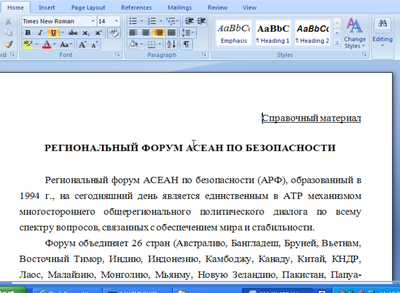
In true internet style, the infection is carried by a phishing attack claiming to be a meeting of the “Association of Southeast Asian Nations” and exploits a Word vulnerability to steal its data.
You can see a sample of the document (in Cyrillic) below
Click on any images in this post for a larger full size view
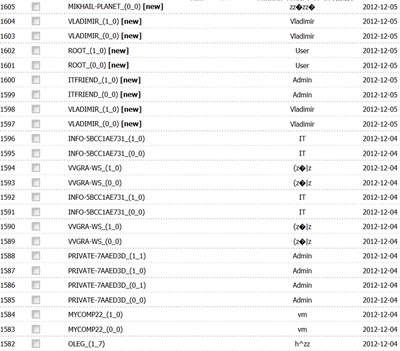
All of the collected data is sent to a public message board where it can be seen by anyone without authentication. This means any data that is stollen can be retrieved by anyone.
RIM kicked out of the NASDAQ-100
The NASDAQ-100 is a stock market index of the world's largest non financial companies. NASDAQ recently announced that Facebook will be listed while Netflix and RIM will be shown the door (in 2013).
Although this is another strike against RIM, it isn't unexpected. With RIM's stock being so low and projections so bad, no one should really be surprised that they will be removed from the NASDAQ-100.
If you don't trust my information, head on over and check the official NASDAQ release [here](http://www.nasdaq.com/article/annual-changes-to-the-nasdaq-100-index-20121214-00830#.UM6Swm80XTr).
How to detect counterfeit headphones
There are thousands of counterfeit products being sold on Craigslist, Kijiji, eBay and other consumer to consumer online sites. During a trip to New York last year, I even found counterfeit Apple products and headphones being sold in a brick and mortar store. As a consumer, you want to make sure you are buying the real thing.
First rule of thumb
Counterfeit products never perform like the real authentic product. Don't listen to what anybody says, they just don't. Best case, the counterfeit product just per form’s bad. Worst case, the counterfeit product may be dangerous for your health and safety.
Regardless of what you have been told, the Original Equipment Manufacturers charge more because their products are built to higher quality/safety standards. These higher standards require higher end components and all of this costs money.
If the deal looks too good to be true, it probably is.
Never buy products sold without boxes
There are legitimate reasons why an online retailer or store may be selling a product without the original box but I’m not interested. Too often, missing boxes are a technique used by those selling counterfeit wares and I’m not interested.
Always look for a box that is clean and complete. It should have the same original seals or shrink wrap as a product sold in a local big box store.
Before buying anything, visit your local bog box store and examine the product. Look at the box closely. What is written? How is it written? How is the box sealed? If the store will allow it, take plenty of pictures. You need an original reference for comparison later.
Start with the batteries
If buying a product that requires AA or AAA batteries, find out what brand they are. Name brand manufacturers use Energizer or Duracell batteries but most Chinese knock-offs I have evaluated came with some other Chinese brand one.
On a recent trip to the "fake mall" in Shanghai, we were accosted by retailers peddling fake Beats headphones.
Every single one we examined came with local Chinese made batteries (while the original comes with Duracell).
When a product comes with a manufacturer brand battery (some Bose QC brand headphones), this is a little more difficult but can still be useful. In this case, you have to compare every detail from an original with the one you are evaluating. Look for different fonts or font sizes. Look for errors in spelling or missing certification labels. Look at the shape very closely as some counterfeits come close but aren't perfect replicas. If anything is off even slightly, you may be looking at a copy.
Examine the box and manual
Previously I asked that you examine the original product in a reliable big box store. This info will now be put to good use. Look at the packaging. I mean really look at it like an inspector.
You are looking for cheap quality printing, faded packaging or labels, strange markings not found on the original box, different fonts or colors used on text, compare or product names and misspelled words.
Do the above check on the box and the manual. Take the time to really look for these telltale signs in detail. If you see any of the above, you are likely holding a counterfeit product.
Presentation of the product
Manufacturers go to great lengths to ensure the customer has an exceptional unboxing experience. Every step of the process is carefully designed to be easy and be a satisfying experience. Compare the placement and internal packaging of the product with an original.
Are items presented in the rights order (i.e. product, cables, manuals)? Is the product inserter into the packaging the same way as an original? IS the product presented properly (righ and left sides of the product in the right position, proper placement of the transport case, inclusion of the proper accessories, etc).
Finally examine the product itself
Go through the markers I mentioned for the packaging. Look for things that are different or unusual. Markings, finishing, quality, weight, etc.
The counterfeit Beat headphones I examined in Shanghai had very different weights than the original we were comparing it too. We then played Apple lossless encoded music from an iPhone 4s and you immediately could head the difference in the sound quality. The original was rich with strong clean bass whereas the counterfeit sounded like it was being played through a can.
Any edges on the original were clean and smooth. The counterfeit product had more jagged edges and looked "less professional".
What to do if you bought a counterfeit product
Try to return the product back to the seller for a full refund. Be nebulous about the reason.
Call your credit card company and file a complaint asking for a charge-back (aka a charge reversal).
If you bought it on eBay with Paypal, file a complaint and ask for a refund. In your complaint be as specific as possible and take pictures as proof.
If the item was sent via mail, you can sometimes file a complain with your countries postmaster who may choose to conduct a more in depth investigation and block additional shipment from that seller into your country.
What if I'm not sure
There may be situations where you have doubts but aren't sure something is counterfeit. In that case, contact the support department of the manufacturer and ask for help. Some may politely reply with "Too bad you should have bought it from an authorized retailer." But more often than not, they will likely give you specific queues to look for [on their product] to help authenticate it.
There was one case where I sent the questionable product to the manufacturer (asking being asked to do it) and was told it was a counterfeit. In this case the manufacturer had amazing customer service and shipped me a replacement (since the original was purchased from a brick and mortar store that should have been authentic).
Buyer beware!
Scammer want your password. Here's how to protect it
never ever ever ever ever share your password with anyone.
You make bad decisions when too much info is available
We live in the information age where almost anything can be researched and learned from the massive information superhighway. But is too much information a bad thing?
Psychology today has an interesting article that claims the more we learn, the harder it becomes to make a decision. Pushing the point just a little more: more information may encourage us to make a worse decision.
The article is worth reading and one paragraph that stood out at me was this:
"The human mind hates uncertainty. Uncertainty implies volatility, randomness, and danger. When we notice information is missing, our brain raises a metaphorical red flag and says, "Pay attention. This could be important."
If information overload leads to bad decisions, then why do we do it? They have a great explanation
Learning is associated with the release of dopamine, the same as powerful drugs like cocaine. It's why we are so vulnerable to an Internet rife with attention parasites that leave us worse for the wear.
They also state that humans tend to over-estimate the value of missing information. Any time we feel info is missing, our subconscious assumes it must be useful. The moral of the story is to consciously decide how much information you really need to make a good decision and stick to your plan.
I wonder if we will ever see people claiming to be "Information Addicts". Do we need to create a 12-step program for information addiction? LOL
It may be time to check out Outlook.com if you use gmail
Full Disclosure
I have been using Google Apps for some time now and it has proven to be reliable, fast and easy to use. December 7 2012, we learned that Google was killing off its free Google Apps offering and forcing new customers to its $50 a year Google Apps for small business offering.
They said existing [free] customers will be grandfathered but who knows what the future holds. Truth be told, the one service I really use is GMAIL and Drive. I tried giving up Microsoft Office for Google Docs but found myself coming back to Office because it was easier to use and more feature rich.
Seeing as Microsoft has spend a considerable amount of money to revamp its email service, I wanted to see how it compared to the venerable GMAIL (in case I was forced to switch). So this is my personal Outlook.com versus Gmail comparison.
Storage Limit
Google offers an impressive 10GB of free storage space for all GMAIL users. 10GB is a lot of space for free but Outlook.com offers unlimited email storage. That's right, no limits.
Microsoft Outlook includes email storage that expands to provide you with as much storage space as you need. Your inbox capacity will automatically increase as you need more space. - Outlook.com storage limit
Recover deleted emails
This isn't a feature I would use often but the one time you need it, it could be a life saver. If you navigate to the Deleted folder, you will see a note that says recover deleted messages.

With Microsoft Outlook, you can recover email that might have been accidently deleted from your inbox. This is also helpful if your account has been hacked, because hackers often delete all the messages in an account. They don't specify how many of your deleted messages how many messages they keep or how far back but its still pretty cool. Contrast this to GMAIL which doesn't have a comparable feature.
Outlook.com gives you mail alias'
An alias is an email address that you can add to your existing account—they’re a great way to use different email addresses with the same inbox.
Aliases use the same contact list and account settings as the primary account. You can create up to five new aliases per year, for an overall maximum of 15. Deleting an alias removes it from the overall count, but not the yearly limit. - link
This is a neat feature that can help improve your account security and control spam. You can use an alias when selling something on craigslist or when signing up to a questionable newsletter. When you're done or annoyed, just delete the alias and your done.
Gmail doesn't offer anything comparable to this. You would have to setup a separate GMAIL account and then configure it to forward emails to your main account. This could work but is a hassle.
Unsubscribe
GMAIL is the king of SPAM filtering but Outlook.com has a neat unsubscribe trick up its sleeve. It detects when an email is a newsletter and allows you to unsubscribe (even if the newsletter doesn't mention the process).
While they try to unsubscribe you from the mailing list, they send all future emails automatically to the junk folder. Now this is what I call smart filtering.

The downside
Try as I might, I could only find one negative about the new Outlook.com and that is the fact that IMAP is not available yet (but the dev team has said it is coming). If you use an iphone, ipad or Android device, you can always use the Exchange sync which works wonderfully well.
What about using my own domain
There seems to be a way for you to use Outlook.com which your own domain name ([email protected]) but I have to test it before writing about it. I'll write up the process once I'm convinced it works well.
Gangdam Style + MC Hammer = good entertainment
I saw this and wanted to share a new spin on Gangdam style
An easy way to encrypt your emails and keep its contents safe
I had written an article a while back entitled "Is Microsoft Going Through Your Cloud Stored Files?". Whether the analysis of your content is done by a human, a robot or disgruntled employee, it feels wrong and there are times when you absolutely need to make sure the info in a particular email is secure & protected.
You can always install one of the open source PGP alternatives but require complicated setup and key exchange (which makes these non usable by the average Joe). This is where Mailvelope is hoping to change the industry.
Mailvelope offers free Chrome and Firefox extensions that encrypt outgoing emails via OpenPGP when using the most popular web based email services( Gmail, Outlook.com, Yahoo, etc). Their claim to fame is that it works with the web based clients offered by these services and is super simple to use.
The product is still in beta but has been shown fairly stable during normal use. You install the extension, generate your public and private keys and that's it. The installation walks you through the process and advance computer skills are not required.
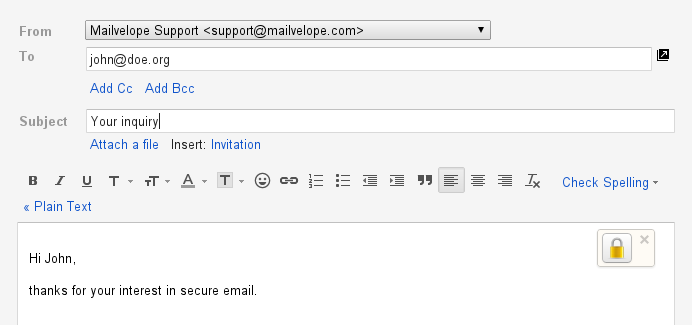
Once the keys have been generated, you will see a lock icon in the message compose window [of your chosen email service], by clicking this icon, you can encrypt your message. Remember that to work, the other party also needs a PGP compliant client to decrypt your message and a public key exchange must also occur. The easiest setup is to ensure the recipient also installs Mailvelope.
I would never call encryption easy but this seems to make it simple enough for the general population to use. I will be interested in seeing how they eventually monetize their service.
Encryption icon on a gmail:
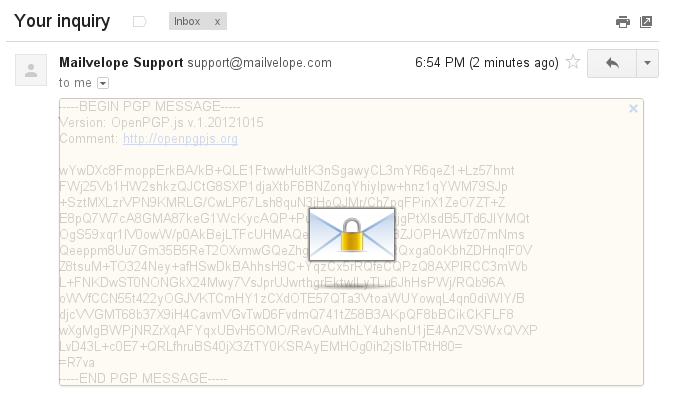
How an encrypted message looks
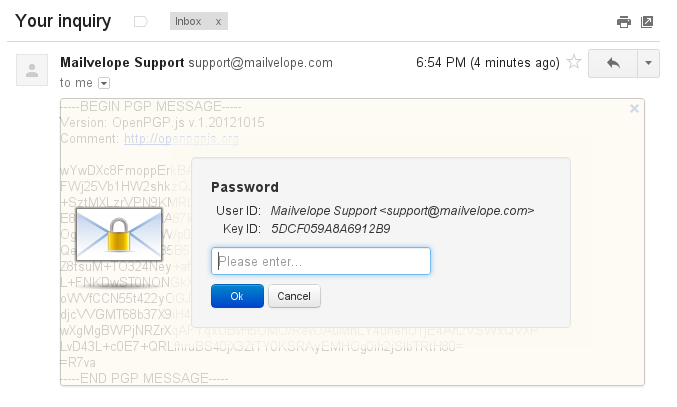
you click on the lock icon and it asks for your private key passphrase
Facebook helps FBI shutdown the butterfly botnet (mariposa)
Facebook becomes the tool
"Facebook’s security team provided assistance to law enforcement throughout the investigation by helping to identify the root cause, the perpetrators, and those affected by the malware. Yahos targeted Facebook users from 2010 to October 2012, and security systems were able to detect affected accounts and provide tools to remove these threats."
Cybercrime is on the rise
Could Google maps for IOS be released tonight?
I'll believe it when I see it but I hope the rumor it correct.
Google Maps for IOS was released just before midnight yesterday and I have been playing with it a little.
First and foremost, it is true to the Google Maps name in that it provides fairly accurate navigation instructions and all of the joys of the niceties of Google Maps (walking and public transit).
Some people have complained about not being able to find it in the iTunes app store. Here is the direct link to Google Maps for IOS : link. If you experience download issues, let me know.
Let me start off by listing some of the shortcomings:
- No iPad optimization
- Only satellite and traffic layers provided
- No map caching for offline use (haven't found it if its there)
- Doesn't seem to have a dark themed night mode
These shortcomings clearly indicate that Google will be using its constantly updating model with Google Maps for IOS (as it does on Android). None of these detract from the core purpose of the app and I prefer having the current version now rather than waiting 6 months for a "more complete" release.
Apple Maps versus Google Maps
I won't spend much time listing the failings of Apple Maps as the media has beaten that point enough however theres no denying Apple Maps are prettier. Everything else a mapping app is expected to do seems to be better on Google Maps (directions are correct more often, finding landmarks is easier and more accurate, etc).
Google Maps improvements on IOS
Comparing Google Maps for Android and IOS, the Android version is clearly more feature complete and reliable, however Google clearly spent time on the visual design of Google Maps for IOS. Google has made Google Maps for IOS more intuitive with little details that make the experience that much better (swiping up to see detailed directions, hiding the layers in a tiny menu option on the right, etc). I am sure many of these design features will eventually wind up in the Android version.
2012 Interesting Twitter Statistics

- Golden Tweets: The top two Tweets that generated the most Retweets for the year, plus honorable mentions for a few others that caught attention around the world.
- The pulse of the planet: Some of the biggest conversations of the year that generated large numbers of Tweets and Retweets.
- Only on Twitter: Moments of serendipity and just plain awesomeness (if there is such a thing) are what we call #onlyontwitter. We list examples of Tweets that came to life organically on Twitter, and can be appreciated in an instant.
- Top trends: Lists of the significant Trends of the year in the U.S., UK and Japan. These phrases reveal what captured our attention based on sudden spike of interest, rather than what was consistently popular.
- New voices: From the Pope to Pelé, this year Twitter welcomed new voices from every corner of the world.
Samsung announcement at CES 2013
On December 6 2012, I wrote an article about the rumors surrounding the Samsung Galaxy S IV. Samsung isn't wasting any time and has started teasing the public, encouraging us to "get ready" because "something new" is coming.
Samsung has released a teaser video which doesn't clarify anything. We know CES 2013 is taking place January 8-11 so it is possible we will see a couple new devices announced there. The reality is we don't even know if these teaser is related to a mobile device but we can all hope.
Securely format your hard drive
Many readers will buy new computers and laptops during the upcoming holiday season and some wil sell their older products. For the security minded, nothing is more important than protecting your personal information so here is a quick suggestion on how to securely format your hard drive.
Formatting your hard drive is the only way to ensure your personal information is unrecoverable by the new owners. This advice applies to anyone that is using a mechanical hard drive (aka not an SSD). If you are selling a Windows based computer (or Linux) then my favorite tool is Darik's Boot and Nuke (affectionately called DBAN).
The process is simple.
- Download the DVD image and burn it onto a DVD disc
- Reboot your PC and make sure it starts from the DVD
- Your computer now boot into DBAN
- Choose the drive
- Choose how many times sector should be overwritten (default is a three-way pass but you can use a 7 or 35 pass if you feel extra paranoid)
- then let it run, run, run, run, run, run, run, run, run, ...
It will take a considerable amount of time (the bigger the disk, the longer it will take) so plan for it. In many cases, it can take a full day or more.
Mehr is the official video service for Iran
Google Nexus 4 can LTE in select US locations
By all accounts, the Nexus 4 is a benchmark for other OEMs building Android devices. It is a beautiful, fast and intuitive device. The biggest complaint most customers have is the inexcusable lack of LTE.
Imagine our surprise when it was reported that some Telus customers were able to force their phone onto the carriers band4 (AWS 1700 / 2100MHz) LTE network. Now users on XDA Developers have made similar claims in the US where AT&T uses the AWS 1700 / 2100 MHZ (Phoenix, Raleigh, San Juan, Los Angeles, Las Vegas, Oklahoma City, Dallas, Chicago, Athens, etc.)
It is important to remember that band4 is rare in the US and even in supported US cities, reception may be spotty. Here is hoping a new version will be released with full support LTE.
Pandora shows some love in Australia and New Zealand
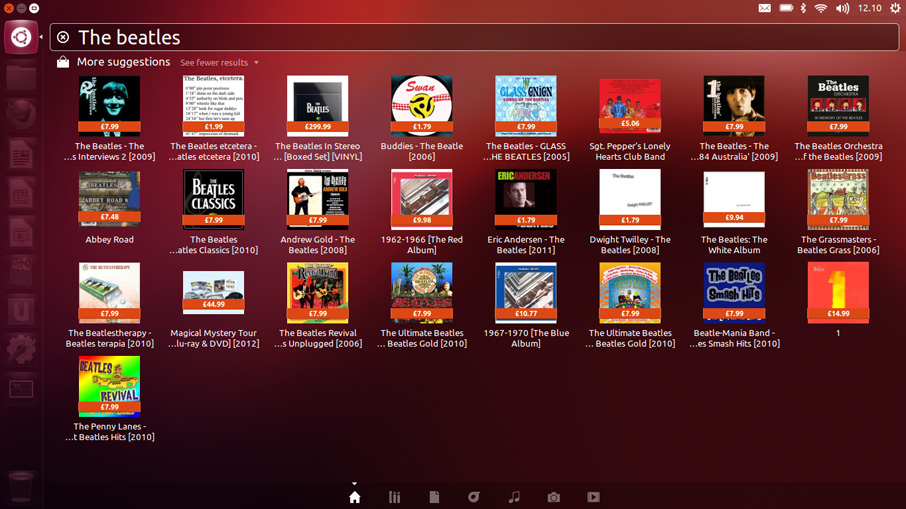
Ubuntu is spyware
Richard Stallman, the creator of the GNU Project and a leader of the Free Software Foundation, recently called Ubuntu spyware.
He made that claim because the latest version of Ubuntu (12.10) sends desktop search information to Canonical (the makers of Ubuntu) so they can show you customized Amazon ads directly in Ubuntu's program called Dash. His exact explanation was "Ubuntu, a widely used and influential GNU/Linux distribution, has installed surveillance code. When the user searches her own local files for a string using the Ubuntu desktop, Ubuntu sends that string to one of Canonical’s servers. (Canonical is the company that develops Ubuntu.)"
Stallman's issue isn't the advertising but rather the monitoring and surveillance done by Canonical to provide targeted advertising (as part of the core operating system). I do want to remind Windows 8 users that many of their built-in apps also come bundled with advertising but in the case of Windows, these aren't core components and you can easily skip using them.
Canonical has a built in switch to allow users to turn this surveillance off but most don't realize it's there. I believe a clear question should be asked during the installation (or update) about this and the switch can then be set to on or off depending on the users explicit response.
What is dash?
In Ubuntu, the Dash has always let you search your computer for your files, photos and videos. But now it does more than just search your computer - it can search all your online accounts too. So, once you’ve saved the login details in the ‘Online Accounts’ function, you can expect to see your Flickr photos, Google Drive documents and more in your search results, alongside the files on your computer.