SoundGecko let's you listen to your favorite website
SoundGecko is a service that takes in web content you are interested in and makes it available as a downloadable audio track. In simple terms, it converts the content you want into spoken word so you can listen to it while driving, running errands or anytime you can't read.
There are clients for IOS, Windows Phone and Android.


How it works
You sign up for a free account and then go to the SoundGecko page.
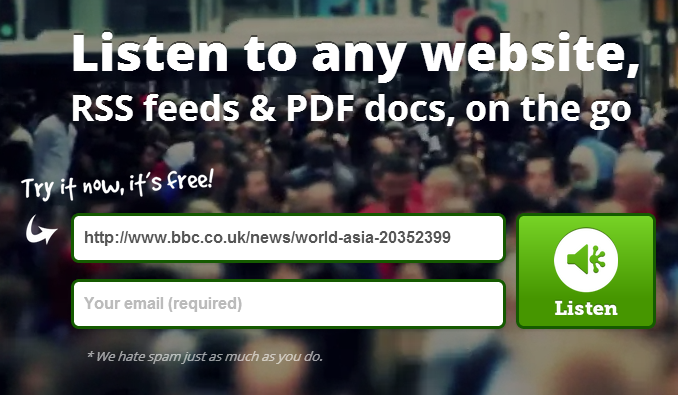
you enter your registered email address and add the URL of the content you want read.
You can also add content via the Chrome extension.
Once processed, you can listen to the content online, download it or browse it via their mobile app

Their mobile apps
The mobile apps are clean and easy to use. Any article it processes appears in the app within minutes.
You can play the content or link to the original article. If the original article contains graphs or videos, that part of the article is skipped by the audio conversion engine.
Leverage the cloud
If you use Dropbox, Google Drive or Microsoft Skydrive, SoundGecko can automatically upload the MP3s to that service.
You can also listen to your conversions as a podcast using most podcast catchers.
Premium version
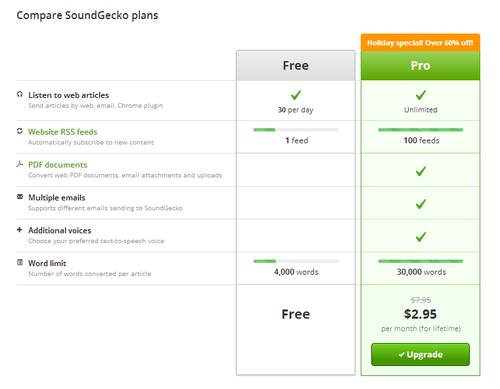
Many users will find that the free version is more than adequate for their casual needs. For the more die hard, they offer a pro version which costs $2.99 a month:
Verdict
This is an interesting way to stay up to date with the latest web content that interests you. I tried it for a couple of days and stopped using it but some of my contacts swear by it and have even forked over for the premium version.
I say try it with the free version and see if this is something that can benefit you. Definitely interesting for the road warrior.
Withings Smart Activity Tracker
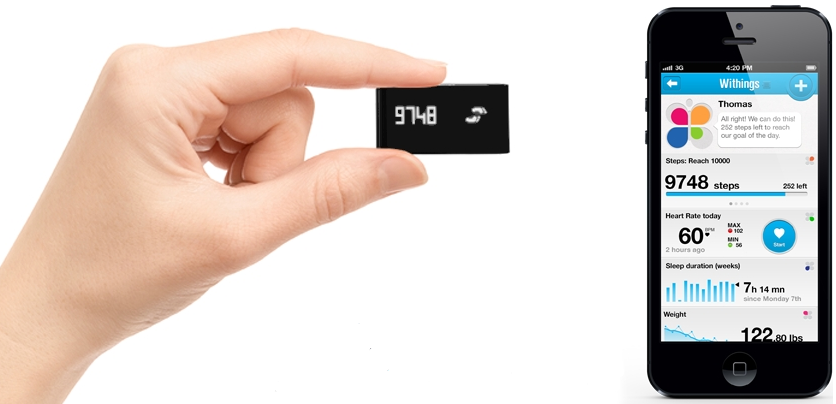
New Smart Body Analyzer measures Air Quality and Heard Rate
Withings has announced that its new Smart Body Analyser scale will incorporate new features "never before seen in a scale". In addition to measuring your weight and body fat, it will also check your heart rate. All of this information is logged in the Withings site and can be seen via its smartphone app.
This ups its game against the Fitbit Aria.
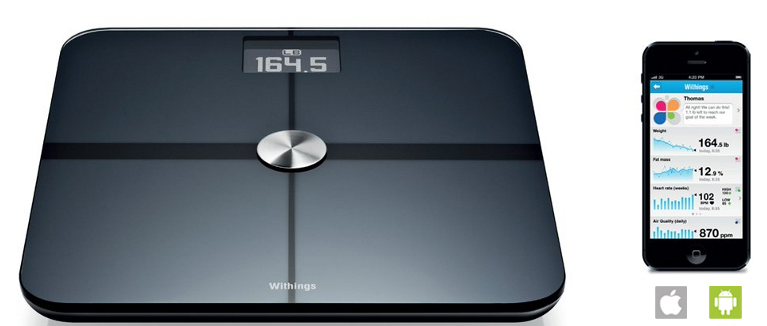
In the evening, (every 30 minutes) it takes a CO2 measurement in your room. They believe this measurement will allow them to create a room air quality score you can use to improve your health.

The release date has not been announced yet but stay tuned...
Your cloud service is shutting down. Now what?
2012 was an interesting year where more services were moved to the cloud and at the same time we saw the risk of cloud services shutting down. In the case of MegaUpload.com (the notorious filesharing site shutdown by the FBI), the government seized all of the hosting servers and made all the information on them unreachable. Even legitimate users ,like the XDA developers, end up losing their information (over 200,000 XDA files were hosted on MegaUpload – all legal).
Other times, a commercial decision is made that can see a free service become for pay or a service can be shelved completely. A good example of this is Google’s decision to scrap the free version of its Google Apps services and charge $50 per year per user for new customers wanted this service (which was free for up to 10 users until December 2012).
EMC killed off its Atmost cloud service and provided a short notice for its customers to move their data or risk losing it.
With all these risks, companies will continue to rely on cloud services because they are typically cheaper and faster to deploy. So what should you do?
1 – Due Diligence
Ensure that the provider has the redundant infrastructure (multiple data centers, multiple copies of your data and a strong backup process) you need to keep your business running. During hurricane Sandy, many companies learned that their hosting provider was only located in New York and many shutdown for weeks while the city recovered.
What are the processes the provider has to recover from the worst case scenarios and ensure the C.I.A of your data (natural disaster, terrorist attack, flu pandemic, malicious insider, etc). In this case CIA = Confidentiality, Integrity and Availability.
If you are subject to government regulation, make sure your chosen provider can meet the regulatory requirements and is willing to provide the required audit evidence.
2 – Data Portability
Before signing up for any cloud service, make your own worst case contingency plan. If the service has a material change in scope/price or is scrapped, what do you do to keep your business running?
Make sure any data export requirements are defined (as exactly as possible), negotiated with the vendor and clearly written down in the contractual language. Don’t wait until something happens to start planning.
In some cases, even with a dump if the data, it is useless because (without the cloud service) you lose the business logic to make it all work. This is a good case for the Plan – Do – Check –Act cycle.
3 – Have a good SLA
Once you know exactly what you want and have found a provided willing to meet it then make sure you spell our exactly what the providers obligations are with examples (to ease understanding) and penalties to incentivize the correct provider behavior.
4 – Continuous Audit
In an ideal situation, you should plan on conducting an annual due diligence audit to ensure continued compliance.
5 – Don’t rush
Most mistakes happen when you rush the investigation or needs determination process. Take the time to do this right and you may just end up getting what you expect.
The best Android keyboard for super fast text entry
As I started exploring Android for the first time (switching from IOS), I wanted to find a fast way to enter text. The IOS method of a screen based keyboard is ok but very slow (and therefore not efficient). I realized that there are dozens of great Android keyboard alternatives.
Some of these keyboards are weird and won't actually improve your text entry speed (Slice is a great example of this).
Slice for Android
If anything, Slice for Android may actually slow you down ;-)
Having played with half a dozen alternatives, my main daily use keyboard is SwiftKey flow (beta)
SwiftKey Flow Beta
What is Swiftkey Flow?
It is a gesture based keyboard which combines swipe to type functionality with Swiftkey's extremely powerful prediction engine.
Swipe to type means you simply move your finger from letter to letter without actually lifting your finger. You can even insert a space by passing over the space key. What truly amazed and surprised me was how well it was able to decipher my (purposely) bad swiping. As long as I swiped close to my intended letters, the prediction engine was able to properly convert it.
The continuous text entry method (where you swipe over the space key instead of lifting your finger from the screen to mark the end of a word) requires some practice but really differentiates Swifkey Flow from the other competitors.
The prediction engine is so good, it will often guess (correctly) the intended word before you even finish writing it. In this case, you simply stop writing and it will autocomplete. For each word, it provides 3 guesses (the most likely one being in the middle and is used for autocompletion).
Improving the prediction
If you'll allow it, the program can log into your Facebook account, Twitter account and blog (via RSS) to learn how you typically write. You can perform this tune-up periodically to improve the prediction.
Some issues and the update
It is important to remember that SwiftKey Flow is still in beta and the team is hard at work releasing bug fixing updates. They released such an update this week which fixed a boatload of issues here and there.
One of the major fixes is related to the continuous text entry. With past versions, if it detected a bunch of the words then couldn't figure out the last one you are entering (in continuous entry mode only), it deleted the entire strong. With this version, it now saves everything it understood and only omits the last unknown word. They have also reduced the memory footprint however this is one area the development team has said it will continue working on.
It's important
As a content consumption device, you really don't care about efficiency on a tablet. The minute the tablet becomes a productivity device, then efficiency becomes critical. you spend a lot of your time entering text and this one tip can make you up to 20% more efficient. It's worth a try.
WhatsApp processed 18 billion messages on December 31 2012
On Dec 31st we had a new record day: 7B msgs inbound, 11B msgs outbound = 18 billion total messages processed in one day! Happy 2013!!!
— WhatsApp Inc. (@WhatsApp) January 2, 2013
WhatApp charges IOS users 99 cents per year. Android, Windows Phone and Blackberry users get the first year free and then are charged 99 cents per year thereafter. What makes WhatsApp very enticing is the fact it is cross platform. It has become the most popular paid app in many iTunes country stores and is winning against the mainstay BBM from Blackberry.
This means iMessage and Facebook Messenger have some interesting competition. Carriers on the other hand are seeing one of their most profitable services (SMS) vanish into thin air..
First peek at the Samsung Galaxy S IV
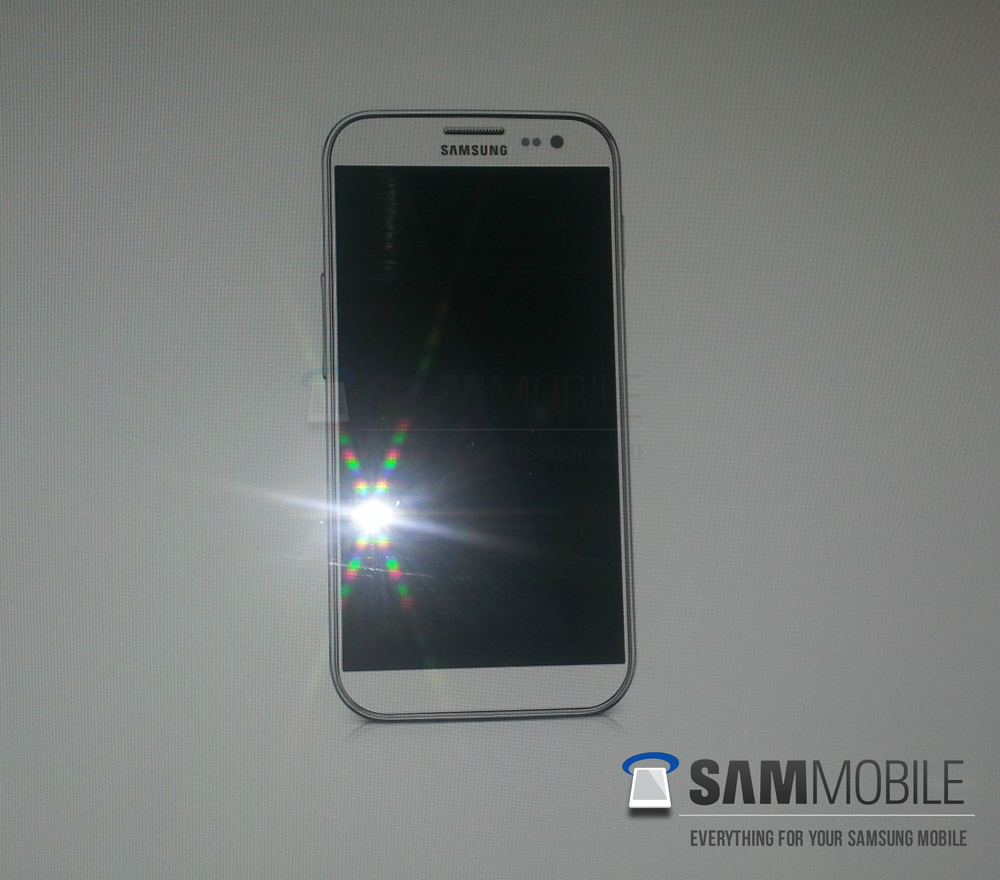
SamMobile, a Samsung only blog, has posted an image it claims is the world’s first look at the upcoming Samsung Galaxy S IV smartphone. They say the image was provided courtesy of a Samsung insider and that because of its look (similar to the SIII) it may be real.
There have been some rumors about the Samsung Galaxy S IV and some have even said it will merge their smartphone and phablet lines creating a new flagship phone. Other rumors have said it will keep its 5” screen but bump pixel density to 441ppi. All of the rumors I have read seem to agree that it will likely contain:
- Android Jelly Bean 4.2
- 2GHZ 8-core Exynos processor
- 2 GB RAM
- 13 megapixel rear camera
These kinds of rumors come and go but when it relates to the world’s most popular Smartphone, I take note.
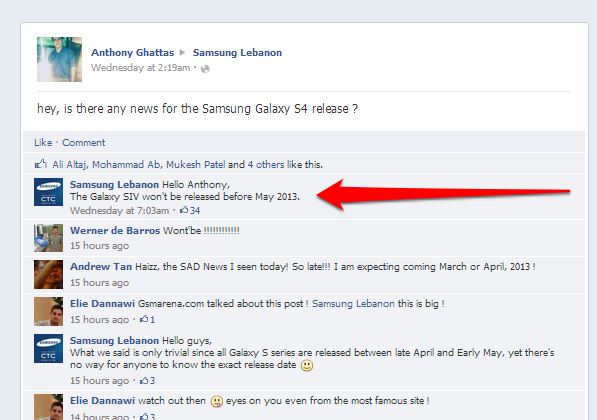
The Samsung account in Lebanon posted to Facebook that the Samsung Galaxy SIV "won’t be released before May 2013."
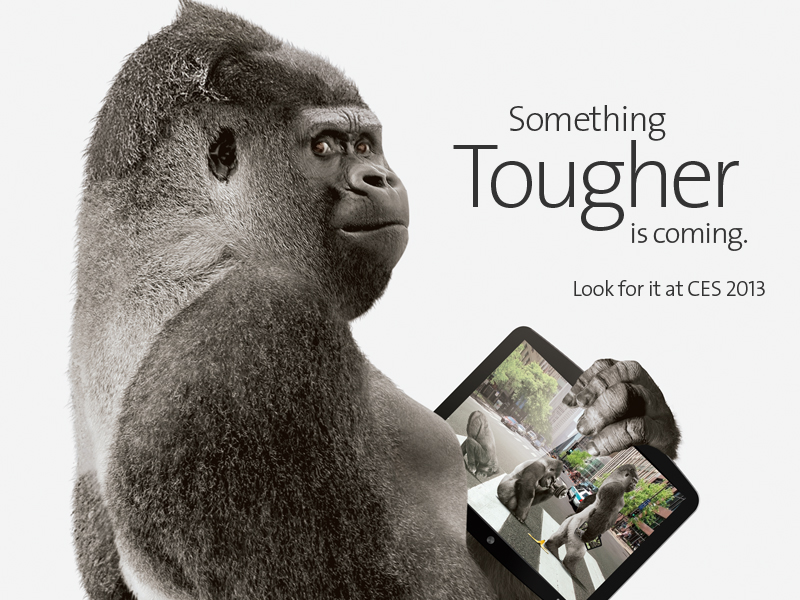
Corning Gorilla Glass 3 50% thinner and more scratch resistant
Corning is the purveyor of fine screen glass for many a manufacturers (ipod, ipad, iphone, Nexus, etc). It has now announced the creation of its next generation product, Corning’s Gorilla Glass 3. It will be thinner, stronger and more scratch resistant than its predecessor.
It will retain its magical strength even when scratched (which is rarely the case for glass). Gorilla Glass 3 will be showcased at CES and should make it into your favorite 2013 gadget.
Stronger, more scratch resistant glass is always a good thing for the road warrior business person.
Nexus 7 dock will be released January 10 2013
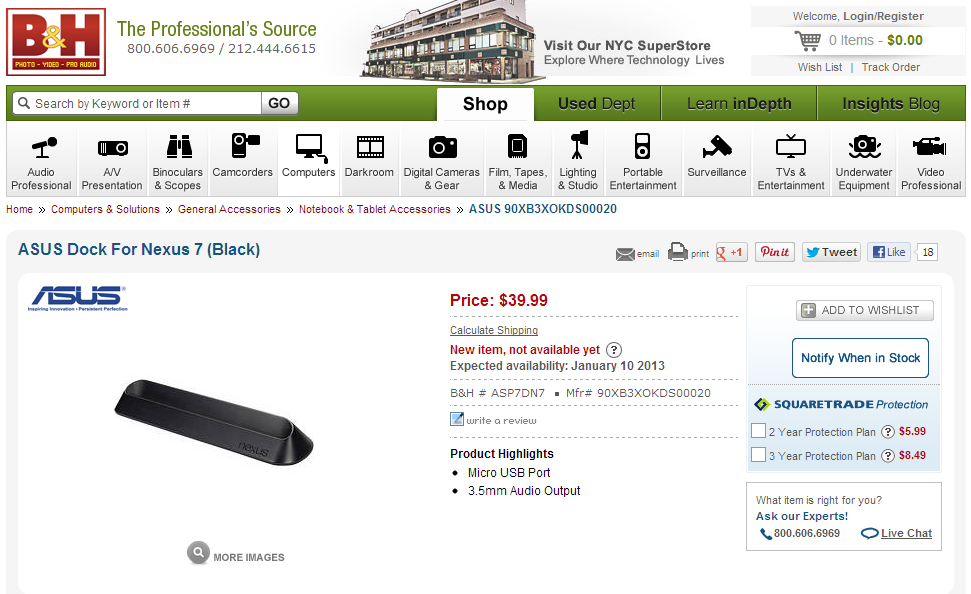
B&H has now updated the ETA for January 16 2013.
Review of the Google Nexus 4
I recently had the opportunity to play with the incredibly in demand and very hard to get Google Nexus 4 phone and wanted to share my point of view. This isn’t meant to be an exhaustive review but rather a quick summary of the positives and negatives.
There is a reason why the Google Nexus 4 is sold out in most Google Play stores around the world. It is a great phone at an incredibly competitive price.
The device
The Google Nexus 4 is a solid and well built device that won’t disappoint. The front is very resilient Corning Gorilla Glass 2 and the back is a nice soft touch plastic. The entire kit feels rock solid and well built. Inside you’ll find a quad-core Qualcomm Snapdragon S4 Pro processor (better GPU/CPU than the Samsung Galaxy SIII), with 2 GB of RAM and full RGB strip IPS Plus screen.
The Google Vanilla experience
Each Android manufacturer adds its own secret sauce to its devices like multiview, updated apps, hand-written note app, but nothing compares to the upgradability of a stock Google branded phone. The Nexus 4 comes with a vanilla version of Android 4.2. Since it’s a Google device, you can expect updates for many years to come (unlike other manufacturer devices that get updates up to 1 year late and some that never get updates at all). In my book, Nexus devices (phones and tablets) are the only way to go.
The negatives
There is no denying that the Nexus is a wonderful phone but it does have some flaws. And some of these flaws are enough to make this device a no-go for me:
- Disappointing camera – Unfortunately the Nexus comes with a plain old run of the mill 8 MP camera. I tested it out and was disappointed. My iPhone 4s often took much sharper pictures. When comparing the Nexus 4 pictures to those of an iPhone 5, the difference is glaring. The Iphone 5’s 8MP sensor, optics and software deliver a more realistic and enjoyable pictures.
- Storage – The Nexus comes in 8GB and 16GB varieties and I am convinced this was a cost control decision. With some podcasts, apps and light data, I can fill up a 16 GB device in no time. This is an even bigger problem when you realize the Nexus 4 doesn’t support SD or Micro-SD cards.
- Connectivity – Officially the Nexus 4 only supports HSDPA. We have heard stories from non-US users who have been able to trick the phone to an AWS band LTE network but this can be turned off by Google at any time via a software update. I can’t imagine buying any new device today without LTE.
- Battery - No user replaceable battery. With normal use, I can kill my smartphone's battery mid-day and being able to simply replace it is a really nice feature. I carry around a Mophie Juicepack Air on my iphone with adds weight and makes the device much bulkier.
Should you get it?
That depends on what you are looking for in a phone. This is a fantastic phone and is perfect for most users. Unfortunately I find its shortcomings too important to ignore and I won’t be plunking down money to buy this device. I am hopeful that Google’s next device will address these issue and make me buy it the day it is released.
I am trying to get my hands on a Samsung Note 2 for testing purposes. The more I think about the concept of a phablet, the more I like it. When I get a chance to "play" with the Samsung Note 2, i'll report back.
IOS piracy site Installous down and out
Many IOS jailbreak evangelists complain that piracy is actually hurting their mission but statistics show that most IOS jailbreakers do it to access pirated content. Cydia itself doesn’t distribute pirated content but allows you to access other application repositories that make it possible to install pirated content.
The king of IOS piracy, the Installous repository run by Hackulous, seems to be down. The official message on chat boards is that the site has been shut down because it is a “ghost town”. This may be due to the fact that an unthetered jailbreak for IOS 6 isn’t readily available. In simple terms, the newest devices [ like the iPhone 5, iPad mini and iPad Gen 4] can’t be jail broken yet, therefore they can’t access the pirated app portal. Older devices like iPhone 4/4s and older iPads can be jailbroken but only if the IOS is at version 5.1.1 or older.
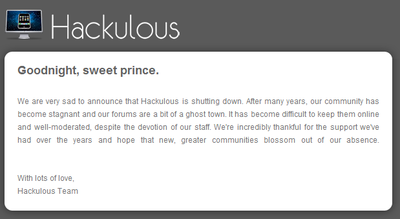
Apple has been raging a battle against these pirates and has patched many of the vulnerabilities these sites exploit to jailbreak IOS devices. This makes jailbreaking more complicated and therefore access to pirated apps less likely.
As a user, the allure of free apps may seem tempting but remember that these apps may have been modified to steal your information or to perform other less than honorable actions. Never install apps from unverified sources!
Android's Adult only app store has legs
It’s a well known fact that Google is much more permissive with apps it admits to its app store, compared to Apple. But some content is too hot even for the open minded folks at Google, enter MiKandi.
As an Android user, you can use any app store you want (the most well known are Google’s Play app store and the Amazon App store) and now can choose the MiKandi app store for all your adult needs. They want to become a broker connecting adult content developers with likeminded customers. To start using their store, you open your device’s browser and navigate to http://www.MiKandi.com
The site was born when Apple performed its mega purge of questionable adult content from the iTunes app store in 2010/11. Overnight Apple killed the revenue stream of thousands of App developers (that Apple had previously admitted to its app store). The founders of MiKandi used this situation as an opportunity to quickly attract adult developers to its marketplace.
They offer content in the Adult News, Erotica, Eye Candy, Social and Games categories. MiKandi is promising adult developers a stable and safe platform where their apps can be found, downloaded and turned into real dollars. It is promising customers a safe non judgmental store where all of their adult needs can be met.
Although official numbers aren't published by the company, it is safe to assume that it is generating enough revenue to continue operating (which is something many start-ups dream of).
Whether you are looking for this kind of content or not, it is an interesting trend to see these kinds of specialized stores open up shop.
Time to switch from IOS to Android?
I am not an Apple “fanboy” but have been buying their mobile products since the release of the original iPhone. Every one of their products has excellent design wrapped in art. Their devices are as beautiful to look at as they are to use.
But over the last year, there have been little irritants that motivated me to explore other options (Apple’s demand for absolute control, lack of innovation with the iPhone 5, Apple rejecting interesting hardware for vague reasons, etc). Windows Phone 8 was dead on arrival because it lacks the ecosystem required to make a Smartphone smart. This left me with Android, a platform I knew little about.
Over the holiday period, I decided to pick up a Nexus 7 tablet. It isn’t perfect and the platform has some irritants of its own but overall a good experience.
Here are some of the positives I discovered while playing with my Nexus 7 (compared to an iPhone or iPad).
In Keyboard we trust
Ability to change the device’s default keyboard - After reading about the various options, I chose to install Swiftkey Flow beta and Swype. Typing on mobile keyboards has never been a great experience but with these alternatives, it becomes much easier and faster. These alternative keyboards actually improve my productivity with the device.
Some IOS apps try to implement similar text entry mechanisms but they are stand alone apps and usually not as good as the field tested Android version.
Tasker allows you to perform cool automation
Tasker is cool little app that allows you to automate tasks on your Android device. It allows you to start/stop apps, change app/device settings depending on time, date, location, etc.
Widgets
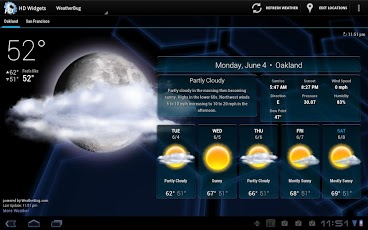
Widgets are special programs that you can add straight on your main screen. These provide information you want without having to open any apps. I setup a weather widget which beautifully shows me the time, date, current temperature and the forecast for the next 4 days.
I added a widget for Any.Do that shows my to do list directly on my home screen which means it is always there screaming at me to be productive.
If you jailbreak your iphone, you can add widgets to the lock screen but that’s about it. Once you start using widgets intelligently, you will wonder how you ever lived without them.
App installation
Apple makes shopping for new apps painful. You can browse on the phone’s small screen or using Apple’s inefficient itunes. Once you connect an Android device to your Google account, you can brose for apps on your computer. When you want to install an app on your device, you choose install (from the Google Play web page) and minutes later the magically appears on your device.
I was amazed at how well this worked. Now that I have done this a couple times, I can’t imagine going back to Apple’s archaic and ugly app store.
Some things iPhone does better than Android
Frangmentation
I love the fact the Android OS is so customizable but this also means manufacturers tend to bastardize it. I chose the Nexus 7 because it is a "pure Google experience" which means it comes with a clean stock version of Android and receives the OS updates very quickly. Go to another brand's devices and you may end up with crapware, weird interfaces that slow down the device or you may never get the latest OS update because the manufacturer doesn't want to provide it.
Regardless of where you buy an iphone, it comes clean (without crapware) and the updates are available to all as soon as Apple releases them.
Better design
As nice as the Nexus 4 or 7 are, Apple's products are prettier when it comes to design. They feel solid, well made and are just plain beautiful. I love the Nexus 7 but it has a plastic back, a huge bezel on each side and is considerably thicker/heavier than the iPad.
Battery Life
Various tests show that a Nexus 4's battery lasts 4.5 hours when performing internet browsing on 3G/4G, video/audio playback and playing games. An iPhone 5 doing the same provides over 7 hours of life.
The only Android phone that outlasted an the iPhone was the Motorola Droid Razr Maxx (providing over 8 hours).
Photo Quality
Compare the camera quality of any Android phone and it likely comes well short of the benchmark set by the iPhone 5. the iPhone 5 camera default app may not have all the bell's and whistles (time, burst, etc) but it provides the quality users expect.
2013 may be the year Android competitors best the iPhone's camera performance but they are not there yet. Here's hoping we see come friendly competition between the big names.
Siri is better... sometimes
I've had a chance to compare the voice capabilities of each phone and they both fall short of what I expect them to do. In my tests, Google has a wider knowledgebase and is able to answer more questions, more accurately. Siri is better at understanding your request in natural language. Siri is still missing tones of information Google already has but it is easier to use.
Accessories and apps galore
iPhone's are all made by Apple which means there is little device fragmentation. This means more companies are willing to build accessories for iPhone. Walk into any store and you will see rows and rows of accessories for the iPhone.
On the Android side, you are lucky to find a couple of cases and maybe a handful of accessories.
Same thing goes for apps. You will be hard-pressed to find a missing app on the itunes store. Anything you can think of is probably already available (many in iPhone and iPad optimized versions). The Android market does have a tone of apps and the Google Play market is getting bigger but there are still a bunch of very popular IOS apps I found myself missing. I was also disappointed by the small number of tablet optimized apps (Flipboard finally became tablet optimized last week on Android).
Ease of use
iPhone wins hands down. As an example, I use DoggCatcher to download and manage my Android podcasts. The artwork associated with each podcast kept showing in the Android picture Gallery. I couldn't find how to exclude it (the .nomedia trick doesn't work) and the answer I received from the Google+ Android communities is to use another app that allows me to manually exclude directories from indexing. Why? This shouldn't be an issue in 2012.
Another example : I uninstalled an app I didn't like but it's directory and many of its files stayed behind. I had to use a file manager to manually delete them.
Since most of my family has IOS devices, sharing with them is super easy with an iphone. Android to iphone sharing is complicated and a pain.
These are examples but there are dozens mores. Apple is easier to use.
Apple losing its customer support edge
How was it calculated
FireSee surveyed 24000 customers from US thanksgiving to Christmas. Interestingly this is one of the biggest drops ForeSee has seen in years and it is Apple's lowest score in 4 years.
Why
ForeSee CEO told AllThingsD that "The luster of Apple is fading a bit, and keeping up with consumer's rising expectations is no easy task."
Top 5
The top 5 customer satisfaction performers for 2012 are:
- Amazon
- LL Bean
- QVC
- VitaCost
- EsteeLauder
Happy holidays
I wanted to take a minute and wish you all a merry christmas and a happy new year.
More posts coming soon.
Ed
Motorola + Google may be working on a special Android phone
Google terminating Activesync support for general public in January
Google is a giant lab and every once in a while we see a list of projects that the sultan of search (aka Google) has decided to kill off. As part of its winter cleaning program, we learned that it will terminate public support for ActiveSync (for all but paying customer using Google Apps business, Government and education). Google will grandfather existing accounts with ActiveSync but will not allow new accounts to use it (past January 31 2013).
As a workaround, Google recommends users leverage IMAP (mail), CalDAV (Calendar) and CardDAV (Contacts). This means software vendors will also have to update their software to account for this new process (including how Microsoft Windows 8 connects back to GMAIL).
I tried the CalDAV and CardDAV and they worked flawlessly on my iphone. It is a slightly longer procedure to set I up but not too bad. Software developers can do the heavy lifting in their apps and make the experience almost seamless to their users (if they want to). I can't wait to see how Android devices and tablet handle this change.
You can read the full winter cleaning note here. It also talks about getting rid of some unpopular google calendar features.
Use your dSLR as a (cheaper than) Lytro alternative
I remember first reading about the (at that time) Lytro camera and was excited about being able to change a picture's Depth of Field after the picture was taken. It meant less shots would get wasted and you could snap a picture almost instantly (since there is no focusing).
The $400 photography revolution that isn't
I am convinced Light Field Technology will revolutionize the consumer photography market in a couple of years. What we have now is first generation and therefore there is plenty of room for improvement.
Although the technology is awesome, I can't justify spending $400 on something I will rarely use. I know people who bought a Lytro hoping to move away from their traditional dSLR but after a short test period came back.
The biggest complaint I heard about Lytro was the picture resolution, high price and low light capabilities.
Get the same effect for free
OK well not for free but using the dSLR you already have. The very cool folks over at Chaos Collective explain how this is done and provide the free tool on their site.
In simple terms, you use your dSLR to take a manual-focus video using the largest aperture possible. Then slowly change the focus for a couple of seconds and save your clips.
How the magic is accomplished
Their software performs the magic by detecting the various focus areas in your video and breaking it down into 20x20 grids than can be clicked. You can upload your photos to their site and get a freely shareable embed code.
Lytro is simpler
Lytro is simpler since all you have to do is press the button and use their software but this solution just saved you $400. If Lytro released v2 with the improvements the market is asking for then I may fork over the money because the tech is great. Until that time, I can play with this little technique.
D-Link PowerLine AV+ Mini Adapter Starter Kit (DHP-309AV) Review
WIFI Convenient but slow
WIFI is a wonderful thing and makes our lives that much easier. Even with the latest and greatest technologies, WIFI is often slow and unreliable compared to a wired network. Interesting real world tests conducted by Epitiro show that a WIFI connection is on average 30 percent slower than a wired one.
You're not going to wire your iphone, Android or ipad and browsing the web on WIFI works well enough but the minute you start playing games, streaming video, using HD video chatting or other service that requires low latency high bandwidth connectivity, you'll feel the pain of WIFI.
Start passing the wires
If your lucky enough to build your new house, you may be able to wire every room with nice and reliable Category 6 cable. You can then route all the cables to one central location and interconnect everything with a gigabit switch.
But most of us won't be building a new home anytime soon and making holes in perfectly good walls and floors is out of the question.
Enter Powerline adapters
Powerline adapters are small little devices that plug into your electrical outlets and use your house's existing electrical wiring to transmit data. Powerline networks aren't as fast as a direct wired Ethernet network but they are the next best thing. There are various models currently available but you should expect between 200Mbps up to 500Mbps networking performance.
Even the slowest name brand powerline adapter will provide enough bandwidth to play games, transfer large files and stream high quality video. It will provide wireless coverage anywhere you have a power plug and in most cases will be much faster (and more reliable) than your WIFI setup.
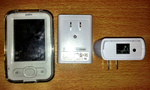
Dlink PowerLine AV+ Mini Adapter Starter Kit (DHP-309AV)
Looking a the box, I thought the adapters would be huge but I was oh so wrong. These adapters are small and light. Installation couldn't have been easier. I plugged both adapters into separate power outlets, I then pressed the little button on the bottom of the first adapter, I then pressed the button on the bottom of the second adapter and within 2 minutes I had setup a secure network connection between these 2 adapters.
It's important to note that these adapters should be plugged directly into the wall without a power adapter, no extension cords or other line conditioner. It is also recommended that you not plug these next to a power hungry appliance. Otherwise you shouldn't experience any issues.
Click on the image to see the full size one in a new window.
My test
At first I was going to test it for a couple of days and write my review but I had such a wonderful experience, I decided to do a longer 3 week test instead.
My internet connection at home is fiber to the house with 16Mmbps down and 8Mbps up. When plugged into the main router, my speed is always constant with only 8ms latency and I always hit the advertised speed.
I conducted WIFI tests with an Engius, Linksys, Apple Airport Extreme and the WIFI built into my fiber router. All wireless routers were configured into a forced 801.11n mode and I chose a channel with very little interference. Most devices were MIMO with multiple antennas.
My test devices were a laptop, desktop with gigabit Ethernet adapter, iphone 4, iphone 4s and an ipad. I tested my internet speed on each of these devices using all of the Wireless routers (only 1 router was online at a time so as not to create interference). My first tests were conducted in the same room, then I move one floor up/down and the last test was from the basement.
The best performance was when I was in the same room as the router and I was very close to wired performance. The next test from 1 floor up/down showed good degradation and my speeds were almost half or worse. The last test from the basement was the worst with speeds less than a quarter of wired.
I then placed one of the powerline adapters next to the router and went to the furthest point in the house (based on location and wiring layout). I then plugged my laptop and desktop (separately) and conducted my tests. I started with a speedtest. Then I tested transferring large (2-20GB files). I also played latency sensitive internet using games. My last test was streaming an mkv super high quality video file from my server to a set top box. Everything worked flawlessly and everything was super speedy. The powerline setup added a 15% latency (negligible). Tests to and from the internet delivered the full capacity of my internet connection. Transfers from my laptop to my desktop where happening at speeds of between 120Mbps to 178Mbps (these adapters have been designed for 200Mbps).
As for latency, WIFI game me 30-100ms of latency whereas the powerline adapters were 12-15 ms (with a wired connection into the router I get 8ms)
I lent these to a friend who connected his Xbox 360 to the internet and everything worked perfectly. No lag or slowdowns. No degradation. It just worked.
Comparing to others
I compared the performance of the Dlink to other 200Mbps rated powerline adapters from Tenda, TP Link and Trendnet. Dlink seemed to outperform its competitors by 8-17%. Dlink really shined when I started streaming HD video. Some of the others caused the stream to buffer whereas the stream powered by DLink was consistently fast and smooth.
Considering the others are sold at almost the same price, Dlink seems to be the better investment.
Purchasing them
Doing a quick internet search, Americans can pick these up from Amazon for about $49. Canadians can scoop up a pair from FutureShop for $69.
Korea is targeting Russia via espionage campaign called Sanny
Anytime I talk about cyber-espionage, the first reaction most people have is that China must be behind the effort. The reality is that most countries have cyber-espionage capabilities and they use it to further their own interests.
My eyes widened and my ear perked up when I read a research paper by FireEye about a possible cyber-espionage campaign against Russian industry by Korea. I say Korea because FireEye hasn’t clarified whether the source is North or South Korea. It seems most companies being targeted as in space research, IT, education and telecommunication.
A FireEye researcher has said
“Though we don’t have full concrete evidence, we have identified many indicators leading to Korea as a possible origin of attack." - Ali Islam
The evidence thus far shows that:
- the SMTP mail server is in Korea
- the Command and Control servers are in Korea
- The fonts used are “Batang” and “KP CheongPong” , which are Korean
Based on the evidence, this seems to be a well organized and sophisticated attack. Ali Islam added
"Once you have that information, you have access to employees' emails even from outside, and that means a lot of official information," Islam says. "It also steals other accounts credentials, all user passwords stored by Firefox for auto login."
In true internet style, the infection is carried by a phishing attack claiming to be a meeting of the “Association of Southeast Asian Nations” and exploits a Word vulnerability to steal its data.
You can see a sample of the document (in Cyrillic) below
Click on any images in this post for a larger full size view
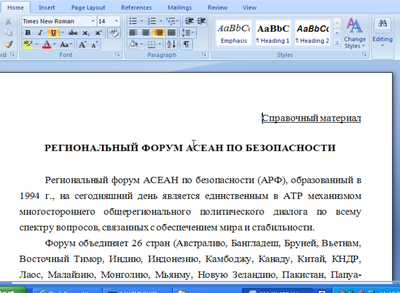
All of the collected data is sent to a public message board where it can be seen by anyone without authentication. This means any data that is stollen can be retrieved by anyone.