
Travel tips when travelling alone
Most business travellers and some leisure travellers are “stuck” travelling alone. Having spent many days abroad, there are a few steps I take every time I travel alone.
Read the reviews
Regardless of the type of trip, you should always do your homework and ensure you read as much information as possible about your destination. Read professionally written reviews (if available) but ensure you get a healthy dose of general traveller reviews to get the real picture.
Many of these sites will allow you to post your questions and get answers before you leave. Some popular sites are:
- http://www.debbiescaribbeanresortreviews.com/
- http://www.flyertalk.com/
- http://www.traveltalkonline.com/
- http://dest.travelocity.com/Reviews/0,,TRAVELOCITY,00.html
Do your official homework
As a Canadian, I always check the government travel advisories of the Canadian Department of Forein Affairs and International Trade. Not only do they provide useful travel advisories but they allow Canadians to register with them and therefore be advised in the event of a major crisis at the destination (even when at your destination). Most foreign governments offer similar services so ensure you contact your countries foreign consular services and use their traveller registration service.
The US State Department has a travel advisory service available here : http://travel.state.gov/travel/cis_pa_tw/tw/tw_1764.html
The UK Foreign and Commonwealth Office offers services for the United Kingdom: http://www.fco.gov.uk/en/travel-and-living-abroad/travel-advice-by-country/
In addition to travel safety information, I strongly recommend you check out vaccination recommendations for your chosen travel destination using sites like:
Center for Disease Control : http://wwwnc.cdc.gov/travel/
Public Health Agency of Canada : http://www.phac-aspc.gc.ca/tmp-pmv/index-eng.php
Define a communications plan
I strongly recommend that you define a communication plan with family or friends back home. Make the plan and stick to it. If anything goes wrong, your family and raise the red flag and call the appropriate government agencies for help.
How will you provide an update to these people? How often? If you will send an SMS message, does your cell phone work in your destination country? If you will send emails, where will you find connectivity? If an emergency happens at home, how can family and friends get in touch with you?
Pack like a pro
I will be travelling to Asia using the One Bag (carry-on only) approach so keep reading my blog for more information about this style of travel.
Regardless of your packing belief, remember that anything you check-in can get charged extra fees, get stolen, get damaged or be significantly delayed. This means anything of importance should always be in your carry-on luggage, including:
- change of clothes
- pair of undergarments
- medication
- ID, payment/charge cards, passports, and all official papers
- all your valuable technology (cell phone, camera, gps, etc)
Ensure that you split key irreplaceable into multiple locations (such as cash, cards, ID, etc). I usually travel wearing a Scottevest Flex Cargo or Hidden Cargo pants which include 11 pockets to carry all of my valuables on my person. In addition to lots of pockets, they contain 2 deep pockets (one on each side) which has magnetic closure which is a great place to store money and ID (since it makes pickpocket’s lives very difficult.)
Blend in and be local
If there is one thing I want you to remember is that you should blend in (as much as possible). Don’t be the stick out tourist in the Hawaiian shirt, fanny pack or camera hanging from your neck.
Don’t flash wads of money, expensive looking jewellery or prized technology. If you want to stay safe, blend in. Don’t do anything that would allow a thief to single you out. Know where you are going before you leave so you don’t ask every 3rd person for directions. Stay on the main streets in well-lit and well-travelled areas. Stay away from unsavoury location which usually attract the “wrong” type of person like strip clubs, rough bars, “special” clubs, etc.
When travelling alone, it may be tempting to seek out other travellers and build a group but beware. You never really know who the other person is and what their intentions are. Approach every situation with caution leaving plenty of options to break away.
Also understand that coincidence rarely happens in the real world. If you meet someone that seems to be a perfect match, that seems to like what you like, be very cautious. It may be a professional that has done their homework and is playing out a carefully prepared plan.
Don’t be a hotel tourist
Be careful but not a hermit. You are in a new exciting city and there is no reason why you shouldn’t experience all of the wonder it has to offer. Go out and eat in local restaurants, visit local sights and enjoy the local offerings. Don’t be one of those business travellers that sees only the airport, hotel and office.
Dell Voice offers free VOIP calling to most Canadian cities
Dell Canada has teamed up with Fongo to offer free VOIP based calling to many Canadian cities through it new iphone/Android/Windows (RIM coming next month) application. After you download the app, you complete a simple registration and validation process and voila, free calling. You also get a free telephone number, caller ID, voicemail and e911 service. Their long distance rates also seem very reasonable.
Dell voice website.
Android

iPhone

Windows

Google may launch online storage "soon"
As a traveller, I carry multiple photocopies of all critical documents (passport, credit cards, driver’s license, tickets, itinerary, etc.) In addition to the paper copies, I also store a copy of these documents on one of my online storage services just in case.
There are dozens of online storage service providers but the most popular are the likes of Dropbox, and Box.net. Unfortunately most of these services charge a premium price when the cost of storage is dropping like a rock so imagine my excitement when the Wall Street Journal reported that Google would soon release its long rumored Google Drive service. Although information is questionable at best, we can assume that if Google does launch this type of service, it will offer plenty of free storage and additional storage at a much more competitive price than its competitors (plus you can expect integration with the other Google properties G+, Google Docs, Picasa, etc).
WSJ says soon may mean weeks or months... So you need patience, patience, patience.
Wanderlite daypack review - A light packable backpack
As many of you already know, I am preparing for a 2 week business trip to China and will be reviewing some of the products I will be taking with me. In a later post, I will talk about my main luggage (the Red Oxx Air Boss) but in addition to that, I will be carrying with me a “special” backpack made by the fine folks at Barefoot (called the Wanderlite Packable Daypacks).
The Wanderlite is a very affordable ($US 27) packable backpack that can be rolled up into a tidy little package, making it very easy to pack. Unlike many of its competitors, the Wanderlite is made in Colorado.
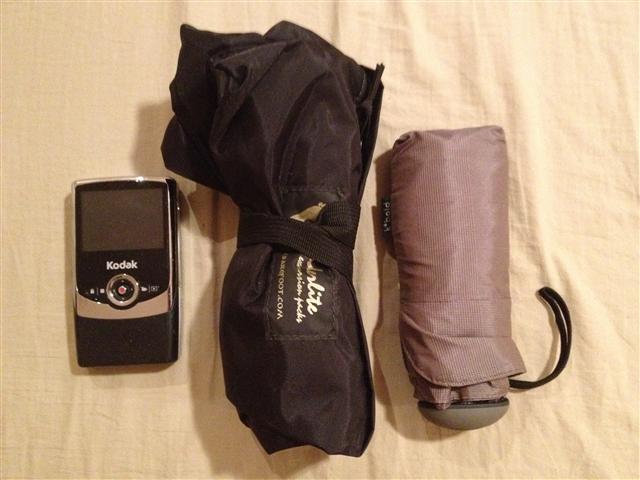
In the above picture, you can see how small it rolls up. It is a standard teardrop shaped backpack with one main compartment and another smaller pocket on the front. The main compartment offers a considerable 32L of storage capacity, yet the entire bag weights slightly less than 9 ounces. This carry capacity coupled with the small pack size and low weight is why I like it.
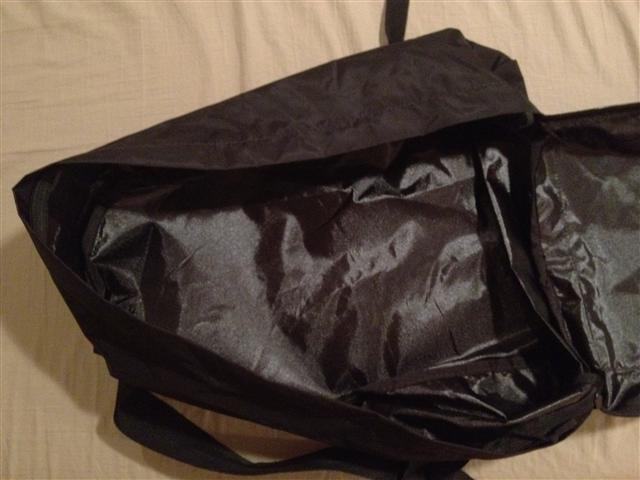
It is built using a decent 420 denier material and the interior is coated with a water resistant polyurethane coating to keep your belongings nice and dry. I generally want my bags to use the heavy duty YKK brand zippers, but the Wanderlite uses a much cheaper, no name brand, one. To be honest, I tested the zipper, roughly opening and closing it about 100 times and didn't encounter any issues and the zipper is still as good as new.
The shoulder straps are unpadded yet comfortable for short day trip use (even when fully loaded). It also has a grab handle on the top making it easy to pickup.
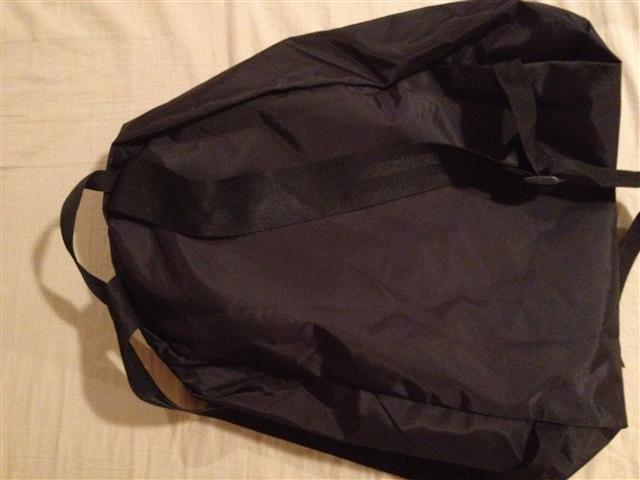

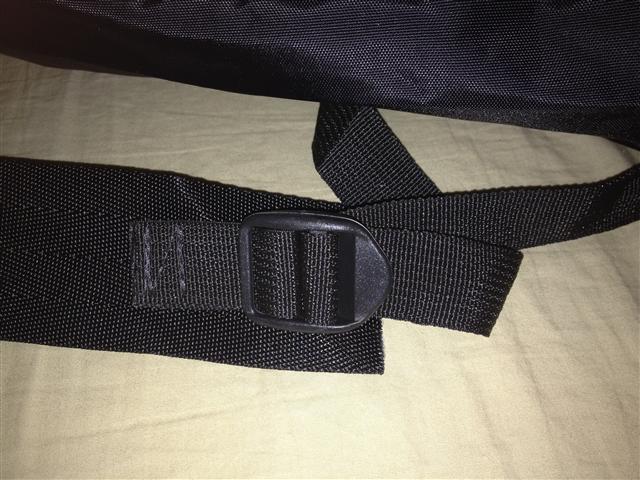
I actually loaded the pack with close to 20 pounds of clothes, electronics and accessories and wore it for about an hour. The bag was easy to carry and it held up extremely well. I wouldn’t use this bag for a hiking excursion, but for the purpose of an easily packable, lightweight secondary day-trip bag, the wanderlite can’t be beat.
Popular journal app Path uploads your personal contact information without notice
Well well… another day, another security issue with a popular mobile app. This time the culprit is a popular life journal app called Path. Arun Thampi discovered that Path uploaded his entire address book (names, numbers, emails) to Path without his prior consent. Arun highlighted the fact that the app never asked for permission to upload this type of sensitive info to Path.
Path’s founder and CEO responded to Arun:
“We upload the address book to our servers in order to help the user find and connect to their friends and family on Path quickly and [efficiently] as well as to notify them when friends and family join Path.”
The CEO went on to say that a recent update for the Android version asked for permission to upload the address book (but it still was not done opt-in style). IOS users still don’t have the luxury of deciding. Regardless of what the company says from this point on, it will be seen as a reaction to the discovery rather than a real genuine interest by Path to inform its user and allow them to intelligently decide on what to do with their information.
In recent weeks, I had been testing Path and will discontinue its use based on this new information. Companies have to learn that being upfront with their users is critically important and that protection of personal data is paramount.
TSA agents may steal your belongings
Would you be surprised if I told you that some TSA agents have been caught stealing from passengers? The TSA is reporting that an agent at JFK may have stolen up to $5,000 in cash from passengers as their personal affects rolled down the screening conveyor belt.
Another TSA employee, this time in Dallas, has been put on administrative leave because he may have stolen up to 8 iPads from passengers. MSNBC interviewed (Nico Melendez ) a TSA spokesperson who made some interesting recommendations for travellers:
- He recommends putting all your valuable items (cash, watch, wallet, phone, etc.) in a zippered pocket in a briefcase. I couldn’t agree more. Never drop valuables in a plastic bin where a good thief can steal it in the blink of an eye. Make is as difficult for them to steal as possible. Personally I put my valuables inside one of the many inside pockets of my Scottevest jacket, then zip the pocket and zip the jacket.
- He recommended never checking in valuables. He says that in addition to TSA screening, a checked luggage may be handled four or five times by airlines (by up to 10 different people). I read this and wonder why people still check in luggage.
- He says that sometimes passengers pick up the wrong luggage (from the carousel) and therefore lost luggage may not have actually been stolen but rather taken by mistake.
- He also highlights the fact that items often get forgotten in “resolution rooms” after a more detailed inspection. So double check to ensure you packed up all your belongings if you get sent to secondary screening.
- He recommends adding clear identification to all your belongings to ensure your items can find their way back to you if misplaced. I agree with this recommendation but with one caveat, never list your address. If a thief knows you are heaving to Cancun on vacation and picks up your address from your luggage tag then he can more comfortably rob your house while you are away. I recommend listing your name and a cell phone number.
Canada's WestJet to charge more service fees
Westjet is Canada’s second largest airline and it recently announced that it has found opportunities to double “ancillary revenue”. Ancillary revenue is income derived from non-ticket sources. One of the possible sources of new income “could be” checked baggage.
The Westjet CEO said more specifically (according to Reuters) that they are carefully watching airline industry practice of charging passengers a fee as of the first checked bag (Air Canada charges $25 as of the first checked bag).
This provides more motivation to be a onebag traveller. I will be travelling to Asia next month using only a carry on and some Scottevest clothes with lots of pockets. Stay tuned as I will be blogging product reviews, tips and tricks.
How to travel light with only a carry-on
Travelling is usually an amazing adventure full of wonderful memories and experiences you will cherish for life. Only one thing stands in the way of your trip: air travel. Airlines seem to be charging more for less and nothing seems to exemplify this better than checked in luggage fees. Many airlines now charge fees from the first check-in bag. Add to that the fact that your luggage gets treated like a football, subject to theft by shady baggage handlers, usually takes 20-30 minutes to find its way on the conveyor belt and sometimes sent to the wrong destination.
One packing expert, Doug Dyment, says he has a solution for all of our luggage frustrations, travel with a carry-on bag. He shares his years of experience on his blog.
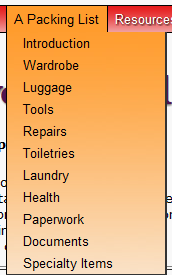
The packing list
OneBag.com is dedicated to the art and science of travelling light. The secret is creating minimalist travel lists, finding the right piece of luggage and using efficient packing techniques.
Most travellers tend to over pack because they try to cover every possible eventuality that may occur during their trip. The fact is, most of the clothes you take with you likely go unused. Be honest and think of your last couple of trips. Onebag.com stresses the importance of creating realistic lists and then sticking to it when packing. The site also provides a series of lists that Doug created based on his years of travel experience.
How to pack
Once your list is created, prepare all your clothes and pack them using a method called bundle packing. This method uses space efficiently and minimizes wrinkling (it is even better than rolling). If carrying shoes, use them to store socks, underwear, etc.
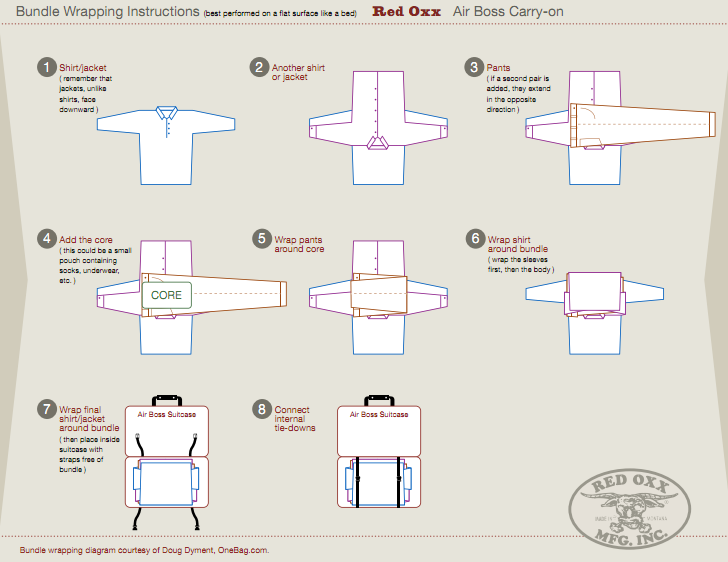
Packing template created by OneBag.com for Red Oxx. Click to see original
Where to pack
The third secret to efficient packing is using the right luggage. He spends lots of time explaining what well designed luggage should look like (depending on the reason for your trip business, leisure or a mix). In summary, he recommends rectilinear luggage (anything else wastes space) without wheels (wheels take packing space and add weight).
I will be taking a business trip to China in March and decided to buy a piece of luggage called the Air Boss by Red Oxx. This piece of luggage not only meets all of Doug’s recommendations but was actually designed in consultation with him so you know it’s good. I will write a review of the Air Boss as soon as I get back from my trip (with pictures and videos).

Veho 360 Bluetooth speaker review
Although this is primarily a European product, it is often easily available on ebay and I wanted to conduct a quick review for my readers. I received this as a christmas gift and have been using it daily for about 3 weeks now.
Quick look
The Veho 360 is a small cylindrical battery powered speaker. It stands 5 cm tall and 4cm in diameter. The device has a 2.2 watt speaker that shoots sound out from the top. On the side, it has 2 ports: a charging port and a 3.5mm audio port. You can use the 3.5mm port to connect the speaker to a non-Bluetooth device.

Herein lies one of my pet peeves with electronic devices… why do I need a special proprietary tip USB cable to charge it?
On the bottom of the device is a little switch with 3 modes: Bluetooth, off and 3.5mm audio in. As you can imagine, the first mode turns on the speakers Bluetooth radio, the second mode turns off the speaker and the last mode allows you to use it with the 3.5mm audio in (thus saving battery by turning the Bluetooth radio off). The switch itself is easy to use and mode selection is clear with a solid click feeling when you change modes.
Cost
You can find this speaker online for about $50US.
Battery
The company recommends charging the unit for 4 hours for a full charge. I conducted a couple of charge discharge cycles then timed the duration of the battery and was able to get between 3.5-4 hours of constant playback. The battery is not replaceable and I was not able to identify the quality of the battery so I expect it to support 300-500 charge cycles.
Pairing
Pairing the device was simple. I simply moves the switch to Bluetooth mode and my iPhone asked if I wanted to pair with the Veho. It was that simple. If you want to pair it with another device, you have to force the original device to forget the Veho, switch Bluetooth off on the original device, switch the toggle to off and back to bluetooth and the new device should see the pairing option.
Sound Quality

You control the volume of the device using the volume rocker of your source device (iphone, ipod, etc). Now let’s make it clear that this is not a high fidelity speaker system. Sound quality seems to be a little better with the 3.5mm audio in (compared to Bluetooth mode). Bluetooth has limited tranmital capacity and should not be used if you are an audiophile.
For a small pocketable speaker, I was expecting lots of distortion at the higher volume levels but to my surprise, it handles higher volume levels well. As expected, you can start hearing sound artifacts and degradation as your Bluetooth source moves farther and farther away from the speaker. For normal use (5-10 feet from the speaker with open access) you won’t notice this. I pushed the Bluetooth connection to its technical limits and although the audio does degrade, I didn’t lose my connection once (staying within the allowable maximum Bluetooth distance standards of course).
Recommendation
Overall I think this is a nice little speaker especially if you want something small that travels well. I do with I could charge it with a regular USB connection. How does this compare to the Jawbone Jambox or the Logitech Mini Boombox?
I have tried the Jambox and can say it is far superior to the Veho. The Jambox offers cleaner, louder and richer sound but costs 3 times more. If you need something with longer battery life, louder volumes and the ability to add feature via loadable speaker apps then go for the Jambox.
I have not tested the Logitech mini Boombox yet so if Logitech wants to send a sample, email me ;-)
LifeProof Iphone 4/4s waterproof case review
I love my iPhone 4s and use it everyday. It has become one of the most important productivity tools in my arsenal and I would be lost without it. I’m always looking for ways to keep the little guy safe and happy so I jumped on the LifeProof case as soon as it became available.
What is the LifeProof case?
This is a thin case the company claims is waterproof, dirt proof, snow proof and shock proof. The fact is, I put the case through months of real world use before I wrote this review. I wanted to make sure I gave my readers the most accurate review possible.

Installing the case
First thing first, the product ships without a manual. There is an information insert that asks you to visit their website for installation instructions. The website is straight forward and provides installation, un-installation and maintenance information in text and video format.
The product comes in 2 pieces (a front and a back piece) that you slowly and carefully snap together. You want to make sure that each of the mini latches in the case lock properly otherwise your case would not be waterproof. You also want to make sure your phone is very clean. I even washed my hands a couple of times and conducted the installation on a dust and lint free surface.
Assembly is very simple and consists of aligning the 2 pieces together and slowly pressing the towards each other. Do it slowly and carefully to make sure each piece snaps in and that you don’t flex the plastic case too much.
If you ever need to take the case apart, follow the instructions on their site. Now here is my first issue. My last case was the Otterbox defender because I tend to switch cases, depending on my day. My 2 main cases are the Otterbox defender (when I need the extra protection) and a Mophie Juicepack Air (when I need battery power). With the LifeProof case, done are the days of swapping cases, their product was built to be installed once and rarely removed. Keep this in mind.
The dock port door
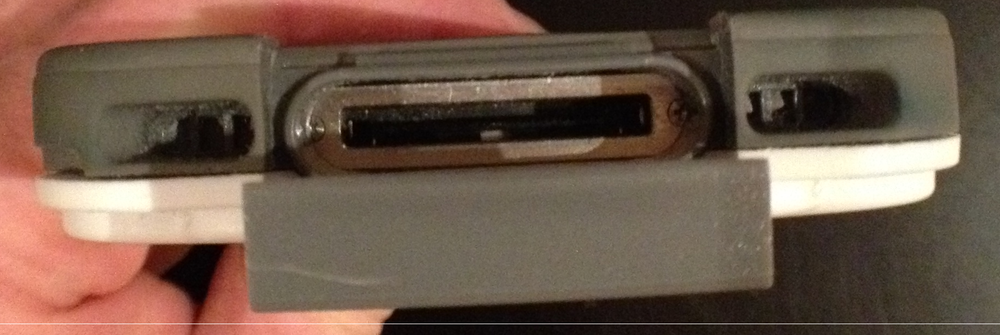
The Lifeproof case has a mini hinged door that closes to keep dust and water out. It looks dinky and cheap but the company states that it has been tested for 10 000 cycles so you should be good for a while.
The original iPhone charging cable will fit through the opening but that’s about it. With this case installed, I wasn’t able to use any of my accessories that dock the iphone. Even the dock SendStation dock extender didn’t fit. This was my second issue with the case. I wish they had made the dock connector door just a little bigger.
Headphone connector
To protect the device, they have a screw in (with an o ring) headphone plug protector. They include a general use headphone adaptor which screws into the headphone port and allows you to hook up you own headphone but again, this is just one more accessory I had to drag with me.
I tested the headphone jack with my Etymotic, Ultimate Ears TripleFi 10 and Senheiser headphones and none of them can be plugged in without this adaptor. The Apple stock headphone do fit (but who really uses those $0.99 crappy earphones)..
Other phone features
All of your devices features are accessible with the case installed. Most work surprisingly well but….
I had issues with the silent rocker. Many times when the phone was in my pocket, it was automatically switching the phone to silent. My wife had the same issue a couple of times when the phone was in her purse. My guess is that the silent rocker is a little bigger with the case on which is making it more likely to switch modes unintentionally.
Protection
The company claims the case is waterproof to 6.6 feet and that it can survive a similar fall onto flat concrete. The case was also designed to operate in the -40 - 140 degree Fahrenheit range (which covers Apple’s recommended operating temperature of 32 – 95 degrees).
Conclusion
I love the concept of the case and the fact that it offers great protection but considering the caveats I discovered, I am not likely to recommend this case (unless you really need extreme protection and are therefore willing to live with the shortfalls).
Should you keep your goals private?
My last article about goal setting can be found here.
A researcher has an interesting proposition... KEEP YOUR GOALS SECRET.... What? this goes against everything we have heard in management theory for the last 20 years.
Watch the above video and let me know what YOU think
Wozniak : believes some Android features are better than the iPhone
Before people start sending me hate mail, Woz still believes the iPhone is a better overall experience but believes Android performs some functions better. One of those features is voice commands and built-in navigation. With all the phanphare around SIRI, WOZ says the Android version performs better (for him at least).
In case you missed it, WOZ went to the Google campus last month to take ownership of a freshly baked Google Nexus phone (although his Android phone of choise is still the Motorola RAZR). WOZ said “The iPhone is the least frightening thing. For that kind of person who is scared of complexity, well, here’s a phone that is simple to use and does what you need it to do.”
The fact is Apple has bought a bunch of mapping and navigation companies but has yet to announce anything concrete. When of when will Apple finally offer some type of IOS bundle navigation.
As for SIRI, we all know it is beta and Apple is likely collecting voice samples to improve the accuracy of its speach recognition engine. Plus many of SIRI's add-on features (like finding a pizzeria) still don't work outside of the US.
Read for more details.
OnLive Desktop brings Windows 7 to your tablet
OnLive is an innovative company that offers to stream console games to your TV, PC or tablet. So you can start a game on your TV, then move to the PC and continue playing them at the airport on your ipad as you wait for the plane. What amazes most people is just how smooth the graphics are for a remotely streamed offering.
The fine folks at OnLive are now bringing their remote streaming expertise to the wonderful world of Windows. They will be bringing to market (on January 12 2012) a new offering called OnLive Desktop. You will be presented with a full windows 7 operating system loaded with the Microsoft Office productivity apps you have come to love. What really sets them apart is that the entire experience is touch optimized and is so well designed, you can even stream a video and watch it on your device with little degradation or artifacting.
We know that their basic entry level offering will be free and offer some basic apps with 2GB of cloud storage. The next tier will be $9.99 and offer 50GB of cloud storage and the full suite of Microsoft Office productivity tools. An enterprise version is also in the works with all of the customization and control companies expect.
Vizio entering computer business
We learned that Vizio will be releasing 5 computer in June 2012. For those that don't know, Vision hit the US market a couple of years ago with high quality but affordable TVs. Their executives said they will do for PCs what they did for TVs with unbelievable pricing.
iPad 3 rumor roundup
Anything you hear or read about the iPad 3 is pure speculation so take it with a grain of salt but..... in case you were wondering what the interwebs are thinking, here is a roundup.
Most expect the iPad 3 to include:
Retina Display - Likely
Most would be surprised if the iPad 3 didn't include a Retina display. A Retina display is any screen that has a pixel density above 300dpi. The current rumor is that the iPad 3 will have double the resolution (2,048-by-1,536) of the iPad 2 plus a 326dpi Retina display.
Not only has this been a persistent rumor but we know that Apple rivals are working to bring these types of resolutions to their devices so Apple has to deliver if it wants to remain king of the hill.
Multiple Screen Sizes - Unlikely
Many believe Apple will have to create a smaller cheaper and more portable iPad to stay competitive. We all know Steeve thought a smaller screen would make the device un-usable so my guess is that they will not create a smaller screen version.
New Quad-Core A6 Processor - Likely
With each iteration of the iPad, Apple has bumped up the horsepower and there is no reason why they wouldnt do the same again. Chances are they will move to a new faster and more efficient chip likely called the A6. Unfortunatly that is about all we can say with certainty. We don't have any credible information about the chip. Is it a faster dual-core or is it a quad-core chip? If Apple can come up with a power efficient quad-core chip then I'm sure they'll use it but they won't sacrifice battery time for power.
More Storage - Maybe
Many thought this was a given but with the advent of iCloud and itunes Match. I doubt Apple will double storage capacity on the iPad 3. I believe we will see 16/32/64GB capacities like the iPhone 4s.
Thunderbolt compatible - Not likely
Obviously Apple will someone bestow the speed of thunderbold on its new device while maintaining USB connectivity. The read question is will the connectivity be through a dock connector cable or will they add a thunderbolt port on the device itself?
My personal guess is that connectivity will be done through a dock-connector cable.
iPad 3 will be thicker
If Apple uses a higher resolution Retina display then we all expect the device to be slightly bigger since the back illumination may require an additional LED illumination bar and more battery power.
Better camera - likely
There is nothing more frustrating that taking beautiful pictures on your iPhone 4s then switching to an ipad and taking grainy ugly ones. My guess is Apple will be the 8MP Iphone 4s camera on the back and an HD capable camera on the front to allow HD Facetime.
From Aluminum to Carbon - moderately likely
We know Apple hired a composites engineer a while back and the standing rumor is that they will switch from aluminum to a lighter and stronger carbon fiber composite. This may provide a better user experience, more reliability and cheaper manufacturing costs.
March release - Likely
There is no way to be certain but most industry insiders expect the new Apple tablet to be released in March. This makes even more sense when you the other industry rumor is that Google will release a new sub $200 7" Android tablet to compete with the Amazon Fire and Apple iPad.
iPad 2 price drop - Likely
As competition from the Amazon Fire heats up, Apple may have to find a way to play in the lower cost tablet market and keeping the iPad 2 as their entry model may do the trick. Analysts believe Apple may keep it around and sell it for either $299 or $399.
Chitika , an ad network, reported that it saw flat ipad stats all throughout the holiday period. The Amazon Kindle fire had 20% daily gowth during the same period with a 120% traffic jump between december 24 and 25. The RIM Playbook and Galaxy tab also saw traffic increases.
This may mean that competitors took a bigger byte out of Apple's holiday tablet sales and that they will have to release a killer tablet to stay competitive. This simply adds more fuel to the fire. Let's hope Apple's up to the challenge.
MacRumors claims to have examined an iPad 3 display and confirm that it will have a high resolution Retina display.

To to handle interruptions at work
With the economic realities we have been living with since 2008, companies are forcing employees to do more with less. Not only are companies asking employees to be more creative and use less resources, they are also asking less employees to do more work.
An interruption is anything that distracts you from the primary task at hand. Common workplace distractions are emails, phone calls, drop-in meetings, etc
This means that most people you talk to, working in a corporate environment, have too much to do and not enough time. This means a small number of daily interruptions can have a huge impact on your productivity.
I wrote an article about MAC OS Lion January 2011 and one of the note in it said :
The Research The truth is that when we attempt to multi-task, we become much less effective. Modern cognitive research clearly demonstrates that when people multi-task, they perform less work and miss information. Researchers discovered that re-orienting yourself to the task at hand, after a distraction, takes 10-15 minutes. Quantifiably, performance for multi-taskers can drop as much as 40% along with a marked degradation of memory and creativity.
The reality is that you cannot completely get rid of distractions. They are a natural part of your work life, the key is to managing them efficiently.
You cannot improve that which you cannot measure
Having managed large operational groups for some multinationals, there is a mantra I repeat to most of my managers. You cannot improve that which you cannot measure. Before you start panicking about how many interruptions you have to deal with on a daily basis, make an objective inventory. Using a simple sheet of paper and a pencil, write down at least the following information (each time you are interrupted):
- Date / Time
- Duration of interruption
- Who interrupted you
- Why they interrupted you (the subject)
- Was the interruption worthwhile?
I recommend you log interruptions for at least 2-3 weeks before you conduct your first review. At the end of your first logging period, it's time to make the data sing. First determine which interruptions were worthwhile and valid. Are they coming from a particular person or group? Do they concern a particular topic? Determine if you can stop these interruptions by making time for these topics or people as planned events in your calendar. You can then inform people to keep these issues until the planned meetings.
You will most likely have interruptions that were not worthwhile and you have to address these. Talk to the people in question and explain why you believe they were not valid and how they should address these in the future. Coaching is the key here. It is useful to explain how these interruptions impact your productivity.
Voicemail is your friend
Most people I talk to at work don’t know how to configure their phone to send calls straight to voicemail. Now is a great time to find out. I’ll wait here while you go and ask the question to a colleague or support person.
If you are working on a tight deadline or simply need some uninterrupted time, send calls straight to voicemail. I recommend you change your voicemail greeting every morning so callers know you are in. Your voicemail message should mention that you are busy and will be checking your messages sporadically during the day.
Do not disturb sign
Whether you work in an office or cubicle, people may drop by unexpectedly and demand an audience. Most of the time, you should you the log method but there may be times when your work is too important and you just can’t afford the interruption. For these times, I recommend you create a notice printed sign that says you are working on something important and would appreciate not being disturbed.
Hand this sign just before people come into view so they do not break your concentration. Explain to your team that you expect them to comply with the sign when they see it because it is only up when absolutely necessary. People generally understand and will comply.
Reserve some available time
- If you are a manager or team lead then a good habit is to reserve some “general availability time” in your calendar. There is no magic rule of how much time or how often. You should reserve as much time as needed but no more. Share these windows of opportunity with your various stakeholders and ask them to leverage these when they need your attention.
-
There are people that you interact with on a regular basis. These are people for whom you should have dedicated reserved time in your calendar.
Conclusions
Hopefully you found some good ideas to help you be productive. Feel free to send me comments, questions or ideas.
Google acquired another 217 patents from IBM.
Engadget is reporting that Google recently acquired 217 patents from their big blue brother( aka IBM). The transaction was posted in the USPO assignment database on Tuesday. Some analysts have looked at the patents in question and have said they include techniques related to email administration, Instant messaging, video conferencing, presentation software and the like.
Just a reminder that they also acquired another 1000 patents from Big Blue in July of 2011, 1023 in September of 2011 and bought Motorola Mobility which also had a vast patent portfolio.
Could they leverage these patents to protect Android against legal attacks from Apple and Microsoft?
Read More: Link
RIM Secretly looking for a new CEO
2011 was a difficult year for Research in Motion (aka RIM) and it’s 2 CO-CEOs: Mike Lazaridis and Jim Blasillie. Now Canada’s Financial post is reporting that the firm may be searching for a new replacement CEO. The paper’s unnamed source believes Barbara Stymiest may be the frontrunner for the new job. She is a member of the RIM board, former head of the TSX Group Inc and the former Chief Operating Officer of Royal Bank of Canada.
The market seemed to like the rumor since RIM stock edged up slightly after the news hit the market.
Read More: Link
Internet Explorer 6 is dead. Long live IE.

Many of us thought IE 6 was already dead but it seems we were wrong. As its share of the web browser market fell to below 1%, Redmond finally gave it a one-two sucker punch. IE6 is now officially down for the count. Roger Capriotti , the Microsoft director in charge of IE marketing said : “IE6 has been the punch line of browser jokes for a while, and we’ve been as eager as anyone to see it go away.”
StatCounter’s latest report shows that Chrome 15 is now the most popular single version browser in the world (surpassing IE8). Combining all versions of all browsers, Internet Explorer is still king of the browser hill.
Read More: Link