
Skype offers free WIFI access in 50 US Airports
Make travelling less stressful with free WIFI from Skype. Until December 27 2011, The fine folks at Skype are offering you an hour of FREE WIFI internet at more than 50 US Airports. All you need is a free Skype account and a Windows, Mac Skype application (or IOS Skype WIFI App).
You can read the Skype blog posts and get a list of participating sites here.
In years past, we have seen Google offer similar gifts (but alas, not this year).
Features I want to see in Evernote
I love the power and simplicity of Evernote. Having used it for a little while, I have some suggestions I wanted to share with you (hopefully someone from Evernote sees this, because improvement recommendations sent to their support box seem to get nowhere).
- You can email notes into Evernote and they get saved into your default notebook. I would love for my Evernote account to have multiple email addresses, each saving a note to a different notebook with particular tags (like a predefined filter).
- Evernote has spent a lot of time making their web client better but I still find it clunky and difficult to work with. I wish their clients (Windows/Apple) had a “thin” mode where your database was not downloaded locally but accessed via the web without leaving traces on the local PC. This would be handy in situations like a work PC where you need the client’s full features but don’t want a copy of your complete database downloaded on the PC.
- Evernote should include some basic image editing features such automatically straightening, cropping, rotating, and enhancing of scanned documents or images.
- I know the real power of Evernote is its awesome search capabilities but I use Evernote as my GTD Reference system and there are notes that never need to come up in a search. I wish there was a per note feature to exclude a note from coming up in a search.
- I have multiple notebooks and hundreds of tags. I wish there was a way to configure tags to pick up all notes assigned to a tag regardless of what notebook I am currently in. Currently it only displays the notes with the selected tag in the active notebook.
- I would like the web clipper to have a set date option directly when clipping a page and note have to go into the full client to make the change.
- I want metadata templates (or note templates). Let’s say I have a bunch of contact notes in a notebook or assigned to a particular tag, I wish I could configure Evernote to show a default pre-defined field note (i.e. with Name, address, tel #, etc). The templates should be user definable.
- If I pick a particular tag, I would like to be able to print out the note titles as a list. I use Evernote for GTD and this missing feature is a real pain.
- I want to be able to encrypt an entire note regardless of the content. Come on Evernote, security is top of mind for most people.
- Currently when someone shared a notebook with me (with full access), I can create new notes in it but I can't move or copy existing notes. Why not?
- Notebooks shared with me should be visible on my main Account tab and not on a separate Shared tab.
- I use to use SmugMug.com to share my photos with friends and family. One cool feature was custom URLs where I could map a URL I owned (i.e. photos.kiledjian.com) directly to my SmugMug account. This could be really cool for Evernote. Evernote could have a public Evernote site for customers where we could publish info we deem public (like a mini blog).
This is my rant for now. I am sure more suggestions will come up in a couple of months…
Other Articles you may like:
- Creating the paperfree work environment with Evernote
- Review of the free scan to cloud software - ScanDrop
- Workflowy is a great list manager
- The Getting Things Done Workflow (GTD)
-
How to tag information
I recently had some more suggestions for new Evernote features:
- I would love to be able to work with notes for 2 separate tags in 2 separate panes simultaneously. Multi-pane Evernote option would be great for GTD users.
- A windows phantom print driver to get content into Evernote (Apple has had this for a while).
- I would like them to increase the file/note size limits for premium users. I don't upload huge files often but once in a while it bothers me when I can't get that one file into it.
- Evernote should have a built in POP/IMAP client. I would love to be able to have Evernote pull my mail from my IMAP server and archive it in Evernote. You can always create a forward rule but this is clunky and not the best option.
- I would like to be able to format Evernote notes using markdown sometimes. Would make like a little simpler.
- Export to markdown. I user Evernote to write and store my blog posts... It would be super useful if it could export a note in Markdown.
Be safe when staying in a hotel (part 4) - Hotels are for spying
In most countries, a hotel is simply a convenient place for you to stay and recharge. Without naming any specific countries, local intelligence agencies in some of them are known to use hotels as an information collection tool on guests.
In these countries, you should assume that everything you do is monitored including
- telephone conversations via the telephone
- assume the hotel's internet service is monitored
- assume the room is bugged for audio monitoring and sometimes even video
This being said, it is important to never leave your laptop, PDA or confidential/important documents in the room. Understand that intelligence agencies are not thieves and will not steal your items but are more likely to copy or clone them so as not to arouse suspicion.
Some tips and tricks related to laptop safety
- Travel with the minimum. When travelling overseas where there is the potential of device confiscation or espionage, ensure that you travel with the minimum information you need. Some people mistakenly assume that strong encryption (like Truecrypt is enough). Understand that any customs agent can ask you to unlock your encrypted drive or partition. If you want to go this route, use hidden volume within an encrypted drive to ensure you have plausible deniability. Move everything you don’t need onto an external drive (kept at home) and then use a tool to wipe the empty space on your disk with at least 7 over-writes.
- Update your PC. Before travelling, ensure your software and operating system are updated. Keeping them updated minimizes the risk of having gaping exploitable vulnerabilities. For software checks, I recommend you install and use the Secunia Personal Sofware Inspector (http://secunia.com/vulnerability_scanning/personal/)
- Secure your PC with software. Ensure you are running a good PC firewall (not the one built into Windows) and a good Antivirus. And of course… keep them updated.
- When possible, use https to secure your internet communications. If you are using Firefox then I strongly recommend you install a free plugin called HTTPS Everywhere produced by the Electronic Frontier Foundation - https://www.eff.org/https-everywhere The EFF describes it as “It encrypts your communications with a number of major websites. Many sites on the web offer some limited support for encryption over HTTPS, but make it difficult to use. For instance, they may default to unencrypted HTTP, or fill encrypted pages with links that go back to the unencrypted site. The HTTPS Everywhere extension fixes these problems by rewriting all requests to these sites to HTTPS.”
- VPN it. When travelling, nothing beats a reliable VPN connection back to your home country. There are lots of services and you should choose one you feel comfortable with. With a VPN connection, all traffic from your PC to the internet is encrypted and routed through your VPN service provider. Which means a man-in-the-middle wouldn’t be able to intercept your traffic. Make sure you choose a reliable company since the VPN provider sees the tail end of your traffic in unencrypted format (unless you use https over the VPN).
… to be continued
Be safe when staying in a hotel (part 3) - What to do when checking in
When travelling, it is best to assume that anyone can be a hostile. When you pull up to the hotel, ensure all of your luggage is removed from the taxi or bus. Stay with your luggage until it is brought into the hotel lobby. Even in the lobby, always keep an eye out for your luggage. Remember that thieves are always looking for distractions and a busy lobby may be the perfect opportunity to snatch your items (or stuff something) in your bag.
If the hotel is still using the old style metal keys (not electronic cards), pay particular attention about how they treat departing customers. Are they immediately recovering the keys and storing them behind the counter or leaving them on the counter for later processing? Unattended keys can easily be copied and the thief can easily overhear the room number during checkout. This is not really an issue in most North American of major European cities but is a problem in certain Asian, Middle East and African hotels.
Understand that the key to safety is minimizing the information a thief can get about you. When checking in, ask the agent not to openly announce your room number but rather to just write it on the checking card.
Reiterate to the front desk that they should never give out your name or room number. If anyone asks for you, they should call you before giving any of your info out.
The minute you check in, take 2 business cards. Keep one by the phone and the other in your wallet. The one next to the phone may be handy during an emergency if you call emergency services (for the address). The one in your wallet may be used when attempting to come back to your hotel via taxi (if the driver doesn’t know your hotel by name, if there are multiple hotels with the same name or if they don’t speak English). In some countries, I have called the hotel and asked the front desk agent to explain to the cab driver I want to be taken to the hotel.
If you are a single woman travelling, you may want to check using Mr and Mrs as a safety measure.
Remember never to register your title (MBA, CFA, etc) or your company name. The name of the game is anonymity. You don’t want to be kidnapped because you work for a foreign company that may pay ransom.
… to be continued
Be safe when staying in a hotel (part 2)
How to choose the safest hotel room
Always choose a room between the 4th and 6th floor (never lower and never higher). The 6th floor maximum is in place because most fire department truck ladders have a maximum height equal to the 6th floor[ of most hotels]. Any higher and rescue during an emergency becomes problematic.
The 4th floor recommend is in place to make it difficult for someone to enter your room from the ground floor (from the outside). If you are staying in a motel or a flat built hotel, choose a room where your balcony is on the inside of the hotel grounds (aka not towards the parking lot).
Never accept a room next to the stairs or end units, these are usually the first room thieves target. Try to get a room as close to the elevator as possible, as these are typically the safest.
As previously mentioned, get a room that has a manual door locking mechanism. Where the windows and balcony door can be opened, I typically want the hotel to provide a manual locking mechanism also.
For most overseas trips, I put the do not disturb sign on my door when I check in and take it off the day I checkout. I don’t want unattended employees in my room. When I need fresh towels or soap, I’ll pick them up on my way back from the reception desk.
If your hotel is a large multi-building setup, try to secure a room in the main building. Also stay away from buildings in isolated sections of the property.
… to be continued
Be safe when staying in a hotel (part 1)
Having travelled to over 30 countries, I have picked up some interesting tips and tricks about hotel safety over the years. Since the holiday season is approaching and many of you may be travelling, I thought I would write a couple of short, bullet point style articles to help you stay safe.
The Preparation
Before leaving, I strongly recommend that you make at least 3 photocopies (front and back) of the following documents:
- Credit cards
- All tickets (airplane, train, show, etc)
- Passport
- Important documents you may be travelling with
I would leave one copy with a trusted resource back home ( as a worst case scenario backup) and carry 2 copies with me in different places. Many international hotels request that you leave a copy of your passport with them overnight while they complete your check-in (bad idea). Never surrender your original passport, give them a photocopy instead. In the age of digital, I often scan all the documents and store a digital copy somewhere in the cloud and on my iPhone ( just in case).
Another important consideration is the documentation of valuables you will be travelling with. I recommend photographing everything from different angles and serial numbers when available.
Before booking the hotel
In an emergency situation, you are ultimately responsible for your own safety. An ounce of prevention is worth a pound of cure. Do your research before booking a hotel and the room. I generally want a non-biased third party to provide the below answers. If that is not possible then I try to stick to major Western chains that usually will be fairly honest with their answers.
- Choose a hotel where the room locks are electronics. This makes it harder for previous guests or “bad guys” to have access to your room. Ask for 2 copies of the room key and keep both on you. If you misplace or lose one, immediately notify the hotel and have replacements made.
- Make sure the room is equipped with a dead bolt lock and a peephole
- Most of us do not pay attention to the hotel’s fire suppression system but trust me this one is important. Make sure your room is equipped with a smoke detector and that each room (and the hallways) have visible sprinkler systems. In many countries the fire response teams are not as fast, well equipped or trained as in North America.
- Make sure that the hotel environment is secure with proper fencing and that the guest areas are well lit (parking, hallways, ice rooms, etc).
- Generally I prefer hotels where the elevator leaving the parking area only goes to the lobby (and not directly to the rooms).
- I try to make sure that any hotel I choose has adequate security personnel. I like to see uniformed security personnel that seem to be well trained and adequately equipped (in this case adequate depends on the area.) They should be willing to escort you to your room or vehicle if requested.
- I recommend you contact the foreign affairs ministry of your country (DFAIT in Canada, US Embassy for USA, etc). Ask them about the area the hotel is located in and determine how safe it is.
… to be continued
The Getting Things Done (GTD) Weekly Review Process
As a GTD fan, I have read the book, listened to the 10CD audio seminar, read the articles on GTD Times and subscribed to David Allen’s audio blog. In all of these mediums, one of the key messages that seems to come up over and over, is the requirement to do the weekly review. What would happen to your car if you never changed the oil? The car would get sluggish and eventually the engine would die. Same thing for GTD. You need to review your system and fine-tune it weekly otherwise it will die a horrible death.
Example of why it’s important
- When I get in the execution zone, I start completing one task after another, after another. This means that I sometimes complete tasks and forget to mark them as complete in my system. This also means that some of my projects may be without their Next Action Item, which is bad in the world of GTD.
- Even though I try to diligently capture everything in my inbox, I sometimes forget and end up with to-dos in my head. The weekly review is a great time to clean out my head.
- Just like my oil change example, without proper maintenance and care, your GTD system will eventually become crusty and no longer applicable. Keep it relevant by constantly maintaining it during your weekly review.
- Mental nirvana. I get a feeling of calm control when I realize that everything is in my system and being tracked properly. Even if my system is perfect and well maintained, there are mental benefits to doing the weekly review and realizing everything is capture and your life is in control.
How much time does it take?
There is no magic rule of thumb here. It should take as much time as you need but no more. Some of my weekly reviews take 30 minutes and others can take upwards of 2 hours. It all depends on how much action I had that week and how I managed to maintain my system on a daily basis.
I’m convinced, what do I do?
This is a question even experienced GTD practitioners need a refresher on from time to time. It is super simple.
When I sit down for my weekly review, here is my process:
- I do a brain dump and make sure I “empty” out my mental to do list.
- I ensure my emails are brought to zero and captured in my inbox
- I ensure my voicemails are all listened to and captured in my inbox
- I ensure my physical papers are all reviewed and captured in my inbox as appropriate
- I now process my inbox and bring it to zero
- I go through my calendar for the last 2-3 weekly and check if I missed any open loops. You will be surprised how many times this reminds me of things I may have forgotten.
- I go through my calendar for the 2-3 upcoming weeks, and determine if all of my open loops have been captured
- I then go through each of my lists and context to ensure the items are valid. Did I complete something and forget to mark it as such? Do I have a project with no next actions? Did someone owe me an item from the Waiting for list?
How do I do it?
My weekly review is planned in my calendar every Friday afternoon for 2 hours. For me it is a hard coded obligation. There are times when other activities become a bigger priority and I cancel my weekly review but this is the exception more than the rule. I never skip more than 1 review in a row and the next review (after a skip) will likely take double the time.
Other GTD Articles:
The four truths about Getting Things Done (GTD)
Like I have said over and over, I love Getting Things Done. It has allowed me to stay on top of things and I try to teach it to as many of my colleagues as possible. Having worked with dozens of people, I realize that there are some misconceptions about GTD, so I decided to write this article to talk about them.
1. GTD is simple and difficult
Whether you read the book, listen to an audio training program or participate to a live training class, you will realize that the core concepts of GTD are simple and based on common sense. They are very simple to learn and understand. The tools required for GTD can be as simple as folders, papers and a pencil.
So how is it complicated? The truth is GTS isn’t complicated but implementing it may be. Humans are creatures of habit and change is difficult. In order to really implement GTD, it has to become a way of life, both personally and professionally. Acquiring a new habit can take anywhere from 3 months to 3 years, depending on you. This is the difficult part. You will fall off the wagon and you have to be committed enough to get back on.
2. GTD is not free
I am not talking about cost but rather time. Many people mistakenly believe that implementing GTD will save them time (i.e. give them more free time). The reality is that GTD will require time to implement, control and manage. You need over an hour a week just for your weekly review (mine sometimes take close to 2+ hours). Then you have monthly reviews, inbox processing, etc.
The key message here is that GTD will take more time out of your day but will give you the tools to make better decisions about how you spend your time. It will give you the confidence that you are making the right time decisions. Consider the time you spend for GTD an investment. Like all good investments, it will reward you handsomely but you need to go in with realistic expectations.
3. You’re doing it wrong
As you go through GTD, you will realize that David Allen always gives suggestions of how GTD could be implemented but really leaves it up to you to customize it. Each user will setup unique contexts, collection tools and systems, review timeframes, etc. The message here is that there is no wrong way to implement GTD. As long as it is working for you and you are getting the benefits you need, then it is the right way for you.
Many GTDers will continue their search for perfection and will join GTD communities in an attempt to learn how others are using GTD. You may get great new ideas, tips or tricks that will help your own system but ultimately the best GTD system for you is the one that works for you.
Don’t worry about doing it wrong. Get it implemented, then start your lifelong commitment to fine-tuning it.
4. GTD isn’t for everyone
The reason there are thousands of time management books is that not every system works for everyone. GTD is no exception. Although I feel GTD is the best time management system I have ever used, and it seems to work for most people, it isn’t for everyone. Try it, give it a real fair chance but it it doesn’t work for you, move on and try something else.
GTD is not the be all end all. It should be one tool amongst many. I believe that an investment in oneself is the best investment you can make. They can take away your house, your car and your couch, but they can’t take away your knowledge. Remember that self-improvement is a constant journey that never ends. Strive to be a better person today then you were tomorrow.
LINKS
The Getting Things Done Workflow (GTD)
Getting Things Done may be the most important business skill
What is the next action" may be the most powerful question you can ask
Blackberry Playbook fire sale at $99
In Canada, our major retailers have been selling the Playbooks for up to $300 MSRP for the last 2 weeks and some of them are now sold out (Best Buy and FutureShop). In addition to this promo, Research In Motion (RIM) is also giving away a free 16GB Playbook with the upgrade of an enterprise BES server to v5 until December 31.
Rim seems to be in a very festive mood because The Verge is reporting that Blackberry is hawking its 16GB tablet for $99 on its employee only portal. Looks like the 32GB model is going for $149 adn the 64GB $199. Each employee can pickup 8 devices so if you know a RIM employee, this may make a great stocking stuffer.
I guess at -$300 from MSRP, the Playbook is a hot seller. Anyone remember the ill fated WebOS?
US thanksgiving black friday sales record set
Although the final numbers arent in yet, many analysts are already predicting a record year for Black Friday sales. IBM is predicting a 24.3% increase sales over last year for black friday sales.
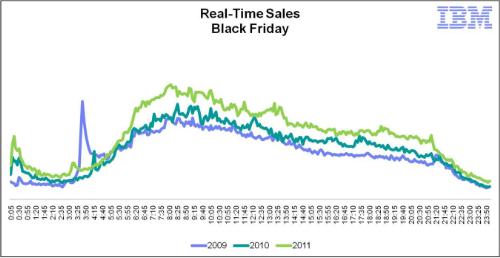
ComScore says online sales grew 26% (compared to 2010) totalling $816 million.
ShopperTrak said : “This is the largest year-over-year gain in ShopperTrak’s National Retail Sales Estimate for Black Friday since the 8.3 percent increase we saw between 2007 and 2006. Still, it’s just one day. It remains to be seen whether consumers will sustain this behavior through the holiday shopping season. ”
Is it time to become an optimist about the economy? Not yet but its a good start. LEt's see how sales hold up through the holiday period.
Crowdsourcing design work with 99designs.com (a review)
If you are planning to start a new small business or have a small business that requires some design services, you may be tempted to try out one of the newer crowdsourcing websites. The first time a customer asked for my advice about these sites, I had no idea. As a manager in a larger organization, I have never used these types of services but decided to check them out. I asked my network of contacts and found a handful of individuals that provided their real-world experiences.
Wikipedia defines crowdsourcing as “Crowdsourcing is the act of sourcing tasks traditionally performed by specific individuals to a group of people or community (crowd) through an open call.”
The site that came up most often was called 99Designs. The concept is simple, you submit a brief, determine how much you are willing to pay for a good design and you let the market bring you fantastic designs at an unbelievable price. At least that is the promise made by the site. Out of the 8 people I spoke to, only 1 had successfully run a project to completion using the site. This one person was satisfied and said designers in his area wanted close to $1000 for similar work (it cost him $300).
The 7 others had a very different perspective. They all said that very few designers actually came forward with design proposals and of the designs they received, nothing looked professional. On a positive note, every one of the 7 was able to contact customer support and quickly get a full refund.
If you have enough time to wait and see then it may be worthwhile to give 99designs a try and see what you get. If you’re not satisfied, you can always ask for a refund. Who knows, you may be able to snag an amazing design for an unbelievable price.
Other crowdsourcing sites you may like to checkout
Crowdsourced Market Intelligence
A site that allows you to crowsource design of a video commercial
Crowdsource the design and manufacture of your product ideas.
Airports may be hazardous to your Kindle
Over the last couple of days, we have been hearing more and more complaints from Kindle owners about airport X-Ray machines killing their beloved eReaders.

The UK Telegraph reports some travellers claiming their device was bricked after going through the X-Ray. The devices were nonfunctional with blank screens.
Amazon is denying that there is a design issue but seems to be replacing affected devices. Some specialists believe it may not be the X-Rays themselves but more a static discharge from the machine’s thick rubber conveyor belt. So far, we are only hearing complaints from Kindle owners. I wonder if owners of other devices like the Kobo, B&N Nook or Sony eReader are having the same experience.
Links:
Smartphone activations don't matter (iphone or android)
Whether you’re in the Apple or Android smartphone camp, at one time or another, your side used creative statistics interpretation to justify why you are the market favorite. The numbers used most often are total activations or total devices sold. But how important are these numbers?
Until a platform reaches critical mass, it is very important for the manufacturer to keep pushing the platform forward. With critical user mass come the apps which in turn will drive additional growth. So a platform needs enough users to make the platform interesting to developers but after that point, who cares!
I want Google and Apple to spend less time trying to creatively interpret statistics and more time improving their user experience.
Outsourcing ITO/BPO best practices
As mentioned in my post on November 7 2011, I was a guest speaker at a breakfast meeting for the Montreal Association of Information Security. My presentation was about best practices, tips and tricks about outsourcing.
As promised, I am making my presentation available here in PDF format. It can be freely distributed as long as it is left intact.
You can download it for free from my Evernote account by following this link : file.
State of my blog
My blog has been online for just over a year now and I am extremely pleased with it. Over the last 30 days, my blog has received over 94,000 visits. During this time, I have had visits from 73 countries. The top countries (with unique visits) are [in no particular order]:
- USA
- Canada
- China
- Poland
- UK
- Hong Kong
- Austria
- Italy
- Russia
- Japan
- Australia
- Taiwan
- Mexico
The most commonly used browsers to visit my site are (in order of importance):
- Internet Explorer (~50%)
- Firefox (~30%)
- Chrome
- Safari
As long as my blog gets this kind of traffic, I will keep writing it so thank you to all my readers. I appreciate your patronage.
4 Tips to remember when Outsourcing to China and beyond
I have spoken and written about outsourcing to China for a couple of years now. Although China does require special handling, many of the high level recommendations are the same as regardless of where you decide to outsource.
So here is a summary style high level overview of some of the important considerations:
Ask Why: Ask yourself exactly why you are outsourcing. It is because you want to reduce your costs, access specialized skills or as a risk management exercise? Understanding exactly why you want to outsource should be your first question. Take the time to get granular and as detailed as possible. If you want to save money, then decide exactly how much and how? Time spent thinking about this will help your decision making and later negotiations.
Ask Who: Once you’ve decided why you want to outsource, then the next logical question is who. What type of provider is best positioned to meet your why requirements? What is the ideal size of the provider? What is the ideal geographic footprint of the provider? What type of experience or client list does the ideal provider have?
Ask How: If I had to pinpoint one reason why most outsourcing deals fail to meet client expectations is SM&G (aka Service Management and Governance). You should have as much SM&G that you need to keep the delivery adequate and the relationship healthy but no more. Think about how you will measure successfully delivery and how you expect the vendor to report on it. What methodology should they use? How will you periodically check their reporting? Some aspects of SM&G that get forgotten are data privacy, IP handling, financial performance, etc. When dealing with offshore providers (India, Malaysia, Philippines, China, etc.), this can get doubly complicated because many times the small to mid size providers won’t have local presence and may have communication issues. Make sure all of this is clearly thought out and documented in your contract. An ounce of prevention is worth a pound of cure.
Chinese Model Cities: The Chinese government has built the concept of Chinese Model Cities. These cities are locations where government encourages a specific type of product or service. When dealing with China, it is important to consider this fact and deal with organizations that deliver the product or service you want from the designated Chinese model city for that product or service. Failing to do so may lead to huge headaches.
This is not an exhaustive list but hopefully it has given you food for thought. If you have questions, feel free to contact me using the Contact Form.
Discussion about Outsourcing Best Practices Nov 15 in Montreal
I wanted to let you know that I will be discussing Outsourcing best practices at an ASIMM event on November 15 in Montreal.
This event will cater to new and experienced professionals alike. We will also have a Q&A session at the end where I will answer your questions (using my 15 years of international Outsourcing experience).
I am currently building the presentation but will post it on my blog (post event) in PDF format for you guys to see.
Stay tuned
Weather Trends 360 predicts weather 1 year out
My local news station weatherman seems to have a 50/50 success rating predicting the 5 day forecast. Imagine my surprise when I learned about a company called Weather Trends International that claims to provide weather prediction for up to 365 days into the future. At first I thought this was another fly by nights hocus pocus type website, then I checked out their client list. It includes names like Walmart, Loblaws, Target, Coca Cola, Heinz and many more.
The prediction
As expected, the mechanism used to predict the weather is a closely guarded secret. What we are told is that they use a constantly refined trade secret algorithm (using statistics and cyclic patterns) and the results are checked by a team of meteorologists. For what it’s worth, the company claims an accuracy rate of 80%.
Interestingly, they provide predictions for over “720,000 locations, all 195 countries, islands and territories”.
Many professional meteorology services have contested that this is a “forecasting service” and say there is no scientific evidence that proves WTI can predict weather that far ahead.
How to use the predictions
Weather Trends International is quick to point out that the best way to use their service isn’t to determine the absolute weather 6 months out but rather to determine the best time period for your planned activities. If you’re planning a trip to sunny Mexico sometime next July or August, then you can use the tool to determine which week seems to be the hottest and driest during your window of opportunity.
The mobile app
They now offer a 0.99 IOS app that is basically a mobile front end to their free website. Interestingly, they seem to listen to their users and in newer versions of the app have added requested features like UV Index, sunrise/sunset, etc.
Considering the purpose of the app, I would love to a historical summary of the weather (like what WolframAlpha currently provides). Coupling the historical with their prediction would make an excellent combo.
Some of the features like animated world maps are well done but the overall app interface seems a little clumsy and not well thought out (like a date slider which doesn’t work all that well on a small iphone screen).
This is the main screen 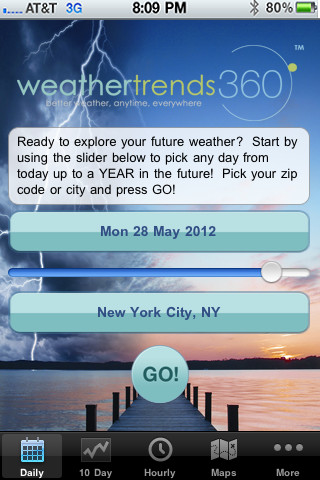
This is the 10 day weather forecast screen
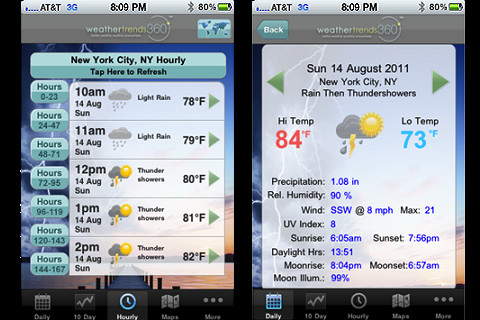
My tests
I tested the app using 3 week long prediction periods at 30, 60, 90 and 120 days out. My unscientific testing showed that their overall period prediction seems to be close enough.
Right now they are predicting the first “light snow” for my area on November 20 2011 (Montreal , Quebec). I will see if they hit the mark with this or not.
Who should use this?
Although the 0.99 price is low which makes the purchase decision easy, I don’t know what the value of the app is when the website is free and provides the same information. To make the app truly worthwhile, they need to add some app-only features.
Setting this point aside, this is a cool tool for anyone planning a family vacation or event. Even small to medium business owners, that can’t afford the WTI commercial product but that could benefit from weather predictions, will likely find this useful in their strategic planning process.
Positives
- App interface is easier to use than a Safari site for this
- Many of the graphical features are pretty
- Simple easy to understand interface
- Seems to be fairly accurate
Negatives
- I would love to have the measurement scale change depending on location (Celsius for most locations outside the US automatically)
- Rethink some of the interface design elements to make them more small screen friendly
- Don't expect accurate daily forecasts
WT360 predicted snow on Nov 20 1.5 months ago. Knowing that they should be used to determine general trends, I wanted to see how close they would get. Today (Nov 22) Environment Canada issues the following prediction "A band of snow will move through the south of the province Wednesday morning bringing the first snowfall of the season." If it does snow tomorrow morning, I will be pretty damn impressed with WT360's prediction.
Review of the Zagg InvisibleShield for Iphone 4/4s
Years ago, I learned the importance of protecting my devices to keep them looking newer longer. Even after a couple of years of use, most of my electronics look fairly new. One of my secrets is the InvisibleShield product from Zagg.
What is the Zagg InvisibleShield?
It is a specially designed thin and transparent film that you install on your phone to protect it from scratches and minor bumps. I bought the Maximum Coverage product which has all of the required pieces to protect the front, back and sides.
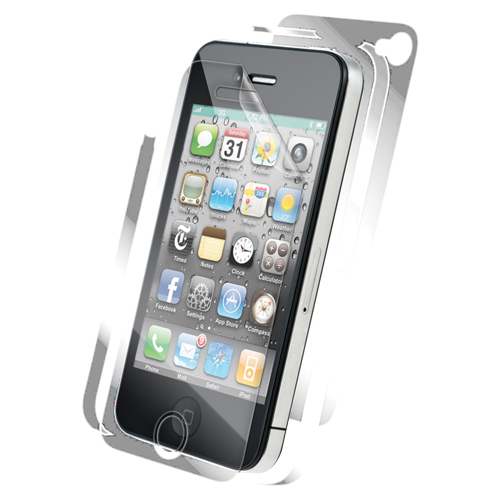
Installation
Installation is a bit tricky and for first time users will be fairly frustrating. Each kit includes a special mini spray bottle (with their special solution), a plastic squeegee and 2 sheets of the material pre-cut to the right shape.
The process is as follow:
- You thoroughly clean your device and ensure it is absolutely dust free
- You wet your finger tips then strip the first section from the backing
- you wet the material (in hand)
- you gently install and nudge the protector until it looks properly positioned
- Using the squeegee, you push out any air bubbles to the sides.
You then wait until it dries a little and move on to the sides and back.
Most installers find it challenging to get the film places “just right” and once the product has dried for 24 hours, it has to be replaced if put on wrong. Their instructions are basic at best. Even after 3 installations, I still find it challenging to find the right side piece and install it in the right place. There is no coding to ensure you install the right [side piece] in the right place.
Finished product
Anything you install on top of your screen will slightly dull, haze or reduce the brightness (orange peel effect) of your screen. InvisibleShield is no different. Although some people find that it adds a yellowish tint, I have not had that issue myself.
The InvisibleShield has a textured surface “to aid with grip”. Some people have complained that it “doesn’t feel natural” however I have never been bothered by this.
Any device I have protected with InvisibleShield has remained scratch free which is really the ultimate test.
Usage with a case
Since the time I bought my product (during the launch of the iPhone 4), they have added a new screen cover specifically made for use with cases. This is a good thing.
Using any of their other protectors with a case means the case will push up the side of the front protector and cause it to bubble and peel. Huge issue. If you have a protector installed on the back, I have found it adds too much thickness to make cases usable. I have tested this with the Mophie Juicepack, Ottherbox Defender, Lifeproof and a couple of other models.
The moral of this story is buy the specific case version if you plan on using it with a case or you will have issues.
Why I am no longer a customer
One of the biggest selling points for me was the warranty. Any company willing to provide a lifetime warranty on its products really believes in them. To be fair, I have had to replace my Shield a couple of times. First time because I started using the Mophie Juicepack air case (there were no counter indications) and found my front shield starting to peel.
Most of the time, the shipping and handling to Canada was a reasonable $US5-6. I had my iphone replaced by Apple and wanted to replace my InvisibleShield. I was shocked when the S&H [for my free replacement] was $US15. Now the last replacement came in a small bubble envelope that costs about $4 to ship to Canada via USPS and rates have not gone up that much to justify such a jump. Keep in mind a brand new replacement can be bought in most retail stores for about $25.

I tweeted and emailed their support asking for a revision to this charge but was told at every turn that the price on the site (for S&H) is the USPS price and there is nothing they can do. When I check shipping on the USPS site with the dimensions and weight of their retail package product, shipping is still under $5. So you have to ask yourself what’s going on.
No more Zagg products for me
I have 2 pairs of Zagg earphones; I have bought about a dozen Invisible shield products, for various devices, over the years. Dozens of my friends and colleagues have purchased Zagg InvisibleShield products because of my recommendations.
Having not had any issues, I would likely have been a customer for many more years but…. This latest challenge with their excessive (my opinion) S&H rate, to replace an in warranty product, was the last straw. It makes me think the S&H cost is being kept unreasonably high to dissuade people from ordering free replacements (again my opinion). Attempts to solve this issue more fairly, using their support, also failed.
For a couple of dollars, Zagg has lost not only a loyal customer but also an advocate. Knowing that every installation will eventually require replacing, I cannot recommend their product due to the high replacement cost [of their free lifetime warranty].