
Facebook Tip - It's time to unfriend
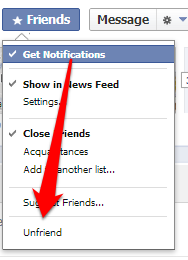
- Go to the profile page of the person you want to unfriend
- Hover over the Friends box at the top of the profile
- Click Unfriend from the menu
It's time to secure your social networks
Most social media users don't realize how much of their information they allow 3rd party apps to access. It is such a problem that I use IFTTT to send me a monthly reminder to check my social media security settings.
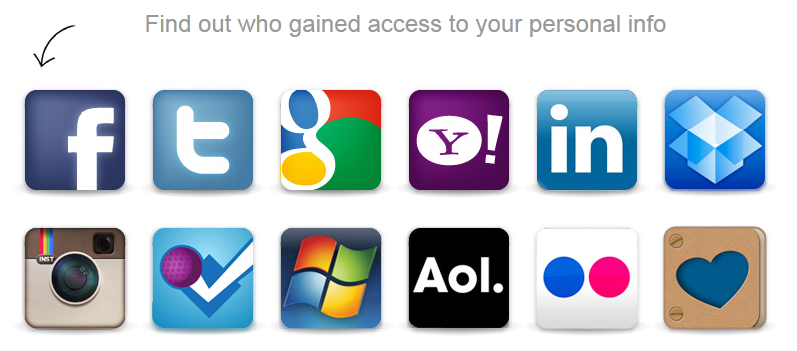
My recommendation is to use MyPermissions and I recommend you read my write-up here. It takes 5 minutes each time and it is time well spent.
If there are any accounts you want to close, take a look at AccountKiller, a neat site that shows you (step by step) how to delete your account from the most popular sites on the internet.
The best HDMI cables are the cheap ones
As we approach the holiday season, you're probably thinking about all the guests you'll have to entertain. I can't think of a better way to entertain the boys than with a new high quality TV. Just because you bought one of those new fangled really cool 3D TVs doesn't mean you have to fork over $100 for a "name brand" HDMI cable (regardless of what the teenage sales rep tells you).
There are dozens of reputable blogs and audio video specialists that preach the same sermon. Don't waste your money on expensive cables. I found it interesting that tech review site CNET uses cheap monoprice cables to test all the AV equipment that goes through their lab.
I have used Monoprice for most of my cable needs for the last 4 years (Ethernet, HDMI, Telephone, etc) and have never regretted my decision. They offer very good cables at super competitive prices. The one time I had a shipping issue, their customer support fixed my issue within 24 hours.
A 6 foot Monoprice HDMI Cable with Ethernet channel built in costs $7.54US.
Unlike most cheap cable providers, Monoprice actual speed tests all of their cables and backs them up with a lifetime manufacturer defect warranty. Even though the cables are cheap, Monoprice takes product design seriously and they implement cool technologies to improve your overall experience (including RedMere chips in some of their higher end HDMI cables).
You can buy a 15ft Ultra Slim Series High Performance HDMI Cable with RedMere® Technology for $23.21US.
What is AWG you ask? It is a size reference to the thickness of the cable. The smaller the number, the thicker the cable. The thicker the wire, the less signal loss you will experience. Of course it depends on the length of your cable. IF you want a 15ft cable then any awg rating will do (normally 28 AWG is fine). If you want a 50ft run then go for a 22AWG.
The first cable I recommended was a 24AWG (for ~$7). You can get a 22AWG HDMI cable at 20ft in length for $23.28US.
So this holiday season do yourself a favour and save some money by buying your cheap HDMI cables online from Monoprice.
The best USB cables for travellers
As a one-bag business traveller, I carefully calculate everything I bring along during my trips. After having researched and tested different types of "travel friendly" cables (rollable, foldable, retractable, etc), I can safely say my favorite kit is the Griffin USB Mini-Cable Kit.
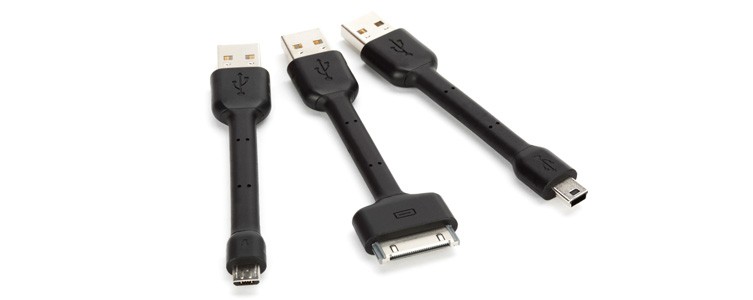
Why did I choose these? They are well built (they will hold up well to the torture of travel) and they are short (which means they take up very little space and won't get tangled). The plastic coating is nice and solid, yet the cables are flexible enough to bend into the right position. The cable plastic covering reaches the end of the connectors without any seems (nice build quality). The kit itself includes a 30 pin iphone cable, a mini USB and a micro USB cable.
Does this mean I don't carry any long cables? I carry a long micro USB cable in case my night stand doesn't have an electrical plug nearby but that is a topic for a different blog entry. I love these short cables and I'm sure you will too.
This is my personal blog and I don't use any kind of affiliate marketing. Any links I provide here are done for your convenience (I don't get anything from the retailers). I shopped around and found that the cheapest place to get them in the US is Amazon.com ($11.99US) and the cheapest for Canada is Amazon.ca ($13.89CAN)
Bring back the start menu in Windows 8 for free
Other related articles your may like to read:
- Bringing The Start Menu Back To The Windows 8 Desktop
- RetroUI - Bring Back The Start Menu In Windows 8
I recently discovered a new way to get the start menu back for free and improve the performance of your PC for free.
When I was on Windows 7, I was using a free PC maintenance software called Soluto. I used Soluto to:
- Keep Windows up to date
- cut down boot time
- find out what programs are crashing
- find out what programs are using the most horsepower
- Easily install some of the most useful free software around
After upgrading to Windows 8, I found out Soluto was compatible so I installed it then logged into their management web interface and saw a new option
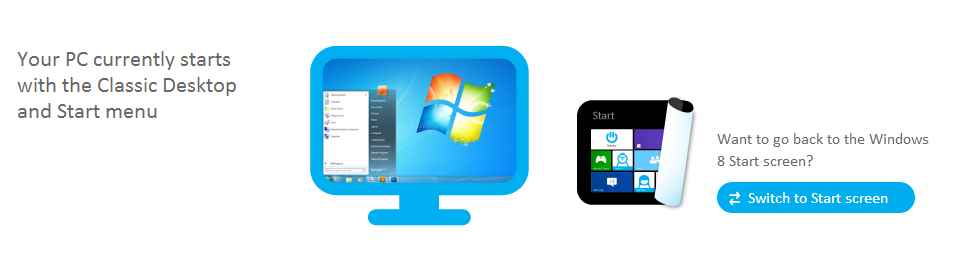
I clicked on one button, rebooted then was presented with a start button and immediately logged into the dekstop interface (instead of the new start page). And all for free for up to 5 PCs per account.
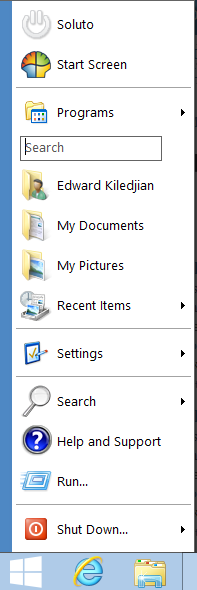
Having tested the other Start menu replacements, I think I will keep the Soluto solution running. It gives me that I want and a little more (all for free).
Run any Android app on your Windows or Mac computer
Imagine being able to run [almost all] of your favorite Android apps on a standard Windows PC or tablet. Bluestacks does just that. Using a proprietary emulation engine, they allow you to run almost any Android app on your Windows PC.
If there are some non PC android apps you absolutely love and can’t live without, you can now use them on your PC (or Mac or tablet).
Windows 8 RT doesn’t have enough apps
The biggest complaint I have heard about Windows 8 RT (aka Surface RT) is the lack of apps. Developers aren’t willing to spend thousands in development costs for a product with an uncertain future. We have heard horror stories of some developers making a measly $100 from their Windows RT apps.
Now Bluestacks is considering to bring its Android emulation technology to Windows RT. What does this mean, it means 700,000 could find their way to Microsoft’s lonely platform and finally make it a little more compelling. Even if Bluestacks released a Windows RT product, Microsoft would have to approve it for distribution through its app store which is far from certain.
Verdict
Right now Windows (not RT) and Mac users can play with the very stable and fun beta of Bluestacks. If you have an Android phone, install their client on it and you can even choose what phone apps you want to copy to your Bluestacks environment.
A great way to have some fruit ninja or Angry bird fun.
Corning unveils thin & flexible glass called Willow Glass
Outage Analyser shows cloud service outages
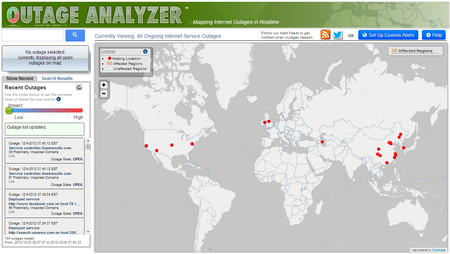
The downside of Outage Analyser is that it only uses data collected from its customers therefore if its customers aren't using a service, an outage may not show-up.
Google apps & gmail will no longer be free for small business'
The Google blog has stated that the free Google Apps for business option is going away. Until now, a small business with fewer than 10 users could opt for the free version instead of the $50 per user per year business option.
Google says this will be better for individual "who often have to wait to get new features while we make them business-ready" and better for business' "which includes 24/7 phone support for any issue, a 25GB inbox, and a 99.9% uptime guarantee with no scheduled downtime".
Clearly this is a cash grab where Google hopes to coax business users to the pay version and therefore increase income. With the new fee structure, many of its millions of business customers may choose to move to other services, including Microsoft's Office 365 online service (which offers a more familiar Office apps and Outlook experience).
Luckily Google is grand fathering existing users by saying "[...] this change has no impact on our existing customers, including those using the free version."
Samsung Galaxy S IV rumors are here
The Samsung Galaxy SIII (S3) is one of the best selling phones ever and is seen as the real competitor to Apple's iPhone 5. With all this popularity, Samsung is the butt of many jokes and the motivation behind many rumors.
Hold your Android phone tight and tell it you love it because we are now hearing rumors from "unnamed sources" that the S IV may see the light of day as early as April 2014. Little is actually known about the rumored device but it is said:
- the project is called project J (internally)
- It will come with an unbreakable screen
- It will come with Android key lime pie
- a 5" 441 pixels per inch screen (PPI)
- a quad core processor
- a 13 mega pixel camera
We all know you can trust rumors from unnamed sources so take all of this with a grain of salt but it is nice to see Samsung continuing to innovate.
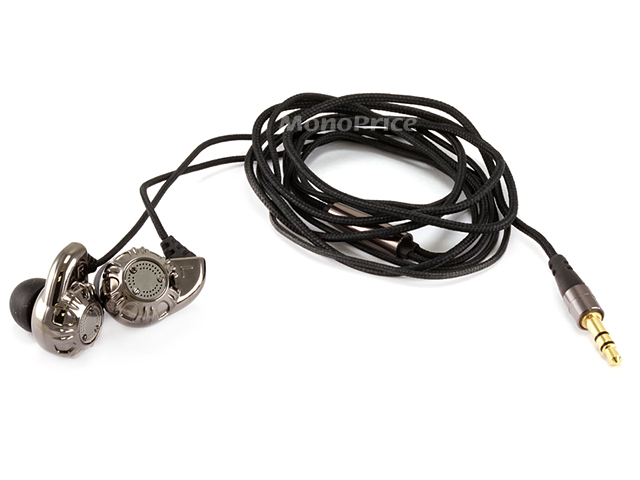
Monoprice 8320 Earphones - Amazing $7 headphones you have to try
I love headphones and have relied on these 2 models as my go to devices:
- UE Triple-FI 10 - for pure sound quality
- Etymotic HF3 - for everyday use with a mic
You wouldn’t catch me dead with a sub-100$ pair of headphones because they usually sound as good as music playing through a can of soup. Imagine my surprise when I tried the Monoprice 8320 and found them decent (they cost less than $7).
The only reason I tried these was because of the Monoprice name. For those that don’t know, I love Monoprice because they offer great quality items at very competitive prices. The headphones do them proud. For a measly $7, you get 14.2mm drivers (larger than most sub $50 earphones), a 48” cloth covered cord (which feels nice and solid) and a gold plated connector jack.
The Monoprice 8320 offers incredible clarity, a clean and full soundstage and solid build quality. I compared them to my beloved Triple-Fi and HF3 and the comparison was interesting. Using Apple Lossless encoded audio (from the source) and connecting it to my iPhone 4s with the EQ turned off, the Monoprice 8320 put up a good fight. I expected it to fail miserably (come on, it’s $7) but it competing well.
During my tests, I found that the 8320 offered a clean soundstage. Mids were full and clean. Bass was strong but clear, I didn’t experience any static or distortion at normal listening volumes.
Soundstage is a very subjective descriptor. To test a soundstage, I put on a track with lots of vocals and instruments (in lossless format ripped from a source), I close my eyes and try to feel the music. Can I hear all the instruments? Can I feel where each of the musicians is standing? When I tested my HF3 and Triple-Fi’s, I heard nuances I had never heard before. They really brought the music to life. The Monoprice 8320’s didn’t perform as well as these two (and I didn’t expect them to) but to be honest, I was dumbfounded by how well they performed. They won’t replace my 2 beloved units but this is a nice pair you can through around and not worry about.
The Monoprice 8320’s do not have a mic option but they can’t be beat for price/value.
A question I get a lot about headphones is “Do I need to use a headphone amp with my…”. I tested the Monoprice 8320 with and without a headphone amp and had the exact same performance.
I can definitely say you do not need a headphone amp with the Monoprice 8320 earphones.
They won’t be replacing my high end earphones but they beat the pants of any other sub $100 earphone I have tried.
Does Internet Explorer (IE) suck less?
Chances are you are probably using Firefox or Chrome to read this blog entry. If you are, you are in good company as most of my readers follow the same pattern. Over the years, most of us have moved away from IE because it was slow, non-intuitive and just plain ugly.
Instagram on iPhone makes you vulnerable to hacking
The Instagram app communicates with the Instagram API via HTTP and HTTPs connections.Highly sensitive activities, such as login and editing profile data, are sent through a secure channel. However, some other request are sent through plain HTTP without a signature, those request could be exploited by an attacker connected to the same LAN of the victim’s iPhone.
The only authentication method for some HTTP calls is an standard cookie that is sent without encryption when the user starts the Instagram app.
An attacker on the same LAN of the victim could launch a simple arpspoofing attack to trick the iPhones into passing port 80 traffic through the attackers machine. When the victim starts the Instagram app a plain text cookie is sent to the Instagram server, once the attacker gets the cookie he is able to craft special HTTP requests for getting data and deleting photos.
True Utility Keychain TelePen
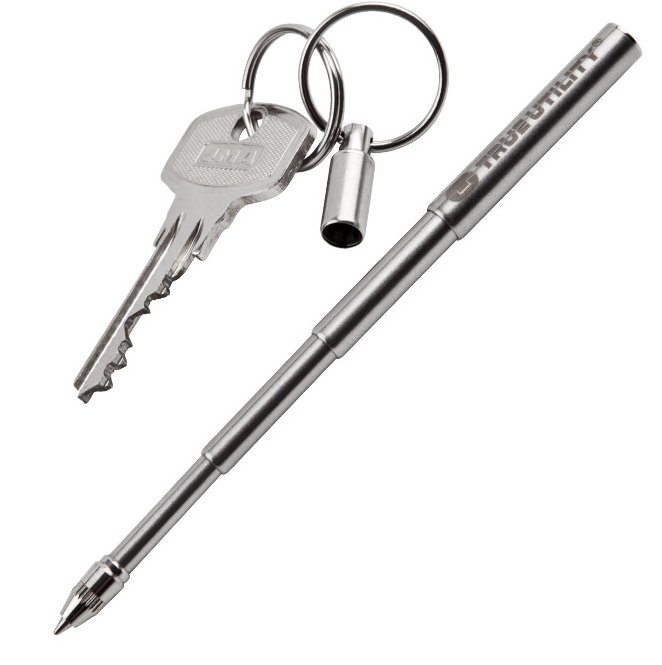
The last essential keychain tool I want to talk about it the True Utility Telepen. It's a stainless steel telescopic pen that shrinks to 50mm when closed and extends to a comfortable 115mm. When fully open, it is easy to hold and write with and closed you'll hardly know its there. Like my 2 other keychain tool recommendations, this is an everyday carry (EDC) type of item that you will find useful. Think of how many times you struggled to find a pen?
You won't write a multi-page letter or novel using this pen but for simple tasks like taking short notes, signing a check or filling out a form, its perfect.
The kit comes with 3 refills but you can always cut a bic refill once you run out.

Surface Pro will be too expensive
Like many tech enthusiasts, I am anxiously waiting for Microsoft’s Surface Pro to hit the market so I could get one. After all, it is supposed to offer the ultimate tablet experience while being able to run all my “normal” Windows apps. Microsoft finally announced pricing for the Surface Pro tablet and many stood there in shock. Depending on which version you pick up, it will cost you $899US to $999US (plus one of the keyboard covers).
Let me be clear, the Surface Pro will cost too much.
Microsoft had said pricing would be in-line with that of ultrabooks but is that a real competitor? Ultrabooks have some qualities Surface Pro does not:
- Bigger screens
- Real keyboards
- More ports for expansion
- More configuration options
- Better battery life
- have user replaceable batteries
The above list shows the advantages a typical ultrabook has over the Surface Pro tablet. I really feel that Microsoft should have made this a lost leader to help create demand and build an ecosystem. The Surface RT was too expensive when compared to the Nexus and iPad tablets. Now the Surface Pro will be too expensive compared to ultrabooks (it's chief rival).
When the Surface Pro is finally released end of January, I will bot be buying one. Instead, I will look at my options and maybe go towards a MacBook Air.
Swiss+Tech Utili-Key 6-in-1 Keychain Multi-Tool
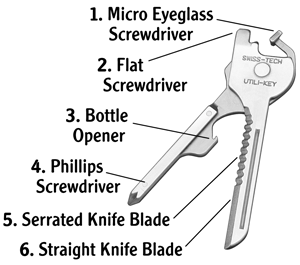
You can't use what you don't have and yesterday I wrote about my favorite keychain attached USB key. Today I want to share with you my favorite keychain multi-tool. The Swiss+Tech Utili-Key is a very portable, keychain attached multi-tool that:
- Flat Screwdriver
- Phillips Screwdriver
- Micro-Sized Screwdriver
- Straight Blade Knife
- Serrated Blade Knife
- Bottle Opener
Demand a little more and you can graduate to its slightly more capable older brother the Utili-Key XT 8-In-1. Which has:
- Flat Screwdriver
- Phillips Screwdriver
- Micro-Sized Screwdriver
- Nail File
- Nail Cleaner
- Wire Cutter
- Wire Stripper
- Bottle Opener
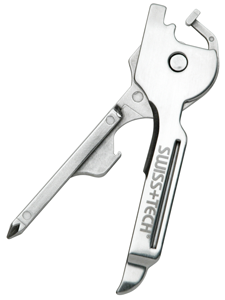
I checked the prices on amazon and the difference between the 2 items was about $3. You won't built a shelter or survive a hurricane with this but it will be there when you need it. I find you use these tools much more when they are always on you.
I had a chance to test the 8 in 1 for 2 weeks and found it well made. Since it's stainless steel, it cleans up easily and resisted scratching fairly well (even though it was in the same pocket as my keys and coins). In that 2 week period, I encountered about a dozen situations when the tool became useful. Can't beat its functionality for the price.
LaCie PetiteKey the ultimate USB key for professionals
We've all heart the old saying "the best camera is the one with you" referring to the benefits of having smartphones with cameras. The same can be said for USB keys. A USB key left in your desk drawer or home office is of no use. This is why I love the PetiteKey product from LaCie.

It is the newest iteration of their immensely popular imakey launched in 2009. Compared to its older brother, the PetiteKey is 30% smaller. The PetiteKey is waterproof to 100 meters and LaCie even says the little guy will survive a spin in the washing machine. This little bundle of joy comes in 8/16/32 GB flavours. My only complaint is that is is USB 2.0 (wish it had USB 3.0 support).
I saw the 8GB version on Amazon for $11.99.
Ultimately this is a tool that will always be on you and therefore will be ready to serve when needed.
Microsoft Safety Scanner - Free Windows malware cleanup tool
5-8% of users who downloaded this tool had some type of infection (Detected and cleaned by the tool). Interestingly many of the vulnerabilities used to infect machines have patches available but users simply didn't apply them.
Read my article entitled : Stop Hackers - Automatically Keeps Your PC Software Updated
Download the Microsoft Safety Scanner here.
Review of heart rate measurement apps on IOS
There are plenty of reasons why you may want to regularly check your heart rate. After a recent run, I wanted to compare the performance of:
- Cardio Buddy 0.99$
- Instant Heart Rate 0.99$
- Wahoo ANT+ Heart Rate Monitor (Check belt and ANT+ key for iphone) $99.00
The measurements were taken within seconds of each other so I could be sure nothing else could impact the results.
First up was Instant Heart Rate. To use this app, you gently plate your finger in front of the back camera & flash. After a couple of seconds, it detects and counts your heart rate.
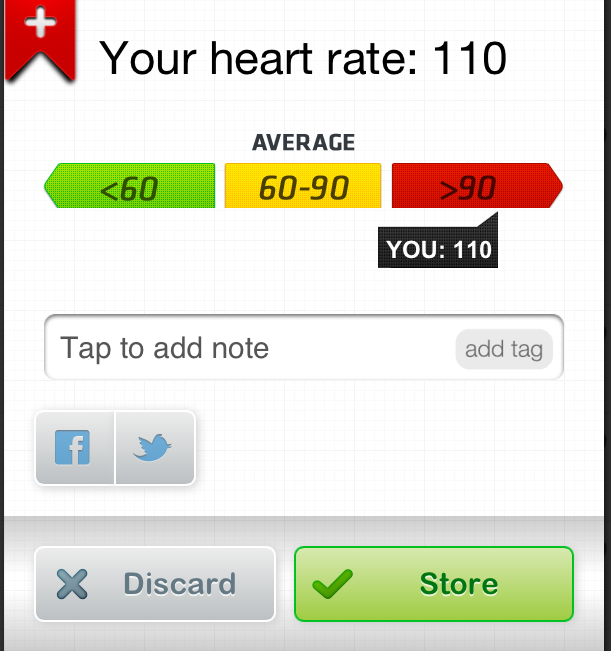
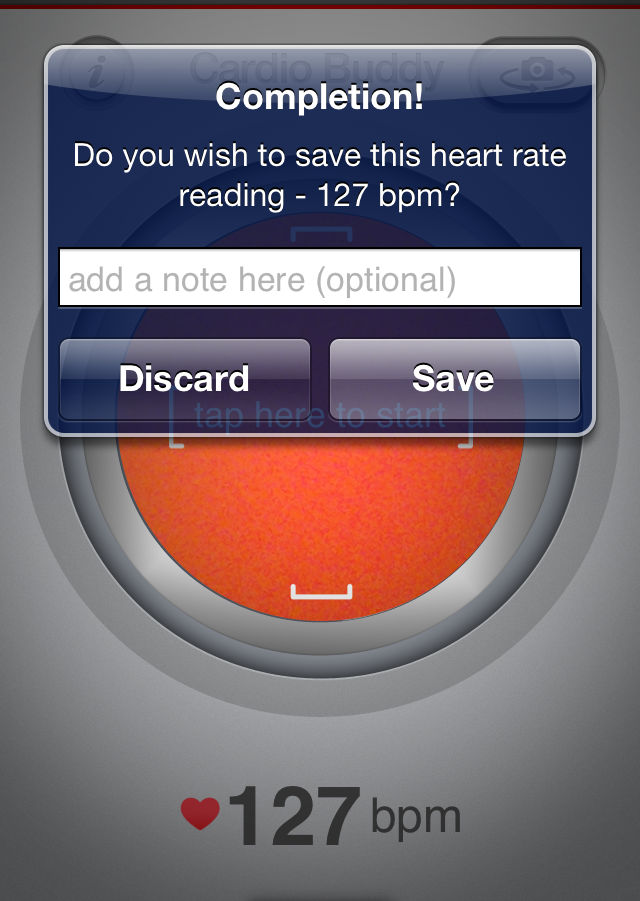
Next up was Cardio Buddy. In addition to performing a useful function (calculating your heart rate), it also has a high cool factor in how it measures your heart rate. You frame your face (using the front facing camera) and it calculates your heart rate using blood flow variations not visible to the human eye. This is a cool party trick. Everyone I show this to is surprised and amazed.
Last was my trusty chest based heart rate monitor. I have previously compared it's results to those from my blood pressure monitor and they usually match.
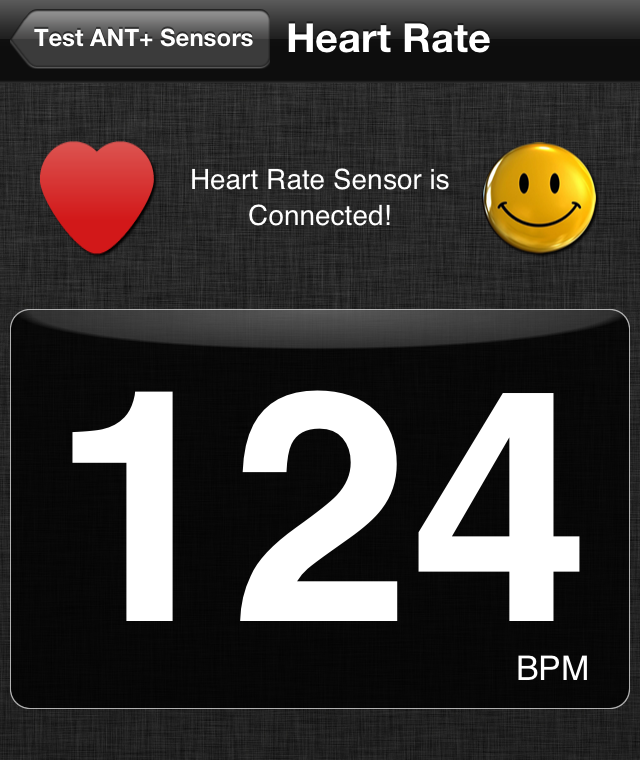
Comparing all of the results, they are relatively close but Cardio Buddy seemed to be closer to the my chest based monitor than Instant HEart Rate (which surprised me). I ran another series of test 30, 60 and 90 minutes later and the results were a almost the same. As the rest period grew longer, Instant Heart rate got closer to the chest monitor but in all the tests, Cardio Buddy was the closest.
It is important to note that the 2 app based monitors are best used in an indoor or shady environment without harsh direct sunlight.
LongURL shows what's really hiding behind that short URL
A technique used by hackers is hiding a malicious URL using a URL shortening service like Goo.gl, TinyURL or the automatic shortening done by twitter using the t.co address. There are plug-ins for most browsers that show the actual URL however you may not want to install another browser plug-in (that may compromise your security or slow down the browser).
LongURL performs this function without having to install anything.
1. GO to LONGURL
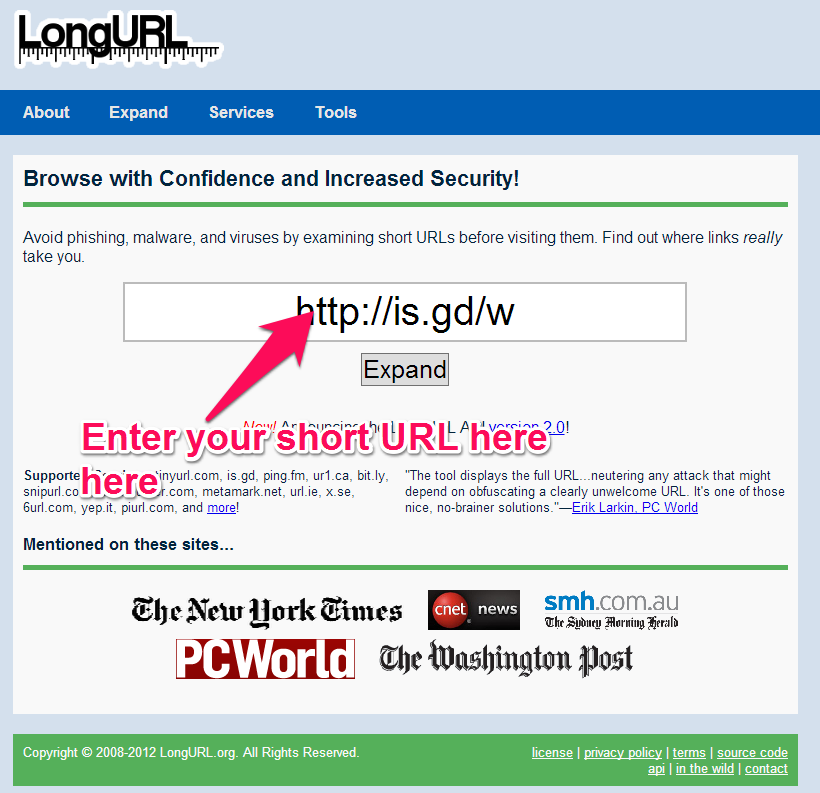
2. Enter your short URL
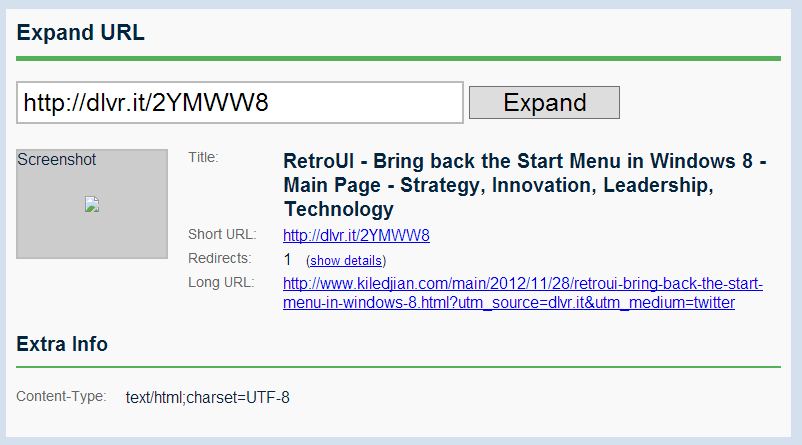
You immediately get the title, short URL, how many redirects they have seen to that address and the long URL. I tried the service with about a dozen different shortened URLs (from different providers and to different web sites) and screenshot never seemed to appear.