Creative Thinking Tip #6 - But What If You Could
If you haven't read my other articles in the series, read them before continuing:
- Creative Thinking Tip #1 - Take The Day Off
- Creative Thinking Tip #2 - Make A Friend
- Creative Thinking Tip #3 - Small Is The New Big
- Creative Thinking Tip #4 - Learn To Mediate
- Creative Thinking Tip #5 - Daydreaming Your Way To Creativity
TIP #6 BUT WHAT IF YOU COULD?
Usually when I talk to someone who is stuck, I get some type of response like “I can’t think of…” or “I can’t find a way to…” or something else similar to that chain of thought.
In situations like this, I take them out of the current environment. We may go for a short walk, go to grab a coffee or anything else that takes the person out of their existing environment. Then I repeat what they told me “I can’t think of..” and I add, “but what if you could […] what would it look like”. Often the first reaction is one of disbelief. They can’t understand why you would ask them that type of question when they told you they can’t. After I get them to play along, I keep facilitating this chain of thoughts.
- “but what if you could […] what would it look like”.
- “Then what would it feel like”
- “what would it look like”
- “If you did it, how would that make you feel”
So on and so forth. Most of the time, I would simply wait for the person to finish talking then look at them and say gently “and” or “because” which encourages them to keep going.
If is very common for the person who was “stuck beyond help” to help themselves out of their rut and into creating wonderful new solutions.
Creative Thinking Tip #5 - daydreaming your way to creativity
If you haven't read my other articles in the series, read them before continuing:
- Creative Thinking Tip #1 - Take The Day Off
- Creative Thinking Tip #2 - Make A Friend
- Creative Thinking Tip #3 - Small Is The New Big
- Creative Thinking Tip #4 - Learn To Mediate
TIP #5 DAYDREAMING YOUR WAY TO CREATIVITY
Even as children, most of us were told daydreaming was a useless activity and we were normally told to “snap out of it and concentrate on the task at hand”. Freud called daydreaming infantile.
One of the more interesting studies I have read about daydreaming came from Daniel Gilbert and Matthew Killingsworth from Harvard. Their study showed that people normally daydream 47% of the time while awake.
As cognitive science progressive, we are learning that daydreaming may actual be a useful cognitive tool. A study from the University of California at Santa Barbara ( by Schooler and Baird) provided a nice modern look at this “useless activity”. They chose 145 undergrads and gave them a standard creativity test called an “unusual use task”. For this test, the subjects are given 2 minutes to come up with creative uses of a boring everyday object like a clothes hangar, rope, etc. The subjects where put into one of four possible situations, 3 of which were:
- Resting in a quiet room
- Performing short term memory tasks
- Doing something extremely boring to encourage daydreaming
Subject assigned to the extremely boring task beforehand performed substantially better at the unusual use task (actually 41% better). The group that was allowed to daydream after being asked about the boring items did the best. It seems the incubation period (in the subconscious mind) cause by the daydreaming helped giggle the creative juices.
"These data suggest that engaging in simple external tasks that allow the mind to wander may facilitate creative problem solving," the researchers wrote in the study.
What does all of this mean? Daydreaming should be encouraged. Whether this is done while taking a long hot shower, sitting in a quiet office or cutting the grass, allow yourself to float into the wonder of your mind and that unbreakable problem may just be solved.
Creative Thinking Tip #4 - Learn to mediate
If you haven't read my other articles in the series, read them before continuing:
- Creative Thinking Tip #1 - Take The Day Off
- Creative Thinking Tip #2 - Make A Friend
- Creative Thinking Tip #3 - Small Is The New Big
TIP #4 LEARN TO MEDITATE
An interesting study was released by psychologist Lorenza Colzato & al from Leiden University in the April 19th issue of Frontiers in Cognition. You probably haven’t read the article but it explains how certain meditation techniques can help the creative thinking process.
When I speak to executives about mediation, they often think it is for relation and stress management but it does so much more. The study clearly shows that the right meditation can help substantially change your life experience by positively impacting cognition and perception of world events (aka how you experience the world).
Convergent and divergent thinking
Convergent thinking is the process of finding one possible solution to a problem using many different inputs. (many to one)
Divergent thinking is the process of finding multiple solutions to problem using one input. (one to many).
Open Monitoring or Focused attention meditation
Open Monitoring is where the meditator is asked to think about all thoughts and sensations experienced (not focusing on anything in particular).
Focused Attention is the exact opposite and the meditator is asked to think about one thought, sensation or object.
The results
The research shows that Open Monitoring improved divergent thinking and was a multiplier for new ideas.
Focused Attention on the other hand did not improve convergent thinking
My 2 cents
Beyond the clinical research, I am a meditator and find that when I do it consistently, it helps tremendously. The life of an executive is chaotic at best and I find mindful meditation helps by creating new focus and allowing me to channel my mental energy towards creative productivity.
I believe the subconscious mind (or as some call it, the other than conscious mind) is a wondrous and powerful tool if you know how to use it. It is faster than the fastest supercomputer and more detailed than the strongest electron microscope. By meditating, I feel my mind becoming more sensitive to the subtle message of my subconscious mind. These subtle messages, if help and acted on, can be incredibly powerful catalyst.
I previously wrote an article entitles "How To Deal With Stress - Tips And Tricks". In it I talk about meditation and how it can be helpful. I also cover 2 meditation tools that non-meditators can use to get started. I write:
"If you want a fast food type method for quick mediation, take a look at Paraliminal audio technology from Learning Strategies corporation or the Holosync mediation program from Centerpointe Research (the granddaddy of audio aided meditation.)"
Microsoft Office for iPad (IOS) coming in 2013
Last year, The Daily reported that Microsoft was working on a version of Office for the iPad. Now the fine folks at The Verge claim to have credible information that Microsoft is working to release Office for the iPad (IOS) early 2013.
The Verge believes that the product will be provided for free which will allow you to view Office files. They will offer an in app unlock option to enable the editing functions. The Verge believes the editing function will not be available for sale but rather made available to subscribers of its Office 365 online service.
It will be interesting to see if this will be made available to enterprise customers who do not use Office 365.
Creative Thinking Tip #3 - Small is the new big
If you haven't read my other articles in the series, read them before continuing:
TIP #3 START SMALL
A journey of a thousand miles begins with a single step.Lao-tzu, The Way of Lao-tzuChinese philosopher (604 BC - 531 BC)
I love the writings of Lao tzu so it is only fitting that he provides my third tip to break the creative deadlock. As executives, we often try to see “the big picture” which is usually an asset but in the case of creativity, may become an 800 lb anchor weighing you down.
I’ll talk about some creativity techniques in a future article but most of those techniques require you to think much smaller (smaller but faster actuallu). Accept that you will eventually get to the right level of detail but for now, accept the fact that you will start by looking at a very small subset of the situation. Pick one aspect, any aspect, and start thinking about that one thing. Don’t criticize yourself that you may be missing something or going in the wrong direction. Just accept that creativity is a strange creature and thinking small will lead to that big breakthrough later. The important is that you start the creativity wheel moving regardless of how small of movement it is.
Creative Thinking Tip #2 - Make a friend
If you havent't read tip #1 (take a Day Off), go and read it now.
TIP #2 Make a friend.
Some problems are seem much more challenging to solve and sometimes may even seem impossible. If tip #1 hasn't solved your mental block then its time to move to tip #2, make a friend.
This is a simple exercise where you pair up with someone you know and trust. You explain to them the exact situation (being as brief and concise as possible) and then you ask them to explain the situation back to you. You may realize that even though you explained it as clearly as you can, they end up with a slightly different understanding. This slightly different reality may be enough to jiggle your creative thinking by allowing you to see the problem through the eyes of someone else.
Creative thinking tip #1 - take the day off
As a business leader, you are paid for your creative thinking and not your ability to follow process. But there are times when you are stuck. You find yourself unable to make a breakthrough. I will write a series of very short snippets to help get you out of your rut and encourage the creative juices to flow.
Tip #1 STOP THINKING ABOUT THE PROBLEM
There comes a time when you have to take a step back and stop thinking about the problem at hand. It may seem counterproductive but trust me, it works. When coaching executives, I sometimes ask them to take a “real day off”. We determine what the perfect relaxation day would look like for them (e.g. golf, spa, reading a book in bed, etc) and then we make plans to implement that perfect day. No cell phones, no emails and absolutely no connection with work or responsibilities.
It is amazing the number of times an executive has come back the next day full of ideas and energy. Try it and I guarantee you will love the results.
Archive your SMS messages in Evernote with mysms
I love Evernote and the team is always looking for new ways to make their users experience better. I use Evernote as my digital filling cabinet and imagine my surprise when I heard about a new function in mysms that allows you to archive your SMS messages in the wonderfully searchable world of Evernote.
The idea of mysms
The idea is simple yet powerful. You install the mysms app on your smartphone (iphone, android, windows phone) and any sms messages you receive are sent to the mysms cloud. Once in their cloud, you can access (send and/or receive) SMS messages from a mac/windows app or a Chrome plugin. Unlike other third party messaging apps, the other party doesn’t have to download any apps or use any special numbers. They send and receive SMS’ like normal (including MMS messages).

Why archive SMS’?
As a business person, I keep every email I receive and take copious notes during any meeting I attend. Information traceability is good. So the idea of permanently storing my SMS messages in Evernote is very appealing. It means they will always be available and searchable should something come up.
And if your phone ever breaks or get's stollen, no worries about your SMS messages.
How does it look in Evernote?
Each person you message with get’s their own note. Every new message is automatically added to their note which makes finding the right note easy.
Verdict
It seems the Android integration is much better than the IOS one. That is more a result of Apple’s restrictive policies than the mysms team. Cool idea and good implementation. If this is something you find useful, give it a try and let me know what you think.
The New Evernote 5 for IOS look great
After releasing the beta of Evernote 5 for Mac, they started teasing us with Evernote 5 for IOS (iphone and ipad).
It looks like a completely redesigned client with lots of features that will make the app easier to use and much more efficient to find information. It includes a Quick Note button, File style folders for NOtes, Notebooks, tags and places.
Check out the above video
The wait is over. If you update your apps, the new Evernote client is availble for download.
Would you buy a Windows Surface phone?
Scanner Pro, CamScanner+, Genius Scan+ and Prizmo document scanner app tests
I love my iPhone and use it for everything. One function I wanted to use it for early on was scanning documents and whiteboards while on the road. Unfortunately I didn’t find a good straight to the point test comparing the more popular apps so I decided to conduct one myself.
I compared the following apps:
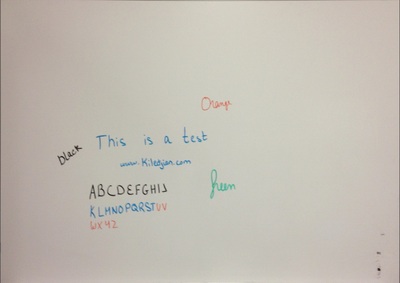
The pictures where taken about 10 feet from the board and cleaned up using each app's features. The board itself is fairly new and was cleaned right before the test. I used new EXPO brand quality whiteboard markers.
Take a look at the pictures and judge for yourself. After months of use and testing, I find myself using CamScanner+ more and more. It is easy to use and produces the cleanest images.
ScannerPro
CamScanner+

GeniusScan+

Prizmo

Counterfeit USB chargers on eBay may be dangerous
In the age of electronic everything, most of us need a couple of chargers to get through the day (one in the car, one at home and one at work). Do you really need to spend $20 for an Apple charger or will a $5 look-a-like device from eBay perform just as well?
Ken Sheriff has written an interesting review about USB chargers and provides a clear scientific explanation as to why those cheaper ones may not be such a good deal afterall. His analysis considers efficiency, power stability, power quality, and power output.
Devices he tested include include major brands such as Apple, HP and Samsung. It includes secondary manufacturers like Belkin, Monoprice and KMS. Last but not least, it includes some counterfeit products that look like the real thing but are anything but.
He recommends buying original chargers from reputable stores and skipping the cheap often fake ebay products. He explains how the fakes provide dirty power which can he dangerous for the health of your device and you.
I had a similar counterfeit experience on eBay I wrote about here. If something is too good to be true, it probably is fake.
How many text messages do Canadians send?
We see lots of US stats so I wanted to share an interesting one for Canadians. The Candian Wireless Telecommunications Association has reported that Canadians have sent 23.8 billion text messages in Q2 2012 (19.5 billion in Q2 2011). For the month of june alone, 267.8 million text messages were sent per day.
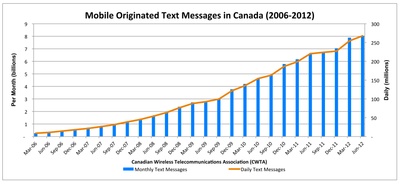
click for a larger image
Anonymous is targeting Zynga because of "unfair layoff" practices
Anonymous has now targeted the game-maker Zynga after its latest round of layoffs. The group called the layoffs “an insult to the population” and an “end of the U.S. game market.”
Anonymous wants Zynga to reverse course or they will release documents showing Zynga plans to move jobs to other countries and they threatened to release a bunch of Zynga games for free. The company has been given until November 5, which is also Guy Fawkes Day.
Although Anonymous is a powerful enemy, some organizations have been able to take a stand against them and have thrived.
Source AnonNews
Skitch for Windows 8
I wrote about the Evernote app for Windows 8, well now its time to talk about their Skitch for windows 8.
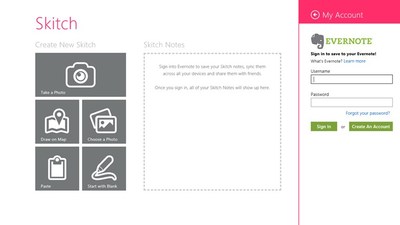
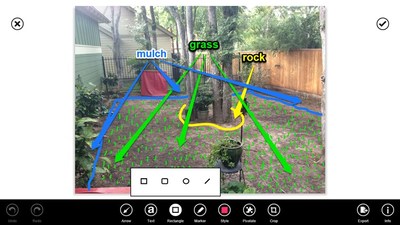
Skitch has always been a great tool to capture screenshots and add lines, shapes, text, highlights. Evernote has now brought this free screen capture and annotation tools to Windows 8. It works in desktop or start menu mode and is well designed and easy to use.
If you are an Evernote customer then it will integrate easily with your account. If you are not an Evernote customer, no problem, it works as a standalone product as well.
TuneIn Radio for Windows 8
In february 2012, I wrote an article entitled "Why I Cancelled My Sirius XM Satellite Radio Subscription"and in it, I talked about using a great streaming radio application on my iPhone called TuneIn Radio. We'll one of my favorite streaming radio apps has made its way to Windows 8 and I liked what they have done.
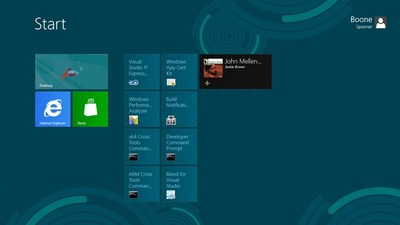
The Windows 8 version give you access to the huge collection of stations you have come to expect. The live tile shows what is currently playing. You can even pin your favorite apps to the Start screen for added ease.

Site will be down because of Sandy
My hosting provider, Squarespace, just notified its customers that their primary data center in New York will be shutting down sometime today. There isn't much I can do, my site will go down until they can restore service. I'm surprised they don't have geo-diversity and that will make an excellent topic for a future post.
I will be available by twitter for questions or issues @ekiledjian
My thoughts and prayers are with the people affected by Sandy.
I will tweet when my site comes back.
MetroTwit is a fantastic Windows 8 Twitter client
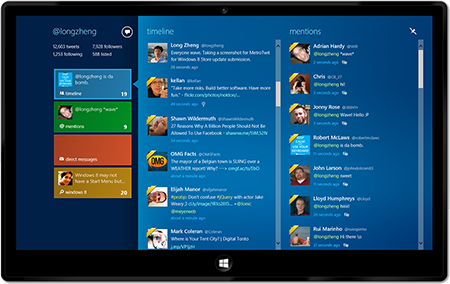
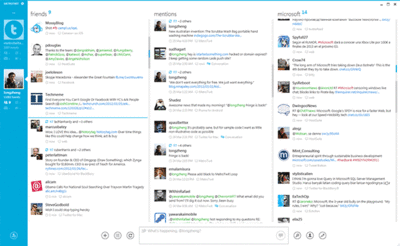
MetroTwit is a fairly new Twitter client and they have done a fantastic job of bringing a visually pleasing yet easy to use and powerful interface to Windows 8. It allows you to watch multiple streams simultaneously, check user profiles, update your own stream, create and manage lists, URL shortening, infinite scrolling and much more. It has a desktop and Start menu versions.
The ad supported free version supports one account (which should be good enough for most people). If you are feeling generous or want to manage multiple accounts then fork over $15US to help the developer, remove ads and enable multi-account management.
Get Google search and Chrome back on Windows 8
After installing Windows 8, you will find that Internet Explorer 10 and Bing are the default browser/search engine. If you like them, then congratulations you’re done. If you are one of the millions of Windows users that prefers the warm embrace from the sultan of search then keep reading.
In a direct yet playful way, as soon as Windows 8 launched, Google opened its “Get Your google Back” webpage. The fine folks at Google provide step by step instructions on how to bring them back into your computing life.
Instructions
- Download the Google search app from the Microsoft Windows 8 store. It provides a Start screen enhanced (aka the interface formerly known as Metro) interface and is touch enabled for touch devices.
- Download Google Chrome for windows 8 and bring a refreshed Google experience back in your life.
Evernote for Windows 8 (Metro Style)
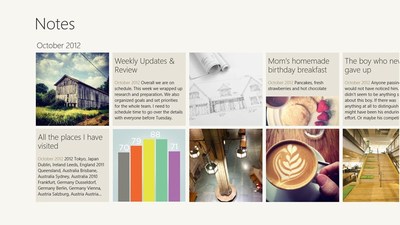
My readers should know how much I love Evernote and I was happy to see their Windows 8 version. This updated version allows you to use all of the Evernote goodness from the new Start screen (the interface formerly known as Metro). Some people have said it is not as feature packed as their Windows 7 client (and they are right) but at least you don’t have to launch the desktop everytime just to add or check a note.
Evernote for Win8 in the MS app store : here