Taiwan Suppliers start producing Blackberry 10 devices
“Taiwan-based handset component makers including Silitech Technology, Ichia Technologies as well as ODM Wistron are expected to begin small volume production of RIM’s BlackBerry 10-based products in December.”
Windows8 TIP - Take a screenshot
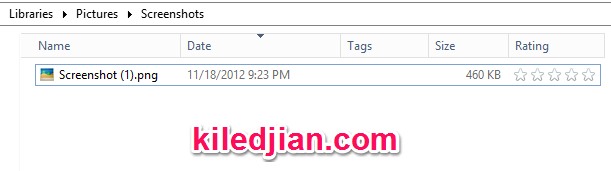
In previous versions of Windows, you have to press the PRINT SCREEN button then go into some type of photo app like Paint, paste the screenshot and then save it. In Windows 8, all you have to do is press the WINDOWS KEY + PRINT SCREEN and it automatically takes a screenshot and saves it to your pictures folder (in PNG format) under a new folder called Screenshots. Unfortunately it simply calls is Screenshot (1).png, where the number is added to each time.
This isn’t the ideal tool for someone that requires powerful screen capture tools but works if you need this functionality once in a blue moon. I also recommend checking out a free screen capture and annotation software for Windows 8 called Skitch.
What is the US Fiscal Cliff?
Read any newspaper, watch any newscast or listen to any economics radio show and you will hear the term fiscal cliff over and over (even outside of the US). Many of my non US readers may be wondering, what is this cliff and why is everyone so excited about it.
What is the fiscal cliff
The fiscal cliff is a new term to describe a confluence of events that will occur at the end of 2012 unless US elected officials can come to a financial agreement and change course. In simple terms, it is the end of the George Bush tax cuts (he implemented almost 10 years ago) and the automatic activation of many US Government budget cuts. The fear is that raising taxes and cutting government spending may push world economies back into a recession.
If there is a will, there is a way to avoid this so called cliff but a majority of politicians will have to agree on a bipartisan fiscal package. Republicans want low taxes and low government spending. Democrats want higher taxes so the government can do more spending. It will be interesting to see if 2 diametrically opposed positions like this can be reconciled in less than 40 days.
A game of chicken
There are politicians on both sides of the isle that are actually advocating a do nothing approach. They believe if they hold steady the other side will eventually panic and cave in. This may work but it is a strategy where there can be no plan B.
Hopefully calm and collected thought will prevail and a mutually agreeable solution will be reached before year end.
FREE Window 8 for Dummies pocket eBook
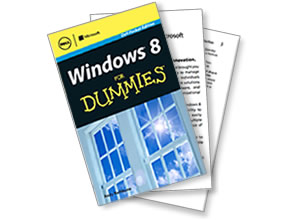
Dell is offering a Free Windows 8 for Dummies eBook right now.
You fill out the request form and are immediately given a special download link. It is a short ebook with 147 information packed pages.
It covers some of the more important topics like the new Start screen, the new desktop, your different storage option, social apps and the 10 things you’ll hate about Windows 8 (and how to fix them).
I went through the book and found the information useful and definitely worth downloading for anyone migrating to a new Windows 8 PC or a Windows 8 tablet.
Request the free eBook here.
Play flash videos on iphone/ipad with the Puffin Internet Browser
Puffin is an IOS (iPhone, iPad or iPad mini) internet browser that leverage’s a back-end cloud infrastructure to deliver a desktop like web browsing experience on your smartphone or tablet. Because the rendering is done on their cloud servers, you get the desktop version of the webpage streamed to your device much faster than the built in local browser. Another benefit of this cloud processing technology, all Flash content on web pages works.
Download it for IOS
Download it for Android
Comparing it to SkyFire
Skyfire is the other popular IOS web browser that supports Flash video but it does it a little differently. Instead of embedding the Flash content directly on the webpage (similar to how it would look on a desktop), it requires that you push a little view icon for the app to process the content on their cloud servers then stream it to you. Puffin does all of this automatically and renders the page as it was designed by the provider (no extra delays or clicks).
I also discovered that some sites that were not enabled to play with Skyfire worked flawlessly with Puffin. For these sites, Skyfire asked that I email the link to their support so it can be enabled (maybe) in a future update.
Plus Puffin was many times faster than Skyfire for normal web page rendering. The difference is noticeable. Puffin is the clear winner.
Comparing it to Chrome and Safari on IOS
Both Chrome and Safari work the exact same way because they use the same render engine on IOS devices.
The first thing I noticed when comparing Puffin to Chrome/Safari was the difference in speed. Puffin was able to load the “normal” webpage many times faster than Chrome/Safari were able to load the mobile optimized version.
The next thing I noticed was the fact that Puffin allowed me to browse the normal webpage (as would be shown on a desktop) whereas most sites forced my Chrome/Safari to their mobile optimized version.
All flash content works (videos and games). Everything I threw at it worked great. Any Flash video could be watched embedded in the webpage or maximized to take up the entire device screen. Some Youtube videos gave me a “Loading failed” when I tried to watch them fullscreen but it was a small number and I emailed their support.
Virtual Trackpad
Some active websites don’t work well with touch devices because they require fine movement control. For these types of sites, Puffin has a virtual trackpad option. It gives you the kind of fine control you need to drag & drop.
Free versus Paid
The free version has ads and other things you won't like so I recommend you get the paid version of the app.
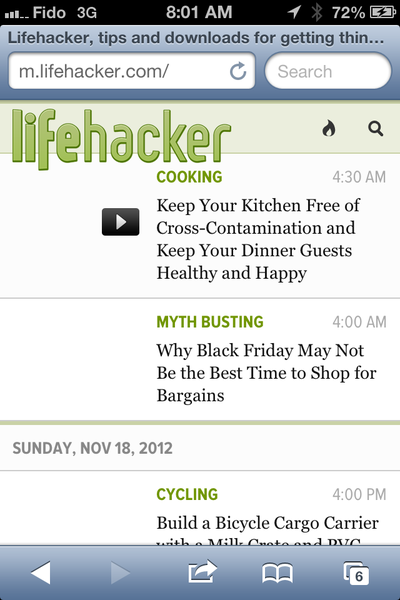
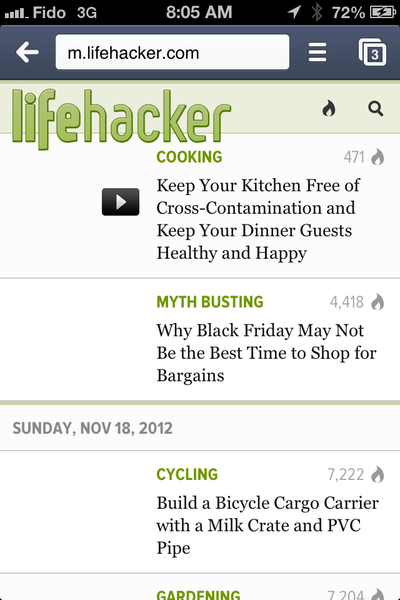
Screenshots - Rendering a webpage
Lifehacker.com webpage on Safari for IOS 6.0.1
Lifehacker.com webpage on Chrome for IOS 6.0.1
Lifehacker.com webpage on Puffin for IOS 6.0.1

Lifehacker.com webpage on Internet Explorer 8 on Windows 7
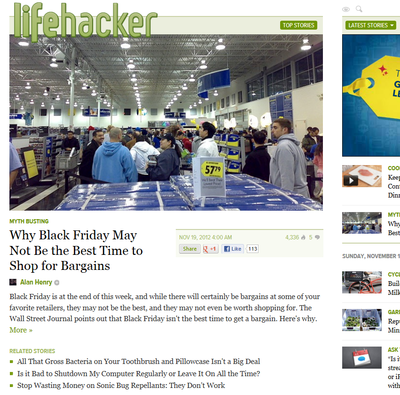
Obviously Puffin is the browser able to provide the desktop experience on my iphone (the other 2 take me to the mobile crippled version).
Screenshots - Flash video on web page
I loaded an episode of a popular show on CTV.ca. Here is the webpage with Safari
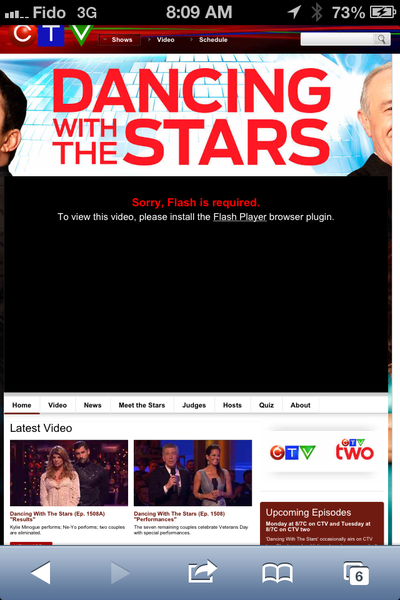
Here is the same page with Puffin

The video played on Puffin without any issues or delays. The audio and video were perfectly synchronized. A much better browsing experience
RIM has scheduled a media event for January 30 2013
What do we have here? RIM has scheduled a media event to launch their Blackberry 10 OS and 2 devices January 30 2013.... Expect them to fully spill the beans at the event including release date, full feature list, operator support and pricing.
“In building BlackBerry 10, we set out to create a truly unique mobile computing experience that constantly adapts to your needs. Our team has been working tirelessly to bring our customers innovative features combined with a best in class browser, a rich application ecosystem, and cutting-edge multimedia capabilities.
Thorsten Heins, CEO of RIM
Is Microsoft going through your cloud stored files?
As the CISO of a large multinational organization, I understand the fine balance between flexibility/usability and security. Absolute usability means no security and vise versa. So when I look at cloud storage solutions like Dropbox, Skydrive, Google Drive, SugarSync , Cubby, iCloud & al, I understand the attraction. You pay a reasonable monthly fee and all of your important data is backed up to the cloud and available everywhere on all your devices. They provide ultimate flexibility.
Unfortunately the average consumer isn’t thinking about the security of their in-cloud files, because this would add a layer of complexity and would reduce the ease and flexibility of the solution. But without real file encryption, the security of your data is dependent on the policies and controls of the provider. Yikes!
I was reminded of this reality when I heard about Microsoft’s Skydrive and their no nudity policy. Skydrive is an interesting one because it is used by Microsoft to tie its ecosystem together (similar to how Apple uses iCloud). Skydrive clearly doesn’t want you to upload nudity even if it is for private storage and legally obtained. If you transgress and your Skydrive account is suspended, then you may also be locked out of other Microsoft services that rely on that account like Windows 8, XBOX Live, Windows Phone, Skype, the online version of Office 2013 and Outlook.com.
On one hand, Microsoft is forcing users of its services and products to leverage their Live account while on the other hand mandating strict usage guidelines even for your own private files. Is anyone wondering how they detect and handle these situations? With over 60,000,000 million users, the possible flagging of a violation isn’t done manually but the secondary confirmation just might be.
Of the major cloud storage service providers, Skydrive seems to be the most restrictive while SugarSync seems to be most permission.
I am not advocating the storage of illegal content on cloud storage services but I feel strongly that my personal files are my own and it is creepy to know some cloud provider somewhere is evaluating my content without my knowledge. This reality has created a new need. We are starting to see customer demand for encrypted cloud storage, where the provider can’t see the content. This new market is in its infancy and the players are still small unknown players but I am sure this will change over time.
For the time being, watch what you store online.
Free ebook: Programming Windows 8 Apps with HTML, CSS, and JavaScript
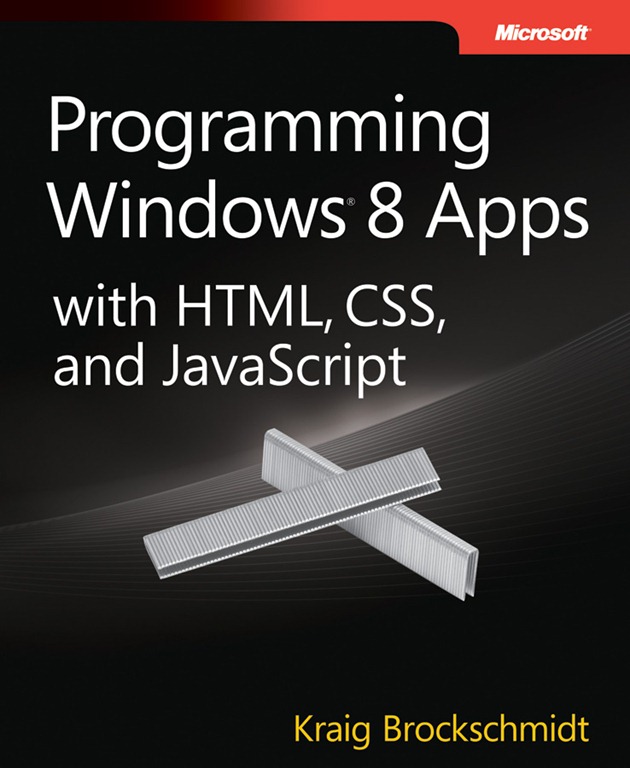
Unlike other free eBooks, this one is a whopping 834 pages:
- Chapter 1: The Life Story of a Windows Store App: Platform Characteristics of Windows 8
- Chapter 2: Quickstart
- Chapter 3: App Anatomy and Page Navigation
- Chapter 4: Controls, Control Styling, and Data Binding
- Chapter 5: Collections and Collection Controls
- Chapter 6: Layout
- Chapter 7: Commanding UI
- Chapter 8: State, Settings, Files, and Documents
- Chapter 9: Input and Sensors
- Chapter 10: Media
- Chapter 11: Purposeful Animations
- Chapter 12: Contracts
- Chapter 13: Tiles, Notifications, the Lock Screen, and Background Tasks
- Chapter 14: Networking
- Chapter 15: Devices and Printing
- Chapter 16: WinRT Components: An Introduction
- Chapter 17: Apps for Everyone: Accessibility, World-Readiness, and the Windows Store
Canadians can request their credit files
- Equifax Canada
- TransUnion Canada
You have the right
Pro
- You get a copy of your credit file for free
- You get to see your file and correct inaccuracies
- You can see what credit cards have been opened in your name which can help detect identity theft
Con
- The free version does not contain your credit score
- It takes between 1-2 weeks to get the information
- The information is sent via regular mail
Alternatives
Pro
In addition to the mail benefits, you also get:
- instant access
- you see your credit score and had the biggest impact on it
- provides guidance on how to improve it.
Con
- Costs money
What is a credit score?
Your credit score is built using a super secret formula by the credit agency to summarise all your credit history in a simple to use score for lenders. It is an indicator of financial health at a given point in time, based on the information available to the agency.
Although each agency uses its own proprietary score, it typically runs from 300-900 (the higher the better). The higher the score, the healthier you are financially and the more likely you are to get better lending terms (aka lower interest rates).
The credit agencies don't determine who is or should be credit eligible, that is up to each individual lender. Between the 2 agencies, the Equifax one is generally considered the gold standard and that is the score I would pay more attention to.
Unless you are about to make a big purchase, I don't think you need access to your score. I recommend getting the free credit report every 6 months and buying access to the Equifax score a couple of months before you make that purchase.
What's a credit rating
When you receive your credit file, you will notice each history contains a letter and a number. The letter is used to identify the type of credit given:
- I is for installment based credit (aka car loan, mortgage, etc). This is a situation where you borrow money in exchange for repayment at fixed intervals.
- O is for open credit. This can refer to things like lines of credit where a lender has allowed you to borrow on an when and as needed basis.
- R is revolving credit and refers to credit cards.
Next to the letter is a number. Here is the meaning of each number
- 0 is too new to rate
- 1 Pays within 30 days and not over 1 payment past due
- 2 Pays in more than 30 days from payment due date but not more than 60 days. Not more than 2 past due payments.
- 3 Pays in more than 60 days but not more than 90 days. Not more than 3 past due payments.
- 4 Pays in more than 90 days but not more than 120 days. Not more than 4 past due payments.
- 5 Account is at least 120 days late but has not been rated a 9.
- 7 Paying back through a special arrangement with the lender.
- 8 Repossession (voluntary or ordered).
- 9 Bad debt sent to collection, moved without providing a forwarding address or declared bankruptcy.
How do I request it?
To request your free (by mail) credit file, click on these links. I added the links straight to the forms because the agencies make it time consuming to find the links to the free report.
Review of the Eagle Creek Pack-It Cube Medium
Over the last 15 years, I have had the privilege of conducting business in over 30 different countries. Many years ago, I consciously decided to be a one-bag traveler which means I travel with carry-on only (aka no check in luggage). This has many benefits including:
- no excess baggage fees
- no worries about lost, delayed or damaged baggage
- no waiting at the luggage claim conveyor belt
Planning is essential
To be a one-bag traveler (which I highly recommend), I had to take some time and decide what I pack and how I pack it. I'll link to some of my past articles later in this post but I want to talk about a company I discovered and love: Eagle Creek. They make modular packing solutions which will cater to all travelers (whether you travel carry-on only or check in large family size rolling suitcases.
My luggage is the Air Boss (Airboss) or SkyTrain by RedOxx. My packing solution is by Eagle Creek.
Why I love Eagle Creek
I have bought and travel tested dozens of different travel organization products, from locally made items to some of the biggest brands; Eagle Creek is one company that has always stood head & shoulders above its competitors. Every Eagle Creek product I have used has always been well designed and manufactured. The true test for me has been the hundreds of flights and thousands of kilometers their products have travelled with me around the world. From a one hour trip to Toronto (Canada) or a 30 hour jaunt to Shenyang (China), their products have kept my personal items clean, safe and organized.
Eagle Creek Pack-It Cube Medium review
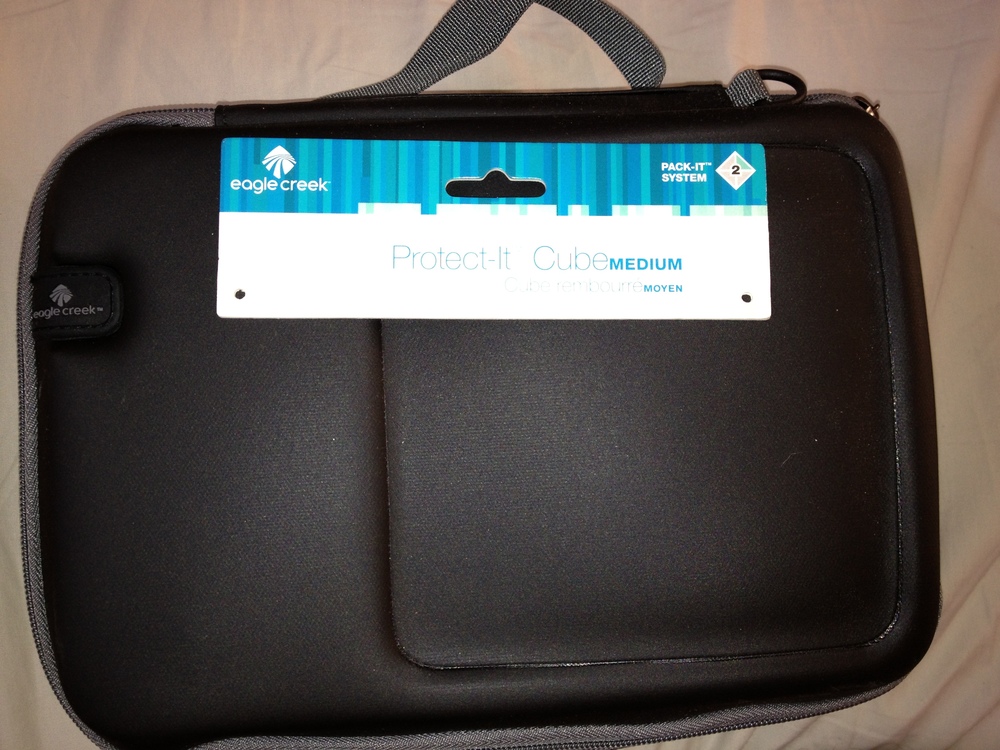
Depending on my destination and the purpose of my trip, I always travel with some assortment of electronics. The Pack-it Cube has proven to be an indispensable companion that organizes and protects my items.
The case itself is soft with a molded top, support structure sides, nice re-arrange able padding/separator and a soft device caressing fleece lining.The medium size seems to be the ideal size for me. It is big enough to carry what I need yet small enough so I can pack it in my carry-on luggage.
Here you see how I pack my Sony HD Camcorder, the power cable, my Joby GripTight and my Glif/Serif mount (last 2 for my iphoneography and the Joby supports my Sony Camcorder).

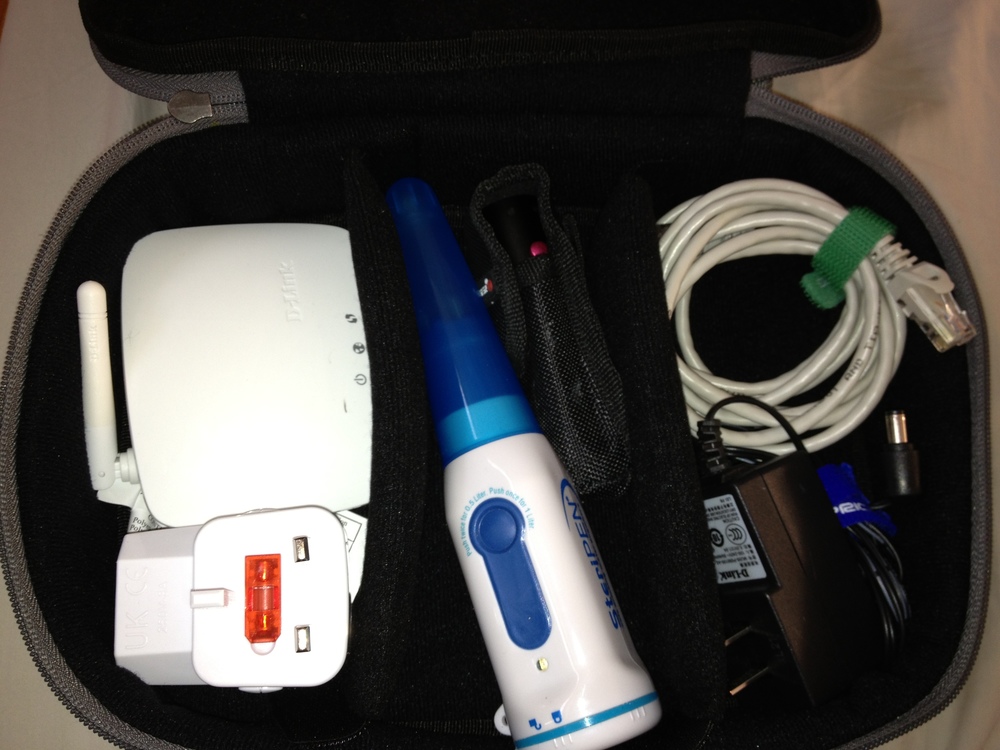
Here you see how I pack my Steripen water sterilizer, D-Link small WIFI router, my universal power-plug converter, my Ledlenser V2 - DUAL COLOR FLASHLIGHT, Ethernet cables and power adapter.
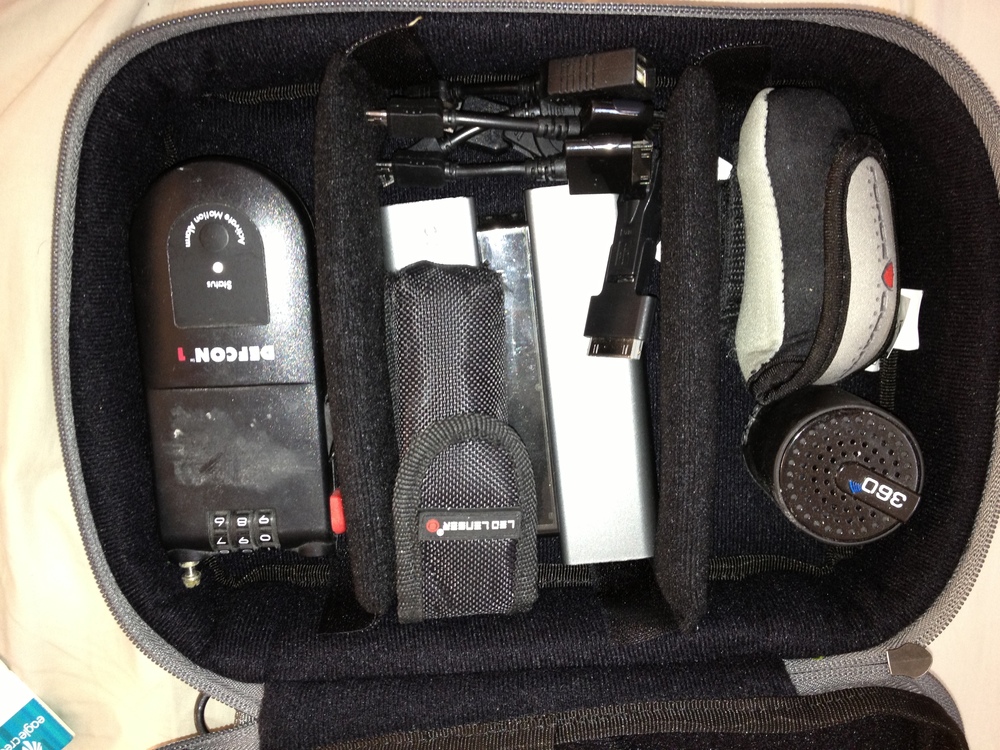
The last configuration I wanted to share with you includes my Veho 360 portable bluetooth speaker, my Force Guard hotel room lock, my Ledlenser flashlight again, my external 4000mAH battery pack with tips and my Defcon1 motion/theft alarm.
Verdict
I love the Pack-it Cubes and after spending hundreds of dollars on competing products, I have stuck with this model. After dozens of trips and a generous helping of abuse, the Cubes look brand new and perform like they did day 1. My electronics are organized and well protected. If you buy them from any of the online retailers, the price is about $30 which is incredibly reasonable for something that is going to give you years of use. There are cheaper look alike products out there but every cheap alternative I have tested ripped, didn’t properly protect my devices or just didn’t perform like I expected it to.
You'll notice that all my cables are tied up and tidy. I use the 6" Hook & Loop Cable Ties (velcro) from Monoprice.com
One warning: *beware of shady unauthorized resellers *because you may just get a knock-off / counterfeit item. I bought a cube from a “reputable” US ebay seller and when I compared the finishing and materials of that item to the original, the differences were huge. Get the original, you’ll be glad you did.
Other Articles you may like
The best way to protect your data - images, music, documents
We are living in the era of everything digital which makes it wonderfully easy to store and retrieve our data. This convenience also introduces a new risk of loss. Not only do you have to worry about fire, flood or theft (like you do for traditional paper based information), but also about your info getting stollen, hijacked or deleted because of drive failure, virus' or hijacking trojans.
Remember the 3-2-1 rule
This is a simple way to remember the right way to backup and protect your data.
- You should always have 3 copies of your important data. This means one primary (aka the one you use on a daily basis) and 2 copies as backups.
- You should always have your backups on 2 different types of media (one of your backups can be to an external hard disk while the other one should be to another type of media like DVD disk or to an online service).
- You should always store 1 copy of your data to "somewhere else". This is to ensure recoverability in case you house or business experience a natural disaster. Now in most cases, this can be one of the popular online backup services or it can simply be you manually storing the media in another location like your office, a bank vault or leaving it in a friends house. To be extra careful, it is recommended to built-in some distance between you and the offsite backup in case a natural disaster eats a good part of your city.
Data backup is like life insurance, it is easy to forget or discount its importance until you need it. But usually its too late (at that point) and you sulk in the knowledge that critical data is gone forever.
Windows8 TIP – Bringing the start menu back to the Windows 8 desktop
To be clear, there is no official Microsoft way to bring back the start menu but many creative 3rd party developers have come out with Start menu replacements.
There are many options available here but the best one I chose is from the kings of Windows modification, the boys and girls of Stardock called Start8. The reason I chose this one is that it seems to be the best written (aka no errors or bugs) and it has a clean Windows 8 modern look.
It does cost $4.99.
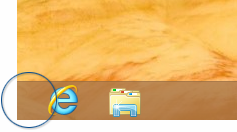
Here is the desktop without Start8 on Windows 8
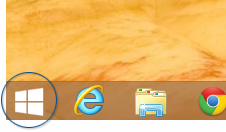
Here is the desktop with Start8 on Windows 8
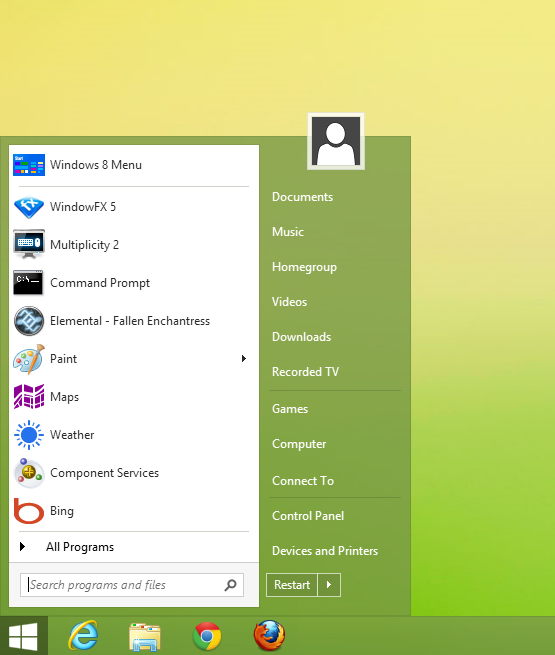
To be fair, I think most people panick and go for these start menu replacements too quickly. I promise that after a week of using Windows 8, you won't look for the start menu anymore and you won't need these start menu replacement programs.
If you do find that you really want them back, it's $5 well spent.
Other alternatives
Power8
Download this free program here.
Win8 StartButton
Download this free program here.
- Restore Windows Start button and Start menu on Windows 8!
- Make 'desktop mode' as your default Windows startup screen
- Choose appearance: classic windows, aero mode, Win 7 and more!
- Restore all your familiar windows menus and options
- All that and more, absolutely free!
- Restore Windows Start button and Start menu on Windows 8!Make 'desktop mode' as your default Windows startup screenChoose appearance: classic windows, aero mode, Win 7 and more!Restore all your familiar windows menus and optionsAll that and more, absolutely free!
ViStart
This is probably the option that looks most like the Windows 7 start menu. It is also free and can be downloaded here.
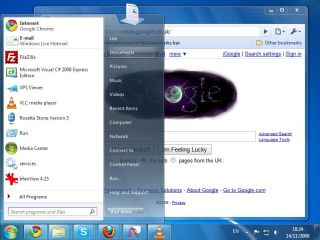
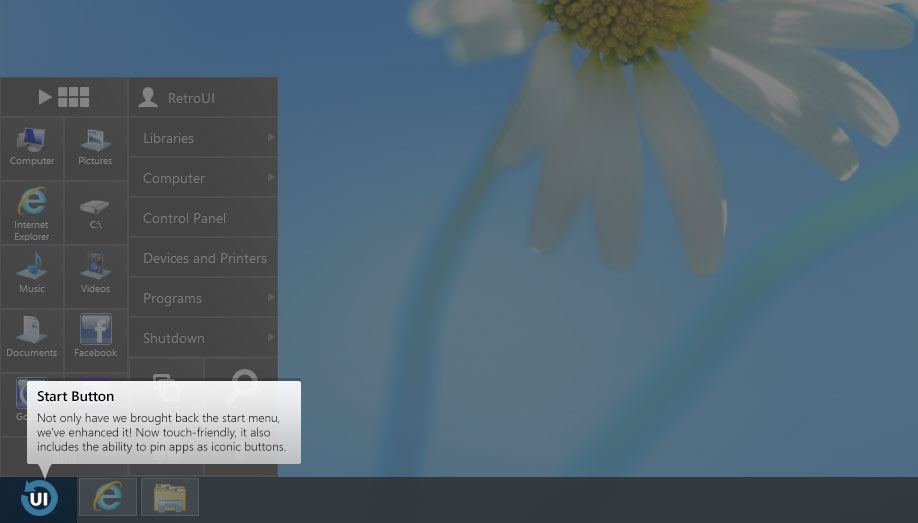
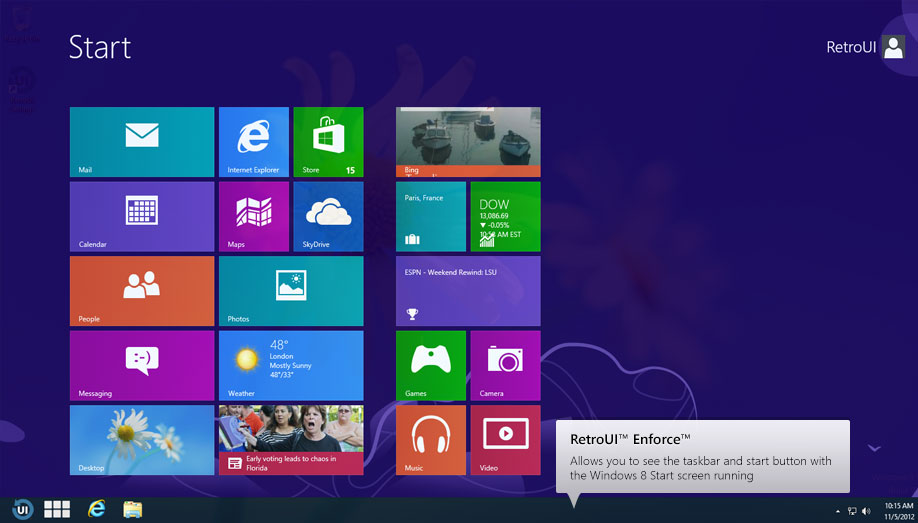
Since writing this original story, an app called RetroUI has received many more features and is now a must consider (if you are looking for to bring back the Start button for windows 8).
A recent update now allows you to run alls in full screen mode (even regular Windows apps). It's a great way to get that Windows 8 full screen goodness from older desktop based apps.
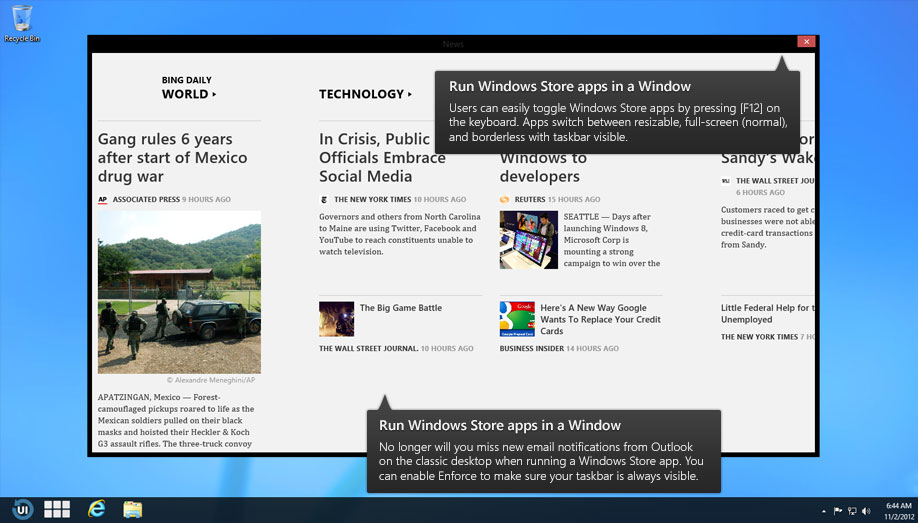
The new version also allows you to run Windows Store apps (aka those tiled apps that show up on the new start menu) on the desktop like your other desktop apps.
At $5 this is a neat option some may want to consider. You can always try the free version and see if you like it.
Walkthrough
Brings back the Start menu on the desktop
Brings a taskbar to the Start Menu (if you want)
Run Windows Store apps in the desktop
Do you need a speaker for a conference?
How to quickly get rid of crapware & bloatware from that new PC
Save your PC from OEM installed bloatware and crapware
Buy any name brand PC and it will likely come with an OS littered with bloatware and crapware. Why do manufacturers do this? Money.
What kinds of bloatware do they install?
- Free security software - I use the word free loosely since in most cases it is one of the name brand products that is known to be slow and sluggish. In addition to the performance hit this may cause, it is usually a very short time trial based license.
- Browser toolbars - Manufacturers are paid to install these and often get a percentage of revenues generated by users clicking through. Again these will slow down your machine. If you use Chrome, there is no reason to install an additional toolbar since searching the web is as simply as typing your query and pressing ENTER.
- "Bonus" software - Depending on the OEM, you may get a whole boatload of extra software from CD burning software with ads to backup clients requiring subscriptions to time-limited Word processing apps.
What should I do
Before I start using any new PC, I usually re-install the Operating System using a Microsoft source disk (since restoring from the OEM disk or recovery partition will bring back all of the original crapware).
But many people are not comfortable reinstalling their operating system since you may need to perform some manual configurations and find hardware driver. Here is where a free software called PC Decrapifier comes in.
Here is a direct link to download the latest version of the app.
How does it work?
You download the app and run it. It scans your PC and finds the list of software it considers Crapware. You approve or modify the list and then ask the software to automatically uninstall the chosen ones. And voila, after a little bit of time, the garbage is gone.
Using this automated approach can save you hours (compared to manually uninstalling the apps).
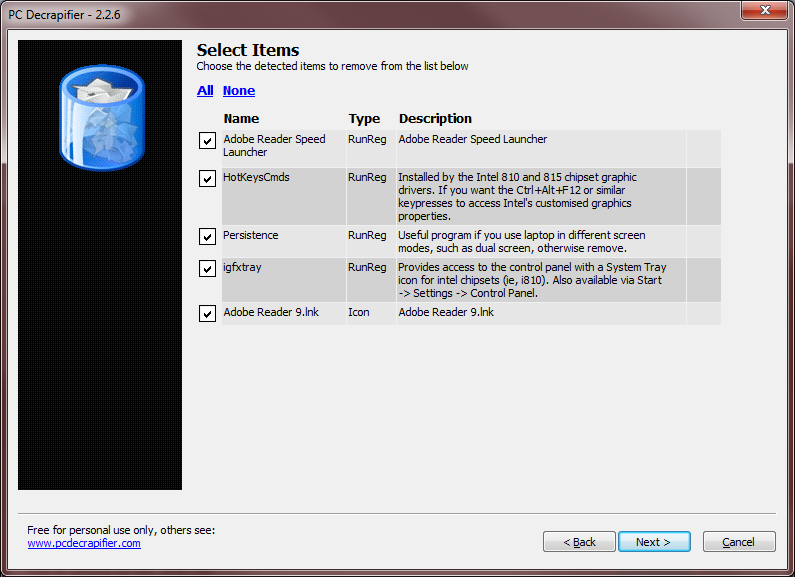
It also gives you the option to remove other program that may not be "crapware" but that you may want removed.
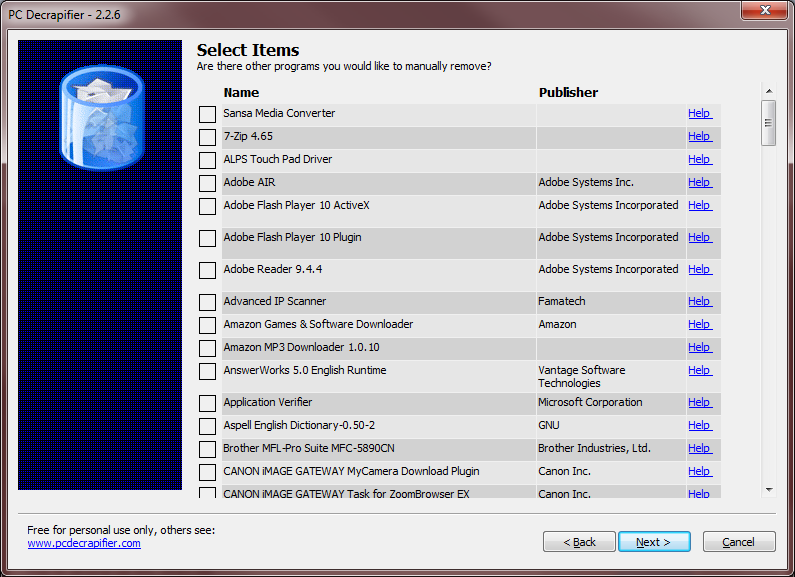
IF you are looking for a great tool to cleanly uninstall software from your Windows PC (not crapware but other software) then read my article about Revo here.
Windows8 TIP - Log in automatically
Press the Windows key + R (to open the run dialog box) then type netplwiz and press ENTER.
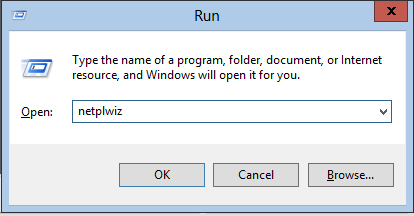
Now the User Accounts dialog box should open.
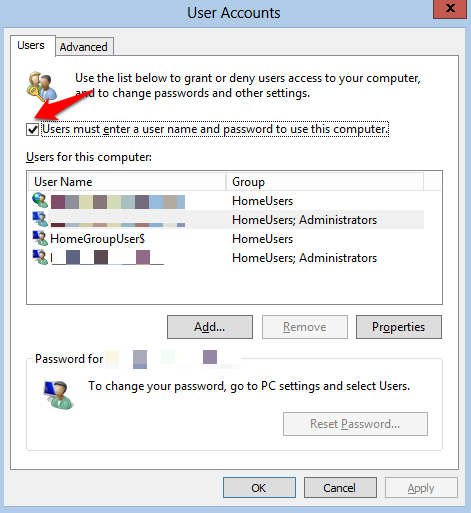
Uncheck the option that says “Users must enter a user name and password to use this computer” and click OK.
Fitbit, Nike Fuelband and Lark Life competitor - enter shine
We have all heard about the Jawbone UP 2, Nike FuelBand, Larklife, Fitbit One, Striiv and Amiigo but make some room for the newest entrant in the world of fitness gamification, Misfit Wearables.
The new Shine is a $99 competitor (at the right price range) that offers some unique characteristics:
- It's really small
- It's the first all metal device
- It synchronizes with your smartphone sans bluetooth or cable! YUP, feel free to re-read that sentence again
- It is waterproof
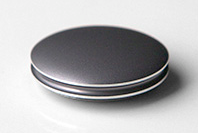
It works like the others as in it tracks "walking related" motion (think running or walking), cycling, yoga and swimming . For non walking/running type activities, it uses a conversion model to convert the activity level into a step equivalent.
Light, made out of solid aircraft grade aluminium yet somehow has a mini light based display system. It has a user replaceable battery that lasts 6 months and comes with a magnet accessory meaning it can be worn almost anywhere.
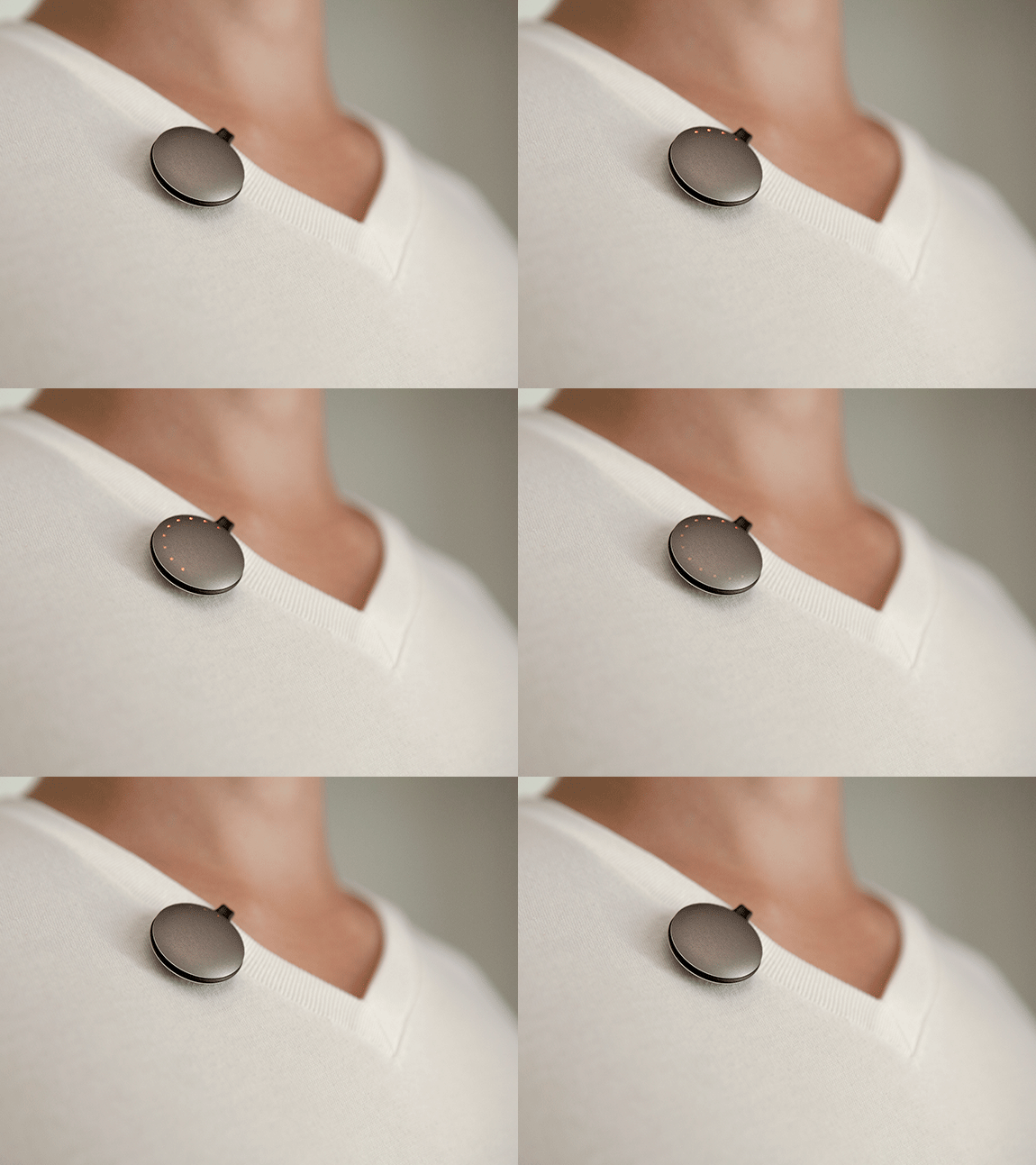
As you can imagine, the company is fairly secretive about the internals but the team behind the midfit had the first FDA approved IOS glucose meter so obviously the team understands health. Until they provide additional details, it's tough to judge the real usability of the product but it is worth keeping an eye out. The expected ship date (for the first batch) is March 2013.
As of this writing, I am anxiously waiting to see the LarkLife hit store shelves so I can test it out and review it for you here.
How I write my blog entries more efficiently
A question I receive once in a while is what application I use to write my blog posts.
Most people believe I must be using Microsoft Word or Google Docs but this couldn’t be further from the truth.
What am I looking for?
When writing a blog post, I want a simple clean work environment with the fewest number of distractions possible.
Additionally I want a tool where I can prepare my entire post and then copy and paste it into my CMS. Since my host supports the markdown layout language, this too became very important for me.
So what do I use to write my blog posts?
It is a free Windows application called Markdownpad.http://markdownpad.com/
It is a clean interface easy to use Markdown editor which offers an easy to read and easy to write environmeent.
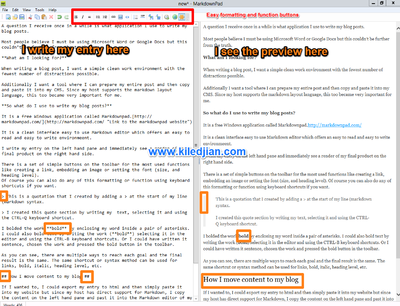
I write my entry on the left hand pane and immediately see a render of my final product on the right hand side.
There is a set of simple buttons on the toolbar for the most used functions like creating a link, embedding an image or setting the font (size, and heading level). Of course you can also do any of this formatting or function using keyboard shortcuts if you want.
This is a quotation that I created by adding a > at the start of my line (markdown syntax.
I created this quote section by writing my text, selecting it and using the CTRL-Q keyboard shortcut.
I bolded the work bold by enclosing my word inside a pair of asterisks. I could also bold text by writing the work (bold) selecting it in the editor and using the CTRL-B keyboard shortcuts. Or I could have written it sentence, chosen the work and pressed the bold button in the toolbar.
As you can see, there are multiple ways to reach each goal and the final result is the same. The same shortcut or syntax method can be used for links, bold, italic, heading level, etc.
How I move content to my blog
If I wanted to, I could export my entry to html and then simply paste it into my website but since my host has direct support for Markdown, I copy the content on the left hand pane and past it into the Markdown editor of my sites CMS.
Verdict
I love the tool and it has saved me countless hours of writing, copying and then formatting. If you have a blog that support Markdown, download and use this cool app.
Screenshots
Click on the image to see the full size picture.
Skype disables password reset function

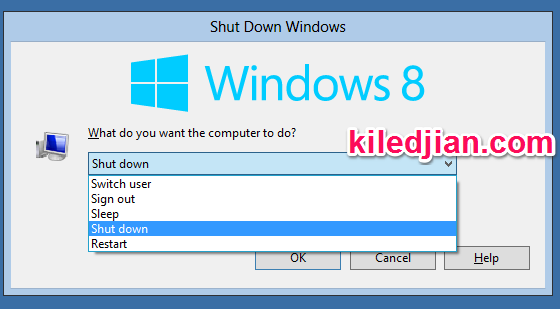
Windows8 TIP - How to shutdown or reboot your PC
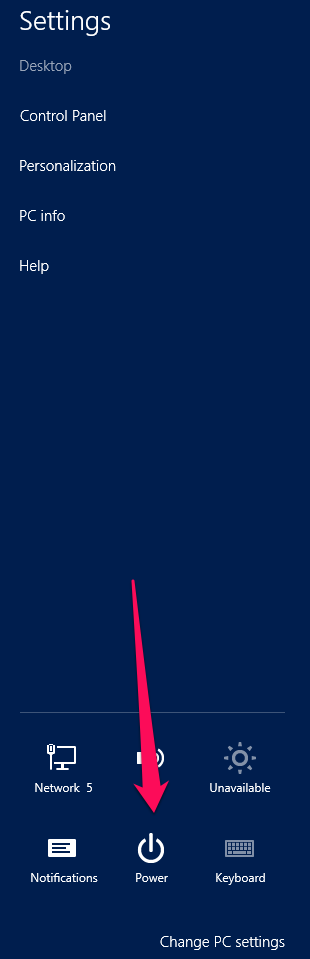
Without a Start menu, you probably guessed it but the procedure to restart or shutdown your PC is a little different. Move your mouse to the bottom right hand corner of the screen and click on the Settings charm option. Then choose Power (from the menu in the lower part of the charm) then choose the restart or shutdown option.
Step 1

Step 2
Step 3
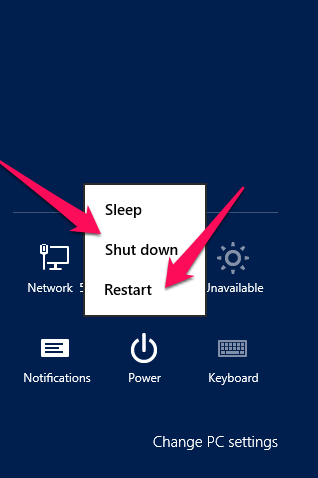
If you are on the Windows 8 desktop, you can also press ALT+F4 to get the restart/shutdown menu.
Stop hackers - Automatically keeps your PC software updated
As the Chief Information Security Officer of a large multinational company, I am willing to look under any stone to provide a safer more secure computing environment for my company.
Like a large company, there is one characteristic that is likely increasing your risk profile and making you more susceptible to hackers, malware and virus. Old not updated software. Old software has many more bugs that can be exploited to commandeer your computer.
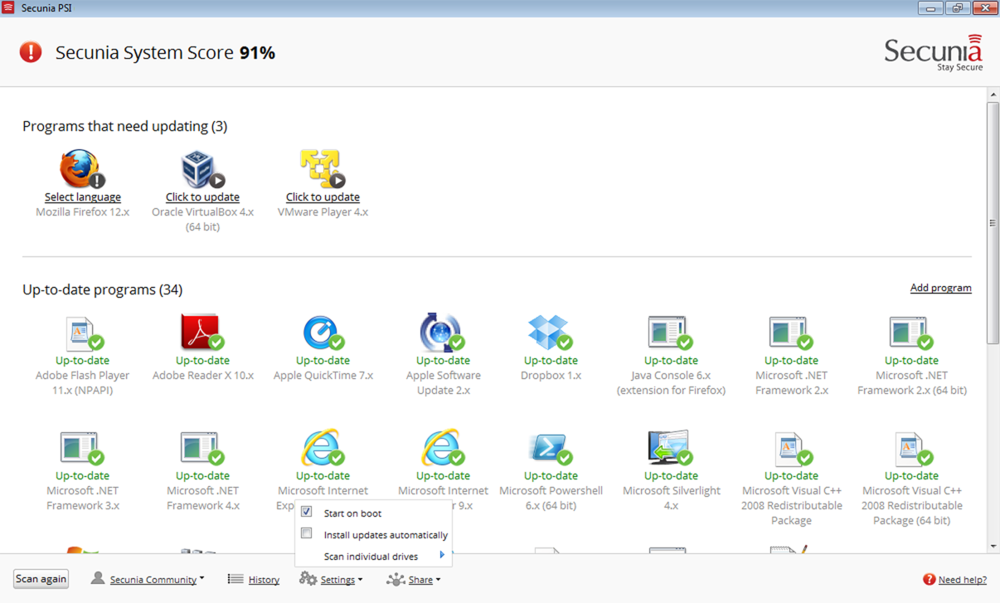
Secunia PSI is your solution
The fine folks at Secunia offer their Personal Software Inspector for FREE!
What does it do?
It scans your computer at pre-determined intervals and identifies software that is missing patches or updates. It's built in database supports over 3000 software so your programs will likely be identified.
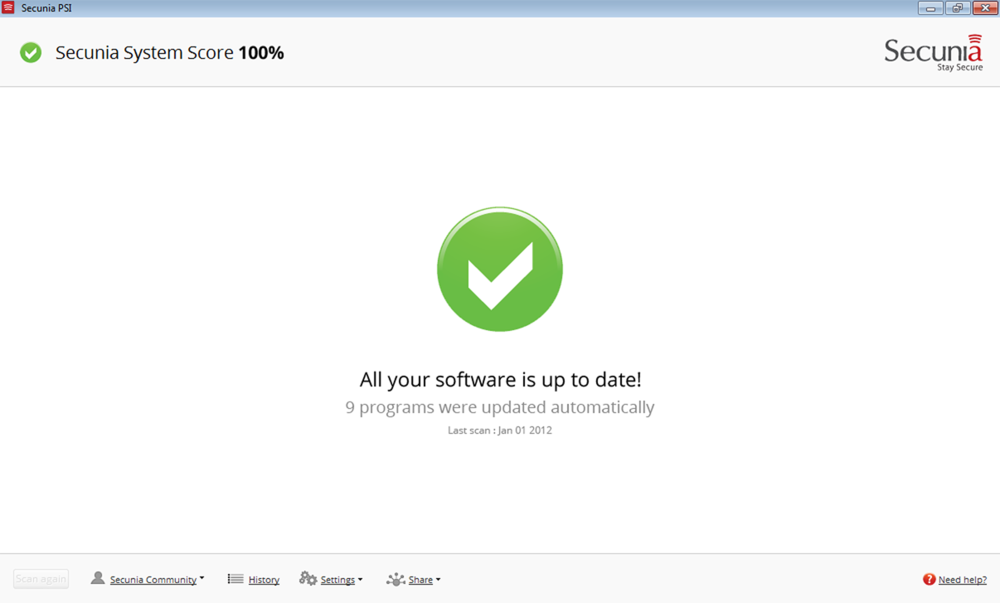
If you allow it, the program can even automatically download updates for most of your programs and automatically install them in the background.
If for some reason it can't install an automatic update, it will show a notification balloon asking you to download and install the update (it will usually provide a direct link to the download anyway).
Simple and easy to use
In its default configuration, the program automatically launches on boot and does its magic in the background. For the less computer literate, it is almost completely hands-off (which is a good thing).
Verdict
Companies pay lots of money to buy programs that do the same thing and its great to see companies bring this technology to the consumer market in a free and easy to use package. Secunia PSI is one of the first software I install on any new Windows PC so obviously my recommendation is Two thumbs up.